Billps Tudios

  • Subscribe to our RSS feed.
  • Twitter
  • StumbleUpon
  • Reddit
  • Facebook
  • Digg

Thursday, 31 December 2009

Brian Krebs on Security

Posted on 07:40 by Unknown

I don’t read as many blogs as I used to but I regularly kept up with Washington Posts’ Security Fix with Brian Krebs. I was sad to read that after 15 years, today is the last day Brian will be contributing to the Post. This is bitter sweet since my oldest daughter Erica was recently brought into the Washington Post Company to work on some of their blog projects and advise them on other new technologies. I was looking forward to her working with other true professionals like Brian.

I had the pleasure to meet Brian at an Anti-Spyware conference in D.C. We were both invited to a dinner which was organized by the good folks from Sunbelt Software. I was immediately impressed when Brian let our host Alex know that he would be required to pay for his own dinner. I know this isn’t really unusual professional behavior but it’s still rare.


briankreb

The good news is Brian certainly won’t be going away. We can now find him at KrebsonSecurity.com. As a seasoned professional you can bet this won’t be just another security blog.

Read More
Posted in | No comments

Tuesday, 29 December 2009

Top Ten Best of 2009

Posted on 08:25 by Unknown

Like many I thought it might be a good idea to recap the best of 2009 and remind folks of some important posts.  The following were some of the most popular stories of 2009.

Who Gets Your Personal Information on Facebook.

Even before Facebook changed their privacy settings I did some research on what companies were getting your information directly from your friends. The companies frequently have no privacy policy or physical address.


Four Secret Reasons Why Win7 is Ten Times Better

Windows 7 is turning out to be a success and as I pointed out in September users were destined to be happy. The core components of Windows 7 were created to increase performance even more than expected.


Free #1 Tweak to Improve Windows Performance

One of the most popular posts all year thanks to all the folks on Twitter, Facebook and PC Pitstop giving the thumbs up to this easy tip.


Security Vulnerabilities near Apocalyptic Proportions

Unfortunately, not a lot has changed. The vulnerabilities in 3rd party application continues to be a serious problem. At one time I expected the day would come when WinPatrol would be obsolete but that day is still far away.


We Have Your Password, and We Own You!

Bad password habits will continue into the year 2010. If you haven't already reconsidered your password habits you should read this story.


Mystery Filenames that Make No Sense 

Even though Microsoft Window now allows long descriptive filenames many developers fail to take advantage of this feature. The worse offender continues to be Microsoft with filenames like lsass.exe or ctfmon.exe.


Windows 7: Good, Bad and the Ugly

Another popular post let folks know what they could expect before Windows 7 was finally released to the public. I still think Recycling Bin is a stupid name.


No, I Don't Want Your #^$% Toolbar 

I’ve continued to resist allowing Toolbar vendors to bribe me into allowing their software to be included with WinPatrol. Unfortunately, many other free programs don’t care and you may be installing unwanted toolbars.
 

Conficker Threat: Fact or Fiction

Everyone was on alert for Conficker to strike on April 1st. If you read Bits From Bill you knew the real danger started on March 31st when folks in the far east had their clocks turn pass midnight way ahead of those of us in America.


Bill's Predictions for 2009

My favorite prediction that came true was “Windows 7 Won’t Suck”. See if you think I was correct with my other predictions.

Read More
Posted in | No comments

Thursday, 10 December 2009

Facebook Simplifies Sharing your Personal Info

Posted on 13:43 by Unknown

Even our local news channels have been reporting that Facebook has simplified their privacy policies. What they failed to notice is how Facebook is encouraging users to disclose even more information to “Everyone”.

The Facebook privacy news has also given credibility to the malicious phishing attempts that arrive in your Email with the subject “Facebook Account Update”. Some of my friends who would normally know better have fallen for these spam Emails thinking it’s part of the newly announced privacy policies.

Instead what Facebook users should see is the following pop up when they sign on.

newfacebook1

Like me your first reaction may be hurray! Facebook has listened to us and will be increasing our privacy. Guess again. When you click to continue you’ll see a revamped version of their current privacy settings. Unless you’re paying attention much of the information you only want “Friends” to see will now be available to “Everyone”. In all the accounts I tested Facebook inconsistently changed the setting from “Friends” to either “Everyone” or “Friends of Friends”.

newfacebook2

Unless you explicitly tell Facebook to use your old settings you’ll be opening up your personal information to the world.

newfacebook3


If you’ve already gone though this process or not I recommend going to your Facebook Settings, click on Privacy and you should see the following window. One problem with this screen is the user interface. It doesn’t tell you that you still need to click on “Change Settings” and re-enter your password. I guess they consider this additional password as security but fail to realize if you come to this screen you’ve already indicated your desire to change your settings.

newfacebook4 There’s also no “Apply” on this screen which as a user interface person drives me nuts. You can just leave this screen and your settings will be changed.

Unfortunately, It Gets Worse

Facebook has also been making some lucrative deals with search engine providers. One of the other new settings you’ll want to look at is “Search”. Do you want Google indexing the information you provide on Facebook making it available to the world? It may be ok if you’re having an affair with Tiger Woods but most of us probably won’t want this information so easily available.

newfacebook5
Find this under Settings –> Privacy Settings –> Search

I’m a pretty public person so my personal information are probably easy to find but I still changed these settings. Facebook to me is something I consider a little more personal and I don’t want to take any chances. I suspect many of you feel the same way.

If you missed my previous article on the companies who created Facebook Applications be sure to read “Who Gets Your Personal Information on Facebook”.

Read More
Posted in | No comments

Wednesday, 9 December 2009

Introducing WinPatrol PLUS Family Pack

Posted on 17:15 by Unknown

scotty family


One of the most talked about packages this year was Microsoft’s Windows 7 Family Pack. Let’s face it, the days of a single computer household are long gone. Unfortunately, you won’t find Win7 Family Pack available at its original $149 price.  I’m a big fan of families so it only seemed right to offer a special WinPatrol PLUS Family Pack.

For $49.95 folks can upgrade to WinPatrol PLUS and use the same PLUS code on their computer, their laptop, their spouses, and all the kids.  The PLUS Family Pack license is valid for immediate family so your kids can be protected even if they’re away at school. The WinPatrol PLUS license isn’t a subscription, it’s good for life.

Click here to Order

This is a limited offer but I hope it will make the holidays brighter especially for those of you with large families.

Read More
Posted in | No comments

Tuesday, 8 December 2009

WinPatrol Birthday Contest Winner

Posted on 16:06 by Unknown

scotty1997
Last month I celebrated the 12th birthday of my favorite application WinPatrol. There isn’t really an advertising budget at BillP Studios so word of WinPatrol has spread mostly via personal recommendation. There are still a lot of people who haven’t heard of WinPatrol so I appreciate when our fans tell their friends and family how much they like Scotty the Windows Watchdog.  It was natural to have a birthday contest that celebrated and rewarded users for helping to spread the word.

Congratulations to Jeremy Stewart of Bothell Washington who told his friend Sherman about WinPatrol.  Sherman became a WinPatrol PLUS member on November 7th, 2009.

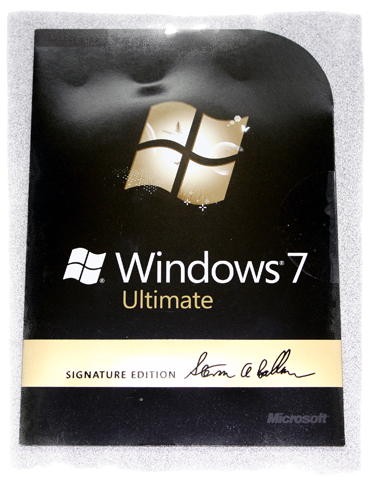
Our grand prize was a copy of Windows 7 Ultimate Signature Edition.

win7signature


Thanks to many of you, WinPatrol still get thousands of downloads every day. The number of people who upgrade to WinPatrol PLUS “legally” could be better but I’m not complaining. If you search Google you’ll find WinPatrol has a great reputation and I love hearing from WinPatrol Fans who have had great experiences.


Click larger view.

winpatrol1 
WinPatrol 1.0 in 1997

wpdelay

WinPatrol 2010


Again, congratulations to Jeremy Stewart and everyone else who won the 2nd prize of a WinPatrolToGo 1 GB Wristband.

Read More
Posted in | No comments

Saturday, 5 December 2009

Who Gets Your Personal Information on Facebook?

Posted on 12:27 by Unknown


Are you one of the 350 million Facebook users? I’m a big fan of Facebook and like many I connect daily to see what my friends are doing and to share photos. As a security professional I am very careful about what I post and what information I allow to be shared. In that respect I’m unique. It surprises me how many of my friends will refuse to allow companies to share their information but eagerly give away their personal information to application developers on Facebook.

allowaccess

My friend Diana sent me some Christmas cheer. How could that be a bad thing right? Well, if I accept her cheer I’m sharing my personal information and all my friends with a company called Mob Science who has no physical address or privacy policy posted on their website.

Who are these application developers you’re giving your personal information too. One of the most popular developers is San Francisco based Zynga. They’re responsible for the games Farmville, YoVille, Mafia Wars, RollerCoaster Kingdom, Scrabble and dozens more. You’ll never be offered a chance to read Zynga’s privacy policy but the information is typical. They say only your name, address and gender are collected. As in most privacy policies they protect themselves with vague statements like “we don't generally collect any “Personally Identifying Information” about our users”.

I’m not saying the folks at Zynga are evil or have bad intent but I doubt most users realize they’re providing information to this or other little known companies. Most people mistakenly believe it’s just all part of the Facebook experience.

It’s not just the games. When you take a quiz, or even donate to “Causes” you’re providing access your personal information. When you create or join a “Cause” you’re registering your personal information with Berkeley based Philotic Inc, started by Sean Parker, one of the brilliant co-founders of Napster.


If you’re a fan of Farm Town, you’ve registered with Florida based SlashKey. Popular game provider MindJolt.com is another one that doesn’t include any physical address or privacy policy on their website. The number two Facebook developer Playfish acknowledges “We collect the following personal data from you … : your date of birth, gender and your contact details including the country where you live and any phone number(s) or email address(es) that you provide.” In addition, “We may use a third party to serve advertisements on our site. Cookies may be associated with these advertisements … We do not have access to or control of cookies placed by third parties.”

In the grand scheme of things the dangers from sharing your information with these companies may still be minor compared to other risks. I wanted to focus on 3rd party Facebook Applications because most people don’t understand why their Email Spam seems to know specific personal details.

Facebook Applications can access this info
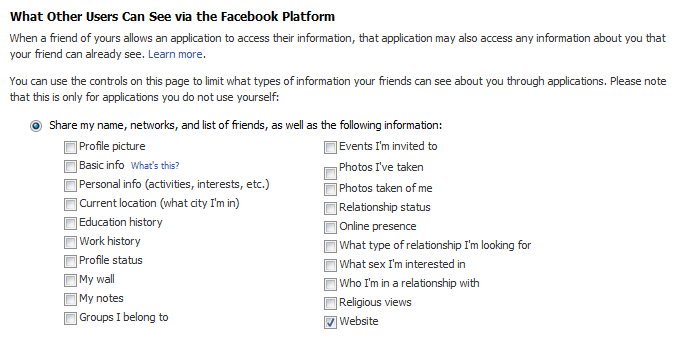
Did you know when your friend allows an application, they give away all your information too?

When you sign up for Facebook all these boxes are checked as the default setting. That means if your friend allows an application, all the information you may have set to "Friends Only" is made available. Click Here to change your settings. (Update 12/9: Facebook has made some changes do don't be surprised if this page looks a little different)

Facebook has been slow to react to customer concerns but recently announced new privacy options. It’s still up to the individual user to check out their rights and options to protect themselves. If you’re a Facebook user please click here to read how you can update your privacy settings.

Updated 12/9
Facebook has updated their privacy options. Here's the replacement for the screen allowing you to restrict information shared by your friends.


Updated Facebook privacy


Facebook Simplifies Sharing your Personal Info
Read More
Posted in facebook, privacy | No comments

Monday, 30 November 2009

MUST HAVE: Windows Home Server

Posted on 11:49 by Unknown

Do you have more than one PC or Laptop in your home? Would you like a better way to make sure your computer data is backed up? If you answered yes then like me you want a Windows Home Server for your home network.

Last month, I finally decided that a Home Server system would be a good choice for me. After some serious research, I went ahead and purchased a HP EX490 1TB Mediasmart Home Server . At the time it was $500 but can now be had for $469 USD. I also added some drive space with an extra Western Digital 1.5 TB Caviar Green SATA Hard Drive for only $90.

hpmediasmart harddrive

HP Mediasmart Home Server

I can’t believe I waited so long before picking up this essential device for any home network. Designed as a single device to stream your music, videos and photos the Mediasmart Home Server has a variety of cool functions. For me the single feature which backs up all my computers was well worth the cost. When I first set up the Windows Home Server I had it back up all my home computers which took the better part of the day. Now, it backs up every system in 5-10 minutes and only stores what has changed. Everything is done without any intervention and alerts me only if an error occurs.

If I sound excited it’s because I am. I’m sure, I’m not the only one with 2+ computers at home and this is a must have addition to any home network. For more information on the power and features of the Windows Home Servers check out Microsoft’s Windows Home Server page.

I recommend highly that you add a Windows Home Server to your holiday wish list. This month keep your eyes out for special savings. Today on Twitter I read that Amazon has a HP LX195 MediaSmart Home Server with a 640 GB hard drive on sale for $199 USD. This smaller unit doesn't have room for more internal storage but includes 4 USB ports to easily add more space. If you’ve ever had a hard drive failure and/or looked at the costs of disk recovery you’ll want to order one today.

Full disclosure: As an affiliate of Amazon I do receive a commission if anyone uses the links above to make a purchase. I feel it’s important to disclose because that’s the kind of guy I am. I do hope it won’t diminish my message because I do believe you all should have a Windows Home Server. You won’t regret it. ;)

Read More
Posted in | No comments

Wednesday, 18 November 2009

Droid Autofocus Camera Problem Solved

Posted on 11:11 by Unknown

In another of my series of Droid articles I wanted to share a recent discovery and address some rumors of a secret silent Droid update. When I first started to use the Droid 5 MP camera I was a little disappointed in the quality. Thankfully, a bug in the camera was confirmed and Motorola quietly acknowledged a fix was coming in a future update.

This week a number of people noticed a sudden improvement in the Droid autofocus feature. An explanation came in the form of a comment on Engaget from purported Google Engineer Dan Morrill. The autofocus problem was due to timestamp rounding error and was fixed automatically once the date has changed. While I question everything, as a programmer I know anything is possible. I’m told a real service update will be provided before the next date cycle screws up the autofocus again. It will be an official update and not a secret silent one.

danmorrill

I’m a skeptical person so I decided it was important to compare photos I took earlier this month with one take today.

This photo was taken on November 9th. Excuse the kitchen rehab mess

kitchen1

kitchen2Taken today November 18th. The lighting change is unrelated to the autofocus changes but the detail is pretty obvious. Nice!

Now, just to confirm the theory, I was able to set the date back on my Droid and take the following photo under similar light conditions.

kitchen4

Thanks to Tech Crunch for bringing this information to my attention.

Previous Driod Posts: http://www.droidpatrol.com

Read More
Posted in camera, droid, fix | No comments

Thursday, 12 November 2009

Droid Day Four; We Have a Map For That

Posted on 19:45 by Unknown

Day One; First Impressions
Day Two; In Search of Apps
Day Three; Copying my Music


I didn’t get to spend a lot of time playing with my Droid today so I don’t have any technical wisdom to share. Instead I can point you to a worthwhile article by Harry McCracken who discusses the new Verizon commercials and AT&T efforts to stop Verizon for what they say are false claims.  Check out…

Lies, Damn Lies and Coverage Maps

Having better coverage is huge.  I love my iTouch and my two year Verizon contract just expired. It would have been natural for me to go for an iPhone.

My decision to get a Droid instead of an iPhone was based completely on my satisfaction with the Verizon network and stories of dropped signals from my friends using AT&T. Even without the stories the 3G maps don’t lie.

The folks at Verizon know this and are going to take full advantage during this Christmas season with commercials like the following.

Read More
Posted in | No comments

Wednesday, 11 November 2009

Droid Day Three; Copying my Music

Posted on 18:24 by Unknown

Day One; First Impressions
Day Two; In Search of Apps

This is my 3rd day playing my new Motorola Droid and logging about my experience. By now you may have realized I never bothered to read any manual or instructions on using the Droid. As a UI freak I wanted to find out how intuitive the Droid User Interface Experience is.

I had hoped to spend today converting my schedule and contacts from my iTouch to the Droid. I decided I could miss some appointments as long as I had some good music to listen too.

droidmusic

The first step naturally was to connect the Droid to my PC using the included USB cable. I opened up Windows Explorer expecting to see a new drive appear or some other indication that a new device had been detected. As a long time Windows users I stared at the screen quite a while until I realized something was wrong.

Well, I confess, I did search online for help on this one. It was not intuitive. Turns out there was another secret hidden in the Notifications panel. When the USB cable is plugged in you can pull down the Notification menu and there it is; ”USB Connected Select to copy files from your computer”

droidusb

When you click on USB connected menu item you’ll see the following screen asking to “Mount” your Droid. I don’t know about you guys but this sounds like ancient computer terminology and doesn’t fit the into modern design. Would R2D2 ever Mount anything? I think not.

Droidusb1Once you click on “Mount” your Droid SD card will show up as a drive on your computer.

The next step again isn’t so obvious. You’ll see a folder for your Google GPS and your camera(DCIM) but there’s no Music folder. You’ll also find a folder named “data” which is used as a data cache similar to your Windows Temporary Internet Folder.

While you’re connected to the computer go ahead and create a folder named “Music” as a top level folder. Then you can just copy your music from the computer to your SD card used in the Droid. Support formats at this time include MP3, M4A, AMR,WMA (8), MIDI, WAV, OGG Vorbis.

You’ll also want to create folder named “Movies”.

When you’re done you’ll still want to (1) eject the drive to make sure all data has been safely written. After that you’ll still want to touch downward on your notifications panel to tell the Droid to (2) Turn off the USB storage.

droidusboffAnd when you touch this menu item you’ll still have one last step to (3) Turn Off, before you want to disconnect the cable. Is there a chance for data lose if you don’t follow all three steps? Probably not but that’s what Apple used to say when they first released the iPod.

droidusboff1

If you have a microSD connector or slot on your computer I’m sure you can also just remove your microSD card from your Droid and plug it in. You’ll still want to create a Movies and Music folder on the microSD chip.

As far as a music player the interface is very intuitive and straight forward. Having a speaker on the back panel provides much cleaner sound quality then my iTouch (rev2) and a much higher volume level.

For some reason I’m still a problem syncing up my album covers but there were only do many hours in the day. I suspect the reason almost all my songs display Jim Morrison's face is just a user error.

Thank you to every one who has contributed comments. I’m still committed to two more days of Droid Blogging and appreciate your participation.

Read More
Posted in copy, droid, Music, USB | No comments

Tuesday, 10 November 2009

Droid Day Two; In Search of Apps

Posted on 17:05 by Unknown

Instead of writing a full length review of the Droid I’ve chosen to create day by day logs of my Droid experience. I expect by focusing on the stupid things I do it will be helpful to others.  I’ve already had some useful comments posted on my Day One; First Impressions that corrected my beginner ignorance.

I still haven’t totally figured out the Droid interface but I’m getting there.  Today I wanted to see what applications I could find.  I mentioned yesterday that my first downloads were Facebook and a Twitter app called TwitWalk. Thank you to Brian and John for pointing me to a different application called Tridroid. It’s free with a Pro version for $3.99. The text isn’t as large as TwitWalk but the Droid screen is so crisp I’m able to deal with it. Eventually I found there was an option in Twidroid to make the font larger so I’m very happy. Now they need an update for Facebook like we recently had on the iPhone.

Adding applications to my Droid home screen wasn’t obvious. I could “LongTouch” an application to add it to my center home page screen but once it was full that user experience failed. As I write this I just watched a segment on TV about the Droid and noticed I could press one of my alternate home screens to add applications and widgets. Thanks you NBC.  I realize they can’t make everything just like the iPhone but this was confusing. My next challenge is to figure out how to remove apps or widgets from my home screens.  I can’t figure it out and now my home page is full. 

After searching online for help I discovered if you press an icon long enough the tab at the bottom turns into a trash can. Just needed to drag my app there. So the LongTough or LongClick is kinda like the right-click on Windows. It’s not obvious to everyone but is very powerful.

Multi-Tasking
One of the big deals about the Android OS is you can multi-task. I would be more impressed if I knew how to switch between applications without always having to go to the home page and re-open it. My friend Brian did point out that what looked like multiple open applications along the top I reported yesterday were actually notifications. I finally realized that anytime I get new Tweets and new messages on Facebook I get a little notification at top so my notification panel is pretty much always full and making noises. Once I figured out how to pull down the Notification panel menu I also found a way to switch back to open applications.

Advanced Task Killer
Oddly enough, most applications don’t have a simple Exit or Close so one of the first applications I was told to get was Advanced Task Killer. I was surprised when I ran this and realized all my apps were still open. I killed them and voila’ all my notifications were gone.


Slingbox
My first disappointment came looking for an application to view my home Slingbox. This is one of the applications I used on my iTouch all the time. There are some conflicting opinions online if an Android version of Slingbox will be available. My sources say it doesn’t look good.


WeatherBug
I was reluctant about downloading WeatherBug. Years ago they were one of the folks connected to the adware scum bags at Gator. I never thought I’d use WeatherBug again but I can’t deny this is a first class app. It’s still ad supported but I’m guessing this time I can remove it if I want.


Google Sky Map

Just one very cool app. Just go outside and it will let you know all about the constellations in your night sky based on your GPS location.  I’m anxious to see if it will download and include special events like when the space station is visible.


Barcode Scanner

This is another one of a kind, just for fun application. If you really want the people of Walmart to stop and take photos of you just go around the store reading barcodes with your Droid. It really works.


Application Power Usage

One of my favorite features is hidden away under Settings –> About phone –> Battery Use.  This screen provides more information than any other device including any PC I have ever used. Not only does it tell you how much power the phone and display are using, it tells you how much power is being used by individual applications that use hardware features.


droidbattery


Stay tuned for Day Three. I think I’m going to work on getting my calendar and contacts updated.

Read More
Posted in | No comments

Monday, 9 November 2009

Verizon Droid Day One; First Impressions

Posted on 19:24 by Unknown

I’ve tried them all and I’m still not sure how we classify the new Motorola Droid. We’ve called them plenty of names; SmartPhone, Personal Digital Assitant, Pocket-PC, AppPhone but there isn’t a generic term yet for a iPhone Wannabe Device(IWD).

Of all the hand-held digital devices, I’m pretty excited about the Droid. I’ve been an iTouch user for over a year but it’s not a phone. I’ve used a Verizon MiFi for internet access so I can use the apps which are actually more valuable to me than a phone. I refused to switch to an iPhone because AT&T 3G service in our area stinks. The Droid may finally provide almost everything I needed in a single hand-held device.

If you’re looking for a full review of the Droid this isn’t one of them. There are hundreds of them online that review specs and typical review topics. This is as the title says Day One and I’ll tell you what I like along with all stupid things I still haven’t figured out. Watch for Day Two through Four and more as I explore more this week and learn how to unleash the full potential of the Droid.


Physical Keyboard Day One
Not all Droids have the physical keyboard which is a little confusing. I have the Motorola Droid but Verizon is also selling the HTC Droid Eris which only has a virtual keyboard and uses an older version of the Android operating system.

I thought one of the things I’d really love is having a physical slide out keyboard. So far (it’s only day one) I still like using the virtual keyboard. When I did use the physical keyboard weird screens would pop up because I may have been hitting shortcut keys. Keep in mind I’ve been using an iTouch and I don’t have any experience using a Blackberry type device. As far as virtual keyboard goes I like it even better than my iTouch. The Droid has a much better predictive dictionary so I don’t have to touch as many characters.

Applications Day One
Apple make have a million applications but just so many you really need. It took me a little while before I realized I needed to open the “Market” icon if I wanted the App Store. For me, the first apps I downloaded were Facebook and a Twitter client called “Twitwalk”. Facebook is barely usable and doesn’t come close to the one of the iPhone. Twitwalk is pretty plain but usable. I picked TwitWalk because it has the most stars but there are many others. I’ll write about other applications as I learn more.

The weirdest thing I’ve experienced is on the top of the screen. It appears that I’m running multiple copies of applications. I remember someone on Twitter saying they had to download a program to close apps but I suspect this is user error. There is a Manage Applications selection under Settings but it doesn’t seem to list what I’m seeing on the top bar.


Camera Day One
I’ve read good and bad things about the camera. It’s very easy to use and below was my first successful posting of a photo from my Droid to Facebook. My first attempt was to use the “Take a Photo” button on the Facebook application. This resulted in what looked like a thumbnail in my Mobile Uploads library. What I finally did was go into the Droid “Gallery”, find the photo and then share it with Facebook to get a reasonable size.

droid1

Stay Tuned for more photo and video tests later this week.

Phone Day One
Making my first call was simple and as easy like it should be. The call quality was exceptional. When I received my first phone call it almost didn’t happen. I tried to touch the green phone on the screen but didn’t know I actually had to slide it to the right to answer.

One cool thing that worked on Day One without any effort was importing friends into my Contact list from Facebook. This was a surprise and was kind of cool when I saw my wife’s Facebook profile photo appear on my phone when she called.


GPS Day One
As far as a phone goes the GPS is brilliant but still needs a little work to compete with stand alone devices. I took one short trip around town using the GPS along side my Garmin Nuvi but it probably isn’t a fair comparison. It didn’t help that the Droid kept calling my street “Sunni-side” Road and not Sunnyside. I’m going to need a little more time to fully evaluate this feature.
droid1

Tomorrow I’ll be spending some time in a hospital waiting room so I should have plenty of time to explore more. Stay Tuned for My Droid Day Two.


Day Two; In Search of Apps

Day Three; Copying my Music

Day Four; We have a Map for That


Read More
Posted in droid, gps | No comments

Wednesday, 4 November 2009

How Apple Failed the Macintosh

Posted on 11:47 by Unknown

Yea, I know may get slammed with hate mail for this one but I am open to alternate opinions. The market has been ripe for Apple to pick up a sizable portion of the computer share but it has failed. According to market researchers IDC and Gartner, Macintosh sales are up but their share is still way below 10%. That compares to PC sales by Acer and Toshiba. Why doesn’t the Mac have a larger market share?

Apple Inc has a polished image, high customer satisfaction and its brand identity couldn't be much better. People who chose Macs have been very happy with their purchase. The only portable music play anyone wants is an iPod. The iPhone has set the bar so high for cell phones that companies are struggling to keep up. The stock value of AAPL is double what it was a year ago and is still climbing.

So, why are people still forking over their hard earned money for Windows 7 machines and not Macs? It doesn't make sense. Did Apple drop the ball while Steve Jobs was on sick leave? In their efforts to target the cool people did they missed an opportunity to attract the main stream market disappointed with Windows Vista?

In the early days, Apple ruled the education market. When families were deciding on a home computer purchase it was easy. If the kids are learning on an Apple, then we should have an Apple at home. Now, the education market doesn't hold the same impact. The business community now has computers on every desk and the same logic holds true. If I'm using a Windows PC at work, I'm probably going to want a Windows laptop or PC at home.

Lately, the advertisements for Mac have been spending a lot of time telling you what's wrong with Windows. This appeals to current Mac fans but doesn’t give us a reason to switch. They need to spend more time telling people what is right with the Mac.


Current Mac vs Windows 7 Ad

When Apple does talk about how much fun you'll have on a Mac they forget something important. Sure we all want to create musical slideshows and videos but many of still have to do word processing and spreadsheets. Maybe you can't make my database more fun but I'd listen if Apple told me how I could be more productive on their Mac. Doesn’t Apple want to see a Mac in the office environment? Check out this ad from 1990 when they did it right.


This ad from 1990 is timeless

While most of my cool friends are using a Mac nothing has compelled me to switch. I’m not suggesting the Mac is a bad machine and I’m not trying to compare Snow Leopard to Windows 7. I just think Apple failed the Macintosh and lost a chance to establish a 15-20% of the market share. I am a fan of Apple Computer Inc. and I use my iTouch daily. In the late 80's they published their "Human Interface Guidelines" which opened my mind to better understanding the computer user experience. If you'd like to open my mind to other ideas just click on the Comments link and share your thoughts. Are Mac users happy to be a elite group or would they benefit from more attention from software and hardware developers?

Read More
Posted in Apple, Macintosh | No comments

Tuesday, 3 November 2009

Win a Copy of Windows 7 Ultimate

Posted on 16:19 by Unknown


I'm pleased this month I have a special prize I can hopefully give away to one of my readers. While attending the Windows 7 NYC Launch Party I received a copy of Windows 7 Ultimate with Microsoft CEO Steve Balmer’s signature. I already have Windows 7 so I wanted to share this version with someone special. Since this month WinPatrol will be 12 years old I thought it was be a great time to celebrate WinPatrol's Anniversary by giving away some valuable prizes.

Brian Peek and Steve Balmer7My friend Brian Peek, co-author of Coding4fun and Steve at the Win7 Launch

Scotty's 12th Birthday Celebration

Tell your friends about WinPatrol and win!

The first version of WinPatrol was released on November 19th, 1997 so this month Scotty will be celebrating his 12th birthday. To show his appreciation to all the PLUS members who have spread the word Scotty wants to share some of his favorite toys. If you have helped a friend or family member by having them adopt Scotty you can register to win. If not, you have until November 19th tell your friends to get on board and become a WinPatrol supporter.

The grand prize:  Windows 7 Ultimate Signature Edition 


GRAND PRIZE


FIVE 2ND PRIZES
1 GB USB Wristbands with WinPatrolToGo

Your chance to win is 1 in 10. For every 10 entries in the contest, a 1 GB WinPatrolToGo USB Wristband will be added to the prizes! A minimum of five wristbands will be awarded. The partner of whoever wins the Grand Prize will also receive a 1 GB WinPatrolToGo wristband.


Click here to Enter

Read More
Posted in | No comments

Saturday, 24 October 2009

Should I Upgrade to Windows 7

Posted on 13:38 by Unknown

Are you wondering if you should upgrade to Microsoft Windows 7? Yesterday on Facebook I heard from an old friend who asked a question I expect I’ll hear a lot this year.

rhonda

As a Microsoft MVP award winner I’m under no obligation to promote Microsoft products. If you’ve read my blog before you know I haven’t been a fan of Windows Vista. Contrary to advice from Microsoft, I also recommend waiting 7-10 days before installing Windows updates. My answer to Rhonda may sound like a paid advertisement from Microsoft but I believe strongly in the benefits of Windows 7.

billreply

I typically tell folks to wait and let others test new software. Windows 7 may have been just released to the general public, but it’s been widely deployed for months. Some of us have been using a stable version of Windows 7 since last November.

Vista Users:
Many readers have told me they’re going to wait for the first service pack before the upgrade to Windows 7.  If you’re currently using Vista think of Windows 7 as the ultimate service pack. Don’t wait.


My Pick: Windows 7 Ultimate Upgrade $219 

Best Value: Windows 7 Family Pack $149


Happy with Windows XP?
If you’re happy with Windows XP I’m not as enthusiastic about upgrading. If you can afford it, you have time to reinstall your favorite software, and you aren’t dependant on really old hardware or software then go for it.  I really wish I could upgrade and have all my machines running Windows 7.  Unfortunately, I still depend on some older hardware on my main desktop so I won’t be upgrading immediately. At least, as a developer I need to keep a machine running XP so I can test and verify all new versions of WinPatrol. I even have an old Gateway Astro running Windows 98 just for testing.

If you are ready to upgrade to Windows 7 plan ahead. Create a pile of CD’s with all your favorite software and make sure you have your license numbers and codes.  Download any software online and get your registration keys. Backup your Email and any documents, music and photos so you can do a clean install.

Buying a New Computer?
No question, you’ll want Windows 7. 
“Do I want a Multi-Touch screen?”
If you can afford it and like to show off, sure, but most people don’t “need” a multi-touch screen. It’s cool but I’m still waiting for a real multi-touch killer app. Personally, my next purchase will probably have multi-touch screen.
“Do I want Windows 64 bit?”
If you have to ask the question probably not.  There are some advantages to using a 64 bit system but at this time there are still too many potential disadvantages. Intel hasn’t scaled back their research in making faster, cooler 32 bit processors. My next purchase will probably be a 32 bit machine.

Read More
Posted in | No comments

Wednesday, 21 October 2009

Think Twice Before that Netbook Purchase

Posted on 12:16 by Unknown

Have you noticed that your fingers feel numb when you wake up? Do your fingers fall asleep when typing, holding the steering wheel or fork? If you recognize these symptoms you may have the first signs of Carpal Tunnel Syndrome.

The concept of Ergonomics is not new to computer users and repetitive movement injuries like Carpal Tunnel Syndrome have been discussed before. Unfortunately, I predict the incidence of these injuries is going to rise along with the increase of small laptop and netbooks. Long hours on a regular keyboard can be bad enough but think about how cramped up your hands are updating your Facebook status on your new netbook.

carpal


I often write about things I experience and today’s blog is no different. This morning my doctor prescribed special wrist splints to treat the pain I now have shooting up my wrists. Luckily, CTS(Carpal Tunnel Syndrome) is very treatable when found in its early stage. Unfortunately, I love my Thinkpad and may have a hard time changing my keyboard habits.


There are many other repetitive movement injuries often diagnosed as CTS. True Carpal Tunnel is specific to pressure on the “median nerve” which travels through a small crowded area of the wrist. It can be diagnosed very easily by your doctor. When caught early it can be treated with rest and anti-inflammatory drugs.


I know you’re all thinking, “What about Blackberry’s and other cell phone use?” I don’t think it’s far fetched to to believe CTS is in the future of many of you using hand held devices to text your friends of update Twitter. I can’t say for sure but I can make the claim using a small laptop keyboard contributed to my latest medical condition.


Read More
Posted in Carpal Tunnel, Netbook, Thinkpad | No comments

Monday, 12 October 2009

Faster Startup with Windows Prefetch

Posted on 07:39 by Unknown

Earlier this month I had a huge reaction to my post about cleaning up the Windows “Temporary Internet Folder”. Comments from readers provided many other great tips but there was some confusion over one of my major points. Even if you don’t use the stand alone Internet Explorer browser, other components of Windows use this folder so if you missed this post check it out.

See: Free #1 Tweak to Improve Windows Performance

A few people also mentioned the Windows Prefetch folder. Prefetch is a pretty cool feature that started with Windows XP, was improved in Vista and even more optimized in Windows 7. There are two primary functions provided by the Prefetch system both designed to speed up your boot and recover time.


prefetch


The first methodology used by Prefetch is to tell Widows which programs or code segments are commonly used at startup by multiple programs or processes. Instead of the having Windows load the same code segment multiple times, it’s loaded once and available for all the programs who use it.

The second focus of Prefetch is to help the disk layout of programs which are commonly loaded at startup. Window keeps track of commonly loaded programs and will check how these programs are stored on your hard drive or other storage device. If needed, the disk will be de-fragmented and organized during idle time so that the programs are easily accessible at boot time. This information is stored in a text file layout.ini found in the prefetch folder.

layout


Other memory optimization information is stored here and used by Windows to decide which code segment should be in active memory and what can be cached. Under Windows XP, many background programs like virus scanners which aren’t common startup programs may get more attention than they deserve. While it’s been fixed starting with Vista, it can still be a problem under Windows XP. If this becomes a problem the solution is a simple reboot. There has always been the controversy over keeping your computer on over night or to reboot each day. I now recommend occasional rebooting which will also help refresh the Prefetch information.

The Prefetch folder is another good reason to keep your list of auto startup programs to a minimum. Using programs like WinPatrol can clean up which programs are auto started and thus stored in Prefetch. Adding WinPatrol PLUS will help you decide which programs are really required.

Delete Prefetch Files?
A lot of tipsters advocate going into the Prefetch folder and deleting the files so it can start with new information. I’ve been playing with this and while I haven’t seen any difference, I don’t see this causing any harm. The next few times you reboot it might take a little longer but that’s expected. I have determined that Windows does do some garbage collection on its own and limits the number of .pf files in this folder to 128 or less.

Microsoft will pay you to forward this Email.
If you believe this one I have another myth for you. An online tip I’ve seen recommends modifying the registry value used by the prefetch mechanism.
HKLM\SYSTEM\CurrentControlSet\Control\Session Manager\Memory Management\PrefetchParameters

There are four values used here by Windows.
0 – Disable Prefetch
1 – Use Application Launch Prefetch only
2 – Default Boot Prefetch
3 – Maximum Prefetch

If you read that you can use a value higher than 3 don’t believe it. I’ve heard from people who swear they see faster performance but there’s no technology to back up the claims.

I’ll be doing some more research on how prefetch, SuperFetch and other memory optimization is done in Windows 7 but for now I recommend just letting Windows do its thing.

Read More
Posted in optimize, prefetch, Win7 | No comments

Friday, 9 October 2009

Super Optimized WinPatrol 2010 Coming Monday

Posted on 14:05 by Unknown

Thanks to continued support and encouragement I’ve been hard at work at making my WinPatrol program the best it can be. For almost 12 years, WinPatrol has consistently been one of the least intrusive programs out there but I thought it was about time to optimize Scotty even more. Even though WinPatrol is written in the programming language “C” I’ve found some monitoring functions were even quicker when written directly in machine code or what we call Assembly language.

The new super optimized version will be available to the public on Monday, October 12th. To show my appreciation to everyone who has supported WinPatrol I've made the new version available early but just to PLUS members. Just go to http://www.winpatrol.com/upgrade.html. You’ll need your name and plus code which are available on the PLUS tab in the WinPatrol software. Fans of our free version will have access on Monday.

What's New

  • Additional Support for Firefox 3 and Google Chrome
    Since Firefox 3 changed from cookie.txt to SQLite database format Scotty hasn't been hungry for Firefox cookies. Support for Firefox 3 has been the single most requested features. Turns out I was able to include support for the SQLite format without increasing the size of WinPatrol.exe. While I was at it I also included support for Google Chrome which also uses SQLite to store their cookies.

  • Reduced Memory Footprint
    The monitor component of WinPatrol has been optimized and shrunk so WinPatrol.exe is now only 314 KB instead of its previous 336 KB size. I’m confident you won't find a smaller Windows system monitor as powerful as WinPatrol.

  • Up to 30% Faster Performance (Sorry PLUS Only)
    Real-time scanning uses 30% less CPU than the polling provided by the free version. The real-time component has been optimized using more direct machine language then its original C coding.

  • Conflict reduction with other security applications.
    Contrary to the warnings by AV suites, Scotty has always worked and play well with others. WinPatrol.exe has been optimized to handle the results of any Windows hooks in its own code space reducing any conflicts created by other security programs.

Read More
Posted in | No comments

Saturday, 3 October 2009

Upgrading to Apple QuickTime Pro

Posted on 09:57 by Unknown

I have plenty of respect and admiration of the Apple Corp but like many, I’ve been critical of some of their auto upgrade tricks. A common complaint is they don’t make it easy to remove their auto upgrade programs from your list of Startup programs.  The last complaint I wrote about was their efforts to force people to download the Safari browser when you download any other Apple product.

See: “Dear Apple, We don’t want Safari” and “Do I Really Need Apple Mobile Device Service”

I don’t have a new complaint today but I did want to share something I found pretty funny. Today, I upgraded to the newest QuickTime. This is usually a good habit considering all the past security vulnerabilities.  What I found interesting was Apple’s method to encourage users to upgrade to the paid or Pro version of QuickTime

quicktime
Free QuickTime Menu with Pro features disabled.

As someone who publishes a free program, I’m always looking at ways to encourage folks to upgrade to WinPatrol PLUS. I’ve really tried not to be annoying or obnoxious. Most people tell me I’ve made the free version too powerful so there’s no reason to upgrade. Apple on the other hand has plenty of features only available on the PRO QuickTime. I have no problem with Apple’s technique. I just think it looks a little desperate.

Read More
Posted in | No comments

Thursday, 1 October 2009

Microsoft “Most Valuable Professional” Program

Posted on 08:06 by Unknown

I’ve often followed the advice of Groucho Marx when he said, “I’d never be a member of club who would have me as a member”. One exception to this rule is a group of highly specialized technical experts known as Microsoft® Most Valuable Professionals. Last year I was honored to receive MVP recognition for my work in the field of computer security.

mvp

I’m proud to announce that today I received notification of my newest Microsoft® MVP Award. I’ve had the pleasure of meeting and knowing other MVP’s from around the world. I can tell you it’s a great feeling to be considered one of their peers.


Microsoft describes MVP’s on their website

"We seek to recognize the best and brightest from technology communities around the world with the Microsoft® Most Valuable Professional (MVP) Award.

These exceptional community leaders come from a wide range of backgrounds. They are teachers, artists, doctors, engineers, as well as technologists, who actively share their high-quality, real-world technical expertise with the community and with Microsoft.

With the MVP Award, we thank these inspiring individuals for representing the voice of thousands in the community through the powerful and independent feedback they give us, and for helping our customers maximize the potential of their software."

I’m sure I’m not alone today in getting my notification so I’d also like to congratulate all the other hard working, caring MVP’s who received their award. Good Job!

Read More
Posted in Microsoft, MVP | No comments

Monday, 28 September 2009

Free #1 Tweak to Improve Windows Performance

Posted on 11:27 by Unknown

Every year billions of dollars are spent by folks just trying to improve the performance of their computers. Over the last couple years there’s been a big market for “Registry Cleaners” even though there has been little evidence having a “tidy”, smaller registry makes any difference. Truth is, a few simple, free tweaks can be done which can drastically improve the speed of their computers.

Providing support for my WinPatrol program I run into a wide range of symptoms reported by our users. Some problems don’t always make sense yet a surprising number are resolved by just cleaning up the Windows Temporary Internet Folder. I haven’t read much from Microsoft about cluttered Temp Folders but my years of experience tell me if this file gets too large all kind of seemingly unrated problems can result. You might be saying “I don’t use Internet Explorer so why do I care about it’s Temp Internet Folder” option. Trust me, if you’re using Windows XP, Vista or even Windows 7, you care.

The original purpose of the Temp Internet Folder was to save time accessing web pages by storing images and other objects that don’t change on your system. Just like the HOSTs file this was a good idea when we were all on slow dial-up connections but today many dial-up connections are fast enough these features are no longer relevant. Anecdotal evidence shows the Temp Internet Folder is used for more than just browsing the Internet.

Go ahead and open Internet Explorer if it’s not already open. Click on the “Tools” menu and select “Internet Options”. Don’t worry about clicking on the Delete button on the first screen. Nothing will be deleted until the 2nd screen. Note: This is how it looks using Internet Explorer 8 which provides more options on which items you’ll want to remove.

cleaup7a cleanup7b
Click on the Settings button and you can tell Windows how much space to allocate for Temporary files. I recommend selecting the lowest amount recommended.
cleanup7c

If you’re looking for even more performance there are some standard changes you can make that all the experts agree on.
Adding memory will always be a big improvement. It may not be free but memory prices are pretty low these days. If you’re getting a new computer and need to choose between a faster processor and more memory, go for the more memory.

The other tweak where you can’t go wrong is by cleaning up the list of programs which are loaded at startup. I’m obviously biased but you can accomplish this by downloading WinPatrol for free. If you’re not sure a program can be removed, upgrade to WinPatrol PLUS.

As I said earlier and have written before some folks will recommend a Registry Cleaner. I’m not a big fan and worry because I think there is always a small risk of removing something that may really be important.

The other tweak which many recommend is to defrag your hard drive. Some experts swear this should be part of your regular system maintenance but I’m not a big fan. It’s a personal thing and may be due to problems I’ve experienced following a disk defrag.

I will stand by my recommendation to clean up your Temporary Internet Folder and welcome comments from others who have had positive or negative results. Check it out and let me know what you think.

Read More
Posted in registry cleaner, temp, Tips, tweaks | No comments
Newer Posts Older Posts Home
Subscribe to: Posts (Atom)

Popular Posts

  • Support for Downloads without Surprises
    Last week I posted a message about the  packaging of ad supported programs along with popular software. It appears to be a common practice t...
  • Employee Manual to Prevent Cryptolocker and More
    A common way computers are infected or compromised has always been a simple yet well thought out deception. It can happen to anyone and the ...
  • What on Earth is “Cloud” Computing
    The new big buzz word in the computing world is “Cloud” computing. In the past I’ve been critical of the concept and even poked fun at Cloud...
  • SQLite C Code to Read Cookies
    While most of the technology leaking from my brain is for a wide audience, today’s post is very technical in nature. I expected the informat...
  • WinPatrol Cloud Edition Public Beta
    WinPatrol Adds the Newest Technology Available. You’ll now have access the knowledge of thousands of WinPatrol users shared in real-tim...
  • Why Dancing with the Stars is #1
    Are you wondering why the heck I’m talking about TV Shows? Well, it’s still a little all about tech and some of my past experiences. In the ...
  • Four Secret Reasons Why Win7 is Ten Times Better
    It’s no secret that I’ve never been a fan of Windows Vista. I really wanted to love it but even as a designated Microsoft MVP I couldn’t dri...
  • Free #1 Tweak to Improve Windows Performance
    Every year billions of dollars are spent by folks just trying to improve the performance of their computers. Over the last couple years ther...
  • Can Facebook be Trusted?
    Last week Facebook rolled out another round of what they consider easy to use privacy settings. What they’re really doing is trying to appea...
  • Forget the DVD & Save on your New Laptop
    I’ve written before about the coming death of the CD/DVD ’s for data storage.  While that time hasn’t come yet for desktop there is one real...

Categories

  • 2007
  • 3G
  • AAPL
  • ABC
  • accelerometer
  • Achilles
  • Acrobat
  • Activex
  • adobe
  • Ads
  • advertising
  • Adware
  • Adwords
  • Airlines
  • Albany Medical Center
  • algorithm
  • Amazon
  • amber alert
  • AMUST
  • Animation
  • antimalware
  • Antivirus 2009
  • antivirus2008
  • AOL
  • Apple
  • applets
  • AQuantive
  • archive
  • Aruba
  • ASC
  • Ask.com
  • ATI
  • Audio
  • Autorun
  • AutoUpdate
  • autoupdates
  • AVG
  • Azure
  • backup
  • badware
  • Bakugan
  • Baseball
  • battery
  • Ben Edelman
  • Beta
  • BillP
  • Birthdayware
  • Bitlocker
  • Blackberry
  • BlackViper
  • bloatware
  • Blogger
  • Blogs
  • Blogspot
  • Blu-ray
  • Bluehoo
  • bluetooth
  • boinc
  • Bonjour
  • Brazil
  • break
  • Breakaway games
  • Brookman
  • Browser wars
  • C64
  • camera
  • Carpal Tunnel
  • CBS News
  • cell phone
  • CES
  • charity
  • Child Safety
  • chinese
  • Chris Cook
  • Christmas
  • Chrome
  • CIPAV
  • clampi
  • Cloud
  • CNet
  • codec
  • comodo
  • conficker
  • Control Panel
  • copy
  • coupon
  • craplets
  • crapware
  • Crawford
  • credit
  • credit card
  • credit cards
  • ctfmon
  • daylight savings time
  • Dell
  • demo
  • Discount
  • Disney
  • DNS
  • Dollar
  • Domain
  • Donna
  • Doubleclick
  • Downadup
  • Dreamscene
  • droid
  • DVD
  • Dvorak
  • Easter egg
  • eclipse
  • Ed Bott
  • Edelman
  • egreeting
  • Email
  • Environment
  • Epilepsy
  • EU
  • eWeek
  • explorer
  • facebook
  • false positive
  • false-positive
  • FBI
  • file types
  • finnish
  • FiOS
  • Firefox
  • fireworks
  • fix
  • flash
  • Flashpix
  • Fort Drum
  • foxit
  • fraud
  • FTC
  • games
  • garmin
  • Gateway
  • GE
  • George Bush
  • Germany
  • global
  • Godmode
  • Google
  • Google Research
  • GotoMyPC
  • gps
  • green
  • Groceries
  • Habitat
  • Hacks
  • hallmark
  • Halo
  • hard drive
  • Harry McCracken
  • Harry Potter
  • Harvard
  • HD-DVD
  • help
  • hidden files
  • Hijack
  • History
  • Hiton
  • homeland security
  • Honor Flight
  • hosts
  • Hubble
  • IAC
  • ICANN
  • IE
  • IE6
  • IE7
  • IE8
  • installers
  • interface
  • Internet
  • IPAddress
  • iPhone
  • iPod
  • Iraq
  • iTouch
  • iTunes
  • java
  • Kaspersky
  • Kazaa
  • kenmore
  • key logger
  • keygen
  • Keylogger
  • Kosovo
  • LA
  • lady chalupa
  • langa
  • Laptop
  • lawsuit
  • Legoland
  • Levar Burton
  • Linksys
  • Little League
  • Live Writer
  • Live.com
  • localize
  • Logo
  • London
  • LOP
  • lottery
  • Lucasfilm
  • Macintosh
  • Malware
  • Marie Domingo
  • Mary
  • McCracken
  • Media
  • Memorial Day
  • mgrs.exe
  • Micosoft
  • Microsoft
  • Microsoft Surface
  • MiFi
  • mit
  • moon
  • Mossberg
  • Mothers Day
  • MPack
  • MSFT
  • msn
  • MTV
  • Multicore
  • Music
  • MVP
  • MVP09
  • nasa
  • NBC
  • Nero
  • Netbook
  • Network
  • network solution
  • New York
  • newsletter
  • Nintendo
  • Nintendo Wii
  • NNEDV
  • Norton
  • NYAG
  • OAuth
  • obama
  • Office
  • OLPC
  • Olympics
  • OpenDNS
  • oprah
  • optimize
  • optout
  • Paperghost
  • passwords
  • Patch
  • Patriot Flight
  • PC Guy
  • pc pitstop
  • PC World
  • pcmag
  • PCWorld
  • PDC
  • PDF
  • pedipaws
  • performance
  • phishing
  • photos
  • Photoshop
  • Pinnacle
  • Piracy
  • Pirillo
  • pogue
  • Porn
  • pornware
  • postcard
  • prediction
  • prefetch
  • Preview
  • Price
  • privacy
  • Prodigy
  • Programming
  • PSP
  • Public Relations
  • Pytlovany
  • Q-Link
  • Quicktime
  • quotes
  • radio
  • realnetworks
  • realplayer
  • RegCleaner
  • RegCure
  • regedit
  • Registry
  • registry cleaner
  • Release
  • remove
  • Research
  • return policy
  • review
  • RIAA
  • Rivera
  • RMS
  • Road Runner
  • rogue
  • router
  • RTM
  • Rumor
  • safari
  • safety
  • sale
  • Sales
  • Santa Monica
  • scam
  • Schenectady
  • Scoble
  • Scott Dunn
  • Scotty
  • sd
  • Search
  • Sears
  • Security
  • Services
  • seti
  • ShellExecute
  • Shirt
  • SimCity
  • site advisor
  • slingbox
  • snopes
  • social engineering
  • social network
  • solid state disk
  • Sounds
  • Sp3
  • space station
  • SPAM
  • spamhaus
  • Special
  • speedtest
  • Spyware
  • SSD
  • Startup
  • Stats
  • Steve Bass
  • stopbadware
  • storm
  • STS-125
  • Sugar
  • Sunbelt
  • support
  • Symantec
  • tagged
  • Task Catcher
  • Task Scheduler
  • taskbar
  • Tax
  • Techorati
  • techwatch
  • teens
  • temp
  • Thinkpad
  • Thurrott
  • tinyurl
  • Tips
  • TiVo
  • TLD
  • Today Show
  • Toolbar
  • toolbars
  • top ten
  • topten
  • toys
  • Translator
  • transunion
  • Tree
  • Trend Micro
  • tricks
  • trillian
  • Trojan
  • tweaks
  • twitter
  • UAC
  • UI
  • Ultimate
  • Unbox
  • Unboxed
  • update
  • Updates
  • upgrade
  • url
  • USB
  • Utility
  • Valentine
  • Verizon
  • versions
  • Veteran
  • Video Games
  • Vista
  • Vulnerability
  • wall-e
  • war
  • Washington
  • web2.0
  • Webslice
  • WGA
  • Widget
  • WiFi
  • Wii
  • WiiItis
  • wiimote
  • Win7
  • Windows 7
  • Windows Secrets
  • Windows Update
  • Windows7
  • WinPartrol
  • WinPatrol
  • winpatrolflash
  • WinPatrolToGo
  • Winter
  • Wireless
  • Wristband
  • WSJ
  • WWII
  • x64
  • Xbox
  • XO
  • XO Laptop
  • XOActivity
  • Xobni
  • xolaptop
  • XP
  • XP SP3
  • xp3
  • Yahoo
  • Zero Day
  • Zone Alarm
  • Zwinky

Blog Archive

  • ►  2013 (31)
    • ►  November (2)
    • ►  October (1)
    • ►  September (1)
    • ►  August (2)
    • ►  July (3)
    • ►  June (5)
    • ►  May (2)
    • ►  April (3)
    • ►  March (2)
    • ►  February (5)
    • ►  January (5)
  • ►  2012 (30)
    • ►  December (3)
    • ►  November (3)
    • ►  October (2)
    • ►  September (2)
    • ►  August (2)
    • ►  July (3)
    • ►  June (2)
    • ►  May (1)
    • ►  April (4)
    • ►  March (4)
    • ►  February (2)
    • ►  January (2)
  • ►  2011 (28)
    • ►  December (4)
    • ►  November (2)
    • ►  October (4)
    • ►  September (2)
    • ►  August (2)
    • ►  July (2)
    • ►  June (2)
    • ►  May (2)
    • ►  April (2)
    • ►  March (2)
    • ►  February (3)
    • ►  January (1)
  • ►  2010 (44)
    • ►  December (2)
    • ►  November (3)
    • ►  October (3)
    • ►  September (4)
    • ►  August (3)
    • ►  July (3)
    • ►  June (3)
    • ►  May (4)
    • ►  April (4)
    • ►  March (3)
    • ►  February (3)
    • ►  January (9)
  • ▼  2009 (90)
    • ▼  December (6)
      • Brian Krebs on Security
      • Top Ten Best of 2009
      • Facebook Simplifies Sharing your Personal Info
      • Introducing WinPatrol PLUS Family Pack
      • WinPatrol Birthday Contest Winner
      • Who Gets Your Personal Information on Facebook?
    • ►  November (8)
      • MUST HAVE: Windows Home Server
      • Droid Autofocus Camera Problem Solved
      • Droid Day Four; We Have a Map For That
      • Droid Day Three; Copying my Music
      • Droid Day Two; In Search of Apps
      • Verizon Droid Day One; First Impressions
      • How Apple Failed the Macintosh
      • Win a Copy of Windows 7 Ultimate
    • ►  October (6)
      • Should I Upgrade to Windows 7
      • Think Twice Before that Netbook Purchase
      • Faster Startup with Windows Prefetch
      • Super Optimized WinPatrol 2010 Coming Monday
      • Upgrading to Apple QuickTime Pro
      • Microsoft “Most Valuable Professional” Program
    • ►  September (4)
      • Free #1 Tweak to Improve Windows Performance
    • ►  August (4)
    • ►  July (12)
    • ►  June (6)
    • ►  May (11)
    • ►  April (7)
    • ►  March (9)
    • ►  February (9)
    • ►  January (8)
  • ►  2008 (122)
    • ►  December (9)
    • ►  November (11)
    • ►  October (14)
    • ►  September (6)
    • ►  August (9)
    • ►  July (9)
    • ►  June (10)
    • ►  May (13)
    • ►  April (8)
    • ►  March (10)
    • ►  February (10)
    • ►  January (13)
  • ►  2007 (155)
    • ►  December (15)
    • ►  November (14)
    • ►  October (12)
    • ►  September (14)
    • ►  August (12)
    • ►  July (13)
    • ►  June (11)
    • ►  May (19)
    • ►  April (17)
    • ►  March (21)
    • ►  February (7)
Powered by Blogger.

About Me

Unknown
View my complete profile