Billps Tudios

  • Subscribe to our RSS feed.
  • Twitter
  • StumbleUpon
  • Reddit
  • Facebook
  • Digg

Wednesday, 27 November 2013

Employee Manual to Prevent Cryptolocker and More

Posted on 14:52 by Unknown

A common way computers are infected or compromised has always been a simple yet well thought out deception. It can happen to anyone and the use of social trickery is nothing new. Understanding the victim is all that’s needed to receive their cooperation. 

If you’re thinking it could never happen to me this refreshed couldn’t hurt. You might want to share the examples here with your friends, family and especially your employees. Social engineering has come a long way since the possibility of seeing Anna Kournikova naked.


Here’s a common example that has been used to infect computers with the crippling Cryptolocker extortion attack.

blog-email-fedex

This one and variations are going to get more popular as Santa starts shipping his presents. In this example the “From” email isn’t even disguised which means these guys were really lazy. Don’t bother replying because the Email address belongs to someone who has already been hacked and was probably shut down by the time you receive your Email.

Any Email “bait” like this will appear to be a legitimate message. The attacker linked to text and a graphic located at FedEx. The simple line of code below is all that’s needed to display the FedEx logo

<img src= “https:// catalog.fedex.com/images/external/gsi/hdr_fedex.jpg">

This Email from fake UPS is also tempting because you certainly wouldn’t want to miss anything. We all love packages.
blog-email-ups


Human Resources Needs You

Here’s one directed at employees designed to be a standard employment request. In this case, it’s to use the company car. It’s very common to see attachments that appear to come from Human Resources.
blog-email-vehicle

The “From” address and even filename has been doctored to make it appear to be from within the company. If the company is large or you’re a new employee downloading and filling in this form may not seem suspicious. It’s not unusual for an attack to be targeted since information on officers and HR managers is easy to find.


You’ve Been Reported

I’ve received a few claiming to be from Dun & Bradstreet trying to scare companies into thinking they need to clear their good name.

blog-email-dnb

It’s also common to see fake Emails from the Better Business Bureau. In the U.K. there’s Companies House which registers and keeps track of companies for the Department for Business, Innovation and Skills.

blog-email-companies


Question Every Email

These phishing expeditions are common and effective in all countries. I generally question every Email even when it comes from someone I know. How many times have you received Email from friends saying they’ve been hacked? If you have any doubts just contact the sender or an official with the company sending the message. My bank has always thanked me for calling. They love to impress customers with their knowledge of security trends.


Curiosity Killed Your Job
It’s not unusual to receive messages which appear to be meant for someone else. More than a few attacks succeed because of human curiosity.

blog-email-linked


Speaking of curiosity, I’ll end with a newer version of a classic bait and steal scheme.

blog-email-intuit

I’ve worked for companies where discussion of salaries could be cause for immediate termination. An ancient method for infiltrating a company involved dropping an infected floppy disks labeled something like “Employee Salaries” in public places. This “Baiting” is still used but relies on DVD’s, USB Flash drive or SD cards labeled as personal or secure data. Visitors often have access to rest rooms in secure areas. What they leave on top of a towel rack could be more dangerous than high explosives.


I’m sure what I’ve discussed isn’t anything new but you may know someone who would benefit from this lesson. Share these examples along with  a healthy dose of paranoia.  The data you save may be your own.


In the News:
The Windows Club shares how you monitor changes to ANY registry value in Real-time.

Read More
Posted in | No comments

Saturday, 16 November 2013

My First State-Sponsored Attack

Posted on 18:16 by Unknown

I thought I’d seen it all but today I was stunned by a warning from our friends at Google. This month I’m celebrating the 16th anniversary of my battle against spyware, adware, malware, viruses, Trojans, root kits, zero-day vulnerabilities and more. I’ve had my share of password surfers, phishing emails, denial of service attacks and cease and desist orders but today was a first.

The warning from Google said “We believe state-sponsored attackers may be attempting to compromise your account or computer.”

It started with an Email to a GMail account I rarely use but is connected to many Google tools that I use. The subject line said
“Suspicious sign in prevented”

gmailhack0

I normally may have ignored this Email. I tend to be cautious of any official looking Email with links. When moving my over the links they appeared to be legitimate from Google but I still manually entered Gmail.com on another computer to change my password. That’s when Google displayed the banner warning me about a state-sponsored attack. 

gmailhack4

Apparently this happens so often that Google has a help page just for this situation. Clicking on the “Protect yourself now” link opened up a page with additional recommendations.


gmailhack2 
Click to view web page


This attack has been identified as “state-sponsored” but I doubt it’s really my first and probably won’t be my last.

I’ve taken appropriate steps to protect my account but I’m still curious about a few things. What in particular identifies this attack as state-sponsored? Even more important, which state is attacking me?

Read More
Posted in | No comments

Tuesday, 15 October 2013

Remove Unwanted Programs with One Click

Posted on 12:10 by Unknown

One complaint I've heard, especially from new users, is the volume of alert messages when WinPatrol reacts to a new program installation or malware attack. Over the years,  the number of critical settings protected by WinPatrol has grown but it’s also source of frustration. While everyone appreciates WinPatrol alerting them to an infiltration, the number of changes revealed combined with numerous malware pop-ups can be overwhelming.

Installing a legitimate program will typically cause new entries in the Startup Programs list, an IE Helper or two and multiple Services. A malware attack may create 10 times the changes all generating individual warnings from WinPatrol. Instead of having to respond to each change most of us would rather just have everything fixed with a single action. Welcome to WinPatrol v29.

This new version will save users from as much frustration as possible and includes new options when unexpected changes occur. Based on a single user response, WinPatrol will evaluate how to handle other immediate changes without requiring extensive user interaction.

adobe700

More Options when you need them.
WinPatrol v29 has added new clickable links on some of our alert screens. Open Folder and Properties features are currently available by right-clicking on a filename in our main tabbed interface. More than one user has pointed out how useful this information would be when an initial alert appears. Disable is also available on our main interface and now can be used immediately to tell WinPatrol you never want this change to occur. This choice is available for those programs (Apple, Adobe, Oracle, Google) which come back anytime you use its parent program.

Hopefully, the Exit WinPatrol won’t be needed now that we’ve added our other new feature but based on the panic I sometimes read I thought folks would appreciate an emergency exit.

Simple Question: Did I install this program?

My goal is to offer a single alert with all the information you need to know if you’ve installed a useful program or you’re under attack. You'll receive a single screen with information to help you decide.
Were you installing something new? Were you visiting new websites? Did you click on a link and wish you hadn't?  If you know the answer WinPatrol will fill in the blanks and let you decide if it's safe to continue or if you're being attacked by malware. If there is a vulnerability in any software already on your computer you don’t have to do anything to be attacked.

Naturally, this new feature can be turned off but it will default to the more friendly, and usable status. If you'd like to see messages for every change uncheck the "Suppress alert" box under Options, "Hide Alerts Messages". This power feature is only available for WinPatrol PLUS users. Feedback indicates that most people don't need to know every detail. They just want it fixed. Any changes will continue to be stored under the History button so any unwanted change can be restored.

Options Tab
suppress
Clicking on the Options tab will show the Hide Alert Messages button

I hope this enhancement will be welcomed and perhaps generate interest again from past WinPatrol fans. I am confident it will be accepted by anyone new to WinPatrol and allow them to continue using WinPatrol so they can discover all its power.

You learn about other changes and to download the newest version just go to http://winpatrol.com/upgrade.html

Read More
Posted in | No comments

Wednesday, 4 September 2013

Task Manager + WinPatrol Disables Unwanted Programs

Posted on 10:20 by Unknown

Our current plan at BillP Studios is to respond quickly to any problem reports by having monthly updates that provide bug fixes and minor features while continuing to research and prepare major new features. This week thanks to ongoing reports and suggestions(thanks Patrick) we have released version 28.8.

Update:  Due to a bug that was caused by our new feature the newest version is now 28.9

One reason for this new policy is to make sure we continue to support multiple versions of Windows which now have many different internal operations. For instance, Windows 8 has a great new Task Manager which includes a list of startup programs that used to be found in the Windows program “MSConfig.exe”. The new Startup list includes many new features. One of new features is a better way to “Disable” a unwanted startup program.

taskstartup

The great advantage of “Disabled” in Windows 8 is that it’s built into the operating system. When Windows starts, it looks for programs set to run but before it launches the program it also checks a second location called “StartupApproved”. If a program is marked as Disabled in this new location, Windows won’t launch it. For a while this will help keep some misbehaving, unwanted programs away. Many programs will notice if they have been removed from their startup location and will restore their startup status. If they don’t know about “StartupApproved” they’ll think they’re ok but still won’t run when you start your computer. Eventually, they’ll figure it out but for a while users will enjoy better performance and less crapware running in the background.

I hate these programs because they ignore what users want and often prevent even uninstall requests. WinPatrol now provides the best of both worlds. The new WinPatrol version 28.8 will work together with the new Task Manager so if you mark a program as Disabled in Task Manager it will be set to Disabled in WinPatrol as well.  When programmers at the companies who think they should always start finally notice StartupApproved I’m sure they will change this setting to “Approved”.  Luckily they’ll still need to deal with WinPatrol. As in the past if a program has been Disabled in WinPatrol it will be removed automatically. On Windows 8 machines if the StartupApproved is changed from Disabled without your permission we’ll also restore the original setting.

As we learn more about this setting and what tricks are used, WinPatrol will adapt so only those programs needed at Startup will be launched. Our friends at Microsoft have been extremely helpful so I expect by version 29 we’ll be fully integrated with Task Manager and Windows 8 users will have complete control with little effort.

In a continued trend to provide regular updates of WinPatrol software the newest version 28.8 is now available for download. Complete details on what else has changed on this version and previous builds go to http://www.winpatrol.com/upgrade.html.

Read More
Posted in | No comments

Thursday, 15 August 2013

WinPatrol Internal Server Error

Posted on 11:24 by Unknown

It’s only natural that problems occur at the worse possible time.  This week WinPatrol is having a unique sale for folks who want to upgrade to PLUS but couldn’t afford it.  I also released a new version of WinPatrol which always generates plenty of downloads and use by folks who haven’t installed WinPatrol in a while. You would have thought I was giving a demo on Good Morning America because yesterday our custom server stopped providing many features PLUS members.  Worse yet was our ability to create PLUS codes after customers made their payment broke.

As far as we know we weren’t attacked by the Syrian Electronic Army like the Washington Post.

Our problems started out around noon when users weren’t able to access any of our web pages. The technical support helper was quick to resolve that problem and I thought everything was fine.  Then I noticed most of our custom programs that run on the server including the one that provides PLUS Info were failing.  Users would see the following when requesting PLUS Info or when trying to create their newly purchased activation code.

errorinternal

My 2nd call to Verio web hosting support also seemed successful. The support rep helped me identify a few bugs that resulted from our earlier solution. It appeared that everyone could again access programs on the server.  Unfortunately, my confidence was short lived.

Late into the evening my third call was made in hopes we could isolate the reason why some programs worked and others didn’t.  By this time my patience and ability to think clearly wasn’t at it’s best.

I’ve now tracked down the main issue and hoped that today’s rep would be able to understand what occurred. It appears that something done during my first phone call created an entirely new problem. My ability to access my web pages no longer exists. I am hour on hour two waiting for a return phone call. 

While I haven’t calculated the lost business and reputation yet but I am happy that most PLUS members can access PLUS data.  If you can’t access your PLUS Info I can offer a quick solution.

Open up the main tabbed interface and click on the Options tab.
If you Uncheck the box in front of “Allow PLUS Info data collection” you’ll be able to obtain the correct PLUS data.
erroroptions 

I hope to have everything back to normal soon and I apologize to anyone who is still waiting for a response to their Email.  While I don’t think I’ve lost any Emails getting the web server working has been my first priority

In other new…

Malwarebytes Reports WinPatrol as Unwanted
I have seen reports that our friends at Malwarebytes have flagged some of the files which are used by our install package as unwanted programs.  We use a install package called Installmate which has worked well and is completely safe.  If I detected any problems or unwanted programs I would be switching to a new installer immediately. I haven’t had a chance to talk to my good friends at Malwarebytes but I understand their next database update will correct any mention of WinPatrol files.

Read More
Posted in | No comments

Saturday, 3 August 2013

WinPatrol PLUS For Everyone Just $2

Posted on 20:16 by Unknown

About once a year I go crazy and try to introduce WinPatrol PLUS to the folks who have never heard of WinPatrol or have never experienced this small powerful app. For over 15 years WinPatrol has been recommended by friends and family but I never invested in any kind of expensive PR campaign.

USA Today put it best when it said, “WinPatrol may be one of the best kept secrets in computer protection.”

This recommendation came from Pulitzer Prize author Byron Acohido author of Zero Day Threat:...

No More Secrets 
The best kept secret will now be available at such a low price everyone will get the word out and we’re sure to see a world wide increase in the use of WinPatrol PLUS. History has shown once someone understands what Scotty can do WinPatrol becomes the first program they install and one they never do without. You'll never find an offer like this and it comes without any check boxes trying to trick you into installing unwanted toolbars or download managers.

Even if you're using a pirated version of WinPatrol PLUS you can afford $2.00 USD to support its future. Over 30,000 have downloaded our newest  version and the more users we have the more effective our new Community Shield data will be to protect you.

one_time_fee For a limited time upgrading to WinPatrol PLUS can be as low as $2.00 USD.  In countries where the US dollar isn’t valuable this will be an even better bargain.  Due to the extremely low price a 50 cent surcharge will be included on bank credit card orders. This charge will not be applied to PayPal orders or other purchase options. This sale will end August 10th.

scotty2011-256


WinPatrol helps you understand what's running in your computer and allows you to prevent unwanted changes. It's small, works with other programs and won't slow you down.  WinPatrol was the first program to use a  behavioral approach to detect new infiltrations and Zero-Day attacks.
WinPatrol continues to add unique features that aren’t found in Anti-Virus programs yet works and plays well with others.  It remains the smallest, fastest system monitor of its kind and complements your favorite security suite. Our future really depends on your appreciation of toolbar free software that helps your computer run the way it should.

Click Image for normal size

winpatrol-startup 
Startup Programs – Beyond MSConfig

winpatrol-active Active Tasks – Multiple Selection Allows Mass Killing

winpatrol-registry WinPatrol Monitors Any Registry Location You Want
Let WinPatrol warn you or tell it to keep your value safe.

Upgrade your computer now for just $2

Read More
Posted in | No comments

Thursday, 25 July 2013

Lithium-ion Battery: What Everyone Should Know

Posted on 11:59 by Unknown

Most of us remember one of the first advancements in rechargeable batteries for consumer devices, the Nickel-cadmium battery(NiCd).  This battery type became known for having “memory” at a particular charge level.  I was told we were supposed to always let the battery fully discharge or it remembered any level it stayed at. In the future the battery would only charge as high as that level.  Eventually, the time available from the battery would decrease and become useless.

Small consumer products and even new vehicles took off with the introduction of Lithium and rechargeable Lithium-ion batteries.  They were able to hold a longer charge and they didn’t have the same memory issue as the NiCd battery. They’re not as toxic and when not in use they don’t lose their charge as quickly.

We’re still learning about the care and feeding of Lithium-ion batteries. For instance, the folk-lore about conditioning a battery is not true. A Lithium battery like the AA’s you put in your remote control are not the same as Lithium-ion. They don’t have the same risk in your device.

My new Helix from Lenovo included many new battery options to help prolong the time I could spend unplugged and also to extend the life of its batteries. The Helix has a battery in both the keyboard and tablet/screen providing a total of 10 hours of power when properly balanced.

helixbattery Lenovo Settings App  Power section


The “Battery Health Mode” feature of the Lenovo battery app has a setting that prevents batteries from being fully charge. If a lithium-ion battery remains fully charged it won’t last as long. This utility is intended for folks who have their laptop plugged in most of the time.  This is much more common now that laptops have replaced desktop computers in the office. The utility recommends only charging 50% when powering my Helix from the wall socket  I just need to remember to change this option and fully charge if I expect to be unplugged for a while..

Another important lesson learned especially by the airline industry is the risk of fire by damaged lithium-ion batteries. There have been recalls and some unexpected fires in the news including an iPhone which was reported to catch fire while being charged but these are still rare given the wide spread use of these batteries.

In 2006, I wrote about a recall by Dell after one of its laptops caught fire and a video was uploaded to YouTube. Later in that year I shared a video which was part of the research initiated by my partners at PC Pitstop.


pitstopYesterday PC Pitstop and D2 Worldwide released the results of their renewed research. While trying not to scare anyone the research is clear that anyone using a lithium-ion based device needs to know the possibilities.

Everyone should know the rules of a lithium-ion fire.
1) You can’t cover it with a blanket, it doesn’t need oxygen. 
2) Do not use water to put it out. Combining water can be explosive.

The best solution is having a Type D Fire Extinguisher. I also recommend leaving the scene as quickly as possible while calling 9-1-1. Whether it’s a laptop or electric car be sure to notify first responders a lithium-ion battery is used.

The video below was created by D2 Worldwide for PC Pitstop. I recommend sharing it with friends, family and anyone you know.


Click Here For More Information and video’s
Read More
Posted in | No comments

Monday, 22 July 2013

Friends of WinPatrol Around the World

Posted on 15:18 by Unknown

I had a lot of fun looking at the statistics for my websites but one surprise and wake up call was how many friends we have outside the United States. I do enjoy sharing information with others so today’s blog provides some of the details that show which countries are the most active.

 germany_flag   portugal_flag   russia_flag   finland_flag   spain_flag   poland_flag   france_flag    brazil_flag   greece_flag   norway_flag  

Only 42.45% of the connections to our website this year have been from the United States. Another 2% were not-set or hidden.  That could mean about 55% of the computers running WinPatrol may be outside the 50 states.  I’ve shared a chart below which shows this years access to WinPatrol.com by our friends in countries which had visits of 2% or greater. There were a total of 206 countries that could be identified.

The following indicates access to WinPatrol.com since the beginning of the 2013. These figures relate to  connections, including requests for PLUS Info so they aren’t directly connected to download counts. It’s more of an indication of WinPatrol usage. The tool used to provide this data was Google Analytics.

winpatrol2013

Order Country / Territory % Non-US Visits
1 United Kingdom 14.02%
2 Germany 8.96%
3 Canada 8.57%
4 Russia 4.85%
5 Italy 4.70%
6 Australia 4.38%
7 France 4.22%
8 Netherlands 4.22%
9 India 3.88%
10 Spain 2.12%
11 Poland 2.07%
12 Brazil 1.99%
13 Belgium 1.91%
14 Indonesia 1.53%
15 Ukraine 1.51%
16 Denmark 1.50%
17 Philippines 1.26%
18 Romania 1.17%
19 Mexico 1.17%
20 Finland 1.14%
21 Sweden 1.14%
22 Thailand 1.07%
23 Turkey 1.05%
24 Portugal 1.01%
25 Greece 0.94%
26 New Zealand 0.90%
27 Norway 0.84%
28 Iran 0.76%
29 Austria 0.75%
30 Hungary 0.75%
31 Israel 0.73%
32 China 0.72%
33 South Africa 0.70%
34 Switzerland 0.70%
35 Malaysia 0.67%
36 Egypt 0.67%
37 Czech Republic 0.66%
38 Serbia 0.61%
39 Ireland 0.56%
40 Argentina 0.54%
41 Bulgaria 0.53%
42 Singapore 0.50%
43 Croatia 0.46%
44 Japan 0.42%
45 Vietnam 0.40%
46 South Korea 0.39%
47 Taiwan 0.37%
48 Hong Kong 0.37%
49 Pakistan 0.35%
50 Saudi Arabia 0.31%
51 Slovakia 0.27%
52 Ecuador 0.26%
53 Colombia 0.25%
54 Venezuela 0.23%
55 Peru 0.22%
56 Algeria 0.21%
57 Slovenia 0.21%
58 Lithuania 0.21%
59 Chile 0.20%
60 United Arab Emirates 0.20%
61 Puerto Rico 0.18%
62 Bosnia and Herzegovina 0.17%
63 Belarus 0.17%
64 Iraq 0.17%
65 Morocco 0.16%
66 Kazakhstan 0.15%
67 Latvia 0.14%
68 Nepal 0.12%
69 Trinidad and Tobago 0.12%
70 Nigeria 0.12%
71 Bangladesh 0.12%
72 Georgia 0.11%
73 Estonia 0.11%
74 Tunisia 0.11%
75 Jamaica 0.10%
76 Moldova 0.10%
77 Sri Lanka 0.10%
78 Cyprus 0.10%
79 Macedonia [FYROM] 0.08%
80 Jordan 0.08%
81 Costa Rica 0.07%
82 Malta 0.07%
83 Ghana 0.07%
84 Paraguay 0.07%
85 Qatar 0.06%
86 Bolivia 0.06%
87 Luxembourg 0.06%
88 Yemen 0.06%
89 Panama 0.06%
90 Lebanon 0.05%
91 El Salvador 0.05%
92 Kuwait 0.05%
93 Sudan 0.05%
94 Kenya 0.05%
95 Palestine 0.05%
96 Albania 0.05%
97 Oman 0.05%
98 Laos 0.05%
99 Montenegro 0.05%
100 Armenia 0.04%
101 Syria 0.04%
102 Guatemala 0.04%
103 Azerbaijan 0.04%
104 Dominican Republic 0.04%
105 Uruguay 0.04%
106 Barbados 0.03%
107 Libya 0.03%
108 Iceland 0.03%
109 Ethiopia 0.03%
110 Mauritius 0.03%
111 Tanzania 0.03%
112 Maldives 0.02%
113 Zimbabwe 0.02%
114 Angola 0.02%
115 Kosovo 0.02%
116 Cambodia 0.02%
117 Uzbekistan 0.02%
118 Bahrain 0.02%
119 Réunion 0.02%
120 Afghanistan 0.02%
121 Honduras 0.02%
122 Côte d’Ivoire 0.02%
123 Senegal 0.02%
124 Guyana 0.02%
125 Kyrgyzstan 0.02%
126 Myanmar [Burma] 0.02%
127 Isle of Man 0.02%
Read More
Posted in | No comments

Saturday, 20 July 2013

Many Surprised by Windows XP Usage

Posted on 11:37 by Unknown

I’ll admit I’m a little surprised at how many copies of Windows XP are still loading when computers are turned on. According to my most recent blog statistics almost 25% of you are still depending on Windows XP.

statsjuly2013bitsfrombill


The data from WinPatrol.com says 21.5% of our visitors use Windows XP. statsjuly2013winpatrol* Numbers will vary for other websites.

I’m pleased to see XP users are still downloading WinPatrol because they may benefit more than anyone by its protection. This will especially be true next April when Microsoft drops security updates for Windows XP or now if you haven’t installed Service Pack 3.

The current official Microsoft warning is

“To continue receiving security updates for Windows, make sure that you're running Windows XP with Service Pack 3 (SP3). The support for Windows XP with Service Pack 3 ends April 8, 2014. If you’re running Windows XP with Service Pack 3 (SP3) after support ends, to ensure that you will receive all important security updates for Windows, you need to upgrade to a later version, such as Windows 8.”

This end of security updates also applies to Office 2003.  The Windows XP “end of support” date has already been extended more than once.

xplaunchThis isn’t unreasonable considering the official Windows XP Launch Party in NYC was in October, 2001. I recall the event because it was six weeks after 9/11. Mayor Rudy Giuliani encouraged Microsoft to help show the world his city was safe. Things were still a little tense. I remember someone from the security staff questioning why my badge said Bill but my drivers license said William.


When Windows XP ends support, users will need to upgrade or risk being a target just by being connected to the Internet.  Initially, XP users rejected upgrading because they hated Windows Vista. While Windows 8 has had a few bad reviews I feel more productive and safe with my newest Windows 8 machine.

User Account Control was introduced in Windows Vista but never lived up to its expectation. As predicted by many, no tool will be 100% effective if people ignore it.  Users who upgrade to WinPatrol PLUS are able to find out more information on a program when it tries access secure locations on their system. WinPatrol is also a choice so users are more likely to pay attention to Scotty’s bark.

In an article in Ars Technica called “Five important security apps for Linux, Mac OS X and Windows”, WinPatrol was chosen as a way to block various types of malware, “For Windows Vista, the watchdog of choice is none other than the unloved User Account Control (UAC), and for Windows XP, we recommend WinPatrol.”

In a review by The Windows Club the author says, “WinPatrol, in my opinion, is a freeware that allows you to better manage the computer, when compared to Windows UAC.”

Microsoft has continued to make advances in security and protection to keep users safe. Even though it’s even older than Windows XP, WinPatrol will also continue to improve its experience while offering protection and information to users even if they stick with Windows XP.


Update 7/23/2013:
I was surprised to see a few days after posting my stats Microsoft was also focusing on their Windows XP fans, especially business users. Click the image below for complete information.

XPRetirement
Thanks to Windows Observer for the tip

Read More
Posted in | No comments

Wednesday, 26 June 2013

Community Data Shared with WinPatrol FREE

Posted on 15:35 by Unknown
One of the functions WinPatrol has always had was to keep a count of any time someone requested information for a particular file. Originally, it let me know which files were the more invasive. A couple years ago I expanded the information to count every time a new program is accepted, rejected or removed from the Windows registry.  This information turned out to be more valuable because it helps WinPatrol users make decisions if a program needed to run on startup or could be removed. Instead of just being my opinion it let members know what the rest of the WinPatrol community thought.
Until now this community data was collected and was only available to WinPatrol PLUS members.  Starting today all WinPatrol users will have access to what we’ve named the “WinPatrol PLUS Community Shield”. This is a great example of how social media can provide a major benefit. By everyone sharing their choices even the most novice user can benefit from the experience of others.

Here’s a portion of the screen that will now be available to all users. This example displays the count for a common Microsoft file, Ctfmon.exe.  In this case it’s not clear if Ctfmon.exe is welcome or not. I invite you to try other files on your computer and see if you agree with our WinPatrol friends.
winpatrolcommunity
Click image for the full page provided to WinPatrol Free Edition
Community Reviews In addition to the automatic summary of requests, rejections and accepted files we’ve also added a way for the WinPatrol Community to give feedback based on their expertise and/or experience. Instead of a number rating system we created five typical types to chose from in common sense terminology.  Now that more WinPatrol users have access to community data this screen will continue to become more valuable. Watch for the sharing of additional community data in our future.

Even though all we do is count an action performed with WinPatrol, it has always been an option. If the option is checked we collect data from Free, PLUS and even folks using WinPatrol PLUS illegally.
winpatroloptions
Click for more details on WinPatrol Options
Privacy When “Share choices with other WinPatrol users” is checked any decision or action made when a file appears on a computer is recorded.
We obviously don’t connect the action to anyone’s identity but a users choice is now what some refer to as meta-data.  The NSA keeps using the term to describe data that they collect which does not include personal information.

scotty_plus
WinPatrol PLUS members still receive more extensive information about a file. When a PLUS member receives a PLUS Info for Ctfmon.exe it will include a human readable description along with a link to a helpful page from Microsoft.
http://support.microsoft.com/default.aspx?scid=kb;EN-US;q282599


Update: One of the advantages of the WinPatrol model is that users are allowed to make their own decision if a program is behaving badly.  Some popular programs have been threatened by companies with Cease and Desist orders if they remove unwanted programs. The WinPatrol Community Shield enhances the power users have based on real data and not my opinion. If over 200,000 users reject a program, this information shared by other WinPatrol users is safe to publish. It is factual and not just my opinion.

Read More
Posted in | No comments

Wednesday, 19 June 2013

Unboxing My New Lenovo ThinkPad Helix

Posted on 12:35 by Unknown

I spent over a month looking at various Windows 8 touch based laptops.  I’ve been very happy with my Microsoft Surface RT but needed a laptop that would run all my software including development tools I need for creating Windows 8 applications. 

Early this year Lenovo introduced a new Windows 8 Hybrid/Convertible Ultrabook that received rave reviews and awards in many “Best of” categories.

awards
According to Lenovo website

Unfortunately, like many products featured at the Consumer Electronics Show the ThinkPad Helix wasn’t immediately available. I patiently waited and finally in late May Lenovo started to accept orders.  One of the promoted features, “mobile broadband” is still included in the online manual however was not available when I was finally able to order my Helix. I’m guessing the delay was due to FCC approval. Ironically, the day I was notified my Helix would be shipping, the mobile broadband feature became available. So my machine came with a SIM card slot that can’t be used.

My decision to purchase the ThinkPad Helix had nothing to do with reviews following CES.  I have been a loyal Lenovo customer and I’m not alone. While other companies are reporting low sales Lenovo is has increased PC sales. It appears the Helix will also help sales.

twhelix 
A nice reply to the news my Helix arrived.

You can read the specs and details for the Helix anywhere but I’ll tell you why it was my choice after long research. I’ve had my Helix for over two weeks so I could provide a real review and not a “isn’t my decision great” review.

**** Battery Life 
For a laptop, the battery life can’t be matched at this time.  There is one battery in the keyboard that can provide up to four hours but the primary battery is in the detachable display screen.  When you remove the screen you have an All-in-One Windows 8 multi-touch tablet running on a series 3 Intel i7 CPU with up to six hours available.

One problem is the batteries can’t be removed so if you need a new battery it requires tech support. Lenovo doeshelixlithium provides a number of ways to save battery life and even an option to recharge your battery in a way meant to increase it’s life.


***** Design
It really is a laptop and a tablet. When you want a laptop, just plug the screen back into the keyboard You’ll have a quality Lenovo keyboard, some USB 3.0 ports and four more hours of battery.  This is problem the main reason I’m happy to have the Helix. Anytime I’ve been in public the reaction from others has been positive. Most people can’t believe it’s a Windows 8 system.

***** Navigation Control
Like most ThinkPad laptops the keyboard includes the IBM TrackPoint(little red eraser tip thingy).  Not everyone loves it but as a long time ThinkPad user I’ve learned to appreciate the TrackPoint.  The Helix also allows navigation with fingers on the 10-point touch screen, on a large multi-function touchpad, a mouse of your choice via USB and the real bonus a digital pen. Pen input isn’t available on most new systems and it’s especially useful when selecting small desktop controls and text links. I am not a typical consumer because I’ve been using pen input since my Motion Computing Tablet running Windows XP.  Pen input has found a real home on Windows 8.  

laptops

**** Display

The Helix is also one of the few laptops that includes a display value called NITS in its spec.  This defines the brightness of the screen. Unfortunately, mentioning this value may be a little deceptive. The Helix display will go up to 400 nits which I now know isn’t as unusual as I thought. While my previous Lenovo x61 is worthless around the pool in the bright sun the Helix is readable but so is my Microsoft Surface RT. The screen does support a wide viewing angle and the resolution of 1920 x 1080 something rare on Windows 8 touch systems.


***** Performance

My Helix is configured to include an Intel i7 Dual Core/Quad Thread CPU. It’s 64 bit which I ‘m not a fan of but as a developer I need to support all the 64 bit machines out there. It does allow me to have 8 GB’s of memory but the real speed comes from a 256 GB solid state (SSD)boot drive. 

* No SD or MicroSD card slot
I’m still trying to wrap my head around this failure. I have a useless SIM card slot but no SD slot. Having an SSD for my primary drive I would really like having an secondary drive that I can use for multimedia and other data. I also assign my virtual drive and temp file to a secondary drive to cut down on excessive writes to the SSD.

** Unwanted Trial Software
Like most computer company’s Lenovo continues to install trial software that takes up precious disk space and causes confusion. Some trial software will claim data file types but after the trial period they don’t restore the previous setting when they’re Uninstalled. I’d like to Uninstall many of the Lenovo trial software but some of the Lenovo apps are useful and it’s not obvious yet which programs I can remove.

startup Pre-Installed Software as Traditional Auto Startups


While I specifically said no Anti-Virus software, Lenovo installed the Norton Internet Security trial. Norton has had ups and downs so I was actually pleased  with  the experience of their new Norton Studio.  I was very happy to see they’ve evaluated WinPatrol and continue to give us appropriate respect.

nortonwinpatrol


** Hardware Controls
I don’t have huge fingers so I suspect anyone will have trouble pressing the Power and Volume buttons along the edge of the screen/tablet. I appreciate that is prevents accidently pressing them which will never happen in their current configuration. I was pleased to see the Windows button is still accessible while docked in laptop mode. This is a problem with the Lenovo Lynx which uses a similar dual battery screen/keyboard design.


More Cool Stuff
Some other features are new since the Helix combines a real laptop with a mobile table. The following weren’t important in my decision but could be to you.
- NFC Device Pairing
- Bluetooth 4.0
- 720p face tracking webcam with low light sensitivity
- 2mb front camera, 5mb rear with LED flash
- Dolby® Home Theater® v4 (Dual speakers)
- Noise-canceling digital microphone

Conclusion
A Helix with my configuration goes for a little over $2000 which I’m sure isn’t a price most folks are looking for. My choice of the Helix was based on a personal wish list which may not be required by most users. If you want a small machine with plenty of power, plenty of battery, plenty of options than a ThinkPad Helix may be your best choice.  If you’re not in a rush you may want to wait for an improved version. I wanted to rave about how great the Helix is, but like new software it might not hurt to wait until some of the quirks are worked out. I would have been happier if I just waited another week.

If you’re looking to upgrade to Windows 8 you’ll want a touch screen. I primarily use the keyboard but I frequently reach to the screen for some functions. It’s really annoying when I use a non-touch screen and forget nothing happens when I touch the screen. Most won’t believe they’d use a touch screen until they have one. Having multiple navigation methods especially with Windows 8 will increase production.

“When Microsoft dreamed up Windows 8 I have to believe the ThinkPad Helix was exactly the machine they saw in its future.”

Read More
Posted in | No comments

Tuesday, 11 June 2013

Is Your Printer Spying on You?

Posted on 14:36 by Unknown

The following is a neat piece I wrote over six years ago with help from the Electronic Frontier Foundation. It provided details on how your printer is designed to help the government catch counterfeiters'. In light of the recent acknowledgement by the government that they will do anything to catch bad guys, I thought it would be a good reminder.

The information below was written in January 2006 so it shouldn't surprise anyone that more sophisticated methods are now available. Most likely your printer is on your home network and has its own IP address and like your web camera could be hacked. Even Time Magazine’s online tech wrote about researchers who claimed a hacker could remotely set your printer on fire.

I agree with HP that it’s unlikely anyone will set your printer on fire but redirecting your output to anywhere in the world is kids play once access is gained.


Bits from Bill:  January 15th, 2006
I thought this was fairly well known but the reaction to yesterdays printer comments have ranged from “Wow, I didn’t know that” to “Are you that paranoid?”  PC World actually reported this in 2004.
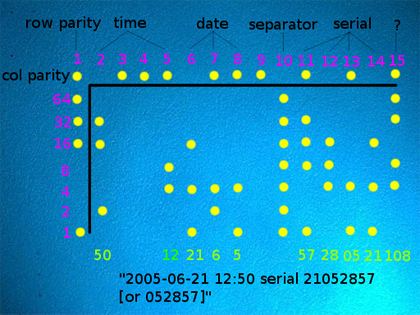
Most world governments require copier and printer manufacturers to include a method to track where a printed image came from. Originally, it was designed to trace counterfeits but now the explanation is mostly related to terrorism.  The only publicly disclosed technique at this time was created at Xerox in the 80’s and consists of a yellow pattern of microscopic dots.
Microscopic Printer Dots
Close up of actual tracking dots,  as seen through a microscope.
The information available is said to include the printer serial number as well as the date and time the image was printed. The Electronic Frontier Foundation is investigating and has published a list of those printers they’ve been able to identify as using the yellow dot technique.  So far, their list is limited to laser printers using the Xerox method. Any technique used by ink jet printers has not been disclosed to the public.

Exposed using a Photon blue LED light
Photos from www.eff.org


Update: When I originally shared this information I had been working many years for Epson America as a contract programmer. Epson was good to me and while I’m no longer under NDA I’m not one to kiss and tell.
I don’t think it’s a company secret that many printers actually include FTP software in their firmware. One program I developed used the file transfer software built into the printer to send and receive commands. This was still a dot-matrix printer so imagine what a new printer could do!

Security is not restricted to just PC’s, tablets and smart phones.  Any device that is connected to the Internet is at risk.

Read More
Posted in | No comments

Tuesday, 4 June 2013

Bonus 1GB Wristband with Family Pack License

Posted on 16:24 by Unknown

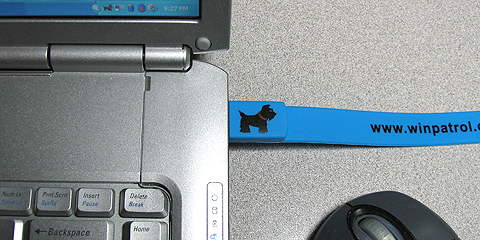
I always get smiles and questions when I take off my unique WinPatrol 1 GB USB Wristband.  I guess it’s not common to have files readily available on your wrist but I can verify it works even if you just carry it in your pocket.


Bonus ($25 value) when upgrading to WinPatrol PLUS Family license

This week, while supplies last, anyone who purchases a WinPatrol PLUS Family Pack license will receive a FREE WinPatrol wristband. The USB drive comes with 1 GB of space for music, photos or portable programs like our own included WinPatrolToGo.exe.

The single file portable version of WinPatrol is designed to run from a SD card or portable USB device without having to be installed on a target computer.  While it doesn’t provide real-time detection of changes it will let you clean out the useless, wasteful programs that just take up space and slow you down. Having WinPatrolToGo, especially on the WinPatrol wristband, can optimize everyone’s computer and make you a hero to family and friends.


WinPatrolToGo Sample Screen showing Windows Services
Changes to Startup Type can Prevent Persistent Startups or Toolbars


You may not know how useful a handy USB drive is until you don’t have one. The first time I used my WinPatrol wristband was after the death of a family member. In an effort to collect meaningful photos to celebrate his life we passed around a wristband.  Everyone in the family was able to copy their favorite photos on to my wristband and a wonderful slide show was created that we all contributed too and shared.

If you’re already a WinPatrol PLUS member you can still purchase just a wristband at http://winpatrol.stores.yahoo.net/wiplfapa.html.
Supplies are limited so this offer will expire when we no longer have inventory available.

Read More
Posted in | No comments
Newer Posts Older Posts Home
Subscribe to: Comments (Atom)

Popular Posts

  • Support for Downloads without Surprises
    Last week I posted a message about the  packaging of ad supported programs along with popular software. It appears to be a common practice t...
  • Employee Manual to Prevent Cryptolocker and More
    A common way computers are infected or compromised has always been a simple yet well thought out deception. It can happen to anyone and the ...
  • What on Earth is “Cloud” Computing
    The new big buzz word in the computing world is “Cloud” computing. In the past I’ve been critical of the concept and even poked fun at Cloud...
  • Why Dancing with the Stars is #1
    Are you wondering why the heck I’m talking about TV Shows? Well, it’s still a little all about tech and some of my past experiences. In the ...
  • WinPatrol Cloud Edition Public Beta
    WinPatrol Adds the Newest Technology Available. You’ll now have access the knowledge of thousands of WinPatrol users shared in real-tim...
  • SQLite C Code to Read Cookies
    While most of the technology leaking from my brain is for a wide audience, today’s post is very technical in nature. I expected the informat...
  • Free #1 Tweak to Improve Windows Performance
    Every year billions of dollars are spent by folks just trying to improve the performance of their computers. Over the last couple years ther...
  • Forget the DVD & Save on your New Laptop
    I’ve written before about the coming death of the CD/DVD ’s for data storage.  While that time hasn’t come yet for desktop there is one real...
  • TWITTER ALERT
    Anyone who uses Twitter, DO NOT use the Twitter web interface until further notice. There is a code injection vulnerability being used tha...
  • Security Software Doesn’t Fix Human Nature
    If you’re interested in PC Security, you’ll want to check a look at research recently compiled by the folks at PC Pitstop. Even I was surpri...

Categories

  • 2007
  • 3G
  • AAPL
  • ABC
  • accelerometer
  • Achilles
  • Acrobat
  • Activex
  • adobe
  • Ads
  • advertising
  • Adware
  • Adwords
  • Airlines
  • Albany Medical Center
  • algorithm
  • Amazon
  • amber alert
  • AMUST
  • Animation
  • antimalware
  • Antivirus 2009
  • antivirus2008
  • AOL
  • Apple
  • applets
  • AQuantive
  • archive
  • Aruba
  • ASC
  • Ask.com
  • ATI
  • Audio
  • Autorun
  • AutoUpdate
  • autoupdates
  • AVG
  • Azure
  • backup
  • badware
  • Bakugan
  • Baseball
  • battery
  • Ben Edelman
  • Beta
  • BillP
  • Birthdayware
  • Bitlocker
  • Blackberry
  • BlackViper
  • bloatware
  • Blogger
  • Blogs
  • Blogspot
  • Blu-ray
  • Bluehoo
  • bluetooth
  • boinc
  • Bonjour
  • Brazil
  • break
  • Breakaway games
  • Brookman
  • Browser wars
  • C64
  • camera
  • Carpal Tunnel
  • CBS News
  • cell phone
  • CES
  • charity
  • Child Safety
  • chinese
  • Chris Cook
  • Christmas
  • Chrome
  • CIPAV
  • clampi
  • Cloud
  • CNet
  • codec
  • comodo
  • conficker
  • Control Panel
  • copy
  • coupon
  • craplets
  • crapware
  • Crawford
  • credit
  • credit card
  • credit cards
  • ctfmon
  • daylight savings time
  • Dell
  • demo
  • Discount
  • Disney
  • DNS
  • Dollar
  • Domain
  • Donna
  • Doubleclick
  • Downadup
  • Dreamscene
  • droid
  • DVD
  • Dvorak
  • Easter egg
  • eclipse
  • Ed Bott
  • Edelman
  • egreeting
  • Email
  • Environment
  • Epilepsy
  • EU
  • eWeek
  • explorer
  • facebook
  • false positive
  • false-positive
  • FBI
  • file types
  • finnish
  • FiOS
  • Firefox
  • fireworks
  • fix
  • flash
  • Flashpix
  • Fort Drum
  • foxit
  • fraud
  • FTC
  • games
  • garmin
  • Gateway
  • GE
  • George Bush
  • Germany
  • global
  • Godmode
  • Google
  • Google Research
  • GotoMyPC
  • gps
  • green
  • Groceries
  • Habitat
  • Hacks
  • hallmark
  • Halo
  • hard drive
  • Harry McCracken
  • Harry Potter
  • Harvard
  • HD-DVD
  • help
  • hidden files
  • Hijack
  • History
  • Hiton
  • homeland security
  • Honor Flight
  • hosts
  • Hubble
  • IAC
  • ICANN
  • IE
  • IE6
  • IE7
  • IE8
  • installers
  • interface
  • Internet
  • IPAddress
  • iPhone
  • iPod
  • Iraq
  • iTouch
  • iTunes
  • java
  • Kaspersky
  • Kazaa
  • kenmore
  • key logger
  • keygen
  • Keylogger
  • Kosovo
  • LA
  • lady chalupa
  • langa
  • Laptop
  • lawsuit
  • Legoland
  • Levar Burton
  • Linksys
  • Little League
  • Live Writer
  • Live.com
  • localize
  • Logo
  • London
  • LOP
  • lottery
  • Lucasfilm
  • Macintosh
  • Malware
  • Marie Domingo
  • Mary
  • McCracken
  • Media
  • Memorial Day
  • mgrs.exe
  • Micosoft
  • Microsoft
  • Microsoft Surface
  • MiFi
  • mit
  • moon
  • Mossberg
  • Mothers Day
  • MPack
  • MSFT
  • msn
  • MTV
  • Multicore
  • Music
  • MVP
  • MVP09
  • nasa
  • NBC
  • Nero
  • Netbook
  • Network
  • network solution
  • New York
  • newsletter
  • Nintendo
  • Nintendo Wii
  • NNEDV
  • Norton
  • NYAG
  • OAuth
  • obama
  • Office
  • OLPC
  • Olympics
  • OpenDNS
  • oprah
  • optimize
  • optout
  • Paperghost
  • passwords
  • Patch
  • Patriot Flight
  • PC Guy
  • pc pitstop
  • PC World
  • pcmag
  • PCWorld
  • PDC
  • PDF
  • pedipaws
  • performance
  • phishing
  • photos
  • Photoshop
  • Pinnacle
  • Piracy
  • Pirillo
  • pogue
  • Porn
  • pornware
  • postcard
  • prediction
  • prefetch
  • Preview
  • Price
  • privacy
  • Prodigy
  • Programming
  • PSP
  • Public Relations
  • Pytlovany
  • Q-Link
  • Quicktime
  • quotes
  • radio
  • realnetworks
  • realplayer
  • RegCleaner
  • RegCure
  • regedit
  • Registry
  • registry cleaner
  • Release
  • remove
  • Research
  • return policy
  • review
  • RIAA
  • Rivera
  • RMS
  • Road Runner
  • rogue
  • router
  • RTM
  • Rumor
  • safari
  • safety
  • sale
  • Sales
  • Santa Monica
  • scam
  • Schenectady
  • Scoble
  • Scott Dunn
  • Scotty
  • sd
  • Search
  • Sears
  • Security
  • Services
  • seti
  • ShellExecute
  • Shirt
  • SimCity
  • site advisor
  • slingbox
  • snopes
  • social engineering
  • social network
  • solid state disk
  • Sounds
  • Sp3
  • space station
  • SPAM
  • spamhaus
  • Special
  • speedtest
  • Spyware
  • SSD
  • Startup
  • Stats
  • Steve Bass
  • stopbadware
  • storm
  • STS-125
  • Sugar
  • Sunbelt
  • support
  • Symantec
  • tagged
  • Task Catcher
  • Task Scheduler
  • taskbar
  • Tax
  • Techorati
  • techwatch
  • teens
  • temp
  • Thinkpad
  • Thurrott
  • tinyurl
  • Tips
  • TiVo
  • TLD
  • Today Show
  • Toolbar
  • toolbars
  • top ten
  • topten
  • toys
  • Translator
  • transunion
  • Tree
  • Trend Micro
  • tricks
  • trillian
  • Trojan
  • tweaks
  • twitter
  • UAC
  • UI
  • Ultimate
  • Unbox
  • Unboxed
  • update
  • Updates
  • upgrade
  • url
  • USB
  • Utility
  • Valentine
  • Verizon
  • versions
  • Veteran
  • Video Games
  • Vista
  • Vulnerability
  • wall-e
  • war
  • Washington
  • web2.0
  • Webslice
  • WGA
  • Widget
  • WiFi
  • Wii
  • WiiItis
  • wiimote
  • Win7
  • Windows 7
  • Windows Secrets
  • Windows Update
  • Windows7
  • WinPartrol
  • WinPatrol
  • winpatrolflash
  • WinPatrolToGo
  • Winter
  • Wireless
  • Wristband
  • WSJ
  • WWII
  • x64
  • Xbox
  • XO
  • XO Laptop
  • XOActivity
  • Xobni
  • xolaptop
  • XP
  • XP SP3
  • xp3
  • Yahoo
  • Zero Day
  • Zone Alarm
  • Zwinky

Blog Archive

  • ▼  2013 (31)
    • ▼  November (2)
      • Employee Manual to Prevent Cryptolocker and More
      • My First State-Sponsored Attack
    • ►  October (1)
      • Remove Unwanted Programs with One Click
    • ►  September (1)
      • Task Manager + WinPatrol Disables Unwanted Programs
    • ►  August (2)
      • WinPatrol Internal Server Error
      • WinPatrol PLUS For Everyone Just $2
    • ►  July (3)
      • Lithium-ion Battery: What Everyone Should Know
      • Friends of WinPatrol Around the World
      • Many Surprised by Windows XP Usage
    • ►  June (5)
      • Community Data Shared with WinPatrol FREE
      • Unboxing My New Lenovo ThinkPad Helix
      • Is Your Printer Spying on You?
      • Bonus 1GB Wristband with Family Pack License
    • ►  May (2)
    • ►  April (3)
    • ►  March (2)
    • ►  February (5)
    • ►  January (5)
  • ►  2012 (30)
    • ►  December (3)
    • ►  November (3)
    • ►  October (2)
    • ►  September (2)
    • ►  August (2)
    • ►  July (3)
    • ►  June (2)
    • ►  May (1)
    • ►  April (4)
    • ►  March (4)
    • ►  February (2)
    • ►  January (2)
  • ►  2011 (28)
    • ►  December (4)
    • ►  November (2)
    • ►  October (4)
    • ►  September (2)
    • ►  August (2)
    • ►  July (2)
    • ►  June (2)
    • ►  May (2)
    • ►  April (2)
    • ►  March (2)
    • ►  February (3)
    • ►  January (1)
  • ►  2010 (44)
    • ►  December (2)
    • ►  November (3)
    • ►  October (3)
    • ►  September (4)
    • ►  August (3)
    • ►  July (3)
    • ►  June (3)
    • ►  May (4)
    • ►  April (4)
    • ►  March (3)
    • ►  February (3)
    • ►  January (9)
  • ►  2009 (90)
    • ►  December (6)
    • ►  November (8)
    • ►  October (6)
    • ►  September (4)
    • ►  August (4)
    • ►  July (12)
    • ►  June (6)
    • ►  May (11)
    • ►  April (7)
    • ►  March (9)
    • ►  February (9)
    • ►  January (8)
  • ►  2008 (122)
    • ►  December (9)
    • ►  November (11)
    • ►  October (14)
    • ►  September (6)
    • ►  August (9)
    • ►  July (9)
    • ►  June (10)
    • ►  May (13)
    • ►  April (8)
    • ►  March (10)
    • ►  February (10)
    • ►  January (13)
  • ►  2007 (155)
    • ►  December (15)
    • ►  November (14)
    • ►  October (12)
    • ►  September (14)
    • ►  August (12)
    • ►  July (13)
    • ►  June (11)
    • ►  May (19)
    • ►  April (17)
    • ►  March (21)
    • ►  February (7)
Powered by Blogger.

About Me

Unknown
View my complete profile