Billps Tudios

  • Subscribe to our RSS feed.
  • Twitter
  • StumbleUpon
  • Reddit
  • Facebook
  • Digg
Showing posts with label Toolbar. Show all posts

Sunday, 26 April 2009

Sun Java Promoting Microsoft Toolbar

Posted on 20:04 by Unknown

I’ve written more than once about annoying toolbars but I ran into one today that just made me laugh.  I was updating Java and during the setup, they encouraged me to “Get the new MSN Toolbar for FREE”.
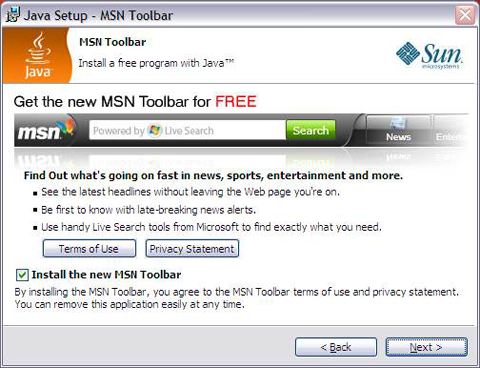

Sun Java promoting the MSN Toolbar


While this is annoying, it’s ironic in so many ways. At one time, Java was on a path to change the computing world and was expected to be one of the hottest technologies of the decade.  That was before Microsoft bastardized Java and eventually killed support for it.  While Java is still a great tool it never reached the popular role it was once destined for.


Even more ironic was that I was updating Java on my Google Chrome Browser.  The idea of using an MSN Toolbar on Chrome is truly bizarre.


As I’ve indicated in the past, the economics of hoisting toolbars on unsuspecting downloads is force to be reckoned with. Sun and its Java line will soon be owned by Oracle but I don’t expect any change in toolbar deals.
April 20th: Oracle to Buy Sun


As I completed this article I read that a dreaded cease & desist order was recently sent the download site Softpedia by makers of Comodo Internet Security. Softpedia has their own standards for classifying software and categorized Comodo as “adware” because they bundled the Ask.com toolbar. They’re not exactly alone.

Softpedia Review of WinPatrol

 As a result of this threat of legal action, Softpedia has chosen to remove any Comodo products from their online library. Hopefully, Comodo won’t threaten others who call them out like the Calendar of Update Installers Hall of Shame.



 

Read More
Posted in Ask.com, comodo, java, msn, Toolbar | No comments

Monday, 25 August 2008

What's Wrong with Toolbars?

Posted on 08:43 by Unknown

Our good friend Donna who manages Calendar of Updates have been keeping an excellent list of which software installers have been sneaking additional software on to our systems. It’s called the Installers Hall of Shame. The list includes folks who insist on installing not only toolbars from Ask.com, Google and Yahoo but also browsers, video players and more. Click here to see the list. I’ve added it to my Favorites so I check it regularly.

Examples include:

  • Cyberlink PowerDVD 8 - Google Toolbar and BETA of Moovielive
  • DivX - Yahoo Toolbar
  • Shockwave Player - Norton Security Scan or Google Toolbar
  • Webroot SpySweeper - Ask Toolbar
  • Windows Live Installer - Windows Live Toolbar & Sign-in Assistant
  • Winzip - RegistryBooster


  • I also see that Donna just posted an article specifically about the Ask.com toolbar; Update on Products with Ask Toolbar. It was a timely post considering just last week I heard back from IAC/InterActiveCorp asking if I would re-consider adding the Ask.com toolbar to WinPatrol. I was told that I wouldn’t have to include MyWebSearch or promote other infamous FunWebProducts from IAC. “We’re not really connected to them” I was told. As I did in the past, I said “No thanks”.


    It’s still surprising that programs like Zone Alarm, SpySweeper and Comodo Firewall install the Ask.com toolbar while other security programs still flag it as undesirable, suspicious or even adware.


    Donna has some great points and screen shots but even if not for suspicious behavior what’s the big deal you ask? One the worse arguments I hear is “It’s the users own fault if they don’t see the pre-checked option”. Well, suppose when you upgraded to WinPatrol PLUS I default the number of licenses to 10. Can you imagine the anger from people who would be charged $299 USD instead of $29.95? I’ll bet a few people wouldn’t even notice it on their credit card bill and pay it. Is it their fault or would I be scamming them?

    Bottom line: No installer should include a default option to install additional software.


    Read More
    Posted in Ask.com, Donna, installers, Toolbar | No comments

    Friday, 14 March 2008

    Internet Explorer 8 Beta: New Names for Old Ideas

    Posted on 14:47 by Unknown

    It has been a year and a half since IE7 was released but I was still surprised to see Internet Explorer 8 was getting ready to make its debut. Microsoft has put a lot into making IE the number one browser although they haven’t been able to monetize this advantage by sending more folks to Microsoft properties as planned.

    They may have noticed that Firefox is starting to get a bigger share of the market. It could also be that Microsoft is trying to fend off concerns of the European Commission. Either way, IE8 beta is available now. I don’t recommend it but if you’re experienced enough you can try IE8 out by visiting the Microsoft IE8 Readiness Toolkit site.


    The most important new feature you’ll want to know about is the “Emulate IE7”. I quickly found many sites failed to work in the default IE8 mode including most Blogspot sites like Bits from Bill. Luckily, many of the new features will continue to work in Emulation mode.Emulate IE 7 Button


    The other good news is when a particular site fails, it won’t kill the browser, just that particular tab process. The browser will try to recover but unfortunately, if it fails once, it will continue to fail.Eror message letting you know IE8 is trying to recover


    Let me repeat again, unless you need to write a review or you’re a serious web developers, don’t rush to download IE8 Beta. While I haven’t had serious problems, I’ve read a number of horror stories that are typical with beta software. Chances are some of these people never bothered to read the release notes to see if they had compatible machines. For me it’s been impossible to use IE8 in anything but Emulate IE7 mode. Some bugs are minor like having a Yahoo icon being displayed on my sites. Others cause the browser to hang and can’t be duplicated.Wrong icons being displayed on IE 8


    Browser Chrome
    Microsoft has always been an advocate for cool new names for things and they’ve put in a lot of creativity into this new version. My favorite is a new name for toolbars. A toolbar is now just a part of your “browser chrome”.


    WebSlices
    This feature isn’t a bad idea but has limited applicability. It will be good if you spend a lot of time with your browser open and you’re interested in watching a portion of a website that might change regularly. Basically, it’s like adding a favorite to your “chrome” that displays only a portion of the web page you’re interested in. Essentially it’s a new way to do what used to be called Channels and takes up space on your browser chrome. Unless you’re a stock watcher or Ebay professional you might want to find a better use for this space.
    On the web side, WebSlices are easy to add. If anything the web based code of this feature would be great for mobile devices. I could definitely see accessing webslices from my phone.


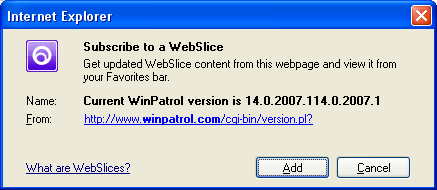
    Add Web Slice


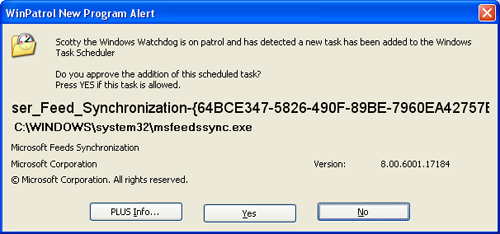
    You may find that just adding a slice will cause a new program to be added to your Scheduled Tasks. MSFeedSync says it’s used to update out-of-date system feeds. Oddly, while WinPatrol reports this new job, it doesn’t appear in my Control Panels Scheduled Task applet on my XP test machine.
    Alert of new msfeedsync task being scheduled


    Activities
    This seems to be a new name for copy and paste. Well, in fairness this combines the features of copy, paste with SendTo. Most of the examples I’ve seen have already been available by just using JavaScript.
    According to Microsoft:


    “Activity providers enhance your ability to work with text that you select on a webpage, enabling you to map addresses, define words, and more.”
    For a list of currently supported Activities check out http://ie.microsoft.com/activities/en-en/Default.aspx


    Developer Tools
    While I may be a little critical of IE8 they have added many features I love. The new developer tool is very useful to anyone developing websites, especially folks like myself who still hand code most of our sites. This is something I’ve had on Firefox, thanks to a plug-in, but it’s very important to have this feature on IE.


    JavaScript
    I’m very pleased that Microsoft has continued to make improvements in their JavaScript engine. There’s even a new JavaScript debugger available. YAY!! I really love how Microsoft insists on calling it “JScript”. It’s reasonable because JavaScript has no connection to Java, but I can’t help thinking Microsoft just thinks Java is a dirty word.


    Open Standards
    Microsoft claims that IE8 will “interpret web content in the most standards compliant way it can”. This will be the default mode that IE8 uses. One might think this is a ploy to pacify regulators but IE General Manager Dean Hachamovitch denies this in the IE Blog.

    “While we do not believe any current legal requirements would dictate which rendering mode a browser must use, this step clearly removes this question as a potential legal and regulatory issue.”


    Translation: There was nothing wrong before, but we fixed it anyway so shut up.

    Address Bar
    Some good common sense improvements have been made to where you enter your web address or URL. IE8 will now handle URL’s that might have been fragmented. This solves a problem that happens when you try to copy and paste long URLs that may have been Emailed to you. This seems like a no-brainer but I can’t help thinking there could be security concerns. You’ll also see the a colored background in the address bar to help identify real and potentially dangerous sites. In addition, you'll see the actual domain will be a little bolder so users can see who they're really connected to.

    New URL formatting


    Favorites Bar
    One more name change came to the Links toolbar. It’s now called the “Favorites bar”. The area above the web page now takes up five rows counting my Google toolbar and unlike older versions of IE it can not be customized. I guess I should be happy they haven’t added an Office 2007 style ribbon.


    For those brave souls who are trying IE8, I look forward to hearing your feedback.


    Read More
    Posted in Beta, IE8, Toolbar, Webslice | No comments

    Saturday, 1 March 2008

    IAC may say Good-Bye Ask.com Toolbar

    Posted on 07:01 by Unknown

    Late last year I attracted a lot of attention by blogging about an offer by Ask.com to include their toolbar with my WinPatrol program. It looks like my choice not to include the toolbar may have been a good business decision after all.


    According to Silicon Alley Insider, IAC may be ready to scrap Ask.com, powered by Teoma, and move their business to Google. IAC already signed a 5 year sponsorship deal with Google last November. Given IAC has an advertising relationship with Microsoft they could also to cut a bigger deal with MSN. Either way, it’s nothing I want to celebrate. Other sources report a large number of Ask.com employees have been told to look for new employment by April.


    I would really be happy if IAC considered separating their “FunWebProducts” line into separate applications. That way users who ask for one application won’t get a dozen along with their toolbar. Unfortunately, I’m guessing they’ll just replace their MyWebSearch toolbar with a Google or MSN toolbar.


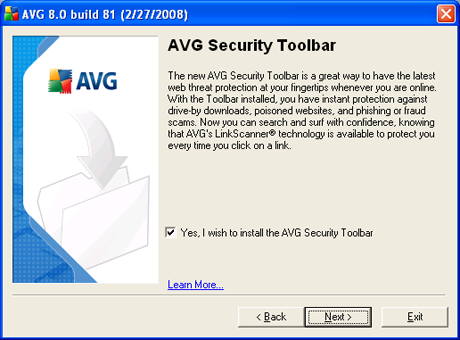
    Everyone is making so much money distributing toolbars that consumers have to be careful installing any application these days. I saw yesterday that AVG Anti-Virus is now installing a Yahoo based toolbar calling it a security toolbar.
    AVG Installation Screen


    Some folks chatting on the Calendar of Updates forums report the toolbar is installed even if you uncheck the option.


    Anyone who reads this blog knows I’m not a fan of toolbars but my fear goes beyond the obvious. Anytime you install a new peice of software you run “some” risk of a system conflict. By installing multiple programs at the same time, the risk increases exponentially and chances of fnding and fixing the problem becomes more difficult.


    Read More
    Posted in Ask.com, AVG, Toolbar, Yahoo | No comments

    Wednesday, 16 January 2008

    Would you like Toolbar with your Software Order?

    Posted on 15:51 by Unknown

    Yesterday, I had a chat with a nice guy who does business development for IAC, the folks behind Ask.com. IAC is also behind other products I don’t care for like Zwinky and so-called FunWebProducts. IAC has had a lot of success lately talking companies into including their free Ask.com toolbar and they thought WinPatrol might be a popular partner.


    Last year a number of companies decided to treat their customers with automatic installation of the Ask.com search/toolbar. If you’re not paying attention when you install software from Webroot, Nero and Zonelabs(Check Point) you’ll soon have a branded version of the Ask.com toolbar installed. My new friend at IAC tells me it’s quite common and they recommend pre-checking the install option to make sure more users receive the toolbar. He mentioned bundled installations of DivX and Skype as examples of this being an accepted industry practice.

    The sales pitch to include a toolbar with WinPatrol was compelling. I’m told that the my reputation wouldn’t be affected and I would be providing my customers with a service by including the free toolbar. All the companies currently installing the toolbar are very happy. He even leaked the news that another well known Anti-Spyware vendor would be announcing their own deal soon.

    I crunched the numbers and sure enough the revenue I could receive by including the toolbar would be huge. My overhead is low and the free version of WinPatrol has many thousand downloads even on the slowest day. If I chose to include the Ask.com tool bar I could probably retire comfortably by the end of the year.


    Unfortunately, a number of people think I’m a really, good guy and I respect their opinion. For the last ten years WinPatrol has had a flawless reputation. I know myself, I really hate companies that install additional software that I didn’t ask for. It’s not only rude, it’s just wrong.


    While IAC may be a respectable company, I’ve never been a fan of programs like SmileyCentral, and Zwinky that install multiple programs when users just want a single cool program. They also auto install the MyWebSearch toolbar and SearchAssistant. Ask.com may very well grow to become the number one search engine but they’ll do so by getting installed on computers without being asked for. (no pun intended)


    I’m going to have to pass and keep WinPatrol simple and pure. There will be a new version of WinPatrol later this month and it won’t include any toolbars. Hopefully, users and editors will continue to recommend Scotty the Windows WatchDog because they love and respect WinPatrol. This may not be the best business decision I’ve ever made but I can live with myself.

    Read More
    Posted in IAC, Toolbar, WinPatrol, Zwinky | No comments
    Older Posts Home
    Subscribe to: Posts (Atom)

    Popular Posts

    • Support for Downloads without Surprises
      Last week I posted a message about the  packaging of ad supported programs along with popular software. It appears to be a common practice t...
    • Employee Manual to Prevent Cryptolocker and More
      A common way computers are infected or compromised has always been a simple yet well thought out deception. It can happen to anyone and the ...
    • What on Earth is “Cloud” Computing
      The new big buzz word in the computing world is “Cloud” computing. In the past I’ve been critical of the concept and even poked fun at Cloud...
    • SQLite C Code to Read Cookies
      While most of the technology leaking from my brain is for a wide audience, today’s post is very technical in nature. I expected the informat...
    • WinPatrol Cloud Edition Public Beta
      WinPatrol Adds the Newest Technology Available. You’ll now have access the knowledge of thousands of WinPatrol users shared in real-tim...
    • Four Secret Reasons Why Win7 is Ten Times Better
      It’s no secret that I’ve never been a fan of Windows Vista. I really wanted to love it but even as a designated Microsoft MVP I couldn’t dri...
    • Free #1 Tweak to Improve Windows Performance
      Every year billions of dollars are spent by folks just trying to improve the performance of their computers. Over the last couple years ther...
    • Forget the DVD & Save on your New Laptop
      I’ve written before about the coming death of the CD/DVD ’s for data storage.  While that time hasn’t come yet for desktop there is one real...
    • Can Facebook be Trusted?
      Last week Facebook rolled out another round of what they consider easy to use privacy settings. What they’re really doing is trying to appea...
    • TWITTER ALERT
      Anyone who uses Twitter, DO NOT use the Twitter web interface until further notice. There is a code injection vulnerability being used tha...

    Categories

    • 2007
    • 3G
    • AAPL
    • ABC
    • accelerometer
    • Achilles
    • Acrobat
    • Activex
    • adobe
    • Ads
    • advertising
    • Adware
    • Adwords
    • Airlines
    • Albany Medical Center
    • algorithm
    • Amazon
    • amber alert
    • AMUST
    • Animation
    • antimalware
    • Antivirus 2009
    • antivirus2008
    • AOL
    • Apple
    • applets
    • AQuantive
    • archive
    • Aruba
    • ASC
    • Ask.com
    • ATI
    • Audio
    • Autorun
    • AutoUpdate
    • autoupdates
    • AVG
    • Azure
    • backup
    • badware
    • Bakugan
    • Baseball
    • battery
    • Ben Edelman
    • Beta
    • BillP
    • Birthdayware
    • Bitlocker
    • Blackberry
    • BlackViper
    • bloatware
    • Blogger
    • Blogs
    • Blogspot
    • Blu-ray
    • Bluehoo
    • bluetooth
    • boinc
    • Bonjour
    • Brazil
    • break
    • Breakaway games
    • Brookman
    • Browser wars
    • C64
    • camera
    • Carpal Tunnel
    • CBS News
    • cell phone
    • CES
    • charity
    • Child Safety
    • chinese
    • Chris Cook
    • Christmas
    • Chrome
    • CIPAV
    • clampi
    • Cloud
    • CNet
    • codec
    • comodo
    • conficker
    • Control Panel
    • copy
    • coupon
    • craplets
    • crapware
    • Crawford
    • credit
    • credit card
    • credit cards
    • ctfmon
    • daylight savings time
    • Dell
    • demo
    • Discount
    • Disney
    • DNS
    • Dollar
    • Domain
    • Donna
    • Doubleclick
    • Downadup
    • Dreamscene
    • droid
    • DVD
    • Dvorak
    • Easter egg
    • eclipse
    • Ed Bott
    • Edelman
    • egreeting
    • Email
    • Environment
    • Epilepsy
    • EU
    • eWeek
    • explorer
    • facebook
    • false positive
    • false-positive
    • FBI
    • file types
    • finnish
    • FiOS
    • Firefox
    • fireworks
    • fix
    • flash
    • Flashpix
    • Fort Drum
    • foxit
    • fraud
    • FTC
    • games
    • garmin
    • Gateway
    • GE
    • George Bush
    • Germany
    • global
    • Godmode
    • Google
    • Google Research
    • GotoMyPC
    • gps
    • green
    • Groceries
    • Habitat
    • Hacks
    • hallmark
    • Halo
    • hard drive
    • Harry McCracken
    • Harry Potter
    • Harvard
    • HD-DVD
    • help
    • hidden files
    • Hijack
    • History
    • Hiton
    • homeland security
    • Honor Flight
    • hosts
    • Hubble
    • IAC
    • ICANN
    • IE
    • IE6
    • IE7
    • IE8
    • installers
    • interface
    • Internet
    • IPAddress
    • iPhone
    • iPod
    • Iraq
    • iTouch
    • iTunes
    • java
    • Kaspersky
    • Kazaa
    • kenmore
    • key logger
    • keygen
    • Keylogger
    • Kosovo
    • LA
    • lady chalupa
    • langa
    • Laptop
    • lawsuit
    • Legoland
    • Levar Burton
    • Linksys
    • Little League
    • Live Writer
    • Live.com
    • localize
    • Logo
    • London
    • LOP
    • lottery
    • Lucasfilm
    • Macintosh
    • Malware
    • Marie Domingo
    • Mary
    • McCracken
    • Media
    • Memorial Day
    • mgrs.exe
    • Micosoft
    • Microsoft
    • Microsoft Surface
    • MiFi
    • mit
    • moon
    • Mossberg
    • Mothers Day
    • MPack
    • MSFT
    • msn
    • MTV
    • Multicore
    • Music
    • MVP
    • MVP09
    • nasa
    • NBC
    • Nero
    • Netbook
    • Network
    • network solution
    • New York
    • newsletter
    • Nintendo
    • Nintendo Wii
    • NNEDV
    • Norton
    • NYAG
    • OAuth
    • obama
    • Office
    • OLPC
    • Olympics
    • OpenDNS
    • oprah
    • optimize
    • optout
    • Paperghost
    • passwords
    • Patch
    • Patriot Flight
    • PC Guy
    • pc pitstop
    • PC World
    • pcmag
    • PCWorld
    • PDC
    • PDF
    • pedipaws
    • performance
    • phishing
    • photos
    • Photoshop
    • Pinnacle
    • Piracy
    • Pirillo
    • pogue
    • Porn
    • pornware
    • postcard
    • prediction
    • prefetch
    • Preview
    • Price
    • privacy
    • Prodigy
    • Programming
    • PSP
    • Public Relations
    • Pytlovany
    • Q-Link
    • Quicktime
    • quotes
    • radio
    • realnetworks
    • realplayer
    • RegCleaner
    • RegCure
    • regedit
    • Registry
    • registry cleaner
    • Release
    • remove
    • Research
    • return policy
    • review
    • RIAA
    • Rivera
    • RMS
    • Road Runner
    • rogue
    • router
    • RTM
    • Rumor
    • safari
    • safety
    • sale
    • Sales
    • Santa Monica
    • scam
    • Schenectady
    • Scoble
    • Scott Dunn
    • Scotty
    • sd
    • Search
    • Sears
    • Security
    • Services
    • seti
    • ShellExecute
    • Shirt
    • SimCity
    • site advisor
    • slingbox
    • snopes
    • social engineering
    • social network
    • solid state disk
    • Sounds
    • Sp3
    • space station
    • SPAM
    • spamhaus
    • Special
    • speedtest
    • Spyware
    • SSD
    • Startup
    • Stats
    • Steve Bass
    • stopbadware
    • storm
    • STS-125
    • Sugar
    • Sunbelt
    • support
    • Symantec
    • tagged
    • Task Catcher
    • Task Scheduler
    • taskbar
    • Tax
    • Techorati
    • techwatch
    • teens
    • temp
    • Thinkpad
    • Thurrott
    • tinyurl
    • Tips
    • TiVo
    • TLD
    • Today Show
    • Toolbar
    • toolbars
    • top ten
    • topten
    • toys
    • Translator
    • transunion
    • Tree
    • Trend Micro
    • tricks
    • trillian
    • Trojan
    • tweaks
    • twitter
    • UAC
    • UI
    • Ultimate
    • Unbox
    • Unboxed
    • update
    • Updates
    • upgrade
    • url
    • USB
    • Utility
    • Valentine
    • Verizon
    • versions
    • Veteran
    • Video Games
    • Vista
    • Vulnerability
    • wall-e
    • war
    • Washington
    • web2.0
    • Webslice
    • WGA
    • Widget
    • WiFi
    • Wii
    • WiiItis
    • wiimote
    • Win7
    • Windows 7
    • Windows Secrets
    • Windows Update
    • Windows7
    • WinPartrol
    • WinPatrol
    • winpatrolflash
    • WinPatrolToGo
    • Winter
    • Wireless
    • Wristband
    • WSJ
    • WWII
    • x64
    • Xbox
    • XO
    • XO Laptop
    • XOActivity
    • Xobni
    • xolaptop
    • XP
    • XP SP3
    • xp3
    • Yahoo
    • Zero Day
    • Zone Alarm
    • Zwinky

    Blog Archive

    • ▼  2013 (31)
      • ▼  November (2)
        • Employee Manual to Prevent Cryptolocker and More
        • My First State-Sponsored Attack
      • ►  October (1)
      • ►  September (1)
      • ►  August (2)
      • ►  July (3)
      • ►  June (5)
      • ►  May (2)
      • ►  April (3)
      • ►  March (2)
      • ►  February (5)
      • ►  January (5)
    • ►  2012 (30)
      • ►  December (3)
      • ►  November (3)
      • ►  October (2)
      • ►  September (2)
      • ►  August (2)
      • ►  July (3)
      • ►  June (2)
      • ►  May (1)
      • ►  April (4)
      • ►  March (4)
      • ►  February (2)
      • ►  January (2)
    • ►  2011 (28)
      • ►  December (4)
      • ►  November (2)
      • ►  October (4)
      • ►  September (2)
      • ►  August (2)
      • ►  July (2)
      • ►  June (2)
      • ►  May (2)
      • ►  April (2)
      • ►  March (2)
      • ►  February (3)
      • ►  January (1)
    • ►  2010 (44)
      • ►  December (2)
      • ►  November (3)
      • ►  October (3)
      • ►  September (4)
      • ►  August (3)
      • ►  July (3)
      • ►  June (3)
      • ►  May (4)
      • ►  April (4)
      • ►  March (3)
      • ►  February (3)
      • ►  January (9)
    • ►  2009 (90)
      • ►  December (6)
      • ►  November (8)
      • ►  October (6)
      • ►  September (4)
      • ►  August (4)
      • ►  July (12)
      • ►  June (6)
      • ►  May (11)
      • ►  April (7)
      • ►  March (9)
      • ►  February (9)
      • ►  January (8)
    • ►  2008 (122)
      • ►  December (9)
      • ►  November (11)
      • ►  October (14)
      • ►  September (6)
      • ►  August (9)
      • ►  July (9)
      • ►  June (10)
      • ►  May (13)
      • ►  April (8)
      • ►  March (10)
      • ►  February (10)
      • ►  January (13)
    • ►  2007 (155)
      • ►  December (15)
      • ►  November (14)
      • ►  October (12)
      • ►  September (14)
      • ►  August (12)
      • ►  July (13)
      • ►  June (11)
      • ►  May (19)
      • ►  April (17)
      • ►  March (21)
      • ►  February (7)
    Powered by Blogger.

    About Me

    Unknown
    View my complete profile