Billps Tudios

  • Subscribe to our RSS feed.
  • Twitter
  • StumbleUpon
  • Reddit
  • Facebook
  • Digg
Showing posts with label Beta. Show all posts

Monday, 2 March 2009

Live from the Microsoft MVP Summit

Posted on 05:01 by Unknown

My view from the Hyatt in downtown Seattle
My morning photo from the Grand Hyatt in downtown Seattle


This week I’ve having the distinct privilege to meet with a number of my fellow compatriots in the world of consumer security. We’re here in Seattle to meet with Microsoft and be briefed on their plans for keeping customers safe in the future. It’s called the Microsoft MVP Summit and open to a select few who Microsoft has designated as Most Valuable Professionals.

There are almost 1500 MVP’s here in town for the event but last night I had chance to meet and get to know those of us here with a particular interest in consumer security. These are folks who aren’t in it for the money or fame.  They’re the ones who have spent countless hours pouring over Hijack logs and listening to frustrated users with the goal of just wanting to help. They’re unique people who investigate and follow all the malware attacks and warn users about rogue AntiSpyware downloads. These are the good guys who don’t think of each other as competition and I’m honored to call them friends.


Most of what I hear from Microsoft I won’t be able to repeat although the knowledge I absorb will certainly add to my overall tech intuition. I can tell you Microsoft is good at getting folks excited and the ultimate winners this week will be the Windows customer.


Five things every Windows beta tester should know
I was very happy to read today that ZDNet columnist and author Ed Bott has commented on my last blog post.  Ed agreed that the concept of beta testing isn’t what it used to be. I have noticed since I complained about the lack of feedback in my WinPatrol 2009 beta, bug reports and comments have increased. Sorry if I over stated the problem but I do welcome your opinions even when I’m not beta testing.

You can read what Ed says about me and about beta testers at http://blogs.zdnet.com/Bott/?p=682


Another view from my hotel.  Waking up to a rainbow seemed like a good sign of things to come
Nothing like waking up to a rainbow when you’re in the Emerald City


Read More
Posted in Beta, Ed Bott, MVP, MVP09 | No comments

Wednesday, 25 February 2009

Release Windows 7, Summer of 2009

Posted on 11:59 by Unknown

When I first read that the next release of Windows 7 was going to be a “release candidate” my reaction was to shout obscenities at my computer screen. I’ve been part of many Window beta tests in the past but Microsoft really seems to be rushing the release of the newest Windows. I really want Windows 7 to be a success and the thought of a quick beta cycle scares me.


After reading more including Ed Bott’s “Who Needs Another Windows 7 beta”, I have reversed my opinion.  I don’t agree completely with everything Ed says but he got me thinking.


Momentum
Right now Windows 7 has momentum. The press and bloggers so far on Win7 has been extremely positive. The performance provided by Windows 7 has been surprising. The longer a beta the higher the expectations and some of the current excitement will fade.


Interruption of Imagination
Every new beta release is a distraction to developers. The time it takes to create a frozen version takes away from a developers imagination and productivity. I’ve worked at Microsoft and I accomplished a lot more when I was sitting in my office all day then I did sitting in meetings or running focus groups. The internal testing required before any public beta is a lot longer than you might think.


Most Beta Testers Suck
As a developer I can tell you , beta tests aren’t what they used to be.  The number of people who actually report decent bug information is minimal. Most people download the beta just to be an earlier adopter. Developers are lucky if users read the release notes and compatibility list let alone any beta instructions. There are so many different machine configurations that sadly the only way to find some bugs is to have full global adoption of new software.


Just use Auto Updates
Anyone who reads Bits From Bill knows I think AutoUpdates are evil. Unfortunately, they’ve become a fact of life. Microsoft has determined Auto Updates are part of the equation and has perfected the procedure as much as technically possible.


Compatibility Already Exists
While there are plenty of new features in Windows 7, there’s a reasonable chance if a program is compatible with Vista, it will work okay on Windows 7. There are many new features a program can take advantage of but under the hood Windows 7 is still a new version of Vista.


Bailing out the Computer Industry
Last year Microsoft told customers that Windows 7 would ship in January 2010.  This would be a huge mistake because it would completely miss the opportunity to increase holiday computer sales. For manufacturers to ship a shiny new Windows 7 computer, the product needs to be final sometime in October. While I don’t expect a government bail out of computer manufactures, it’s in the consumers best interest to have many successful competing OEM’s. (Original equipment manufacturer)

Students will choose PC’s not Macs
If they really want to push it, t
he next big computer sales period is the end of summer when parents and students are shopping.  Vista’s current reputation may encourage more Mac purchases for kids going off to school. If there’s a release candidate in April, like currently being reported, that might allow a final OEM product being available by early summer.  That would also be a huge boost for student computer sales and certainly help Microsoft’s bottom line.


My only complaint
One of the reasons Windows will generate new computer sales is because there currently is no upgrade path from Windows XP. If you have Windows XP you’ll need to install Windows 7 by reformatting from scratch.


Update: 
Microsoft has posted a list of new changes for the upcoming Release Candidate.
http://blogs.msdn.com/e7/archive/2009/02/26/some-changes-since-beta.aspx


Part II:

Windows 7 Certified and Free Win7 Upgrades


Read More
Posted in Beta, Windows 7 | No comments

Monday, 23 February 2009

Find What's New to Clean Up Malware

Posted on 12:13 by Unknown

My thanks to everyone who has participated in the beta test of the newest WinPatrol. I’ve heard a lot of good comments and one suggestion was so valuable I couldn’t wait for a future release to make it available.


Available today is the last beta of what will become WinPatrol 2009. If you’re like to participate you can download beta 4 at http://www.winpatrol.com/beta16.html.


The latest WinPatrol feature is so simple I can’t believe nobody has thought of it before. One of WinPatrol’s unique features is to keep track of when a program, service, hidden file or registry entry was first detected on your machine.


When any kind of infection occurs all its related files will show up as recent additions to your system. WinPatrol 2009 includes a new single list that sorts critical files and entries by their date detected. There’s a really good chance any new malware files will show up at the top of this list.


WinPatrol Recent Tab
WinPatrol new Recent Tab


In the past months I’ve had a number of friends and family members bring me their laptops to clean up malware. If I had a Recent list at the time I probably could have helped them over the phone.


This should be the last beta version so if you’d like to participate I would love to hear from you. Next week I’ll be in Redmond blogging from Microsoft’s Most Valuable Professional Summit.  I hope to announce our official launch soon after I return.


Thanks!
Bill

Read More
Posted in Beta, Malware, WinPatrol | No comments

Tuesday, 2 September 2008

Chrome Steals Headlines back from Gov Palin.

Posted on 04:29 by Unknown

Google Chrome
First it was hurricane Gustav. Today it’s a new internet browser called, Google Chrome. Even with the shocking announcement of VP candidate Sarah Palin other news stories keep taking attention away from the Republic National Convention.


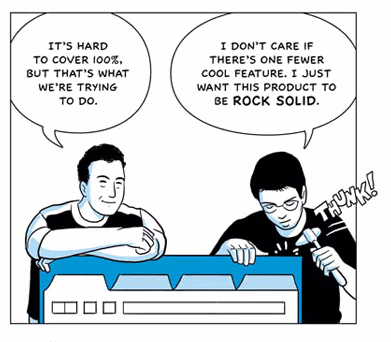
There’s no doubt that everyone will be talking about and evaluating the possible success of Google’s surprise entry into the browser wars. Google’s announcement came in the form of a comic book. Hopefully, it will be a more successful launch than the recent PR disaster from Cuil.


Chrome PR
Comic adaptation by Scott McCloud


At the time I post this, Google Chrome isn’t yet available for public download but according to the Google Blog it should be available today. I was planning on rearranging my office today but instead I’ll be reviewing Chrome and making any needed updates to WinPatrol so it’s completely compatible. WinPatrol v16 is almost ready for release but won’t be coming with its own comic book.


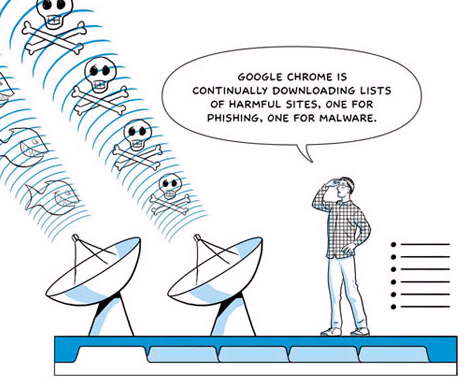
Google Chrome with built in malware fishing
Click Here to Read the Google Chrome Comic book


It will be interesting to see what people think about Chrome. Techies will be pleased that it’s open-source, but so far, no word on a Mac version. I know I’m a geek and this is exciting to me but I still think this is big news. It will be the talk of main stream news media and is definitely more news worthy than another pregnant 17 year old.

Read More/Chrome Easter Eggs: Chrome Proves, No Future in Web OS

Update: Download Google Chrome


Read More
Posted in Beta, Chrome, Google, WinPatrol | No comments

Saturday, 30 August 2008

Automatic Update of IE8 Beta 2

Posted on 13:45 by Unknown

There has been a lot of talk lately about the newest beta software for Internet Explorer 8. Most of the talk has been very positive but I haven’t been one of those to have the greatest luck.


My new IBM ThinkPad didn’t like IE8 beta 2 but thanks to the system restore applet I was able to back to where I was. I tried to update but all it did was remove IE7 from my system. I had to reinstall IE7 using Firefox so it’s a good thing Microsoft now supports FF on their websites. The Gateway desktop machine had a more mysterious experience.


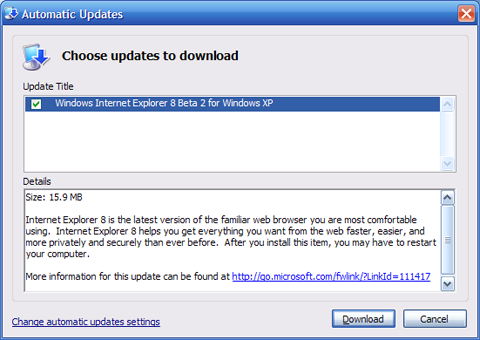
Today, Windows update told me I had new software to download. I was extremely surprised it told me the update was Internet Explorer 8 Beta 2. I hope this isn’t typical behavior but on my desktop Microsoft was telling me to install beta software as a normal Windows update. I really hope people with updates set to automatic aren’t getting beta software without asking for it.


Auto Update of IE 8 beta software


I decided for the sake of my readers it might be worth checking out IE beta 2. Downloading beta software, especially system software is not something I recommend to others. After spending the morning fixing my desktop machine from a failed update, I really recommend staying away from IE8 beta 2 for now.


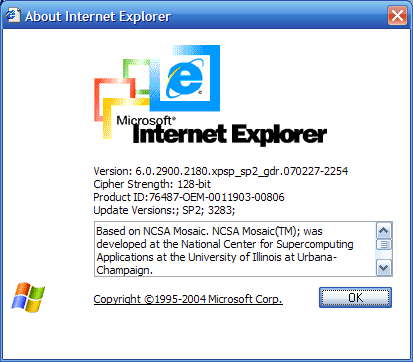
I can’t explain why yet but after my update, my system was downgraded to Internet Explorer 6.


Downgraded to IE6


After that I started to receive new update messges including the upgrade to XP Service Pack 3 which I had already performed. My computer refused to boot after this next step so I went back to my last working configuration to save my sanity. Hopefully, the only reason I received an update was because I had previously installed IE8 beta 1.

I really want to see the new features in IE8 beta 2 but for now I’ll read about them online. I recommend you all do the same.


Read More
Posted in Beta, IE8, Windows Update | No comments

Sunday, 13 April 2008

WinPatrol 2008 ActiveX Beta

Posted on 09:53 by Unknown

Later this week I plan to release the first beta of the next version of WinPatrol, called WinPatrol 2008. This test phase will be limited but you can request access by Emailing support@winpatrol.com. Include basic information about your system and any special talents you might have. PLUS members will naturally be given priority but it’s not a requirement.


The big new feature in WinPatrol 2008 will be monitoring and control of your ActiveX components. Even our friends at Symantec recently reported ActiveX account for an overwhelming majority of all browser plug-in vulnerabilities. Microsoft controls made up 79% of the 239 plug-in bugs discovered the last half of 2007. Those problems were followed by Apples’ Quicktime which had 19 vulnerabilities patched last year.


It seems like every week more problems are reported in Quicktime, RealPlayer, Adobe Flash, Sun’s Java or other 3rd party controls. Once the vulnerability is known the risk increases exponentially until a patch is available.


New WinPatrol ActiveX interface
WinPatrol 2008 Beta 1


WinPatrol 2008 takes the worry out of waiting for a patch to become available. When a vulnerability is found Scotty will let you disable or set the “kill-bit” on the appropriate control until a new one is made available.


One of the tasks for each tester will be to go through the list of ActiveX controls and just click on PLUS Info. That will provide us with a list of most commonly used controls so our research department can have data available for all PLUS members by release time. Our research director Robin doesn’t know it yet but we’ll all be working a little overtime.
Smile


Read More
Posted in Activex, Beta, Vulnerability, WinPatrol | No comments

Friday, 14 March 2008

Internet Explorer 8 Beta: New Names for Old Ideas

Posted on 14:47 by Unknown

It has been a year and a half since IE7 was released but I was still surprised to see Internet Explorer 8 was getting ready to make its debut. Microsoft has put a lot into making IE the number one browser although they haven’t been able to monetize this advantage by sending more folks to Microsoft properties as planned.

They may have noticed that Firefox is starting to get a bigger share of the market. It could also be that Microsoft is trying to fend off concerns of the European Commission. Either way, IE8 beta is available now. I don’t recommend it but if you’re experienced enough you can try IE8 out by visiting the Microsoft IE8 Readiness Toolkit site.


The most important new feature you’ll want to know about is the “Emulate IE7”. I quickly found many sites failed to work in the default IE8 mode including most Blogspot sites like Bits from Bill. Luckily, many of the new features will continue to work in Emulation mode.Emulate IE 7 Button


The other good news is when a particular site fails, it won’t kill the browser, just that particular tab process. The browser will try to recover but unfortunately, if it fails once, it will continue to fail.Eror message letting you know IE8 is trying to recover


Let me repeat again, unless you need to write a review or you’re a serious web developers, don’t rush to download IE8 Beta. While I haven’t had serious problems, I’ve read a number of horror stories that are typical with beta software. Chances are some of these people never bothered to read the release notes to see if they had compatible machines. For me it’s been impossible to use IE8 in anything but Emulate IE7 mode. Some bugs are minor like having a Yahoo icon being displayed on my sites. Others cause the browser to hang and can’t be duplicated.Wrong icons being displayed on IE 8


Browser Chrome
Microsoft has always been an advocate for cool new names for things and they’ve put in a lot of creativity into this new version. My favorite is a new name for toolbars. A toolbar is now just a part of your “browser chrome”.


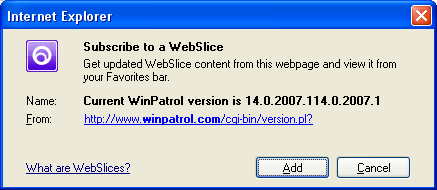
WebSlices
This feature isn’t a bad idea but has limited applicability. It will be good if you spend a lot of time with your browser open and you’re interested in watching a portion of a website that might change regularly. Basically, it’s like adding a favorite to your “chrome” that displays only a portion of the web page you’re interested in. Essentially it’s a new way to do what used to be called Channels and takes up space on your browser chrome. Unless you’re a stock watcher or Ebay professional you might want to find a better use for this space.
On the web side, WebSlices are easy to add. If anything the web based code of this feature would be great for mobile devices. I could definitely see accessing webslices from my phone.


Add Web Slice


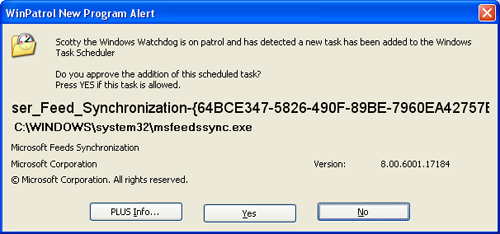
You may find that just adding a slice will cause a new program to be added to your Scheduled Tasks. MSFeedSync says it’s used to update out-of-date system feeds. Oddly, while WinPatrol reports this new job, it doesn’t appear in my Control Panels Scheduled Task applet on my XP test machine.
Alert of new msfeedsync task being scheduled


Activities
This seems to be a new name for copy and paste. Well, in fairness this combines the features of copy, paste with SendTo. Most of the examples I’ve seen have already been available by just using JavaScript.
According to Microsoft:


“Activity providers enhance your ability to work with text that you select on a webpage, enabling you to map addresses, define words, and more.”
For a list of currently supported Activities check out http://ie.microsoft.com/activities/en-en/Default.aspx


Developer Tools
While I may be a little critical of IE8 they have added many features I love. The new developer tool is very useful to anyone developing websites, especially folks like myself who still hand code most of our sites. This is something I’ve had on Firefox, thanks to a plug-in, but it’s very important to have this feature on IE.


JavaScript
I’m very pleased that Microsoft has continued to make improvements in their JavaScript engine. There’s even a new JavaScript debugger available. YAY!! I really love how Microsoft insists on calling it “JScript”. It’s reasonable because JavaScript has no connection to Java, but I can’t help thinking Microsoft just thinks Java is a dirty word.


Open Standards
Microsoft claims that IE8 will “interpret web content in the most standards compliant way it can”. This will be the default mode that IE8 uses. One might think this is a ploy to pacify regulators but IE General Manager Dean Hachamovitch denies this in the IE Blog.

“While we do not believe any current legal requirements would dictate which rendering mode a browser must use, this step clearly removes this question as a potential legal and regulatory issue.”


Translation: There was nothing wrong before, but we fixed it anyway so shut up.

Address Bar
Some good common sense improvements have been made to where you enter your web address or URL. IE8 will now handle URL’s that might have been fragmented. This solves a problem that happens when you try to copy and paste long URLs that may have been Emailed to you. This seems like a no-brainer but I can’t help thinking there could be security concerns. You’ll also see the a colored background in the address bar to help identify real and potentially dangerous sites. In addition, you'll see the actual domain will be a little bolder so users can see who they're really connected to.

New URL formatting


Favorites Bar
One more name change came to the Links toolbar. It’s now called the “Favorites bar”. The area above the web page now takes up five rows counting my Google toolbar and unlike older versions of IE it can not be customized. I guess I should be happy they haven’t added an Office 2007 style ribbon.


For those brave souls who are trying IE8, I look forward to hearing your feedback.


Read More
Posted in Beta, IE8, Toolbar, Webslice | No comments

Tuesday, 27 November 2007

Windows XP SP3 Includes Four New Services

Posted on 16:15 by Unknown

Microsoft is in the process of testing service packs for both Vista(SP1) and Windows XP(SP3). There has been a lot of talk about how Windows XP may be the biggest competitor for Vista. I’ll never forget Bill Gates showing the Blue Screen of Death on Windows 98 as the reason to upgrade to Windows XP. Many of us are satisfied with what Windows XP offers and I’m pleased with the continued support from Microsoft.

While reports of Vista’s service pack have been mixed, many folks testing Windows XP SP3 report a more robust operating system. While I don’t typically upgrade immediately, as a developer I need to keep up with new versions of Windows. I wasn’t included on Microsofts’ beta list but I was able to check out SP3 on a friends laptop.

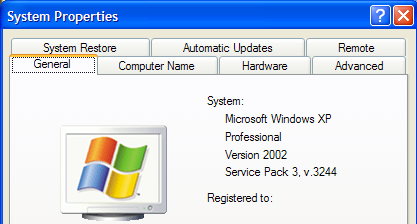
Windows XP SP3


You won’t find a lot of visible changes to SP3. In fact, I was very surprised that it didn’t force an to upgrade to IE7.

Using WinPatrol’s date “First Detected” feature, I did find a few new services that weren’t there before. This list could vary depending on your configuration.

  • EAPSVC.DLL – Provides windows clients Extensible Authentication Protocol Service Click for more info

  • KMSVC.DLL – Manages health certificates and keys (used by NAP) This relates to managing keys for volume licenses and their health, not medical information.

  • QAGENTRT.DLL – Allows windows clients to participate in Network Access Protection. This includes some of the new security features of Vista minus UAC.

  • DOT3SVC.DLL – This service performs IEEE 802.1X authentication on Ethernet interfaces. Improves detection and connection to wireless networks

Luckily, I was able to run some benchmarks on the system before SP3 was installed. I’ll write more if I find a difference in performance or other issues as I continue to perform tests.

Read More
Posted in Beta, Services, Sp3, XP | No comments
Older Posts Home
Subscribe to: Posts (Atom)

Popular Posts

Categories

  • 2007
  • 3G
  • AAPL
  • ABC
  • accelerometer
  • Achilles
  • Acrobat
  • Activex
  • adobe
  • Ads
  • advertising
  • Adware
  • Adwords
  • Airlines
  • Albany Medical Center
  • algorithm
  • Amazon
  • amber alert
  • AMUST
  • Animation
  • antimalware
  • Antivirus 2009
  • antivirus2008
  • AOL
  • Apple
  • applets
  • AQuantive
  • archive
  • Aruba
  • ASC
  • Ask.com
  • ATI
  • Audio
  • Autorun
  • AutoUpdate
  • autoupdates
  • AVG
  • Azure
  • backup
  • badware
  • Bakugan
  • Baseball
  • battery
  • Ben Edelman
  • Beta
  • BillP
  • Birthdayware
  • Bitlocker
  • Blackberry
  • BlackViper
  • bloatware
  • Blogger
  • Blogs
  • Blogspot
  • Blu-ray
  • Bluehoo
  • bluetooth
  • boinc
  • Bonjour
  • Brazil
  • break
  • Breakaway games
  • Brookman
  • Browser wars
  • C64
  • camera
  • Carpal Tunnel
  • CBS News
  • cell phone
  • CES
  • charity
  • Child Safety
  • chinese
  • Chris Cook
  • Christmas
  • Chrome
  • CIPAV
  • clampi
  • Cloud
  • CNet
  • codec
  • comodo
  • conficker
  • Control Panel
  • copy
  • coupon
  • craplets
  • crapware
  • Crawford
  • credit
  • credit card
  • credit cards
  • ctfmon
  • daylight savings time
  • Dell
  • demo
  • Discount
  • Disney
  • DNS
  • Dollar
  • Domain
  • Donna
  • Doubleclick
  • Downadup
  • Dreamscene
  • droid
  • DVD
  • Dvorak
  • Easter egg
  • eclipse
  • Ed Bott
  • Edelman
  • egreeting
  • Email
  • Environment
  • Epilepsy
  • EU
  • eWeek
  • explorer
  • facebook
  • false positive
  • false-positive
  • FBI
  • file types
  • finnish
  • FiOS
  • Firefox
  • fireworks
  • fix
  • flash
  • Flashpix
  • Fort Drum
  • foxit
  • fraud
  • FTC
  • games
  • garmin
  • Gateway
  • GE
  • George Bush
  • Germany
  • global
  • Godmode
  • Google
  • Google Research
  • GotoMyPC
  • gps
  • green
  • Groceries
  • Habitat
  • Hacks
  • hallmark
  • Halo
  • hard drive
  • Harry McCracken
  • Harry Potter
  • Harvard
  • HD-DVD
  • help
  • hidden files
  • Hijack
  • History
  • Hiton
  • homeland security
  • Honor Flight
  • hosts
  • Hubble
  • IAC
  • ICANN
  • IE
  • IE6
  • IE7
  • IE8
  • installers
  • interface
  • Internet
  • IPAddress
  • iPhone
  • iPod
  • Iraq
  • iTouch
  • iTunes
  • java
  • Kaspersky
  • Kazaa
  • kenmore
  • key logger
  • keygen
  • Keylogger
  • Kosovo
  • LA
  • lady chalupa
  • langa
  • Laptop
  • lawsuit
  • Legoland
  • Levar Burton
  • Linksys
  • Little League
  • Live Writer
  • Live.com
  • localize
  • Logo
  • London
  • LOP
  • lottery
  • Lucasfilm
  • Macintosh
  • Malware
  • Marie Domingo
  • Mary
  • McCracken
  • Media
  • Memorial Day
  • mgrs.exe
  • Micosoft
  • Microsoft
  • Microsoft Surface
  • MiFi
  • mit
  • moon
  • Mossberg
  • Mothers Day
  • MPack
  • MSFT
  • msn
  • MTV
  • Multicore
  • Music
  • MVP
  • MVP09
  • nasa
  • NBC
  • Nero
  • Netbook
  • Network
  • network solution
  • New York
  • newsletter
  • Nintendo
  • Nintendo Wii
  • NNEDV
  • Norton
  • NYAG
  • OAuth
  • obama
  • Office
  • OLPC
  • Olympics
  • OpenDNS
  • oprah
  • optimize
  • optout
  • Paperghost
  • passwords
  • Patch
  • Patriot Flight
  • PC Guy
  • pc pitstop
  • PC World
  • pcmag
  • PCWorld
  • PDC
  • PDF
  • pedipaws
  • performance
  • phishing
  • photos
  • Photoshop
  • Pinnacle
  • Piracy
  • Pirillo
  • pogue
  • Porn
  • pornware
  • postcard
  • prediction
  • prefetch
  • Preview
  • Price
  • privacy
  • Prodigy
  • Programming
  • PSP
  • Public Relations
  • Pytlovany
  • Q-Link
  • Quicktime
  • quotes
  • radio
  • realnetworks
  • realplayer
  • RegCleaner
  • RegCure
  • regedit
  • Registry
  • registry cleaner
  • Release
  • remove
  • Research
  • return policy
  • review
  • RIAA
  • Rivera
  • RMS
  • Road Runner
  • rogue
  • router
  • RTM
  • Rumor
  • safari
  • safety
  • sale
  • Sales
  • Santa Monica
  • scam
  • Schenectady
  • Scoble
  • Scott Dunn
  • Scotty
  • sd
  • Search
  • Sears
  • Security
  • Services
  • seti
  • ShellExecute
  • Shirt
  • SimCity
  • site advisor
  • slingbox
  • snopes
  • social engineering
  • social network
  • solid state disk
  • Sounds
  • Sp3
  • space station
  • SPAM
  • spamhaus
  • Special
  • speedtest
  • Spyware
  • SSD
  • Startup
  • Stats
  • Steve Bass
  • stopbadware
  • storm
  • STS-125
  • Sugar
  • Sunbelt
  • support
  • Symantec
  • tagged
  • Task Catcher
  • Task Scheduler
  • taskbar
  • Tax
  • Techorati
  • techwatch
  • teens
  • temp
  • Thinkpad
  • Thurrott
  • tinyurl
  • Tips
  • TiVo
  • TLD
  • Today Show
  • Toolbar
  • toolbars
  • top ten
  • topten
  • toys
  • Translator
  • transunion
  • Tree
  • Trend Micro
  • tricks
  • trillian
  • Trojan
  • tweaks
  • twitter
  • UAC
  • UI
  • Ultimate
  • Unbox
  • Unboxed
  • update
  • Updates
  • upgrade
  • url
  • USB
  • Utility
  • Valentine
  • Verizon
  • versions
  • Veteran
  • Video Games
  • Vista
  • Vulnerability
  • wall-e
  • war
  • Washington
  • web2.0
  • Webslice
  • WGA
  • Widget
  • WiFi
  • Wii
  • WiiItis
  • wiimote
  • Win7
  • Windows 7
  • Windows Secrets
  • Windows Update
  • Windows7
  • WinPartrol
  • WinPatrol
  • winpatrolflash
  • WinPatrolToGo
  • Winter
  • Wireless
  • Wristband
  • WSJ
  • WWII
  • x64
  • Xbox
  • XO
  • XO Laptop
  • XOActivity
  • Xobni
  • xolaptop
  • XP
  • XP SP3
  • xp3
  • Yahoo
  • Zero Day
  • Zone Alarm
  • Zwinky

Blog Archive

  • ▼  2013 (31)
    • ▼  November (2)
      • Employee Manual to Prevent Cryptolocker and More
      • My First State-Sponsored Attack
    • ►  October (1)
    • ►  September (1)
    • ►  August (2)
    • ►  July (3)
    • ►  June (5)
    • ►  May (2)
    • ►  April (3)
    • ►  March (2)
    • ►  February (5)
    • ►  January (5)
  • ►  2012 (30)
    • ►  December (3)
    • ►  November (3)
    • ►  October (2)
    • ►  September (2)
    • ►  August (2)
    • ►  July (3)
    • ►  June (2)
    • ►  May (1)
    • ►  April (4)
    • ►  March (4)
    • ►  February (2)
    • ►  January (2)
  • ►  2011 (28)
    • ►  December (4)
    • ►  November (2)
    • ►  October (4)
    • ►  September (2)
    • ►  August (2)
    • ►  July (2)
    • ►  June (2)
    • ►  May (2)
    • ►  April (2)
    • ►  March (2)
    • ►  February (3)
    • ►  January (1)
  • ►  2010 (44)
    • ►  December (2)
    • ►  November (3)
    • ►  October (3)
    • ►  September (4)
    • ►  August (3)
    • ►  July (3)
    • ►  June (3)
    • ►  May (4)
    • ►  April (4)
    • ►  March (3)
    • ►  February (3)
    • ►  January (9)
  • ►  2009 (90)
    • ►  December (6)
    • ►  November (8)
    • ►  October (6)
    • ►  September (4)
    • ►  August (4)
    • ►  July (12)
    • ►  June (6)
    • ►  May (11)
    • ►  April (7)
    • ►  March (9)
    • ►  February (9)
    • ►  January (8)
  • ►  2008 (122)
    • ►  December (9)
    • ►  November (11)
    • ►  October (14)
    • ►  September (6)
    • ►  August (9)
    • ►  July (9)
    • ►  June (10)
    • ►  May (13)
    • ►  April (8)
    • ►  March (10)
    • ►  February (10)
    • ►  January (13)
  • ►  2007 (155)
    • ►  December (15)
    • ►  November (14)
    • ►  October (12)
    • ►  September (14)
    • ►  August (12)
    • ►  July (13)
    • ►  June (11)
    • ►  May (19)
    • ►  April (17)
    • ►  March (21)
    • ►  February (7)
Powered by Blogger.

About Me

Unknown
View my complete profile