Billps Tudios

  • Subscribe to our RSS feed.
  • Twitter
  • StumbleUpon
  • Reddit
  • Facebook
  • Digg
Showing posts with label Updates. Show all posts

Monday, 12 May 2008

Windows XP SP3, The Good, the Bad and the Ugly

Posted on 09:47 by Unknown

It’s been a week now since Windows XP Service Pack 3 has been deployed and the results are good, bad and little ugly.


The Good
I’ve been one of the 99% of those who downloaded and installed Service Pack 3 with no trouble at all. I already wrote last month about what changed in SP3 but now we have the results of performance benchmarks. While some folks have reported increased performance, the benchmarks don’t show any major improvements. In my own tests, I have found a slight increase in internet speed but it depended on my configuration. The results will vary depending on your firewall and the use of network monitor device protocol.


The Bad
Some folks (not all) using HP computers and AMD processors quickly reported problems rebooting after installing SP3. If you haven’t upgrade yet or have problems you’ll want to review the information available in Jesper’s Blog. Jesper experienced the problem personally and with some helped worked through the issues and provides a detailed solution for others who might have problems.


The Ugly
Depending on who you ask you’ll get a different answer about how SP3 affects different versions of Internet Explorer. If you’re using the beta version of IE8 most recommend you downgrade from IE8 before installing SP3. I didn’t experience any problems but I also skipped IE7 when I installed the IE8 beta. My friend Corrine has some good details on the relationship between IE and SP3.


This upgrade is good example of why I recommend waiting 7–10 days before installing any new updates. It’s nearly impossible for Microsoft or anyone to test such critical software when it’s used by millions with millions of different configurations. Thanks to Jesper and others, information is now available to resolve potential problems from Service Pack 3.


Read More
Posted in Updates, xp3 | No comments

Thursday, 27 March 2008

Apple Bad Habits Punish Windows Users

Posted on 12:44 by Unknown

It seems like Apple just wants to punish Windows users while they make deals and slowly infiltrate our machines. I haven't used an Apple computer for years but I don't remember them treating their own customers so badly.

  • One bad habit has been around for a while in the QuickTime video player. Anytime you view a Quicktime encoded video, Apple automatically adds the program, qttask.exe to the Windows registry so it will automatically run anytime you reboot. This was one of the reasons why I created the "Disable" button in WinPatrol so it could automatically be removed.

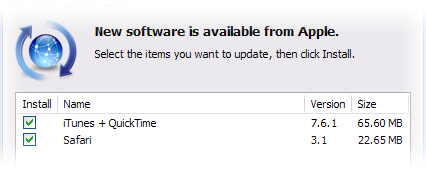
  • A recent bad habit getting a lot of attention is their effort to sneak the Safari browser on to your machine when you update your iPod/QuickTime software. There have been many cries that Apple Safari is Malware. Just like your typical adware company Apple claims “it's an option” but when the option is pre-checked we all know most people won’t even notice it. That’s considered a user decision to accept it.

The option to install Safari is prechecked
It’s especially disrespectful since Apple Human Interface Guidelines put the “action” button on the far right where Windows users are accustom to a Quit,Close or Cancel button. If you’re doing a Windows application then use Windows UI guidelines. (BillP Pet Peeve)
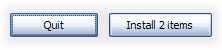
Apple Human Interface Guidelines are different from Windows.


Fun Side Note
: According to the Safari EULA, “Apple forbids Windows users from installing Safari for Windows”

  • This morning I realized most people will receive QuickTime whether they want it or not. Much to my surprise I was told I should install QuickTime when all I wanted to do was look up my credit card balance.

I just wanted to check out my credit card bill and needed Quicktime?

It didn’t matter what I said.

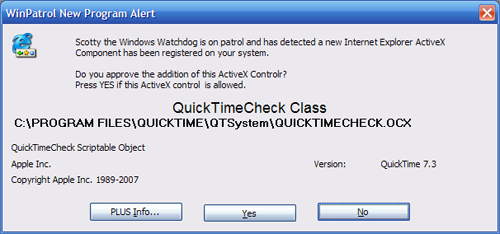
One of the features I’m working on for WinPatrol 2008 is monitoring and control of ActiveX controls. It seems like once a week we’re hearing about vulnerabilities in ActiveX components so I want to give users immediate control instead of waiting for the next patch. The alert below appeared when I was just checking my credit card bill.


New ActiveX control from Apple


After digging a little it turns out the QuickTime component was part of a Google ad-sense box which was located on the main chase.com page. So not only is my credit card company charging me for my card, they’re trying to make money advertising to me. I’m getting off topic now but you get the idea.

I guess I really need to get WinPatrol 2008 released soon or it will be time to dig my Mac programming manuals out of the attic. How does “QuickPatrol” sound?

Read More
Posted in iPod, Quicktime, safari, Updates | No comments

Wednesday, 19 September 2007

Office 2003 SP3 Things You Should Know

Posted on 12:22 by Unknown

I’m a big fan of the Service Pack updates that Microsoft provides for free. I’m also a big fan of being informed before you install any new software on your computer.

Like any update, I recommend against rushing out to be the first. It never hurts to let others be test subjects for a few weeks before making major changes to the machine that your productivity or life style may depend on.

Microsoft has released Service Pack 3 for Office 2003 which contains number of needed fixes and security enhancements. I’m pretty sure I’ll install the Service Pack on my machines running Office 2003 but it won’t be today. Even as it’s being released Microsoft has acknowledged a few possible quirks that you should certainly be aware of.

The known issues below should be reviewed before anyone installs SP3.
(Click number link for more info)

  • You are unexpectedly prompted to restart the computer after you install an Office service pack or an Office update (905726)

  • The functionality of an add-in, an ActiveX control, or a COM add-in is reduced, or the functionality is blocked after you install Office 2003 Service Pack 3 (938814)

  • Error message when you try to create a new MAPI form in Outlook 2003: "contact the administrator" (938816)

  • Attachments that contain the .gadget extension cannot be opened in Outlook 2003 after you install Office 2003 Service Pack 3 (938811)

  • The Fast Saves feature in Word 2003 no longer functions after you install Office 2003 Service Pack 3 (938808)

  • You may experience issues when you run the Microsoft Office Document Imaging program after you install Office 2003 Service Pack 3 (938813)

  • You receive an error message when you try to open a file or to save a file after you install Office 2003 Service Pack 3 (941636)

  • You cannot open Microsoft Excel 5.0/95 Workbook files that contain Visual Basic for Applications macros in Excel 2003 after you install Office 2003 Service Pack 3 (938806)

  • Office files that are saved in certain formats no longer contain the version number of Office after you install Office 2003 Service Pack 3(938807)

Some of these issues may not apply to everyone, but you should be familiar with them before installation. In time, I suspect this list will grow.

For detailed information about these issues as well as the benefits of Office 2003 Service Pack 3 go to http://support.microsoft.com/kb/923618.


Read More
Posted in Office, Sp3, Updates | No comments

Saturday, 1 September 2007

AOL Active Update Doesn't Suck

Posted on 18:19 by Unknown

Today, in a RARE move I’m going to say something positive of both America Online AND automatic updates. I’ll make up for it tomorrow by pointing out another new annoyance from AOL.

Recently, AOL has been “offering” an update of its “update” mechanism to fix potential problems. “This corruption can cause software updates to restart repeatedly until they are successfully completed. “

Unlike most other updates, they actually have my approval on how this update is being presented.

AOL Update dialog


There are some things I really like about this update.


  1. They actually notify the user an update is going to occur.

  2. Date, Time and Update number(although cryptic) are displayed.

  3. They provide a “Let me do it later” option.

  4. They describe the purpose of the update.

  5. They even provide a link to more details that describe the update.

    If you click on the image above, it answers the questions...
    “What SoftwareUpdate am I Receiving?”
    “What is the AOL Software Update Mechanism and How Does it Work?

The only thing missing is an option, “Never Update” but I can understand this being a required due to the serious nature of the problem.

Unfortunately, this kind of update is rare but I sure would like to see more like it.


Read More
Posted in AOL, Updates | No comments

Saturday, 14 July 2007

Another Flakey Windows Update

Posted on 14:16 by Unknown

Everyone who reads my Blog knows how much I hate AutoUpdate programs including the automatic updates for Windows. In most cases, the risk of any update far exceeds the benefits. When there are exceptions I will mention them here.

This weeks update caused a couple problems so far this week. First reported was a conflict with Sunbelts Ninja Email Security. Sunbelt’s crack development team was quick to provide a fix for their users.

Now we have word of “sluggish” applications which use .Net Managed Applications. More information can be found on Heath Stewart’s Blog.

What I regularly recommend is that users set the Windows Update option so that it only downloads updates and doesn’t install them. I suggest waiting 7–10 days before installing any updates. Usually, the only exception is when it’s a security fix for a zero-day threat that is known to be widely deployed by the bad guys. If you do have problems with a security update you can contact Microsoft for free at 1–866–PC-Safety.
Read More
Posted in Updates, Windows Update | No comments

Saturday, 5 May 2007

Auto Update Programs Running All the Time

Posted on 09:08 by Unknown
One of the bonus features for WinPatrol PLUS users is they can quickly look up information on new programs that appear on their computers. Our PLUS knowledge base contains information on both malware and legitimate programs and is written so hopefully mere mortals can understand what a program is doing. Essentially, the “PLUS Info…” feature is a “What the heck is this program?” feature.

At least once a month I compile a list of the most commonly requested programs along with some free info on many of the more dangerous programs. I couldn’t help but notice that last month 4 of the top 15 are designed to just sit there and check for new versions.

The following popular programs were among the most often requested information by WinPatrol users. I’ve included some snippets of information along with links to PLUS Info examples.

GOOGLETOOLBARNOTIFIER.EXE
“Googletoolbarnotifier.exe and swg.dll install with recent versions of the Google Toolbar. According to Google, these files run in the background and prevent other search engines from setting themselves as the default search engine.”… More PLUS Info…


GETFLASH.EXE
“Getflash.exe is the update utility that installs with Adobe's popular Flash player. Adobe now owns Flash as they've purchased the entire Macromedia Product line.” More PLUS Info…


SPUPDSVC.EXE
“Spupdsvc.exe will appear in your Windows\System or System32 folder. It's the Windows Service Pack Installer update service also described as the Update RunOnce Service. As the name implies, this file should not need to be running all the time.". More PLUS Info…

ISUSPM.EXE
“InstallShield is a very popular program installer. Chances are good that you have lots of programs on your system that used that as the program installer. Isuspm.exe can be used to check for updates or additional product information.” More PLUS Info…


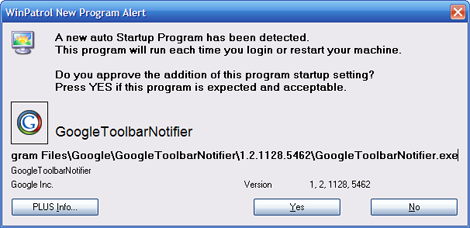
sample of a winpatrol alert when google toolbar notifier is detected
Most Common Alert April 2007


Obviously, this indicates to me that most people have no idea these resident programs are being added to automatically run. If you don’t use WinPatrol, you might want to run MSConfig which comes with Windows and take a peek at your list of Startup Programs.

Read More
Posted in crapware, flash, Updates, WinPatrol | No comments

Monday, 30 April 2007

Top Ten Blogs April 2007

Posted on 19:31 by Unknown

I’m ending the month with a list of the most popular posts. This is mainly to aid people who get here by searching for topics included in this months archive web page.

So, here’s the top ten for April in no particular order…

  1. File Restoration, a new Revenue for Microsoft

  2. Multiple Languages for WinPatrol

  3. Not All Computers are Updated Equally

  4. Female Journalists in the Media

  5. Connection Not a Vista of Dell Problem

  6. Dell Offers Windows XP As Choice

  7. Apple Ad Could Improve New Windows PC’s

  8. Microsoft Patches & BlackBerry Updates

  9. Do I Need a Registry Cleaner?

  10. AntiSpyware Advertising Gets Nasty

Read More
Posted in Blackberry, crapware, Dell, Media, Registry, Updates | No comments
Older Posts Home
Subscribe to: Posts (Atom)

Popular Posts

  • Support for Downloads without Surprises
    Last week I posted a message about the  packaging of ad supported programs along with popular software. It appears to be a common practice t...
  • Employee Manual to Prevent Cryptolocker and More
    A common way computers are infected or compromised has always been a simple yet well thought out deception. It can happen to anyone and the ...
  • What on Earth is “Cloud” Computing
    The new big buzz word in the computing world is “Cloud” computing. In the past I’ve been critical of the concept and even poked fun at Cloud...
  • SQLite C Code to Read Cookies
    While most of the technology leaking from my brain is for a wide audience, today’s post is very technical in nature. I expected the informat...
  • WinPatrol Cloud Edition Public Beta
    WinPatrol Adds the Newest Technology Available. You’ll now have access the knowledge of thousands of WinPatrol users shared in real-tim...
  • Four Secret Reasons Why Win7 is Ten Times Better
    It’s no secret that I’ve never been a fan of Windows Vista. I really wanted to love it but even as a designated Microsoft MVP I couldn’t dri...
  • Free #1 Tweak to Improve Windows Performance
    Every year billions of dollars are spent by folks just trying to improve the performance of their computers. Over the last couple years ther...
  • Forget the DVD & Save on your New Laptop
    I’ve written before about the coming death of the CD/DVD ’s for data storage.  While that time hasn’t come yet for desktop there is one real...
  • Can Facebook be Trusted?
    Last week Facebook rolled out another round of what they consider easy to use privacy settings. What they’re really doing is trying to appea...
  • TWITTER ALERT
    Anyone who uses Twitter, DO NOT use the Twitter web interface until further notice. There is a code injection vulnerability being used tha...

Categories

  • 2007
  • 3G
  • AAPL
  • ABC
  • accelerometer
  • Achilles
  • Acrobat
  • Activex
  • adobe
  • Ads
  • advertising
  • Adware
  • Adwords
  • Airlines
  • Albany Medical Center
  • algorithm
  • Amazon
  • amber alert
  • AMUST
  • Animation
  • antimalware
  • Antivirus 2009
  • antivirus2008
  • AOL
  • Apple
  • applets
  • AQuantive
  • archive
  • Aruba
  • ASC
  • Ask.com
  • ATI
  • Audio
  • Autorun
  • AutoUpdate
  • autoupdates
  • AVG
  • Azure
  • backup
  • badware
  • Bakugan
  • Baseball
  • battery
  • Ben Edelman
  • Beta
  • BillP
  • Birthdayware
  • Bitlocker
  • Blackberry
  • BlackViper
  • bloatware
  • Blogger
  • Blogs
  • Blogspot
  • Blu-ray
  • Bluehoo
  • bluetooth
  • boinc
  • Bonjour
  • Brazil
  • break
  • Breakaway games
  • Brookman
  • Browser wars
  • C64
  • camera
  • Carpal Tunnel
  • CBS News
  • cell phone
  • CES
  • charity
  • Child Safety
  • chinese
  • Chris Cook
  • Christmas
  • Chrome
  • CIPAV
  • clampi
  • Cloud
  • CNet
  • codec
  • comodo
  • conficker
  • Control Panel
  • copy
  • coupon
  • craplets
  • crapware
  • Crawford
  • credit
  • credit card
  • credit cards
  • ctfmon
  • daylight savings time
  • Dell
  • demo
  • Discount
  • Disney
  • DNS
  • Dollar
  • Domain
  • Donna
  • Doubleclick
  • Downadup
  • Dreamscene
  • droid
  • DVD
  • Dvorak
  • Easter egg
  • eclipse
  • Ed Bott
  • Edelman
  • egreeting
  • Email
  • Environment
  • Epilepsy
  • EU
  • eWeek
  • explorer
  • facebook
  • false positive
  • false-positive
  • FBI
  • file types
  • finnish
  • FiOS
  • Firefox
  • fireworks
  • fix
  • flash
  • Flashpix
  • Fort Drum
  • foxit
  • fraud
  • FTC
  • games
  • garmin
  • Gateway
  • GE
  • George Bush
  • Germany
  • global
  • Godmode
  • Google
  • Google Research
  • GotoMyPC
  • gps
  • green
  • Groceries
  • Habitat
  • Hacks
  • hallmark
  • Halo
  • hard drive
  • Harry McCracken
  • Harry Potter
  • Harvard
  • HD-DVD
  • help
  • hidden files
  • Hijack
  • History
  • Hiton
  • homeland security
  • Honor Flight
  • hosts
  • Hubble
  • IAC
  • ICANN
  • IE
  • IE6
  • IE7
  • IE8
  • installers
  • interface
  • Internet
  • IPAddress
  • iPhone
  • iPod
  • Iraq
  • iTouch
  • iTunes
  • java
  • Kaspersky
  • Kazaa
  • kenmore
  • key logger
  • keygen
  • Keylogger
  • Kosovo
  • LA
  • lady chalupa
  • langa
  • Laptop
  • lawsuit
  • Legoland
  • Levar Burton
  • Linksys
  • Little League
  • Live Writer
  • Live.com
  • localize
  • Logo
  • London
  • LOP
  • lottery
  • Lucasfilm
  • Macintosh
  • Malware
  • Marie Domingo
  • Mary
  • McCracken
  • Media
  • Memorial Day
  • mgrs.exe
  • Micosoft
  • Microsoft
  • Microsoft Surface
  • MiFi
  • mit
  • moon
  • Mossberg
  • Mothers Day
  • MPack
  • MSFT
  • msn
  • MTV
  • Multicore
  • Music
  • MVP
  • MVP09
  • nasa
  • NBC
  • Nero
  • Netbook
  • Network
  • network solution
  • New York
  • newsletter
  • Nintendo
  • Nintendo Wii
  • NNEDV
  • Norton
  • NYAG
  • OAuth
  • obama
  • Office
  • OLPC
  • Olympics
  • OpenDNS
  • oprah
  • optimize
  • optout
  • Paperghost
  • passwords
  • Patch
  • Patriot Flight
  • PC Guy
  • pc pitstop
  • PC World
  • pcmag
  • PCWorld
  • PDC
  • PDF
  • pedipaws
  • performance
  • phishing
  • photos
  • Photoshop
  • Pinnacle
  • Piracy
  • Pirillo
  • pogue
  • Porn
  • pornware
  • postcard
  • prediction
  • prefetch
  • Preview
  • Price
  • privacy
  • Prodigy
  • Programming
  • PSP
  • Public Relations
  • Pytlovany
  • Q-Link
  • Quicktime
  • quotes
  • radio
  • realnetworks
  • realplayer
  • RegCleaner
  • RegCure
  • regedit
  • Registry
  • registry cleaner
  • Release
  • remove
  • Research
  • return policy
  • review
  • RIAA
  • Rivera
  • RMS
  • Road Runner
  • rogue
  • router
  • RTM
  • Rumor
  • safari
  • safety
  • sale
  • Sales
  • Santa Monica
  • scam
  • Schenectady
  • Scoble
  • Scott Dunn
  • Scotty
  • sd
  • Search
  • Sears
  • Security
  • Services
  • seti
  • ShellExecute
  • Shirt
  • SimCity
  • site advisor
  • slingbox
  • snopes
  • social engineering
  • social network
  • solid state disk
  • Sounds
  • Sp3
  • space station
  • SPAM
  • spamhaus
  • Special
  • speedtest
  • Spyware
  • SSD
  • Startup
  • Stats
  • Steve Bass
  • stopbadware
  • storm
  • STS-125
  • Sugar
  • Sunbelt
  • support
  • Symantec
  • tagged
  • Task Catcher
  • Task Scheduler
  • taskbar
  • Tax
  • Techorati
  • techwatch
  • teens
  • temp
  • Thinkpad
  • Thurrott
  • tinyurl
  • Tips
  • TiVo
  • TLD
  • Today Show
  • Toolbar
  • toolbars
  • top ten
  • topten
  • toys
  • Translator
  • transunion
  • Tree
  • Trend Micro
  • tricks
  • trillian
  • Trojan
  • tweaks
  • twitter
  • UAC
  • UI
  • Ultimate
  • Unbox
  • Unboxed
  • update
  • Updates
  • upgrade
  • url
  • USB
  • Utility
  • Valentine
  • Verizon
  • versions
  • Veteran
  • Video Games
  • Vista
  • Vulnerability
  • wall-e
  • war
  • Washington
  • web2.0
  • Webslice
  • WGA
  • Widget
  • WiFi
  • Wii
  • WiiItis
  • wiimote
  • Win7
  • Windows 7
  • Windows Secrets
  • Windows Update
  • Windows7
  • WinPartrol
  • WinPatrol
  • winpatrolflash
  • WinPatrolToGo
  • Winter
  • Wireless
  • Wristband
  • WSJ
  • WWII
  • x64
  • Xbox
  • XO
  • XO Laptop
  • XOActivity
  • Xobni
  • xolaptop
  • XP
  • XP SP3
  • xp3
  • Yahoo
  • Zero Day
  • Zone Alarm
  • Zwinky

Blog Archive

  • ▼  2013 (31)
    • ▼  November (2)
      • Employee Manual to Prevent Cryptolocker and More
      • My First State-Sponsored Attack
    • ►  October (1)
    • ►  September (1)
    • ►  August (2)
    • ►  July (3)
    • ►  June (5)
    • ►  May (2)
    • ►  April (3)
    • ►  March (2)
    • ►  February (5)
    • ►  January (5)
  • ►  2012 (30)
    • ►  December (3)
    • ►  November (3)
    • ►  October (2)
    • ►  September (2)
    • ►  August (2)
    • ►  July (3)
    • ►  June (2)
    • ►  May (1)
    • ►  April (4)
    • ►  March (4)
    • ►  February (2)
    • ►  January (2)
  • ►  2011 (28)
    • ►  December (4)
    • ►  November (2)
    • ►  October (4)
    • ►  September (2)
    • ►  August (2)
    • ►  July (2)
    • ►  June (2)
    • ►  May (2)
    • ►  April (2)
    • ►  March (2)
    • ►  February (3)
    • ►  January (1)
  • ►  2010 (44)
    • ►  December (2)
    • ►  November (3)
    • ►  October (3)
    • ►  September (4)
    • ►  August (3)
    • ►  July (3)
    • ►  June (3)
    • ►  May (4)
    • ►  April (4)
    • ►  March (3)
    • ►  February (3)
    • ►  January (9)
  • ►  2009 (90)
    • ►  December (6)
    • ►  November (8)
    • ►  October (6)
    • ►  September (4)
    • ►  August (4)
    • ►  July (12)
    • ►  June (6)
    • ►  May (11)
    • ►  April (7)
    • ►  March (9)
    • ►  February (9)
    • ►  January (8)
  • ►  2008 (122)
    • ►  December (9)
    • ►  November (11)
    • ►  October (14)
    • ►  September (6)
    • ►  August (9)
    • ►  July (9)
    • ►  June (10)
    • ►  May (13)
    • ►  April (8)
    • ►  March (10)
    • ►  February (10)
    • ►  January (13)
  • ►  2007 (155)
    • ►  December (15)
    • ►  November (14)
    • ►  October (12)
    • ►  September (14)
    • ►  August (12)
    • ►  July (13)
    • ►  June (11)
    • ►  May (19)
    • ►  April (17)
    • ►  March (21)
    • ►  February (7)
Powered by Blogger.

About Me

Unknown
View my complete profile