Billps Tudios

  • Subscribe to our RSS feed.
  • Twitter
  • StumbleUpon
  • Reddit
  • Facebook
  • Digg
Showing posts with label Vista. Show all posts

Friday, 17 October 2008

Engineering Features for Windows 7

Posted on 08:41 by Unknown

It’s no secret that I’ve been disappointed with the current version of Windows known as Vista. I really wanted to love Vista but it just never happen. I’m skipping Vista and hoping that Microsoft will get me excited about Windows 7. I’m so hopeful that I’ll be attending this years Professional Developers Conference and will start playing with the newest version next month.


Today I caught an article that described changes in the Windows development process that sound very promising. Last year, I connected with Larry Osterman, a long time developer at Microsoft who helped me find a compatibility problem with WinPatrol in Vista. Larry went out of his way, working into the night to help debug the problem and became one of my heroes in Redmond. Larry is busy working on Windows 7 but took the time to post an article describing how the development process has improved.


ENGINEERING 7: A VIEW FROM THE BOTTOM

“… the test team was brought into the planning process very early on, the test team provided valuable input and we were able to ensure that we built features that were not only code complete but also test complete by the end of the milestone (something that didn’t always happen in Vista). And it ensured that the features we built were actually testable (it sounds stupid I know, but you’d be surprised at how hard it can be to test some features).”

Larry also hints that some features may not make the final version but any that do will be solid.

“A feature is not permitted to be checked into the winmain branch until it is complete. And I do mean complete: the feature has to be capable of being shipped before it hits winmain – the UI has to be finished, the feature has to be fully functional, etc.”


So from an engineering stand point is sounds like Microsoft really has it together. This sounds more like the habits I learned from my mentor when I worked for Microsoft.


I would love to see a similar article that describes how new user experience issues are adopted. Some of my disdain for Vista came from changes in how to accomplish simple tasks. In a support role, providing help to others is much easier when the steps are consistent. Vista made some major changes and hopefully we all won’t have to start all over again with Windows 7.


Larry will be speaking at the Professional Developers Conference so I’m looking forward to thanking him in person for both his help and for getting me excited about Windows 7.

Read More
Posted in Programming, Vista, Windows7 | No comments

Wednesday, 4 June 2008

Is Vista Really More Secure?

Posted on 08:01 by Unknown

First, I’ll admit as much as I’d like to be, I’m not a fan of Vista. I do find myself saying that Vista is more secure and that’s not a bad thing. I’ve noticed that most people associate the increase in security to User Account Control. There’s actually more to Vista security than UAC.


Everyone loves to hate User Account Control because it’s so annoying. Ars technica recently referred to WinPatrol as being UAC for Windows XP which motived me to create some new annoy-proof features. (Coming soon). I was pleased to see that even Vista evangelist Ed bott recently wrote “How Microsoft can fix UAC”. Ed pointed to comments by Sunbelts Software’s Alex Eckelberry who shares my own “cry wolf” fears with UAC. “Since over 80% of all infections are based on social engineering, the popups should focus on that weak point.”


Social engineering is when users are tricked into doing something and end up installing malware that they never wanted. I’ve mentioned many examples of social engineering but my favorite is the hacker who would leave a floppy disk with a virus/worm on it laying around at a company he wanted to infiltrate. On the label of the floppy disk, he hand wrote the words “Employee Salaries”.


Since social engineering isn’t addressed in Vista, is Vista really more secure?


Symantec recently published a number of papers on Vista security. While their work was balanced they weren’t shy pointing out some problems. For instance, most of the code that makes up Vista includes a compiler feature called GS Stack Protection which prevents a popular hack called “Buffer Overflow”. According to Symantec researcher Ollie Whitehouse “~150 binaries under the C:\Windows directory that do not contain GS protected code.”


According to AV-test.org, UAC stops many rootkits from being installed, and I know Microsoft takes these infiltrations seriously. One of my friends at Microsoft once told me, “They(root kits) scare the bejebers out of us”. Kernel Patch Protection prevents programs from hooking into the guts of Windows and is critical in the prevention of root kit infiltrations. Unfortunately, KPP only works with Vista x64 and breaks attempts at protection from many other security vendors. Thankfully, it’s not a problem for WinPatrol.


Microsoft also considers Windows Auto Update to be a security feature. They recommend users allow auto updates and when new security patches are available on Tuesdays, Windows users are automatically saved from possible threats by newly discovered vulnerabilities. If you’re a regular Bits from Bill reader you’ll know how I feel about auto updates. They’re just plain evil.


Vista Ultimate includes a feature called BitLocker. Essentially, this feature encrypts all data stored on your hard drive. This method has already been hacked by researchers at Princeton and sadly reminds me how much success I had with early Microsoft disk compression. I’ll pass for now.


Microsoft’s Strategy Director Jeff Jones recently published his “Windows Vista One Year Vulnerability Report” and the results show “Windows Vista has an improved security vulnerability profile over its predecessor.”

  • Windows Vista had 30% fewer Security Bulletins than Windows XP
  • Windows Vista had 20% fewer vulnerabilities than Windows XP
  • Windows Vista had 28% fewer Critical and Important vulnerabilities than Windows XP
  • 26 vulnerabilities on Windows Vista are less severe for any users running as standard user.

So, it appears for the 20% of non-Social Engineered vulnerabilities Vista has an advantage. Unfortunately, it’s still not enough for me. As long as any vulnerabilities are being found I’ll continue to be on watch using my favorite protection programs.


Read More
Posted in Security, Symantec, UAC, Vista | No comments

Saturday, 19 April 2008

Vista AutoUpdate Kills USB

Posted on 06:03 by Unknown

If you’re a new reader to Bits from Bill you may not know how I feel about auto updates. I’ve written about it before and documented some problems.

    • Detect Changes to Windows Automatic Updates (10/07)
    • Not All Computers are Updated Equal (04/07)
    • More AutoUpdate Problems (04/06)
    • Microsoft Security Update Problems (04/06)
    • AutoUpdates Are Evil (03/06)
    • Windows Blackout caused by AutoUpdates (01/06)

Last week Microsoft deployed a new update and again, some problems were reported. PC Magazine reports a number of reports of USB failures that occured following the update.

“Users who installed the update, however, soon found their USB devices unresponsive, particularly mice and flash drives. Removing and re-installing the programs reportedly did not immediately solve the problem”

I often write about new security updates which are generally deployed on Tuesdays. I tell folks to set Windows Updates in the control panel to “Download updates for me, but let me choose whether to install them”. In most cases, I recommend waiting at least a week to 10 days before installing updates. That way you’ll benefit from everyone else in the world testing the changes. The only exception is when there are serious security vulnerabilities with many threats already known to be out on the net.

If you do experience a problem with a Microsoft update support is available for free at 1-866-PC-Safety.

Read More
Posted in autoupdates, pcmag, Vista | No comments

Sunday, 9 March 2008

Faster Computing by Disabling Services

Posted on 11:17 by Unknown

Disabling normal Startup/AutoRun Programs can really speed up your system. Picking and choosing some programs that aren’t needed to run all the time is a straight forward decision. Versions of Windows based on NT technology like XP and Vista include programs called “Windows Services”. These programs may also be set to run on bootup or automatically when other programs launch. Deciding what Services can be disabled or set to manual may not always be obvious.

Many of the services from Microsoft are integral parts of the Windows operating system. Some services that may not sound needed could be required by other Microsoft services. Some Services that don’t seem necessary today could be expected by new software or hardware components that you add in the future.

Bill Detwiler at Tech Republic has created a list of common Windows Services and included recommendations for which services can be disabled. The six page white paper also includes suggested settings along with special considerations. If you really like the minimum programs running on your system check it out by clicking here. (update: Registration is required)


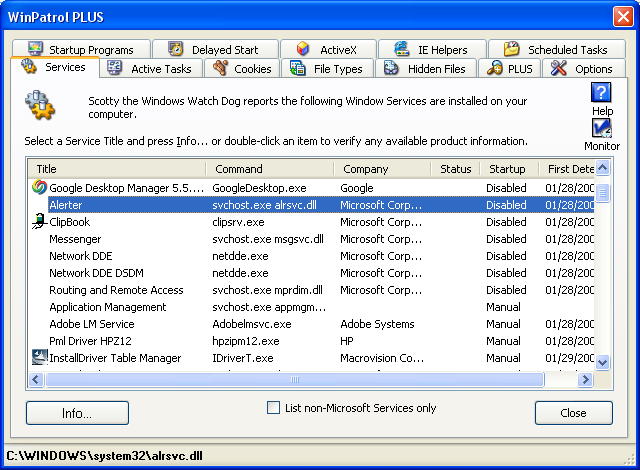
WinPatrol Services
Services Tab using WinPatrol

When I first added the Services tab to WinPatrol there were very few non-Microsoft service components. Now, many new programs include one or more Services. You’ll find many of the autoupdate programs these days are Services. The options for services are Automatic, Manual and Disable. When I’m not sure if something can be Disabled, I’ll set it to manual so it’s still available when needed but won’t run on boot up.

Update 03/16: Some comments have been left with tips on other sites that provide information on Windows Services.

Black Viper: http://www.blackviper.com/WinXP/servicecfg.htm

Speedy Vista: http://www.speedyvista.com/services.html


Read More
Posted in BlackViper, Services, Vista, WinPartrol | No comments

Friday, 29 February 2008

Microsoft Fines Continue to Increase Daily

Posted on 09:21 by Unknown

The European Union doesn’t think Microsoft is giving them a lot of respect and wants to make them pay. Recent fines amount to 899 million(€) Euros which came out to be about $1.3 billion USD the day it was announced. Since that time, the US dollar as fallen so the fine has increased about 400 million just due the conversion rate changes.

Of course, as the dollar falls Microsoft products become more affordable to Europeans. For example, last week my 29.95 USD WinPatrol PLUS sold for over 21 EUR. Today, it’s under 20 EUR. So while it’s more expensive for US residents to purchase products made abroad, the rest of the world can now afford our products.

The European Union determined that Microsoft had failed to disclose technical information that would allow competitors to develop products that would work with Windows. Microsoft did provide most of the technical information requested but charged a licensing fee that was considered extreme.

Microsoft has a long history of skirting the letter of the law and delaying court decisions until their opponents just give up. The EU appears determined whittle away at the Microsoft monopoly one way or another. In 2006 the French parliament decided to dump Windows in favor of Linux and open source applications.

I’ve always said I wished Microsoft Corp spent more on development than on lawyers. Perhaps we would see a better Vista instead of class action suits from people who purchased “Windows Vista Capable” machines that don’t run Vista. Under pressure to get Vista in the hands of more people Microsoft announced a price cut this week. Vista Ultimate drops $80 to $219 while Home Premium drops $30 to $129.

Ideally, newly discounted retail packages of Vista will include the SP1 update. If not, the first thing new Vista users will be doing is downloading multiple system updates and finally SP1. I would recommend new Vista users refrain from any web surfing until all the updates are completed.


Side note: Ironically, last year when French President Nicolas Sarkozy vacationed in Lake Winnipesaukee, New Hampshire, he stayed at the estate of former Microsoft executive Michael Appe. You may remember President Sarkozy had a confrontation with photographers over their intrusion into his family vacation.

Read More
Posted in Dollar, EU, lawsuit, Micosoft, Vista | No comments

Thursday, 1 November 2007

DreamScene Ran on Windows 95 But Not My Vista

Posted on 09:28 by Unknown

I was pleased when I heard that Microsoft was making their Vista Ultimate Extras available. I was especially looking forward to DreamScene which provides cool animated, video desktop backgrounds.

Unfortunately, the machine I use for Vista testing doesn’t support DreamScene. This Ultimate Vista Extra requires the Windows Aero theme. Unfortunately, Aero doesn’t seem to be supported on my year old NVidia GeForce3 graphics card.

Not many people know that animated desktop backgrounds were introduced over ten years ago on Windows 95. An ingenious Seattle programmer named Joe King created a wallpaper animation engine called Crystal Walls. Joe, who once worked on the Windows 1.0 team, had the support of over 30 programmers and artists who created over a dozen unique flowing backgrounds.


I was honored to be one of the programmers who created a scene to include in the product which was first launched in Egghead Software stores. My scene “13 Sharpei’s Contemplating the Universe” included a number of playful pups including Nosey who would occasionally approach and tap his paw on the monitor glass.

Crystal Walls puppy used in my animated wall paper

Crystal Walls was considered to be included in a “Windows PLUS Pack!” but instead, Microsoft introduced something called Active Desktop with Internet Explorer 4.0. Active Desktop broke the Crystal Walls engine and promised to provide a similar experience. Active Desktop was created to take advantage of “push” technology but it never really gained mass appeal.

According to his LinkedIn profile Joe’s talent has been discovered by the folks at Amazon where he’s Senior Manager of Social Computing.

Vista Trick: There’s a window handle trick on Vista that lets you to use a screen saver as desktop wallpaper. LockerGnome wrote about it today and according to Chris Pirillo, this works on monitors that may not support DreamScene. Unfortunately, it didn’t work well on mine.

From the cmd.exe box, type “ribbons.scr /p65552”. This trick is cool but be sure to close any open files before you try it. While it may work on some machines it could jumble the screen on others. If you try this and it messes up, you’ll need to Ctrl-Alt-Del and either Log Off or Restart. You can use other screen savers and it should work on all version of Vista, not just Ultimate.


Read More
Posted in Dreamscene, Pirillo, Tips, Ultimate, Vista | No comments

Monday, 13 August 2007

Where Did I Save That File?

Posted on 15:19 by Unknown

I spent the weekend with a friends Vista based laptop, cleaning up the results of a Trojan horse that infected his computer. About every five minutes his browser would open a few dozen sessions trying to go to a web site, s2.truth-is-out-there. The reason for my post isn’t to complain about Vista security and why Defender didn’t detect things like the Trojan “mgrs.exe” found by WinPatrol. I really want to like Vista but I found exploring for various files to be annoying.

A long time ago, Bill Gates talked his vision of making Windows “document centric”. While I didn’t agree with Bill, it was suppose to be the solution to one of the big problems with casual computer users; “Where did I save that file”?

The new Explorer in Vista really hasn’t solved the problem of “Where Did I Save That File”. For the most part, only folder names were changed.
Instead of “Documents and Settings”, Vista has a root folder called “Users”.
Instead of “My Documents”, it’s just “Documents”.
The “My” has been removed from other user folders like Music, Pictures, Downloads and they have been given special placement in the Users folder.
“If” and only if an application developer paid attention to the rules, these changes won’t break their programs

File type extensions continued to be hidden by default. I’m not sure why Microsoft considers a “dot” followed by a semi-descriptive extension so confusing. What I found confusing is trying to find how to change this option so I could see file extensions. Under “Organize”, I finally found “Folder and Search Options”. Using the new Search command line in Vista would be much easier with extensions displayed, instead of just little file type icons.

So far Vista has been taking a lot of heat but most of us reluctant to upgrade have been nice. The only people really evangelizing Vista are the authors of Vista books or those who have something to gain by it. I have the most respect for the online helpers and MVP’s who upgraded to Vista so they could help others in need. Most have learned to like Vista but I don’t hear them encouraging others to upgrade. I really want to be more helpful too, and I really want to like Vista but it ain’t happenin’ yet.


Read More
Posted in explorer, mgrs.exe, Vista | No comments

Thursday, 2 August 2007

WinPatrol 2007 version 12

Posted on 12:03 by Unknown

I am very pleased with the feedback I’ve received from everyone who helped test the newest version of WinPatrol. The new version is officially available today.

Everyone seems to really like our new Scotty icon. The last time I tried to change the main icon there was a rebellion of sorts. All our Vista users are glad that Scotty has his voice back.

I’ve had the most feedback about the new HijackPatrol log which is now available on the Options tab. This new informational feature isn’t intended to replace any other program but provides WinPatrol information in a familiar format. Based on the feedback from testers I’ve included additional information in our log like File Type Associations and Hidden file locations.


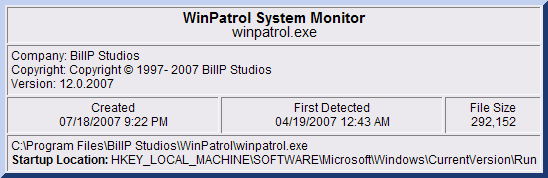
New WinPatrol Info dialog


All the new reports are available to both Free and Plus users although access to PLUS information has been improved and is available with a single click. Version 12 carries on our goal of helping everyone answer the question, “What the heck is running on my computer, where did it come from and what is it doing?”

For more information on changes and to download version 12, go to http://www.winpatrol.com/upgrade.html

Read More
Posted in Hijack, Vista, WinPatrol | No comments

Monday, 30 July 2007

WinPatrol 2007 v12 Test

Posted on 11:41 by Unknown

I appreciate all of you who come regularly to read my leaking thoughts. I try my best to come up with topics that will interest you and attract new readers. One of the keys to getting new readers is to have other popular Blogs link to your stories.

On the lower left-hand column of the Blog screen you’ll see I include a link to Technorati which keeps track of which Blogs link to me. Out of all the topics I cover my recent news about Scotty getting his bark back in Vista attracted the most attention ever.
At least five legitimate Blogs linked to my post.
CertifiedBug: Scotty will bark again on Vista
Nellie2: Winpatrol Will Soon Woof Again
Security Ticker: Winpatrol Gets It’s Bark Back
Security Garden: Windows Vista Won’t Silence Scotty’s Bark
Larry Osterman: Playsound is Failing on Vista! What’s Wrong?
Little did I realize how exciting this news would be. There are some other changes which I hope folks will also enjoy. There’s a new icon and two new report formats. One report choice creates a file called HijackPatrol.log which outputs all our information in a format familiar to any online helpers.

WinPatrol 2007The new version is almost ready for release but I wanted to get a little more feedback before finalizing version 12. If you’re interested in downloading our new version and providing feedback, go to http://www.winpatrol.com/beta12.html. If not, I promise you won’t have to wait long for the new version.

Read More
Posted in Hijack, Techorati, Vista, WinPatrol | No comments

Wednesday, 9 May 2007

Wow! Vista's Been Here for 100 Days

Posted on 11:21 by Unknown

The official launch of Windows Vista celebrates a 100 day milestone this week. Not everyone has embraced Windows Vista but Microsoft(MSFT) claims over 20 million licenses were sold in its first 30 days. They say it’s twice the adoption rate of Windows XP when it was released.

Unlike every other version of Window I still only use Vista on a test machine. In the past, I upgraded as soon as a new Windows was released. Everyone agrees, the new Aero interface is nice, but some have complained it can be a drain on laptop batteries. There also seems to be a love-hate relationship with the new User Access Control feature which makes Vista more secure.

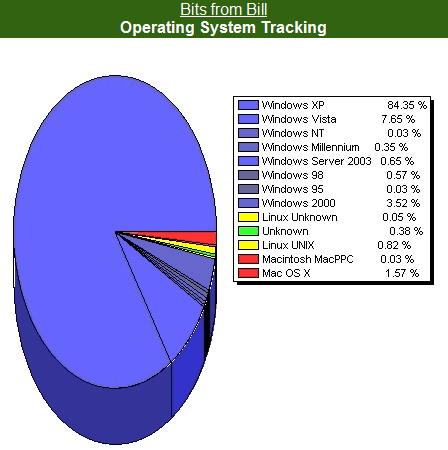
According to my Blog stats 7.65% of my readers are now using Vista.Bits from Bill Blog Stats on May 9th.

This is up from 1.3% which I documented on January 22nd. Initial predictions estimated Vista infiltration to be at 15% within the first year.

It looks like Vista is here to stay and Microsoft is busy making improvements based on user feedback. According to an interview in WindowsITPro by Paul Thurrott, “Microsoft will fix or create drivers for any device that generates 500 or more user reports.” Maybe it’s really worth while to send those error reports to Redmond when your system crashes. According to Microsoft, the only exception appears to be “drivers for devices that are no longer sold because the company that made them went out of business”.

This week a number of fixes were included in auto updates for both Windows XP, Vista and Office. I’m sure Microsoft will keep them coming. I’ll probably wait until SP1 before I upgrade my main machine but obviously regular folks have been Wow’d by Vista.

Read More
Posted in MSFT, Stats, UAC, Vista | No comments
Older Posts Home
Subscribe to: Posts (Atom)

Popular Posts

  • Support for Downloads without Surprises
    Last week I posted a message about the  packaging of ad supported programs along with popular software. It appears to be a common practice t...
  • Employee Manual to Prevent Cryptolocker and More
    A common way computers are infected or compromised has always been a simple yet well thought out deception. It can happen to anyone and the ...
  • What on Earth is “Cloud” Computing
    The new big buzz word in the computing world is “Cloud” computing. In the past I’ve been critical of the concept and even poked fun at Cloud...
  • SQLite C Code to Read Cookies
    While most of the technology leaking from my brain is for a wide audience, today’s post is very technical in nature. I expected the informat...
  • WinPatrol Cloud Edition Public Beta
    WinPatrol Adds the Newest Technology Available. You’ll now have access the knowledge of thousands of WinPatrol users shared in real-tim...
  • Four Secret Reasons Why Win7 is Ten Times Better
    It’s no secret that I’ve never been a fan of Windows Vista. I really wanted to love it but even as a designated Microsoft MVP I couldn’t dri...
  • Free #1 Tweak to Improve Windows Performance
    Every year billions of dollars are spent by folks just trying to improve the performance of their computers. Over the last couple years ther...
  • Forget the DVD & Save on your New Laptop
    I’ve written before about the coming death of the CD/DVD ’s for data storage.  While that time hasn’t come yet for desktop there is one real...
  • Can Facebook be Trusted?
    Last week Facebook rolled out another round of what they consider easy to use privacy settings. What they’re really doing is trying to appea...
  • TWITTER ALERT
    Anyone who uses Twitter, DO NOT use the Twitter web interface until further notice. There is a code injection vulnerability being used tha...

Categories

  • 2007
  • 3G
  • AAPL
  • ABC
  • accelerometer
  • Achilles
  • Acrobat
  • Activex
  • adobe
  • Ads
  • advertising
  • Adware
  • Adwords
  • Airlines
  • Albany Medical Center
  • algorithm
  • Amazon
  • amber alert
  • AMUST
  • Animation
  • antimalware
  • Antivirus 2009
  • antivirus2008
  • AOL
  • Apple
  • applets
  • AQuantive
  • archive
  • Aruba
  • ASC
  • Ask.com
  • ATI
  • Audio
  • Autorun
  • AutoUpdate
  • autoupdates
  • AVG
  • Azure
  • backup
  • badware
  • Bakugan
  • Baseball
  • battery
  • Ben Edelman
  • Beta
  • BillP
  • Birthdayware
  • Bitlocker
  • Blackberry
  • BlackViper
  • bloatware
  • Blogger
  • Blogs
  • Blogspot
  • Blu-ray
  • Bluehoo
  • bluetooth
  • boinc
  • Bonjour
  • Brazil
  • break
  • Breakaway games
  • Brookman
  • Browser wars
  • C64
  • camera
  • Carpal Tunnel
  • CBS News
  • cell phone
  • CES
  • charity
  • Child Safety
  • chinese
  • Chris Cook
  • Christmas
  • Chrome
  • CIPAV
  • clampi
  • Cloud
  • CNet
  • codec
  • comodo
  • conficker
  • Control Panel
  • copy
  • coupon
  • craplets
  • crapware
  • Crawford
  • credit
  • credit card
  • credit cards
  • ctfmon
  • daylight savings time
  • Dell
  • demo
  • Discount
  • Disney
  • DNS
  • Dollar
  • Domain
  • Donna
  • Doubleclick
  • Downadup
  • Dreamscene
  • droid
  • DVD
  • Dvorak
  • Easter egg
  • eclipse
  • Ed Bott
  • Edelman
  • egreeting
  • Email
  • Environment
  • Epilepsy
  • EU
  • eWeek
  • explorer
  • facebook
  • false positive
  • false-positive
  • FBI
  • file types
  • finnish
  • FiOS
  • Firefox
  • fireworks
  • fix
  • flash
  • Flashpix
  • Fort Drum
  • foxit
  • fraud
  • FTC
  • games
  • garmin
  • Gateway
  • GE
  • George Bush
  • Germany
  • global
  • Godmode
  • Google
  • Google Research
  • GotoMyPC
  • gps
  • green
  • Groceries
  • Habitat
  • Hacks
  • hallmark
  • Halo
  • hard drive
  • Harry McCracken
  • Harry Potter
  • Harvard
  • HD-DVD
  • help
  • hidden files
  • Hijack
  • History
  • Hiton
  • homeland security
  • Honor Flight
  • hosts
  • Hubble
  • IAC
  • ICANN
  • IE
  • IE6
  • IE7
  • IE8
  • installers
  • interface
  • Internet
  • IPAddress
  • iPhone
  • iPod
  • Iraq
  • iTouch
  • iTunes
  • java
  • Kaspersky
  • Kazaa
  • kenmore
  • key logger
  • keygen
  • Keylogger
  • Kosovo
  • LA
  • lady chalupa
  • langa
  • Laptop
  • lawsuit
  • Legoland
  • Levar Burton
  • Linksys
  • Little League
  • Live Writer
  • Live.com
  • localize
  • Logo
  • London
  • LOP
  • lottery
  • Lucasfilm
  • Macintosh
  • Malware
  • Marie Domingo
  • Mary
  • McCracken
  • Media
  • Memorial Day
  • mgrs.exe
  • Micosoft
  • Microsoft
  • Microsoft Surface
  • MiFi
  • mit
  • moon
  • Mossberg
  • Mothers Day
  • MPack
  • MSFT
  • msn
  • MTV
  • Multicore
  • Music
  • MVP
  • MVP09
  • nasa
  • NBC
  • Nero
  • Netbook
  • Network
  • network solution
  • New York
  • newsletter
  • Nintendo
  • Nintendo Wii
  • NNEDV
  • Norton
  • NYAG
  • OAuth
  • obama
  • Office
  • OLPC
  • Olympics
  • OpenDNS
  • oprah
  • optimize
  • optout
  • Paperghost
  • passwords
  • Patch
  • Patriot Flight
  • PC Guy
  • pc pitstop
  • PC World
  • pcmag
  • PCWorld
  • PDC
  • PDF
  • pedipaws
  • performance
  • phishing
  • photos
  • Photoshop
  • Pinnacle
  • Piracy
  • Pirillo
  • pogue
  • Porn
  • pornware
  • postcard
  • prediction
  • prefetch
  • Preview
  • Price
  • privacy
  • Prodigy
  • Programming
  • PSP
  • Public Relations
  • Pytlovany
  • Q-Link
  • Quicktime
  • quotes
  • radio
  • realnetworks
  • realplayer
  • RegCleaner
  • RegCure
  • regedit
  • Registry
  • registry cleaner
  • Release
  • remove
  • Research
  • return policy
  • review
  • RIAA
  • Rivera
  • RMS
  • Road Runner
  • rogue
  • router
  • RTM
  • Rumor
  • safari
  • safety
  • sale
  • Sales
  • Santa Monica
  • scam
  • Schenectady
  • Scoble
  • Scott Dunn
  • Scotty
  • sd
  • Search
  • Sears
  • Security
  • Services
  • seti
  • ShellExecute
  • Shirt
  • SimCity
  • site advisor
  • slingbox
  • snopes
  • social engineering
  • social network
  • solid state disk
  • Sounds
  • Sp3
  • space station
  • SPAM
  • spamhaus
  • Special
  • speedtest
  • Spyware
  • SSD
  • Startup
  • Stats
  • Steve Bass
  • stopbadware
  • storm
  • STS-125
  • Sugar
  • Sunbelt
  • support
  • Symantec
  • tagged
  • Task Catcher
  • Task Scheduler
  • taskbar
  • Tax
  • Techorati
  • techwatch
  • teens
  • temp
  • Thinkpad
  • Thurrott
  • tinyurl
  • Tips
  • TiVo
  • TLD
  • Today Show
  • Toolbar
  • toolbars
  • top ten
  • topten
  • toys
  • Translator
  • transunion
  • Tree
  • Trend Micro
  • tricks
  • trillian
  • Trojan
  • tweaks
  • twitter
  • UAC
  • UI
  • Ultimate
  • Unbox
  • Unboxed
  • update
  • Updates
  • upgrade
  • url
  • USB
  • Utility
  • Valentine
  • Verizon
  • versions
  • Veteran
  • Video Games
  • Vista
  • Vulnerability
  • wall-e
  • war
  • Washington
  • web2.0
  • Webslice
  • WGA
  • Widget
  • WiFi
  • Wii
  • WiiItis
  • wiimote
  • Win7
  • Windows 7
  • Windows Secrets
  • Windows Update
  • Windows7
  • WinPartrol
  • WinPatrol
  • winpatrolflash
  • WinPatrolToGo
  • Winter
  • Wireless
  • Wristband
  • WSJ
  • WWII
  • x64
  • Xbox
  • XO
  • XO Laptop
  • XOActivity
  • Xobni
  • xolaptop
  • XP
  • XP SP3
  • xp3
  • Yahoo
  • Zero Day
  • Zone Alarm
  • Zwinky

Blog Archive

  • ▼  2013 (31)
    • ▼  November (2)
      • Employee Manual to Prevent Cryptolocker and More
      • My First State-Sponsored Attack
    • ►  October (1)
    • ►  September (1)
    • ►  August (2)
    • ►  July (3)
    • ►  June (5)
    • ►  May (2)
    • ►  April (3)
    • ►  March (2)
    • ►  February (5)
    • ►  January (5)
  • ►  2012 (30)
    • ►  December (3)
    • ►  November (3)
    • ►  October (2)
    • ►  September (2)
    • ►  August (2)
    • ►  July (3)
    • ►  June (2)
    • ►  May (1)
    • ►  April (4)
    • ►  March (4)
    • ►  February (2)
    • ►  January (2)
  • ►  2011 (28)
    • ►  December (4)
    • ►  November (2)
    • ►  October (4)
    • ►  September (2)
    • ►  August (2)
    • ►  July (2)
    • ►  June (2)
    • ►  May (2)
    • ►  April (2)
    • ►  March (2)
    • ►  February (3)
    • ►  January (1)
  • ►  2010 (44)
    • ►  December (2)
    • ►  November (3)
    • ►  October (3)
    • ►  September (4)
    • ►  August (3)
    • ►  July (3)
    • ►  June (3)
    • ►  May (4)
    • ►  April (4)
    • ►  March (3)
    • ►  February (3)
    • ►  January (9)
  • ►  2009 (90)
    • ►  December (6)
    • ►  November (8)
    • ►  October (6)
    • ►  September (4)
    • ►  August (4)
    • ►  July (12)
    • ►  June (6)
    • ►  May (11)
    • ►  April (7)
    • ►  March (9)
    • ►  February (9)
    • ►  January (8)
  • ►  2008 (122)
    • ►  December (9)
    • ►  November (11)
    • ►  October (14)
    • ►  September (6)
    • ►  August (9)
    • ►  July (9)
    • ►  June (10)
    • ►  May (13)
    • ►  April (8)
    • ►  March (10)
    • ►  February (10)
    • ►  January (13)
  • ►  2007 (155)
    • ►  December (15)
    • ►  November (14)
    • ►  October (12)
    • ►  September (14)
    • ►  August (12)
    • ►  July (13)
    • ►  June (11)
    • ►  May (19)
    • ►  April (17)
    • ►  March (21)
    • ►  February (7)
Powered by Blogger.

About Me

Unknown
View my complete profile