Billps Tudios

  • Subscribe to our RSS feed.
  • Twitter
  • StumbleUpon
  • Reddit
  • Facebook
  • Digg
Showing posts with label AutoUpdate. Show all posts

Friday, 6 March 2009

Automatic Updates and New Computers FAIL

Posted on 08:07 by Unknown

Windows Automatic Updates
Have you heard me rant about Automatic updates before? 
Over the years I've been somewhat critical of auto update programs including Microsoft's own Windows Update mechanism. I've always told people to wait 5-10 days before installing a new update so the rest of the world can test it and report any problems.


Of course, there have been exceptions. Occasionally Microsoft has released security patches for vulnerabilities which we knew to be out there actively attacking on the web. During those situations,  I've recommended you be the first on your block to download a security patch, typically available on Tuesday morning.


This week I had the privilege to spend some time with the folks at Microsoft responsible for automatic updates and security patches. While I've been asked not to share the exact process and procedures for creating Windows updates I can tell you I have more confidence in Microsoft then I used to.


In most cases, I will still wait 5 -10 days before installing a Windows Update, but I will be preaching to the world not to let the update be forgotten. Again, I'm not at liberty to share specific numbers but I can tell you there are too many people who aren't doing updates at all. The more machines out there not having updated security patches the more dangerous it is for the rest of us.


My new recommendation is to set your Automatic Update settings to "Download updates for me, but let me choose when to install them". Ideally, I would like this to say “Download updates for me, and make sure I don’t forget to install them”.  Your settings can be changed in the Security Center applet in the control panel.
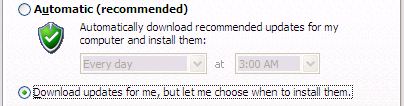

New recommendation for updates


There are far too many un-patched Windows machines in the world and their problem could be our problem. They’re ripe to become at the control of the bad guys and available to launch attacks or fill our inboxes with spam. Tell your grandmother, tell your boss, tell your dry cleaner, run the Windows updater and make sure their machine is safe. No amount of anti-virus programs in the world can take the place of a completely patched Windows operating system.


Austin We Still Have a Problem
Unfortunately, there’s still one major problem that annoys the heck out of me. When you buy a new computer, it may include the latest service pack, but it probably won’t have all the available security patches installed.  That means, the moment your connect to the internet, it’s ready to be attacked. 


Computer OEM’s need to be more responsible and they need to ship machines with all the available updates!  This goes beyond a well patched Windows OS. If they’re shipping with Adobe Acrobat, or Apple Quicktime they better not have been put on the disk image a month ago. They need to be the most currently available, patched version or they’re selling you a time bomb.  If you’re buying a new computer don’t be afraid to ask the sales rep what third party software is installed and what especially what version it is.

Things to consider before you buy…

What version of Internet Explorer is installed?
Does it come with Apple Quicktime?  RealPlayer?
Adobe Acrobat?  Flash?  Which versions?


My audience here at BitsFromBill.com isn’t that big so spread the word. Until customers start asking these questions, nobody at Dell, HP, Sony, Lenova, etc will take on the responsibility for their actions.  Expect future rants from me on this topic.


Read More
Posted in AutoUpdate | No comments

Sunday, 27 July 2008

Windows Update Swaps Dual Monitors

Posted on 07:55 by Unknown

Yes, I’ve been critical of auto updates in the past. I’ve documented numerous problems. While I have always considered them evil, yesterday was the first time I’ve been personally burnt by a simple Microsoft system update.( KB951748: Security Update for DNS Server)


The trouble appeared immediately when I rebooted my dual monitor XP desktop following the Windows update. For some reason my Start button and all the desktop icons were on my 2nd monitor on the right. How this relates to a DNS Server is still a mystery to me. Software is so complex these days you just never know.


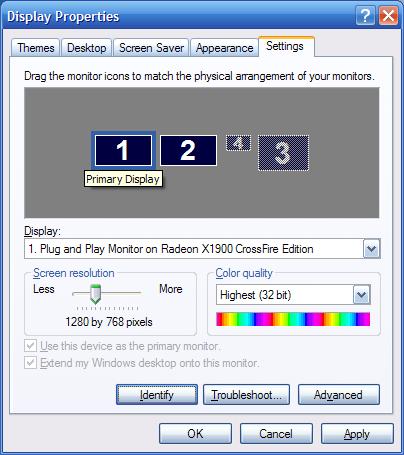
Normally the dialog below is be used to specify your primary monitor and the order of any extended monitors. Try as I might, I still wasn’t allowed to change things back so my left hand monitor was primary.


Display Properties for multiple monitors


So, today my only solution short of a system restore was to physically re-arrange the monitors on my desk. No big deal but obviously, something is wrong with this picture.


A side note for other old guys like me. I actually used to have three monitors. While it impressed everyone who entered my office I found it was also responsible for some of my chronic neck and shoulder pain. Two monitors seem to work fine as long as I can keep my primary monitor on the left.

Read More
Posted in AutoUpdate, Windows Update | No comments

Tuesday, 29 April 2008

Windows XP Service Pack 3 Update Delayed

Posted on 12:54 by Unknown

I guess having SP3 available to a limited but large audience helped Microsoft flush out a few more bugs before its official release.

While Service Pack 3 was due to be deployed today, Microsoft decided to wait until they could block some systems they don’t want updated. They’re not making any changes to SP3, they’re just going to block those system which they’ve determined are incompatible.

No Dynamic Retail Management System


Specifically, if you’re running “Microsoft Dynamics Retail Management System (RMS)” you shouldn’t upgrade to Service Pack 3. Microsoft also acknowledged problems with Vista Service Pack 1 and Dynamics Retail Management Systems.

If you’re one of those people who have already found and installed XP SP3 or Vista SP1, you don’t need to worry unless your system is using the Dynamics Retail Management System. If you plan on upgrading using Windows Update or the Microsoft Download Center no date has been given for public release.

Again, no fixes or changes are being made to Service Pack 3. The changes will be made to the Windows Update and Microsoft Download Center so that incompatible systems can be blocked.

Read More
Posted in AutoUpdate, Microsoft, RMS, Sp3 | No comments

Friday, 26 October 2007

Detect Changes to Windows Automatic Updates

Posted on 11:43 by Unknown

There has been a lot of controversy lately over the Windows Automatic Update feature. First Microsoft made change some files used in the Auto Update mechanism on a users machine without ever making it an option. Now, Microsoft has been accused of making changes to the Windows AutoUpdate settings. Some claim during the last Windows update their configuration was changed to “Update Automatically”. Microsoft denies the accusations. Others report that Microsoft One Care or other application make changes for you.


WinPatrol has a long history of monitoring unique settings that most other programs don’t worry about. Many new WinPatrol features are requested by users but a lot of changes are based on things I want for myself. I thought “Hey, I’d like to know if something changes my Automatic Update settings”.

Windows Automatic Update Settings


Available today, WinPatrol 12.2.2007 will now alert you if changes are made to your Automatic Update settings. Like most features, the intention is to protect users from changes made by malicious programs. As a side however, it will also detect if Microsoft or one of their applications decide to change these settings without your knowledge.


Also included in this new version will be detection of a few other unique settings like the prefix inserted by your browser (http://). If you don’t include http:// when you type in an address, Windows automatically adds it. If I changed this setting to http://www.billp.com/ no matter what you typed into your browser you’d always come to me. Depending on what comes after it, I could display a fake look-alike phishing page and grab your eBay, or Paypal account number.


I didn’t have a lot bugs to fix so I also included a few other safe changes. WinPatrol will now correctly read registry startup entries that use invalid formats. I’ve also included an online component to the PLUS activation process. This will finally allow the creation of an affiliate partner program and can accurately thank the folks who help promote WinPatrol.

As always, this version is a free upgrade to all WinPatrol users and is available at http://www.winpatrol.com/download.html.

My personal recommendation for Windows Automatic Update has always been “Notify me but don’t automatically download or install them”. I like to wait at least a week to see what problems are reported.

Headlines:

WinPatrol 12.2.2007 Press Release

Newest Windows Update Snafu Puzzles Microsoft

Microsoft: We Didn't Change Automatic Updates

Microsoft OneCare Silently Changes Automatic Updates

Read More
Posted in AutoUpdate, WinPatrol | No comments

Monday, 8 October 2007

Task Scheduler Provides Malware Hiding Place

Posted on 09:14 by Unknown

One of the least used features of Windows has been its control panel applet, Task Scheduler. In 2003, I added a feature to WinPatrol 6.0 which monitored Task Scheduler jobs and warned users if some kind of malware injected itself in the Scheduler list. In the past, I found few incidence's of malware using this as a method to run programs which might take over a system, replicate or just do nasty stuff. This has always surprised me since most Anti-Malware programs won’t alert users to newly created scheduled tasks jobs.

I have noticed more legitimate programs finally using Task Scheduler but unfortunately many obnoxious programs are also taking advantage of this poorly monitored launch location. There is a variant of the nasty Adware called “Lop.com” that now adds a program to the Scheduled Task list. Malware frequently creates file names using random letters like IS-HDKEUL.exe. Lop is distinguished by file names created by random words like “BASH ACE STUPID.EXE”, “EXIT FIVE GLUE.EXE, sometimes without spaces between the words.

Some recent detections to watch for in the Task Scheduler include:
RVHOST.exe – Yahoo Messenger Worm
At1.job – Multiple worms installed using old Windows vulnerability
BLASTCLNNN.EXE – Sohana/YahLover Worm
WUNAUCLT.EXE – Possible Zoih A Trojan
WINMDS.EXE – Porn Dialer Trojan
And many LOP type using file names created with random words.


Anyone who reads this Blog knows how I feel about AutoUpdates, especially when they run in the background all the time. The Task Scheduler is an ideal place for autoupdate programs. These programs shouldn’t run constantly but it couldn’t hurt to have them scheduled to check for updates on a regular basis and then shutdown.

Some of the annoying auto updaters that need to be moved to Task Scheduler come from Google, Adobe and InstallShield which looks for updates of any programs that used InstallShield as their setup package.

According to recent requests for PLUS Info, the following are now using Task Scheduler.
MPCMDRUN.EXE – Windows Defender
SOFTWAREUPDATE.EXE – Usually Apple/iTunes/Quicktime
SYSTEMOPTIMIZER.EXE – TuneUp Software GMBH
MSFEEDSSYNC.EXE – Microsoft IE7 RSS Support
WALIGN – Window 98 File Optimizer
MSNTBUP.EXE – Microsoft Live Toolbar

Microsoft has made radical changes in Task Scheduler for Vista. This has encouraged many developers to take advantage of its power. It also has appeared to provide a little better security so that malicious programs will have a harder time infiltrating systems this way. You’ll still be surprised by how many unnecessary services run here slowing you down when you least expect it.

You’ll definitely want to keep an eye on your Scheduled Tasks either by using WinPatrol or occasionally opening the Task Scheduler applet in the Windows Control Panel. It might help explain where that “Do you want to update…?” message appears to come from.

Read More
Posted in AutoUpdate, LOP, Malware, Task Scheduler | No comments
Older Posts Home
Subscribe to: Posts (Atom)

Popular Posts

  • Support for Downloads without Surprises
    Last week I posted a message about the  packaging of ad supported programs along with popular software. It appears to be a common practice t...
  • Employee Manual to Prevent Cryptolocker and More
    A common way computers are infected or compromised has always been a simple yet well thought out deception. It can happen to anyone and the ...
  • What on Earth is “Cloud” Computing
    The new big buzz word in the computing world is “Cloud” computing. In the past I’ve been critical of the concept and even poked fun at Cloud...
  • SQLite C Code to Read Cookies
    While most of the technology leaking from my brain is for a wide audience, today’s post is very technical in nature. I expected the informat...
  • WinPatrol Cloud Edition Public Beta
    WinPatrol Adds the Newest Technology Available. You’ll now have access the knowledge of thousands of WinPatrol users shared in real-tim...
  • Four Secret Reasons Why Win7 is Ten Times Better
    It’s no secret that I’ve never been a fan of Windows Vista. I really wanted to love it but even as a designated Microsoft MVP I couldn’t dri...
  • Free #1 Tweak to Improve Windows Performance
    Every year billions of dollars are spent by folks just trying to improve the performance of their computers. Over the last couple years ther...
  • Forget the DVD & Save on your New Laptop
    I’ve written before about the coming death of the CD/DVD ’s for data storage.  While that time hasn’t come yet for desktop there is one real...
  • Can Facebook be Trusted?
    Last week Facebook rolled out another round of what they consider easy to use privacy settings. What they’re really doing is trying to appea...
  • TWITTER ALERT
    Anyone who uses Twitter, DO NOT use the Twitter web interface until further notice. There is a code injection vulnerability being used tha...

Categories

  • 2007
  • 3G
  • AAPL
  • ABC
  • accelerometer
  • Achilles
  • Acrobat
  • Activex
  • adobe
  • Ads
  • advertising
  • Adware
  • Adwords
  • Airlines
  • Albany Medical Center
  • algorithm
  • Amazon
  • amber alert
  • AMUST
  • Animation
  • antimalware
  • Antivirus 2009
  • antivirus2008
  • AOL
  • Apple
  • applets
  • AQuantive
  • archive
  • Aruba
  • ASC
  • Ask.com
  • ATI
  • Audio
  • Autorun
  • AutoUpdate
  • autoupdates
  • AVG
  • Azure
  • backup
  • badware
  • Bakugan
  • Baseball
  • battery
  • Ben Edelman
  • Beta
  • BillP
  • Birthdayware
  • Bitlocker
  • Blackberry
  • BlackViper
  • bloatware
  • Blogger
  • Blogs
  • Blogspot
  • Blu-ray
  • Bluehoo
  • bluetooth
  • boinc
  • Bonjour
  • Brazil
  • break
  • Breakaway games
  • Brookman
  • Browser wars
  • C64
  • camera
  • Carpal Tunnel
  • CBS News
  • cell phone
  • CES
  • charity
  • Child Safety
  • chinese
  • Chris Cook
  • Christmas
  • Chrome
  • CIPAV
  • clampi
  • Cloud
  • CNet
  • codec
  • comodo
  • conficker
  • Control Panel
  • copy
  • coupon
  • craplets
  • crapware
  • Crawford
  • credit
  • credit card
  • credit cards
  • ctfmon
  • daylight savings time
  • Dell
  • demo
  • Discount
  • Disney
  • DNS
  • Dollar
  • Domain
  • Donna
  • Doubleclick
  • Downadup
  • Dreamscene
  • droid
  • DVD
  • Dvorak
  • Easter egg
  • eclipse
  • Ed Bott
  • Edelman
  • egreeting
  • Email
  • Environment
  • Epilepsy
  • EU
  • eWeek
  • explorer
  • facebook
  • false positive
  • false-positive
  • FBI
  • file types
  • finnish
  • FiOS
  • Firefox
  • fireworks
  • fix
  • flash
  • Flashpix
  • Fort Drum
  • foxit
  • fraud
  • FTC
  • games
  • garmin
  • Gateway
  • GE
  • George Bush
  • Germany
  • global
  • Godmode
  • Google
  • Google Research
  • GotoMyPC
  • gps
  • green
  • Groceries
  • Habitat
  • Hacks
  • hallmark
  • Halo
  • hard drive
  • Harry McCracken
  • Harry Potter
  • Harvard
  • HD-DVD
  • help
  • hidden files
  • Hijack
  • History
  • Hiton
  • homeland security
  • Honor Flight
  • hosts
  • Hubble
  • IAC
  • ICANN
  • IE
  • IE6
  • IE7
  • IE8
  • installers
  • interface
  • Internet
  • IPAddress
  • iPhone
  • iPod
  • Iraq
  • iTouch
  • iTunes
  • java
  • Kaspersky
  • Kazaa
  • kenmore
  • key logger
  • keygen
  • Keylogger
  • Kosovo
  • LA
  • lady chalupa
  • langa
  • Laptop
  • lawsuit
  • Legoland
  • Levar Burton
  • Linksys
  • Little League
  • Live Writer
  • Live.com
  • localize
  • Logo
  • London
  • LOP
  • lottery
  • Lucasfilm
  • Macintosh
  • Malware
  • Marie Domingo
  • Mary
  • McCracken
  • Media
  • Memorial Day
  • mgrs.exe
  • Micosoft
  • Microsoft
  • Microsoft Surface
  • MiFi
  • mit
  • moon
  • Mossberg
  • Mothers Day
  • MPack
  • MSFT
  • msn
  • MTV
  • Multicore
  • Music
  • MVP
  • MVP09
  • nasa
  • NBC
  • Nero
  • Netbook
  • Network
  • network solution
  • New York
  • newsletter
  • Nintendo
  • Nintendo Wii
  • NNEDV
  • Norton
  • NYAG
  • OAuth
  • obama
  • Office
  • OLPC
  • Olympics
  • OpenDNS
  • oprah
  • optimize
  • optout
  • Paperghost
  • passwords
  • Patch
  • Patriot Flight
  • PC Guy
  • pc pitstop
  • PC World
  • pcmag
  • PCWorld
  • PDC
  • PDF
  • pedipaws
  • performance
  • phishing
  • photos
  • Photoshop
  • Pinnacle
  • Piracy
  • Pirillo
  • pogue
  • Porn
  • pornware
  • postcard
  • prediction
  • prefetch
  • Preview
  • Price
  • privacy
  • Prodigy
  • Programming
  • PSP
  • Public Relations
  • Pytlovany
  • Q-Link
  • Quicktime
  • quotes
  • radio
  • realnetworks
  • realplayer
  • RegCleaner
  • RegCure
  • regedit
  • Registry
  • registry cleaner
  • Release
  • remove
  • Research
  • return policy
  • review
  • RIAA
  • Rivera
  • RMS
  • Road Runner
  • rogue
  • router
  • RTM
  • Rumor
  • safari
  • safety
  • sale
  • Sales
  • Santa Monica
  • scam
  • Schenectady
  • Scoble
  • Scott Dunn
  • Scotty
  • sd
  • Search
  • Sears
  • Security
  • Services
  • seti
  • ShellExecute
  • Shirt
  • SimCity
  • site advisor
  • slingbox
  • snopes
  • social engineering
  • social network
  • solid state disk
  • Sounds
  • Sp3
  • space station
  • SPAM
  • spamhaus
  • Special
  • speedtest
  • Spyware
  • SSD
  • Startup
  • Stats
  • Steve Bass
  • stopbadware
  • storm
  • STS-125
  • Sugar
  • Sunbelt
  • support
  • Symantec
  • tagged
  • Task Catcher
  • Task Scheduler
  • taskbar
  • Tax
  • Techorati
  • techwatch
  • teens
  • temp
  • Thinkpad
  • Thurrott
  • tinyurl
  • Tips
  • TiVo
  • TLD
  • Today Show
  • Toolbar
  • toolbars
  • top ten
  • topten
  • toys
  • Translator
  • transunion
  • Tree
  • Trend Micro
  • tricks
  • trillian
  • Trojan
  • tweaks
  • twitter
  • UAC
  • UI
  • Ultimate
  • Unbox
  • Unboxed
  • update
  • Updates
  • upgrade
  • url
  • USB
  • Utility
  • Valentine
  • Verizon
  • versions
  • Veteran
  • Video Games
  • Vista
  • Vulnerability
  • wall-e
  • war
  • Washington
  • web2.0
  • Webslice
  • WGA
  • Widget
  • WiFi
  • Wii
  • WiiItis
  • wiimote
  • Win7
  • Windows 7
  • Windows Secrets
  • Windows Update
  • Windows7
  • WinPartrol
  • WinPatrol
  • winpatrolflash
  • WinPatrolToGo
  • Winter
  • Wireless
  • Wristband
  • WSJ
  • WWII
  • x64
  • Xbox
  • XO
  • XO Laptop
  • XOActivity
  • Xobni
  • xolaptop
  • XP
  • XP SP3
  • xp3
  • Yahoo
  • Zero Day
  • Zone Alarm
  • Zwinky

Blog Archive

  • ▼  2013 (31)
    • ▼  November (2)
      • Employee Manual to Prevent Cryptolocker and More
      • My First State-Sponsored Attack
    • ►  October (1)
    • ►  September (1)
    • ►  August (2)
    • ►  July (3)
    • ►  June (5)
    • ►  May (2)
    • ►  April (3)
    • ►  March (2)
    • ►  February (5)
    • ►  January (5)
  • ►  2012 (30)
    • ►  December (3)
    • ►  November (3)
    • ►  October (2)
    • ►  September (2)
    • ►  August (2)
    • ►  July (3)
    • ►  June (2)
    • ►  May (1)
    • ►  April (4)
    • ►  March (4)
    • ►  February (2)
    • ►  January (2)
  • ►  2011 (28)
    • ►  December (4)
    • ►  November (2)
    • ►  October (4)
    • ►  September (2)
    • ►  August (2)
    • ►  July (2)
    • ►  June (2)
    • ►  May (2)
    • ►  April (2)
    • ►  March (2)
    • ►  February (3)
    • ►  January (1)
  • ►  2010 (44)
    • ►  December (2)
    • ►  November (3)
    • ►  October (3)
    • ►  September (4)
    • ►  August (3)
    • ►  July (3)
    • ►  June (3)
    • ►  May (4)
    • ►  April (4)
    • ►  March (3)
    • ►  February (3)
    • ►  January (9)
  • ►  2009 (90)
    • ►  December (6)
    • ►  November (8)
    • ►  October (6)
    • ►  September (4)
    • ►  August (4)
    • ►  July (12)
    • ►  June (6)
    • ►  May (11)
    • ►  April (7)
    • ►  March (9)
    • ►  February (9)
    • ►  January (8)
  • ►  2008 (122)
    • ►  December (9)
    • ►  November (11)
    • ►  October (14)
    • ►  September (6)
    • ►  August (9)
    • ►  July (9)
    • ►  June (10)
    • ►  May (13)
    • ►  April (8)
    • ►  March (10)
    • ►  February (10)
    • ►  January (13)
  • ►  2007 (155)
    • ►  December (15)
    • ►  November (14)
    • ►  October (12)
    • ►  September (14)
    • ►  August (12)
    • ►  July (13)
    • ►  June (11)
    • ►  May (19)
    • ►  April (17)
    • ►  March (21)
    • ►  February (7)
Powered by Blogger.

About Me

Unknown
View my complete profile