Billps Tudios

  • Subscribe to our RSS feed.
  • Twitter
  • StumbleUpon
  • Reddit
  • Facebook
  • Digg
Showing posts with label WiFi. Show all posts

Saturday, 9 January 2010

New Tech Brings Domestic Violence Dangers

Posted on 10:08 by Unknown

As a security researcher one area I’ve always cared about is the use of tech in domestic violence cases. My regular readers know how I feel about people who advocate keyloggers as a parental tool. Wake up people, over 90% of the keylogger market is used to spy and control ex-spouses and lovers. Detection and removal of keyloggers is one feature I still always include in the free version of WinPatrol.

It has been over a year since I’ve written about the risks to domestic violence survivors and based on recent experiences it’s time I share some new tips. My past presentations still apply so before I talk about new risks here are links to previous information I presented to the National Network to End Domestic Violence.

safetyalert

  • NNEDV Bluetooth Security Presentation

  • NNEDV WiFi Security Presentation


New Tricks

GPS Tracking: The Good and Bad.
One new tech tool for kid safety has been popular but may put survivors in danger. Many cell phone carriers provide GPS tracking for as little as $10 a month. This service allows you to track the location of your child and see where they go and how long they stay. As a parent/grand parent I think this is a fantastic use of technology. Unfortunately, it could also be used by controlling ex-partners. If the words, “Look mom, Dad bought me a new cell phone for Christmas” sound familiar you should think twice. Perhaps I’m a little more suspicious than most but I’ve already advised more than one mom in abusive custody fights how to turn off the GPS feature. If your ex can track your child when in your care, they can track you as well.

30 Day Hold for your Mail
The United States Postal Service has implemented a lot new technology but may still need to add some safe guards. I was recently asked to help a woman who was arrested for failure to appear in Schenectady County Family Court. According to the court she was sent notices advising her of family court matters which she was required to appear. Turns out she never received this mail. She also never received her electric bill and other important correspondence. It turns our her husband went online and with little effort had the post office put a “hold” on her mail without her knowledge. A nice little trick which I hope my readers are good people and won’t abuse this information.

Donate your Phone
Lastly, I know you all have old cell phones sitting around that could be put to good use. Domestic Violence shelters and national organizations like NNEDV still accept donations of old cell phones. These phone are critical to domestic violence survivors and can be a lifeline to help. Check with your local agency or get more information at “Donate Your Phone”.

Read More
Posted in bluetooth, NNEDV, WiFi | No comments

Friday, 8 May 2009

MiFi Portable Wifi will be My Next New Toy

Posted on 18:42 by Unknown

How would you like a WiFi connection anywhere you go?


Last December I put together a list of predictions for 2009. One of the things I wrote about was the increase in using 3G type cell networks instead of WiFi Networks when traveling.

3G Networks When Traveling
I have discovered when I travel Wi-Fi coverage can be spotty. Hotels boast high speed Wi-Fi connections but they aren’t doing a very good job. Even at a recent Microsoft conference I ended up using my Verizon EV-DO connection because it was faster than the Wi-Fi provided. Currently the best reason to use 3G over WiFi is security. Keep your WiFi networking at home and use 3G when you travel.

After traveling again earlier this year, I’m even more convinced you can’t depend on public hotspots and found my Verizon USB modem more dependable. It could be I always request rooms in quiet locations away from the elevator but the WiFi has consistently been poor.

Today Verizon announced my next new toy. The MiFi 2200 Intelligent Mobile Hotspot will be available on May 17th and will be in my hands soon after. A creation of Novatel, the MiFi 2200 is a portable WiFi HotSpot that weighs only 2.05 ounces and will fit in your shirt pocket.  It uses the Verizon 3G broadband mobile network.


Verizon MiFi
Verizon MiFi 2200

According to the published specs, the MiFi has a battery life of 4 hours and includes a USB connection which will provide additional power on the road. Up to 5 WiFi devices can use the MiFi for an internet connection.

From Verizon’s Press Release
The MiFi 2200 will be available online and in Verizon Wireless Communications Stores for $99.99 after a $50 mail-in rebate with a new two-year customer agreement. Customers can select from various price plans:

  • $39.99 monthly access for 250 MB monthly allowance and 10 cents per megabyte overage
  • $59.99 monthly access for 5 GB monthly allowance and 5 cents per megabyte overage

Customers can also use the MiFi 2200 with Verizon Wireless’ Mobile Broadband DayPass for $15 for 24-hour access when the device is purchased at full retail price without a monthly service plan.


I first learned about the MiFi from David Pogue who wrote more about the MiFi for the NY Times. He says a 1 hour TV show on iTunes is 200 megabytes  which calculates to 25 shows a month if you’re on the 5 GB plan.  I agree 5 GB a month is plenty of bandwidth for me.


So why am I so excited? I already pay $60 a month for a USB modem that only works on a single laptop.

As I’ve mentioned before, I’m happier when I use Verizon 3G network when traveling. Recently, I shocked fellow travelers at Dulles Airport when I connected to my home Slingbox and watched a show I had previously recorded on my TiVo. The video quality was great which you might not expect for a cell network.  If I’m traveling with others, theyll be able to use my MiFi hotspot at no extra charge.

I love using my Apple iTouch.  Unfortunately, once I leave my home WiFi network I can’t connect to many online services like Facebook or Twitter. Now with MiFi in my pocket my iTouch will have all the benefits I would want in an iPhone but I can keep the 32 GB of  memory available in the iTouch.

Verizon also claims that MiFi will be for cameras. I do have an EyeFi SD card in my camera but I’m not counting on a connection right out of the box.  Once I get my own MiFi, I’ll let you know how it really works.


Read More
Posted in 3G, pogue, Verizon, WiFi | No comments

Monday, 28 July 2008

WiFi Security Presentation

Posted on 06:05 by Unknown

Next month, I’m speaking at a conference of trainers for the National Network to End Domestic Violence. One of my sessions will be about WiFi wireless security geared towards protecting someone’s privacy from potential abusers. I’ve included an outline below which I hope will educational to all but I’m also open to comments about what else I could include.

Frequently a Wireless(WiFi) Router comes as part of the package from Comcast, Time Warner or Verizon FIOS even If you don’t specifically request it. The Wireless router is your connection to the internet and needs to be secure.


· Default Password
The default password for your router is publically available and should be changed to something only you know. This year we’re discovering more malware trying to gain control of your router by trying default passwords. How to access the wireless router control panel should be in your documentation. Typically, it will be as easy as typing in an address like http://192.168.1.1/.


· WEP/WP2 Encryption
The data that goes over the air from your laptop to the router is accessible to anyone else with a software. This data can be jumbled up with encryption so it’s not easy to understand. Typically, this encryption will be called WEP or WP2 and is standard on most wireless routers and the card in your laptop. Your Wireless control panel will allow you to create a simple key that is required by any laptop using your wireless network.


· Extended Range of Wireless devices
Simple WiFi network typically has a range around 100 feet so you might think someone needs to be close to your computer to access your wireless data. New high powered antenna’s and even home grown hacks can be used to extend the range of a wifi network.


· Beware of Free WiFi Networks
It’s often tempting to use what looks like a free WiFi network. You might be in the airport, Starbucks or local book store which has free networking. Make sure you know the name of the network you’re connecting to. Someone with another laptop could configure their machine to appear as if it’s a free network when instead you’d be communicating through their computer while they capture your name and passwords.


I’m sure there’s more I can say so feel free to comment. I’ll also be speaking about Bluetooth security so I’ll be looking for tips on Bluetooth security as well.

Read More
Posted in NNEDV, router, Security, WiFi | No comments

Tuesday, 17 June 2008

Malware Attacking Your Router

Posted on 11:19 by Unknown

WinPatrol was one of the first to detect malware based on “behavior” of program and continues to follow that model. One behavior we’ve seen a lot of lately is very scary.

Instead of installing malware that continues to run like a key logger or trojan, malicious programs are increasingly attacking the network router which is common with any internet connected home and/or office. An unwanted program can quickly make a change to your router settings that will immediately open all your computers to the world. The bad guys won’t have to install a key logger, they’ll be able to record every byte that goes across your network. It’s happening now to thousands of routers which are still using their default name and password.

Do you know if the password has been changed since your router was purchased?
Do you know how to access your router to change the password?

I’ve run across a number of users who follow all the recommendations to configure their networks for WEP or WPA2 encryption but they never bother to change their default name/password. They’ll even take the time to rename their default SSID but still don’t change the name/password from the factory setting.


It probably won’t surprise you that the factory passwords don’t change much and are widely available. The WinPatrol research group dissected some recent malware threats and could see the routers they were attacking.

  • Linksys, uses the name and password, “admin”. Older units use a blank user name.
  • Belkin, uses blank password for default access
  • Netgear, user name is “admin” and the default password is “password”. Big improvement over their old default “1234”
  • ActionTec, Some unit don't even require an admin login. New devices use "admin" and "password". (updated)
You get the idea. The program recently submitted to our research team had a list of 28 different routers complete with address, name and password clear for anyone to read with the proper tools.

As a security professional I’m reading more and more about vulnerabilities being found in wireless and non-wireless routers. There’s only so much we all can do but the first thing should be to change the default password.


If you don’t know how to access your router, just use your favorite search engine and type in your router name and “change default password”.


Read More
Posted in Linksys, Malware, router, Security, WiFi | No comments

Friday, 14 December 2007

Malware is FREE on Wireless Networks

Posted on 13:43 by Unknown

I love that when I travel I can get online from just about anywhere. High speed WiFi networks are now available in most hotels and airports of the world. This is a big change from when I used to bring wire strippers, electrical tape and a screw driver when traveling. In my old Q-Link days hotels didn’t even have modular jacks so I used to unscrew the phone jack to wire up my 300 baud modem.

Unfortunately, WiFi public networks can be a real danger to your privacy and the security of your computer. If you’re connecting to an unsecured WiFi network your data is up for grabs to anyone with the right tools. Keystrokes, Emails and passwords on unsecure web pages can be grabbed out of the air.

What you also need to watch for is bogus WiFi networks that phish for your connection. One of the guys at VirusList.com recently blogged, while sitting at Schiphol Airport in Amsterdam, that his computer found suspicious networks with names like “Free Public WiFi” and “US Airways Free WiFi”.


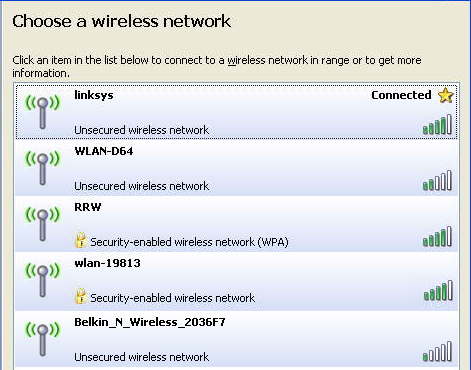
Beware of free Wireless Networks

Just driving around my neighborhood I was able to find a number of wireless networks open to the public. At a hotel or airport you’ll see many others including some with the word “FREE” in their name. Beware!

According to VirusList.com

“It's easy to spot rogue WiFi links - you just need to look for the following signs:

- an enticing name like 'Free Wifi' or 'Free Internet'
- an AD-Hoc type connection, rather than an access point”

If it’s an AD-Hoc network you should see the words, “Computer-to-Computer” under the network name. The ones shown in my example are Access Point networks.

They also recommend the following…

“- use a VPN link over any public WiFi internet access link to dial back home and access the internet using a secure proxy over the VPN link
- use only encrypted IMAP e-mail connections to read mail, TLS or SSL
- beware of fake certificates
- use a firewall and IPS or a combined security solution such as KIS7”

Most of you don’t have or probably don’t know what a VPN is so I’ll offer you an alternative. I use a service from GoToMyPC.com.

Using GoToMyPC when I travel, I connect to my home/office PC. I open up my Outlook Email as if I was sitting in my chair at home. It also means I don’t have to sync up stuff I’m working on when I leave and return. I even sign on AOL from that computer via GoToMyPC. Essentially my laptop acts as a dump terminal and the entire session is done using 128–bit AES encryption. The service is $20 a month but you can click here for a free trial.

If you’re a regular reader you’ll remember I recently changed from Time Warner Road Runner to Verizon FIOS which provides much greater upload speed. Many broadband providers give you lots of download bandwidth but a small slice for upload. Having more bandwidth allocated to upload is especially helpful for using GoToMyPC.

Read More
Posted in GotoMyPC, privacy, WiFi, Wireless | No comments
Older Posts Home
Subscribe to: Posts (Atom)

Popular Posts

Categories

  • 2007
  • 3G
  • AAPL
  • ABC
  • accelerometer
  • Achilles
  • Acrobat
  • Activex
  • adobe
  • Ads
  • advertising
  • Adware
  • Adwords
  • Airlines
  • Albany Medical Center
  • algorithm
  • Amazon
  • amber alert
  • AMUST
  • Animation
  • antimalware
  • Antivirus 2009
  • antivirus2008
  • AOL
  • Apple
  • applets
  • AQuantive
  • archive
  • Aruba
  • ASC
  • Ask.com
  • ATI
  • Audio
  • Autorun
  • AutoUpdate
  • autoupdates
  • AVG
  • Azure
  • backup
  • badware
  • Bakugan
  • Baseball
  • battery
  • Ben Edelman
  • Beta
  • BillP
  • Birthdayware
  • Bitlocker
  • Blackberry
  • BlackViper
  • bloatware
  • Blogger
  • Blogs
  • Blogspot
  • Blu-ray
  • Bluehoo
  • bluetooth
  • boinc
  • Bonjour
  • Brazil
  • break
  • Breakaway games
  • Brookman
  • Browser wars
  • C64
  • camera
  • Carpal Tunnel
  • CBS News
  • cell phone
  • CES
  • charity
  • Child Safety
  • chinese
  • Chris Cook
  • Christmas
  • Chrome
  • CIPAV
  • clampi
  • Cloud
  • CNet
  • codec
  • comodo
  • conficker
  • Control Panel
  • copy
  • coupon
  • craplets
  • crapware
  • Crawford
  • credit
  • credit card
  • credit cards
  • ctfmon
  • daylight savings time
  • Dell
  • demo
  • Discount
  • Disney
  • DNS
  • Dollar
  • Domain
  • Donna
  • Doubleclick
  • Downadup
  • Dreamscene
  • droid
  • DVD
  • Dvorak
  • Easter egg
  • eclipse
  • Ed Bott
  • Edelman
  • egreeting
  • Email
  • Environment
  • Epilepsy
  • EU
  • eWeek
  • explorer
  • facebook
  • false positive
  • false-positive
  • FBI
  • file types
  • finnish
  • FiOS
  • Firefox
  • fireworks
  • fix
  • flash
  • Flashpix
  • Fort Drum
  • foxit
  • fraud
  • FTC
  • games
  • garmin
  • Gateway
  • GE
  • George Bush
  • Germany
  • global
  • Godmode
  • Google
  • Google Research
  • GotoMyPC
  • gps
  • green
  • Groceries
  • Habitat
  • Hacks
  • hallmark
  • Halo
  • hard drive
  • Harry McCracken
  • Harry Potter
  • Harvard
  • HD-DVD
  • help
  • hidden files
  • Hijack
  • History
  • Hiton
  • homeland security
  • Honor Flight
  • hosts
  • Hubble
  • IAC
  • ICANN
  • IE
  • IE6
  • IE7
  • IE8
  • installers
  • interface
  • Internet
  • IPAddress
  • iPhone
  • iPod
  • Iraq
  • iTouch
  • iTunes
  • java
  • Kaspersky
  • Kazaa
  • kenmore
  • key logger
  • keygen
  • Keylogger
  • Kosovo
  • LA
  • lady chalupa
  • langa
  • Laptop
  • lawsuit
  • Legoland
  • Levar Burton
  • Linksys
  • Little League
  • Live Writer
  • Live.com
  • localize
  • Logo
  • London
  • LOP
  • lottery
  • Lucasfilm
  • Macintosh
  • Malware
  • Marie Domingo
  • Mary
  • McCracken
  • Media
  • Memorial Day
  • mgrs.exe
  • Micosoft
  • Microsoft
  • Microsoft Surface
  • MiFi
  • mit
  • moon
  • Mossberg
  • Mothers Day
  • MPack
  • MSFT
  • msn
  • MTV
  • Multicore
  • Music
  • MVP
  • MVP09
  • nasa
  • NBC
  • Nero
  • Netbook
  • Network
  • network solution
  • New York
  • newsletter
  • Nintendo
  • Nintendo Wii
  • NNEDV
  • Norton
  • NYAG
  • OAuth
  • obama
  • Office
  • OLPC
  • Olympics
  • OpenDNS
  • oprah
  • optimize
  • optout
  • Paperghost
  • passwords
  • Patch
  • Patriot Flight
  • PC Guy
  • pc pitstop
  • PC World
  • pcmag
  • PCWorld
  • PDC
  • PDF
  • pedipaws
  • performance
  • phishing
  • photos
  • Photoshop
  • Pinnacle
  • Piracy
  • Pirillo
  • pogue
  • Porn
  • pornware
  • postcard
  • prediction
  • prefetch
  • Preview
  • Price
  • privacy
  • Prodigy
  • Programming
  • PSP
  • Public Relations
  • Pytlovany
  • Q-Link
  • Quicktime
  • quotes
  • radio
  • realnetworks
  • realplayer
  • RegCleaner
  • RegCure
  • regedit
  • Registry
  • registry cleaner
  • Release
  • remove
  • Research
  • return policy
  • review
  • RIAA
  • Rivera
  • RMS
  • Road Runner
  • rogue
  • router
  • RTM
  • Rumor
  • safari
  • safety
  • sale
  • Sales
  • Santa Monica
  • scam
  • Schenectady
  • Scoble
  • Scott Dunn
  • Scotty
  • sd
  • Search
  • Sears
  • Security
  • Services
  • seti
  • ShellExecute
  • Shirt
  • SimCity
  • site advisor
  • slingbox
  • snopes
  • social engineering
  • social network
  • solid state disk
  • Sounds
  • Sp3
  • space station
  • SPAM
  • spamhaus
  • Special
  • speedtest
  • Spyware
  • SSD
  • Startup
  • Stats
  • Steve Bass
  • stopbadware
  • storm
  • STS-125
  • Sugar
  • Sunbelt
  • support
  • Symantec
  • tagged
  • Task Catcher
  • Task Scheduler
  • taskbar
  • Tax
  • Techorati
  • techwatch
  • teens
  • temp
  • Thinkpad
  • Thurrott
  • tinyurl
  • Tips
  • TiVo
  • TLD
  • Today Show
  • Toolbar
  • toolbars
  • top ten
  • topten
  • toys
  • Translator
  • transunion
  • Tree
  • Trend Micro
  • tricks
  • trillian
  • Trojan
  • tweaks
  • twitter
  • UAC
  • UI
  • Ultimate
  • Unbox
  • Unboxed
  • update
  • Updates
  • upgrade
  • url
  • USB
  • Utility
  • Valentine
  • Verizon
  • versions
  • Veteran
  • Video Games
  • Vista
  • Vulnerability
  • wall-e
  • war
  • Washington
  • web2.0
  • Webslice
  • WGA
  • Widget
  • WiFi
  • Wii
  • WiiItis
  • wiimote
  • Win7
  • Windows 7
  • Windows Secrets
  • Windows Update
  • Windows7
  • WinPartrol
  • WinPatrol
  • winpatrolflash
  • WinPatrolToGo
  • Winter
  • Wireless
  • Wristband
  • WSJ
  • WWII
  • x64
  • Xbox
  • XO
  • XO Laptop
  • XOActivity
  • Xobni
  • xolaptop
  • XP
  • XP SP3
  • xp3
  • Yahoo
  • Zero Day
  • Zone Alarm
  • Zwinky

Blog Archive

  • ▼  2013 (31)
    • ▼  November (2)
      • Employee Manual to Prevent Cryptolocker and More
      • My First State-Sponsored Attack
    • ►  October (1)
    • ►  September (1)
    • ►  August (2)
    • ►  July (3)
    • ►  June (5)
    • ►  May (2)
    • ►  April (3)
    • ►  March (2)
    • ►  February (5)
    • ►  January (5)
  • ►  2012 (30)
    • ►  December (3)
    • ►  November (3)
    • ►  October (2)
    • ►  September (2)
    • ►  August (2)
    • ►  July (3)
    • ►  June (2)
    • ►  May (1)
    • ►  April (4)
    • ►  March (4)
    • ►  February (2)
    • ►  January (2)
  • ►  2011 (28)
    • ►  December (4)
    • ►  November (2)
    • ►  October (4)
    • ►  September (2)
    • ►  August (2)
    • ►  July (2)
    • ►  June (2)
    • ►  May (2)
    • ►  April (2)
    • ►  March (2)
    • ►  February (3)
    • ►  January (1)
  • ►  2010 (44)
    • ►  December (2)
    • ►  November (3)
    • ►  October (3)
    • ►  September (4)
    • ►  August (3)
    • ►  July (3)
    • ►  June (3)
    • ►  May (4)
    • ►  April (4)
    • ►  March (3)
    • ►  February (3)
    • ►  January (9)
  • ►  2009 (90)
    • ►  December (6)
    • ►  November (8)
    • ►  October (6)
    • ►  September (4)
    • ►  August (4)
    • ►  July (12)
    • ►  June (6)
    • ►  May (11)
    • ►  April (7)
    • ►  March (9)
    • ►  February (9)
    • ►  January (8)
  • ►  2008 (122)
    • ►  December (9)
    • ►  November (11)
    • ►  October (14)
    • ►  September (6)
    • ►  August (9)
    • ►  July (9)
    • ►  June (10)
    • ►  May (13)
    • ►  April (8)
    • ►  March (10)
    • ►  February (10)
    • ►  January (13)
  • ►  2007 (155)
    • ►  December (15)
    • ►  November (14)
    • ►  October (12)
    • ►  September (14)
    • ►  August (12)
    • ►  July (13)
    • ►  June (11)
    • ►  May (19)
    • ►  April (17)
    • ►  March (21)
    • ►  February (7)
Powered by Blogger.

About Me

Unknown
View my complete profile