


I love that when I travel I can get online from just about anywhere. High speed WiFi networks are now available in most hotels and airports of the world. This is a big change from when I used to bring wire strippers, electrical tape and a screw driver when traveling. In my old Q-Link days hotels didn’t even have modular jacks so I used to unscrew the phone jack to wire up my 300 baud modem.
Unfortunately, WiFi public networks can be a real danger to your privacy and the security of your computer. If you’re connecting to an unsecured WiFi network your data is up for grabs to anyone with the right tools. Keystrokes, Emails and passwords on unsecure web pages can be grabbed out of the air.What you also need to watch for is bogus WiFi networks that phish for your connection. One of the guys at VirusList.com recently blogged, while sitting at Schiphol Airport in Amsterdam, that his computer found suspicious networks with names like “Free Public WiFi” and “US Airways Free WiFi”.
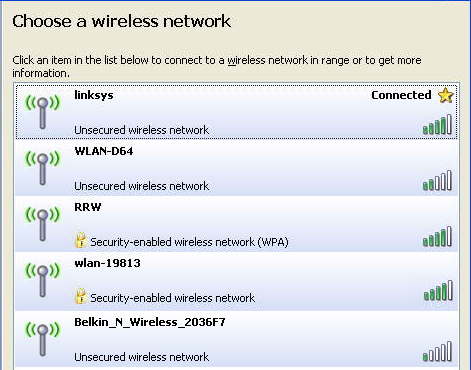
According to VirusList.com
If it’s an AD-Hoc network you should see the words, “Computer-to-Computer” under the network name. The ones shown in my example are Access Point networks.“It's easy to spot rogue WiFi links - you just need to look for the following signs:
- an enticing name like 'Free Wifi' or 'Free Internet'
- an AD-Hoc type connection, rather than an access point”
They also recommend the following…
Most of you don’t have or probably don’t know what a VPN is so I’ll offer you an alternative. I use a service from GoToMyPC.com.“- use a VPN link over any public WiFi internet access link to dial back home and access the internet using a secure proxy over the VPN link
- use only encrypted IMAP e-mail connections to read mail, TLS or SSL
- beware of fake certificates
- use a firewall and IPS or a combined security solution such as KIS7”
Using GoToMyPC when I travel, I connect to my home/office PC. I open up my Outlook Email as if I was sitting in my chair at home. It also means I don’t have to sync up stuff I’m working on when I leave and return. I even sign on AOL from that computer via GoToMyPC. Essentially my laptop acts as a dump terminal and the entire session is done using 128–bit AES encryption. The service is $20 a month but you can click here for a free trial.
If you’re a regular reader you’ll remember I recently changed from Time Warner Road Runner to Verizon FIOS which provides much greater upload speed. Many broadband providers give you lots of download bandwidth but a small slice for upload. Having more bandwidth allocated to upload is especially helpful for using GoToMyPC.


0 comments:
Post a Comment