


I’ve been getting a lot of questions about my new OLPC so I expect to write a lot about my experience with this new XO Laptop. I doubt I’ll be the only one writing about this unique device.
OLPC Evaluation Guide
Rule 1: Forget everything you already know.
The target user for this laptop are kids who have never been exposed to a computer before. You’ll need to look at using this computer as if you’ve never used Windows, Mac or even a C64 before.
That means forget about double clicking by tapping on the touch pad. The position of OK and Cancel buttons won’t match the Windows interface. You shouldn’t expect File/Edit drop down menus. Instead of Save, you’ll “Keep” your data and access it from your journal. Forget any concept of a folder based file system.
Rule 2: Forget about the price
In theory, the kids won’t ever know the market value of the OLPC laptop. It was supposed to be the $100 laptop but that price will have to wait. If you Give One to Get One, you are making a donation. Don’t expect your OLPC laptop to be anything more than a conversation piece or toy.
Rules 3: Take your Time
I had thought I could spend a couple days to evaluate the OLPC. I was really wrong. I keep learning more and more and there’s no way I can do justice to this machine until I spend at least a month with it. Nobody should publish any review for this laptop until at least next year.
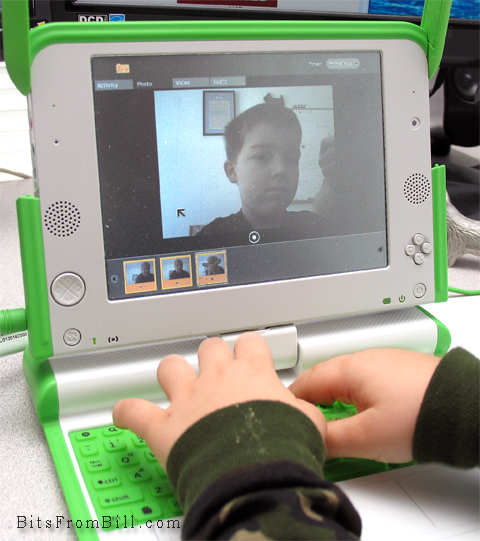
Tristan playing with the photo/video/audio application.
OLPC First Impression
My first impression was disappointment but that’s already starting to change. The interface is different which is ok and expected. Unfortunately, it’s fragmented. It tries to be different but still tries to teach computer skills. I think there’s always been a gap between academia and real world. What sounds good in some white paper may not convert well to a real product(::cough:: Ada). Profit is sometimes the best motivation in the creation of great products.
Earlier this month John C. Dvorak wrote an article suggesting it might be better to just give $200 worth of food. John was just being a cranky greek and I still disagree. Giving this laptop is an investment and while risky it’s worth a shot. It’s not like it could hurt America’s image any more than the Bush Admistration has already done.
What I Like
- The browser doesn’t suck: It’s quick enough and while limited, it supports Flash, Javascript, PDF files and Cookies(Yea that can be a good thing)
- Applications are plentiful: It even includes a number of programming examples for kids to learn how to create their own programs.
- Size: It’s small for kids hands.
- Networking: It took a little practice but it now always finds my WiFi network and searches for any available Mesh networks.
What I don’t Like
- No power crank: I thought this was the whole point.
- Durability: I expected it to be a little more ruggedized.
- Bugs: I’ve had my share of reboots and mouse weirdness. I can’t say if it’s hard,soft or firmware related.
- No Popups: Some web apps actually use pop ups.
- Sound quality: The quality is similiar to my old C64 but the speaker isn’t as good. Seems like MOS Technology’s SID chip could gotten cheaply.
One thing for sure, there is a huge need for some instruction books along with tips and tricks. I have to wonder if David Pogue is already working on “OLPC: The Missing Manual”.
Update: I spoke with David and we won't be seeing a book from him but Edward Cherlin directed me to OLPC help available at http://wiki.laptop.org/go/OLPC_Publications. Edward also was kind enough to address my dislikes in the comments section below.


0 comments:
Post a Comment