Billps Tudios

  • Subscribe to our RSS feed.
  • Twitter
  • StumbleUpon
  • Reddit
  • Facebook
  • Digg
Showing posts with label AOL. Show all posts

Thursday, 29 May 2008

Remove AOL Email Footer Advertising

Posted on 12:06 by Unknown

Earlier this month Yahoo! Mail Blog announced that advertisements would no longer be included at the end of messages sent by Yahoo Mail users. The news brought hopes from other free Email users that perhaps Gmail and Hotmail might follow Yahoo’s example.

Last year I wrote how angry I was,(as a paying customer) that AOL started to insert advertisements at the end of my Emails. I even came up with a way around it although it was a bit of a hack.

Thanks to a tip from one my readers, I learned that AOL does provide an way to opt-out. I’m not sure if this is an official solution but it worked for me.

AOL users can click the following, remove the check box and click Save.
http://controls.api-mail.aol.com/mailcontrols/app/en-US/FooterControl.html
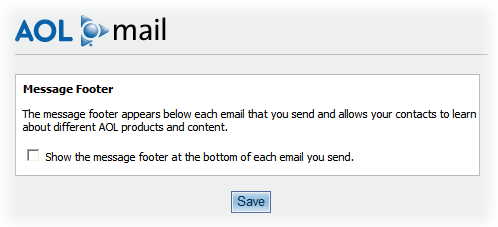
Remove AOL Email footer Ads
Remove AOL Email Footer Ads


Read More
Posted in advertising, AOL, Email | No comments

Sunday, 9 December 2007

Commodore 64: 25th Anniversary Celebration

Posted on 15:10 by Unknown

The Computer History Museum in Mountain View, CA is having a special celebration on Monday, December 10th. Invited speakers include former CBM president Jack Tremial, Apple pioneer Steve Wozniack, Amiga developer Adam Chowaniec and William C Lowe, father of the IBM PC. I’m sure my invitation was lost in the mail.


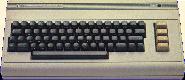
The Commodore C64

Let me just say that the C64 changed my life like no other device. It was like a drug that addicted me with its charm and personality. It helped me find new love, friendship, travel and a completely fun new career. Call me sentimental but it allowed me to find confidence and purpose in my life.

I had become quite the advocate of the C64/128 when I met up with a guy named Steve Case and his friend Marc Seriff. We shared a vision that personal telecommunications could be so much easier. I won’t bore you with sorted details of my C64 history but I’ll share some of my favorite tricks and memories that might be interesting to other C64 users.

Q-link animation
Click for Video of my 1985 Q-Link Demo


I used to bring my Commodore Vic-20 with me into my chemistry lab in college. Instead of spending one hour studying the lab work the night before, I would spend three hours writing a program to input and process my lab results. I thought my professor would be impressed but he was more excited that I could make the computer duplicate the sound of a phone ringing.

Unlike other computers of the time, the Commodore 1541 floppy disk drive had a processor and memory which allowed it to be programmed as well. While this was typically used for copy protection, someone actually wrote a program that made the disk drive play the tune “Bicycle Built for Two” by moving the drive head back and forth at different frequencies. It was a cute trick but not one I demo’d very often.

My favorite trick was created by programmer, Michael J Henry. It was easy to customize the text in programs by editing characters on the floppy disk so you could make the screen say anything. Well, Michael’s trick discouraged people from removing his name on the screen. The “L” in his first name was represented as “4C” which in the machine language of the C64 was also the code for the instruction JMP or Jump to the address of the next two bytes. At startup, his program would jump to the physical screen address where the “L” was visible and it would cause the program execution to jump to the address “204A” which was represented by the “space J” in his name. If anyone changed his name, the program stopped working. If you were able to follow that you can claim geek status.

One person missing from Mondays’ event will be my old friend and mentor Jim Butterfield. In doing research for today’s post I discovered that Jim passed away peacefully June 29th of this year.

Read More
Posted in AOL, C64, History, Q-Link | No comments

Wednesday, 17 October 2007

AOL Name Change to Advertising OnLine

Posted on 08:39 by Unknown

I was sad to read that AOL in Dulles, VA has laid off another 2000 workers as part of a “incredibly complex and significant transformation“. Just last month AOL officially moved their headquarters to New York City not far from Madison Avenue. Until now, AOL had been the 2nd largest employer in Loudoun County, Virginia.


It’s time I accept the reality, AOL is no longer the innovative online service that I once knew and loved. Our vision was to create a service that could be used by anyone and didn’t require knowledge of parity bits, baud rates and intricate commands. We were proud to provide clickable graphical content instead of black and white scrolling screens of text.


According to CEO Randy Falco in his letter to employees, “my vision for AOL is to build the largest and most sophisticated global advertising network”. This is change from the late 80’s when AOL employees laughed at Prodigy because their service had advertising covering the lower third of the screen. Now I wonder if AOL will be looking to purchase adware companies the likes of 180Solutions, Claria or Direct Revenue.


The point was hammered home last night when I received “Certified AOL Mail” from a travel search company called Side Step.


Junk mail certified by AOL
AOL Certified SPAM


I never signed up or requested Emails from Side Step. The Email was very careful to follow the minimum requirements of the Can-Spam Act of 2003. Having this Email “Certified” by AOL means nothing to me other than “Advertising OnLine” was paid by this company to spam my Email account.


These days AOL has little to offer besides a familiar interface and that’s slowly being eroded. This is a far cry from efforts like the original AOL Greenhouse designed to encourage unique and interesting content. The current AOL Greenhouse is an Add-on tool development group for AOL staffers only.


Previous AOL posts:
Ads in AOL Email
Remove AOL Free Email Advertising
Full Pay & Benefits for forum volunteers
Welcome to the End of the Computer Age


Read More
Posted in advertising, AOL, SPAM | No comments

Tuesday, 4 September 2007

Removing Ads in AOL

Posted on 09:06 by Unknown

After writing nice about AOL, I promised I’d point out another annoyance along with a simple fix. It’s almost comical how AOL finds new ways to advertise everything and everywhere on its service. It’s personally ironic when I remember back to the early 90’s when I managed the AOL client software. We ridiculed and made fun of Prodigy for including ads on every screen.

I know most of my readers no longer use AOL but this is just too much. The subject line may also attract as many new readers as my articles on removing Zwinky.

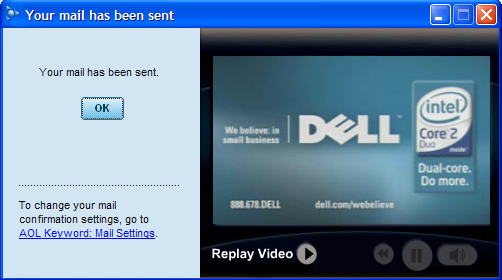
The newest insult to “paying” AOL customer comes when they send an Email. Not only does the “Your mail has been sent” window come with an ad, some of the advertisements are complete video commercials.
AOL's indication that your mail has been sent, not includes an ad video for Dell


Not all my machines with America Online include this feature so I assume it’s being rolled out with some kind of “no choice” auto-update. While I seem to have plenty of bandwidth and horsepower, I don’t like AOL slowing me down anymore than needed.


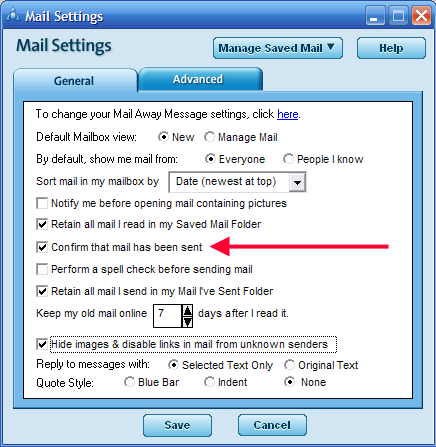
Luckily, this one is easy to remove although you’ll lose your confirmation notification in the process. Just click on the “Mail Settings” link and you’ll see the following. Remove the checkbox in front of “Confirm that mail has been sent” and the ad will go away.


Remove the checkbox in front of


Read More
Posted in Ads, AOL | No comments

Saturday, 1 September 2007

AOL Active Update Doesn't Suck

Posted on 18:19 by Unknown

Today, in a RARE move I’m going to say something positive of both America Online AND automatic updates. I’ll make up for it tomorrow by pointing out another new annoyance from AOL.

Recently, AOL has been “offering” an update of its “update” mechanism to fix potential problems. “This corruption can cause software updates to restart repeatedly until they are successfully completed. “

Unlike most other updates, they actually have my approval on how this update is being presented.

AOL Update dialog


There are some things I really like about this update.


  1. They actually notify the user an update is going to occur.

  2. Date, Time and Update number(although cryptic) are displayed.

  3. They provide a “Let me do it later” option.

  4. They describe the purpose of the update.

  5. They even provide a link to more details that describe the update.

    If you click on the image above, it answers the questions...
    “What SoftwareUpdate am I Receiving?”
    “What is the AOL Software Update Mechanism and How Does it Work?

The only thing missing is an option, “Never Update” but I can understand this being a required due to the serious nature of the problem.

Unfortunately, this kind of update is rare but I sure would like to see more like it.


Read More
Posted in AOL, Updates | No comments
Older Posts Home
Subscribe to: Posts (Atom)

Popular Posts

Categories

  • 2007
  • 3G
  • AAPL
  • ABC
  • accelerometer
  • Achilles
  • Acrobat
  • Activex
  • adobe
  • Ads
  • advertising
  • Adware
  • Adwords
  • Airlines
  • Albany Medical Center
  • algorithm
  • Amazon
  • amber alert
  • AMUST
  • Animation
  • antimalware
  • Antivirus 2009
  • antivirus2008
  • AOL
  • Apple
  • applets
  • AQuantive
  • archive
  • Aruba
  • ASC
  • Ask.com
  • ATI
  • Audio
  • Autorun
  • AutoUpdate
  • autoupdates
  • AVG
  • Azure
  • backup
  • badware
  • Bakugan
  • Baseball
  • battery
  • Ben Edelman
  • Beta
  • BillP
  • Birthdayware
  • Bitlocker
  • Blackberry
  • BlackViper
  • bloatware
  • Blogger
  • Blogs
  • Blogspot
  • Blu-ray
  • Bluehoo
  • bluetooth
  • boinc
  • Bonjour
  • Brazil
  • break
  • Breakaway games
  • Brookman
  • Browser wars
  • C64
  • camera
  • Carpal Tunnel
  • CBS News
  • cell phone
  • CES
  • charity
  • Child Safety
  • chinese
  • Chris Cook
  • Christmas
  • Chrome
  • CIPAV
  • clampi
  • Cloud
  • CNet
  • codec
  • comodo
  • conficker
  • Control Panel
  • copy
  • coupon
  • craplets
  • crapware
  • Crawford
  • credit
  • credit card
  • credit cards
  • ctfmon
  • daylight savings time
  • Dell
  • demo
  • Discount
  • Disney
  • DNS
  • Dollar
  • Domain
  • Donna
  • Doubleclick
  • Downadup
  • Dreamscene
  • droid
  • DVD
  • Dvorak
  • Easter egg
  • eclipse
  • Ed Bott
  • Edelman
  • egreeting
  • Email
  • Environment
  • Epilepsy
  • EU
  • eWeek
  • explorer
  • facebook
  • false positive
  • false-positive
  • FBI
  • file types
  • finnish
  • FiOS
  • Firefox
  • fireworks
  • fix
  • flash
  • Flashpix
  • Fort Drum
  • foxit
  • fraud
  • FTC
  • games
  • garmin
  • Gateway
  • GE
  • George Bush
  • Germany
  • global
  • Godmode
  • Google
  • Google Research
  • GotoMyPC
  • gps
  • green
  • Groceries
  • Habitat
  • Hacks
  • hallmark
  • Halo
  • hard drive
  • Harry McCracken
  • Harry Potter
  • Harvard
  • HD-DVD
  • help
  • hidden files
  • Hijack
  • History
  • Hiton
  • homeland security
  • Honor Flight
  • hosts
  • Hubble
  • IAC
  • ICANN
  • IE
  • IE6
  • IE7
  • IE8
  • installers
  • interface
  • Internet
  • IPAddress
  • iPhone
  • iPod
  • Iraq
  • iTouch
  • iTunes
  • java
  • Kaspersky
  • Kazaa
  • kenmore
  • key logger
  • keygen
  • Keylogger
  • Kosovo
  • LA
  • lady chalupa
  • langa
  • Laptop
  • lawsuit
  • Legoland
  • Levar Burton
  • Linksys
  • Little League
  • Live Writer
  • Live.com
  • localize
  • Logo
  • London
  • LOP
  • lottery
  • Lucasfilm
  • Macintosh
  • Malware
  • Marie Domingo
  • Mary
  • McCracken
  • Media
  • Memorial Day
  • mgrs.exe
  • Micosoft
  • Microsoft
  • Microsoft Surface
  • MiFi
  • mit
  • moon
  • Mossberg
  • Mothers Day
  • MPack
  • MSFT
  • msn
  • MTV
  • Multicore
  • Music
  • MVP
  • MVP09
  • nasa
  • NBC
  • Nero
  • Netbook
  • Network
  • network solution
  • New York
  • newsletter
  • Nintendo
  • Nintendo Wii
  • NNEDV
  • Norton
  • NYAG
  • OAuth
  • obama
  • Office
  • OLPC
  • Olympics
  • OpenDNS
  • oprah
  • optimize
  • optout
  • Paperghost
  • passwords
  • Patch
  • Patriot Flight
  • PC Guy
  • pc pitstop
  • PC World
  • pcmag
  • PCWorld
  • PDC
  • PDF
  • pedipaws
  • performance
  • phishing
  • photos
  • Photoshop
  • Pinnacle
  • Piracy
  • Pirillo
  • pogue
  • Porn
  • pornware
  • postcard
  • prediction
  • prefetch
  • Preview
  • Price
  • privacy
  • Prodigy
  • Programming
  • PSP
  • Public Relations
  • Pytlovany
  • Q-Link
  • Quicktime
  • quotes
  • radio
  • realnetworks
  • realplayer
  • RegCleaner
  • RegCure
  • regedit
  • Registry
  • registry cleaner
  • Release
  • remove
  • Research
  • return policy
  • review
  • RIAA
  • Rivera
  • RMS
  • Road Runner
  • rogue
  • router
  • RTM
  • Rumor
  • safari
  • safety
  • sale
  • Sales
  • Santa Monica
  • scam
  • Schenectady
  • Scoble
  • Scott Dunn
  • Scotty
  • sd
  • Search
  • Sears
  • Security
  • Services
  • seti
  • ShellExecute
  • Shirt
  • SimCity
  • site advisor
  • slingbox
  • snopes
  • social engineering
  • social network
  • solid state disk
  • Sounds
  • Sp3
  • space station
  • SPAM
  • spamhaus
  • Special
  • speedtest
  • Spyware
  • SSD
  • Startup
  • Stats
  • Steve Bass
  • stopbadware
  • storm
  • STS-125
  • Sugar
  • Sunbelt
  • support
  • Symantec
  • tagged
  • Task Catcher
  • Task Scheduler
  • taskbar
  • Tax
  • Techorati
  • techwatch
  • teens
  • temp
  • Thinkpad
  • Thurrott
  • tinyurl
  • Tips
  • TiVo
  • TLD
  • Today Show
  • Toolbar
  • toolbars
  • top ten
  • topten
  • toys
  • Translator
  • transunion
  • Tree
  • Trend Micro
  • tricks
  • trillian
  • Trojan
  • tweaks
  • twitter
  • UAC
  • UI
  • Ultimate
  • Unbox
  • Unboxed
  • update
  • Updates
  • upgrade
  • url
  • USB
  • Utility
  • Valentine
  • Verizon
  • versions
  • Veteran
  • Video Games
  • Vista
  • Vulnerability
  • wall-e
  • war
  • Washington
  • web2.0
  • Webslice
  • WGA
  • Widget
  • WiFi
  • Wii
  • WiiItis
  • wiimote
  • Win7
  • Windows 7
  • Windows Secrets
  • Windows Update
  • Windows7
  • WinPartrol
  • WinPatrol
  • winpatrolflash
  • WinPatrolToGo
  • Winter
  • Wireless
  • Wristband
  • WSJ
  • WWII
  • x64
  • Xbox
  • XO
  • XO Laptop
  • XOActivity
  • Xobni
  • xolaptop
  • XP
  • XP SP3
  • xp3
  • Yahoo
  • Zero Day
  • Zone Alarm
  • Zwinky

Blog Archive

  • ▼  2013 (31)
    • ▼  November (2)
      • Employee Manual to Prevent Cryptolocker and More
      • My First State-Sponsored Attack
    • ►  October (1)
    • ►  September (1)
    • ►  August (2)
    • ►  July (3)
    • ►  June (5)
    • ►  May (2)
    • ►  April (3)
    • ►  March (2)
    • ►  February (5)
    • ►  January (5)
  • ►  2012 (30)
    • ►  December (3)
    • ►  November (3)
    • ►  October (2)
    • ►  September (2)
    • ►  August (2)
    • ►  July (3)
    • ►  June (2)
    • ►  May (1)
    • ►  April (4)
    • ►  March (4)
    • ►  February (2)
    • ►  January (2)
  • ►  2011 (28)
    • ►  December (4)
    • ►  November (2)
    • ►  October (4)
    • ►  September (2)
    • ►  August (2)
    • ►  July (2)
    • ►  June (2)
    • ►  May (2)
    • ►  April (2)
    • ►  March (2)
    • ►  February (3)
    • ►  January (1)
  • ►  2010 (44)
    • ►  December (2)
    • ►  November (3)
    • ►  October (3)
    • ►  September (4)
    • ►  August (3)
    • ►  July (3)
    • ►  June (3)
    • ►  May (4)
    • ►  April (4)
    • ►  March (3)
    • ►  February (3)
    • ►  January (9)
  • ►  2009 (90)
    • ►  December (6)
    • ►  November (8)
    • ►  October (6)
    • ►  September (4)
    • ►  August (4)
    • ►  July (12)
    • ►  June (6)
    • ►  May (11)
    • ►  April (7)
    • ►  March (9)
    • ►  February (9)
    • ►  January (8)
  • ►  2008 (122)
    • ►  December (9)
    • ►  November (11)
    • ►  October (14)
    • ►  September (6)
    • ►  August (9)
    • ►  July (9)
    • ►  June (10)
    • ►  May (13)
    • ►  April (8)
    • ►  March (10)
    • ►  February (10)
    • ►  January (13)
  • ►  2007 (155)
    • ►  December (15)
    • ►  November (14)
    • ►  October (12)
    • ►  September (14)
    • ►  August (12)
    • ►  July (13)
    • ►  June (11)
    • ►  May (19)
    • ►  April (17)
    • ►  March (21)
    • ►  February (7)
Powered by Blogger.

About Me

Unknown
View my complete profile