Billps Tudios

  • Subscribe to our RSS feed.
  • Twitter
  • StumbleUpon
  • Reddit
  • Facebook
  • Digg
Showing posts with label USB. Show all posts

Wednesday, 11 November 2009

Droid Day Three; Copying my Music

Posted on 18:24 by Unknown

Day One; First Impressions
Day Two; In Search of Apps

This is my 3rd day playing my new Motorola Droid and logging about my experience. By now you may have realized I never bothered to read any manual or instructions on using the Droid. As a UI freak I wanted to find out how intuitive the Droid User Interface Experience is.

I had hoped to spend today converting my schedule and contacts from my iTouch to the Droid. I decided I could miss some appointments as long as I had some good music to listen too.

droidmusic

The first step naturally was to connect the Droid to my PC using the included USB cable. I opened up Windows Explorer expecting to see a new drive appear or some other indication that a new device had been detected. As a long time Windows users I stared at the screen quite a while until I realized something was wrong.

Well, I confess, I did search online for help on this one. It was not intuitive. Turns out there was another secret hidden in the Notifications panel. When the USB cable is plugged in you can pull down the Notification menu and there it is; ”USB Connected Select to copy files from your computer”

droidusb

When you click on USB connected menu item you’ll see the following screen asking to “Mount” your Droid. I don’t know about you guys but this sounds like ancient computer terminology and doesn’t fit the into modern design. Would R2D2 ever Mount anything? I think not.

Droidusb1Once you click on “Mount” your Droid SD card will show up as a drive on your computer.

The next step again isn’t so obvious. You’ll see a folder for your Google GPS and your camera(DCIM) but there’s no Music folder. You’ll also find a folder named “data” which is used as a data cache similar to your Windows Temporary Internet Folder.

While you’re connected to the computer go ahead and create a folder named “Music” as a top level folder. Then you can just copy your music from the computer to your SD card used in the Droid. Support formats at this time include MP3, M4A, AMR,WMA (8), MIDI, WAV, OGG Vorbis.

You’ll also want to create folder named “Movies”.

When you’re done you’ll still want to (1) eject the drive to make sure all data has been safely written. After that you’ll still want to touch downward on your notifications panel to tell the Droid to (2) Turn off the USB storage.

droidusboffAnd when you touch this menu item you’ll still have one last step to (3) Turn Off, before you want to disconnect the cable. Is there a chance for data lose if you don’t follow all three steps? Probably not but that’s what Apple used to say when they first released the iPod.

droidusboff1

If you have a microSD connector or slot on your computer I’m sure you can also just remove your microSD card from your Droid and plug it in. You’ll still want to create a Movies and Music folder on the microSD chip.

As far as a music player the interface is very intuitive and straight forward. Having a speaker on the back panel provides much cleaner sound quality then my iTouch (rev2) and a much higher volume level.

For some reason I’m still a problem syncing up my album covers but there were only do many hours in the day. I suspect the reason almost all my songs display Jim Morrison's face is just a user error.

Thank you to every one who has contributed comments. I’m still committed to two more days of Droid Blogging and appreciate your participation.

Read More
Posted in copy, droid, Music, USB | No comments

Saturday, 14 February 2009

WinPatrolToGo for the "Computer guy" or Girl

Posted on 09:28 by Unknown

This weekend I’m re-launching the portable version of WinPatrol with a new look and new name.  I’m pleased to announce the release of WinPatrolToGo. (formerly called WinPatrolFlash)


WinPatrol To Go


  • Are you the “Computer Guy” or “Girl” in your family?

  • Do your friends and family call you when their computer needs serious help?

  • Would you like to increase the performance of their computer?

  • Do you want to be the hero of your friends and family?

  • Do you own what’s called Pen Drive, USB Drive, Jump or Thumb drive?

If you answered yes to any of those statements than WinPatrolToGo is for you.


This single .exe file can be downloaded or copied to a thumb drive or other portable flash devices. Run it directly from your portable drive on anyones machine to help analyze and improve their performance.

No need to install any files or uninstall following use. While you’re able to modify system settings on the target machine no WinPatrolToGo files will be left over.


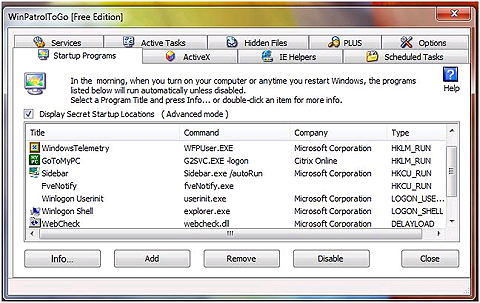
Startup Programs as viewed by WinPatrolToGo
Check out Auto Run Programs with WinPatrolToGo


WinPatrolToGo is FREE. You’re welcome to use WinPatrolToGo as long as you like.  Additional information on files can be obtained by upgrading to WinPatrol PLUS.  Current WinPatrol PLUS customers may transfer their current PLUS code to WinPatrolToGo and store on their portable drive, no additional charge.


Read More
Posted in USB, winpatrolflash, WinPatrolToGo | No comments

Saturday, 21 June 2008

WinPatrol USB Wristband

Posted on 18:36 by Unknown

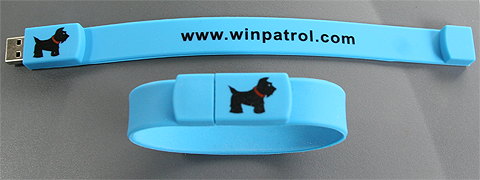
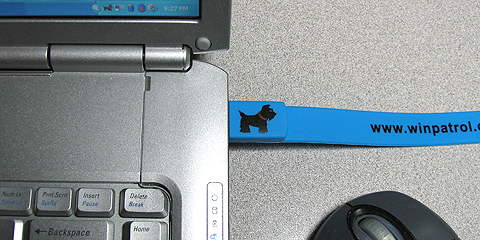
After the creation of a stand alone version of WinPatrol it became obvious that users wanted to have their own flash memory based tool kit. I also thought it would be cool to have a WinPatrol brand flash memory stick so I created the WinPatrol USB Wristband.


WinPatrol flash wristband
WinPatrol Flash USB Wristband


I couldn’t get one for myself without ordering a large batch so I’m making the wristbands available in the BillP Studios online store. Wristbands are currently available for $24.95 plus shipping until the supply runs out.


Included:

  • 1 GB flash memory ( Copy your favorite photos and tunes )

  • WinPatrolflash.exe ( WinPatrol portable)

  • wpsetup.exe ( newest install for FREE WinPatrol )

Use your WinPatrol USB Wristband to copy your music, photos or even your data from one computer to another.


Click here to order

(PLUS code not included)


WinPatrol USB Flash Wristband

Read More
Posted in flash, USB, WinPatrol | No comments

Thursday, 22 May 2008

Help Friends/Family with WinPatrol FLASH

Posted on 10:52 by Unknown

Are you the one your friends and family call when they have computer problems? Are you interested in optimizing your friends and families systems?
If so, the new WinPatrol Flash Edition is a tool for you. You may have also been one of the many WinPatrol users who have asked for this feature over the years.

WinPatrol Flash Edition is a portable version of the main tabbed WinPatrol Explorer interface. WinPatrol Flash can run from a USB/Flash drive without having to install any WinPatrol files or settings on the system you’d like to fix or optimize.


WinPatrol FLASH Edition

The idea is WinPatrolFlash.exe will allow you to work on someone’s computer, even using your PLUS access, without installing anything new on their system.

  • Remove Un-Wanted Auto Start crapware.
  • Disable Un-Needed Automatic Services
  • Remove Annoying Toolbars and BHO's
  • Create Reports that provide a snapshot of potential problems
  • Disable ActiveX Controls & MORE!

Click here to Visit WinPatrolFlash.com


Read More
Posted in flash, USB, Utility, WinPatrol | No comments
Older Posts Home
Subscribe to: Posts (Atom)

Popular Posts

  • Support for Downloads without Surprises
    Last week I posted a message about the  packaging of ad supported programs along with popular software. It appears to be a common practice t...
  • Employee Manual to Prevent Cryptolocker and More
    A common way computers are infected or compromised has always been a simple yet well thought out deception. It can happen to anyone and the ...
  • What on Earth is “Cloud” Computing
    The new big buzz word in the computing world is “Cloud” computing. In the past I’ve been critical of the concept and even poked fun at Cloud...
  • SQLite C Code to Read Cookies
    While most of the technology leaking from my brain is for a wide audience, today’s post is very technical in nature. I expected the informat...
  • WinPatrol Cloud Edition Public Beta
    WinPatrol Adds the Newest Technology Available. You’ll now have access the knowledge of thousands of WinPatrol users shared in real-tim...
  • Four Secret Reasons Why Win7 is Ten Times Better
    It’s no secret that I’ve never been a fan of Windows Vista. I really wanted to love it but even as a designated Microsoft MVP I couldn’t dri...
  • Free #1 Tweak to Improve Windows Performance
    Every year billions of dollars are spent by folks just trying to improve the performance of their computers. Over the last couple years ther...
  • Forget the DVD & Save on your New Laptop
    I’ve written before about the coming death of the CD/DVD ’s for data storage.  While that time hasn’t come yet for desktop there is one real...
  • Can Facebook be Trusted?
    Last week Facebook rolled out another round of what they consider easy to use privacy settings. What they’re really doing is trying to appea...
  • TWITTER ALERT
    Anyone who uses Twitter, DO NOT use the Twitter web interface until further notice. There is a code injection vulnerability being used tha...

Categories

  • 2007
  • 3G
  • AAPL
  • ABC
  • accelerometer
  • Achilles
  • Acrobat
  • Activex
  • adobe
  • Ads
  • advertising
  • Adware
  • Adwords
  • Airlines
  • Albany Medical Center
  • algorithm
  • Amazon
  • amber alert
  • AMUST
  • Animation
  • antimalware
  • Antivirus 2009
  • antivirus2008
  • AOL
  • Apple
  • applets
  • AQuantive
  • archive
  • Aruba
  • ASC
  • Ask.com
  • ATI
  • Audio
  • Autorun
  • AutoUpdate
  • autoupdates
  • AVG
  • Azure
  • backup
  • badware
  • Bakugan
  • Baseball
  • battery
  • Ben Edelman
  • Beta
  • BillP
  • Birthdayware
  • Bitlocker
  • Blackberry
  • BlackViper
  • bloatware
  • Blogger
  • Blogs
  • Blogspot
  • Blu-ray
  • Bluehoo
  • bluetooth
  • boinc
  • Bonjour
  • Brazil
  • break
  • Breakaway games
  • Brookman
  • Browser wars
  • C64
  • camera
  • Carpal Tunnel
  • CBS News
  • cell phone
  • CES
  • charity
  • Child Safety
  • chinese
  • Chris Cook
  • Christmas
  • Chrome
  • CIPAV
  • clampi
  • Cloud
  • CNet
  • codec
  • comodo
  • conficker
  • Control Panel
  • copy
  • coupon
  • craplets
  • crapware
  • Crawford
  • credit
  • credit card
  • credit cards
  • ctfmon
  • daylight savings time
  • Dell
  • demo
  • Discount
  • Disney
  • DNS
  • Dollar
  • Domain
  • Donna
  • Doubleclick
  • Downadup
  • Dreamscene
  • droid
  • DVD
  • Dvorak
  • Easter egg
  • eclipse
  • Ed Bott
  • Edelman
  • egreeting
  • Email
  • Environment
  • Epilepsy
  • EU
  • eWeek
  • explorer
  • facebook
  • false positive
  • false-positive
  • FBI
  • file types
  • finnish
  • FiOS
  • Firefox
  • fireworks
  • fix
  • flash
  • Flashpix
  • Fort Drum
  • foxit
  • fraud
  • FTC
  • games
  • garmin
  • Gateway
  • GE
  • George Bush
  • Germany
  • global
  • Godmode
  • Google
  • Google Research
  • GotoMyPC
  • gps
  • green
  • Groceries
  • Habitat
  • Hacks
  • hallmark
  • Halo
  • hard drive
  • Harry McCracken
  • Harry Potter
  • Harvard
  • HD-DVD
  • help
  • hidden files
  • Hijack
  • History
  • Hiton
  • homeland security
  • Honor Flight
  • hosts
  • Hubble
  • IAC
  • ICANN
  • IE
  • IE6
  • IE7
  • IE8
  • installers
  • interface
  • Internet
  • IPAddress
  • iPhone
  • iPod
  • Iraq
  • iTouch
  • iTunes
  • java
  • Kaspersky
  • Kazaa
  • kenmore
  • key logger
  • keygen
  • Keylogger
  • Kosovo
  • LA
  • lady chalupa
  • langa
  • Laptop
  • lawsuit
  • Legoland
  • Levar Burton
  • Linksys
  • Little League
  • Live Writer
  • Live.com
  • localize
  • Logo
  • London
  • LOP
  • lottery
  • Lucasfilm
  • Macintosh
  • Malware
  • Marie Domingo
  • Mary
  • McCracken
  • Media
  • Memorial Day
  • mgrs.exe
  • Micosoft
  • Microsoft
  • Microsoft Surface
  • MiFi
  • mit
  • moon
  • Mossberg
  • Mothers Day
  • MPack
  • MSFT
  • msn
  • MTV
  • Multicore
  • Music
  • MVP
  • MVP09
  • nasa
  • NBC
  • Nero
  • Netbook
  • Network
  • network solution
  • New York
  • newsletter
  • Nintendo
  • Nintendo Wii
  • NNEDV
  • Norton
  • NYAG
  • OAuth
  • obama
  • Office
  • OLPC
  • Olympics
  • OpenDNS
  • oprah
  • optimize
  • optout
  • Paperghost
  • passwords
  • Patch
  • Patriot Flight
  • PC Guy
  • pc pitstop
  • PC World
  • pcmag
  • PCWorld
  • PDC
  • PDF
  • pedipaws
  • performance
  • phishing
  • photos
  • Photoshop
  • Pinnacle
  • Piracy
  • Pirillo
  • pogue
  • Porn
  • pornware
  • postcard
  • prediction
  • prefetch
  • Preview
  • Price
  • privacy
  • Prodigy
  • Programming
  • PSP
  • Public Relations
  • Pytlovany
  • Q-Link
  • Quicktime
  • quotes
  • radio
  • realnetworks
  • realplayer
  • RegCleaner
  • RegCure
  • regedit
  • Registry
  • registry cleaner
  • Release
  • remove
  • Research
  • return policy
  • review
  • RIAA
  • Rivera
  • RMS
  • Road Runner
  • rogue
  • router
  • RTM
  • Rumor
  • safari
  • safety
  • sale
  • Sales
  • Santa Monica
  • scam
  • Schenectady
  • Scoble
  • Scott Dunn
  • Scotty
  • sd
  • Search
  • Sears
  • Security
  • Services
  • seti
  • ShellExecute
  • Shirt
  • SimCity
  • site advisor
  • slingbox
  • snopes
  • social engineering
  • social network
  • solid state disk
  • Sounds
  • Sp3
  • space station
  • SPAM
  • spamhaus
  • Special
  • speedtest
  • Spyware
  • SSD
  • Startup
  • Stats
  • Steve Bass
  • stopbadware
  • storm
  • STS-125
  • Sugar
  • Sunbelt
  • support
  • Symantec
  • tagged
  • Task Catcher
  • Task Scheduler
  • taskbar
  • Tax
  • Techorati
  • techwatch
  • teens
  • temp
  • Thinkpad
  • Thurrott
  • tinyurl
  • Tips
  • TiVo
  • TLD
  • Today Show
  • Toolbar
  • toolbars
  • top ten
  • topten
  • toys
  • Translator
  • transunion
  • Tree
  • Trend Micro
  • tricks
  • trillian
  • Trojan
  • tweaks
  • twitter
  • UAC
  • UI
  • Ultimate
  • Unbox
  • Unboxed
  • update
  • Updates
  • upgrade
  • url
  • USB
  • Utility
  • Valentine
  • Verizon
  • versions
  • Veteran
  • Video Games
  • Vista
  • Vulnerability
  • wall-e
  • war
  • Washington
  • web2.0
  • Webslice
  • WGA
  • Widget
  • WiFi
  • Wii
  • WiiItis
  • wiimote
  • Win7
  • Windows 7
  • Windows Secrets
  • Windows Update
  • Windows7
  • WinPartrol
  • WinPatrol
  • winpatrolflash
  • WinPatrolToGo
  • Winter
  • Wireless
  • Wristband
  • WSJ
  • WWII
  • x64
  • Xbox
  • XO
  • XO Laptop
  • XOActivity
  • Xobni
  • xolaptop
  • XP
  • XP SP3
  • xp3
  • Yahoo
  • Zero Day
  • Zone Alarm
  • Zwinky

Blog Archive

  • ▼  2013 (31)
    • ▼  November (2)
      • Employee Manual to Prevent Cryptolocker and More
      • My First State-Sponsored Attack
    • ►  October (1)
    • ►  September (1)
    • ►  August (2)
    • ►  July (3)
    • ►  June (5)
    • ►  May (2)
    • ►  April (3)
    • ►  March (2)
    • ►  February (5)
    • ►  January (5)
  • ►  2012 (30)
    • ►  December (3)
    • ►  November (3)
    • ►  October (2)
    • ►  September (2)
    • ►  August (2)
    • ►  July (3)
    • ►  June (2)
    • ►  May (1)
    • ►  April (4)
    • ►  March (4)
    • ►  February (2)
    • ►  January (2)
  • ►  2011 (28)
    • ►  December (4)
    • ►  November (2)
    • ►  October (4)
    • ►  September (2)
    • ►  August (2)
    • ►  July (2)
    • ►  June (2)
    • ►  May (2)
    • ►  April (2)
    • ►  March (2)
    • ►  February (3)
    • ►  January (1)
  • ►  2010 (44)
    • ►  December (2)
    • ►  November (3)
    • ►  October (3)
    • ►  September (4)
    • ►  August (3)
    • ►  July (3)
    • ►  June (3)
    • ►  May (4)
    • ►  April (4)
    • ►  March (3)
    • ►  February (3)
    • ►  January (9)
  • ►  2009 (90)
    • ►  December (6)
    • ►  November (8)
    • ►  October (6)
    • ►  September (4)
    • ►  August (4)
    • ►  July (12)
    • ►  June (6)
    • ►  May (11)
    • ►  April (7)
    • ►  March (9)
    • ►  February (9)
    • ►  January (8)
  • ►  2008 (122)
    • ►  December (9)
    • ►  November (11)
    • ►  October (14)
    • ►  September (6)
    • ►  August (9)
    • ►  July (9)
    • ►  June (10)
    • ►  May (13)
    • ►  April (8)
    • ►  March (10)
    • ►  February (10)
    • ►  January (13)
  • ►  2007 (155)
    • ►  December (15)
    • ►  November (14)
    • ►  October (12)
    • ►  September (14)
    • ►  August (12)
    • ►  July (13)
    • ►  June (11)
    • ►  May (19)
    • ►  April (17)
    • ►  March (21)
    • ►  February (7)
Powered by Blogger.

About Me

Unknown
View my complete profile