Billps Tudios

  • Subscribe to our RSS feed.
  • Twitter
  • StumbleUpon
  • Reddit
  • Facebook
  • Digg
Showing posts with label UAC. Show all posts

Monday, 16 March 2009

WinPatrol 2009 Available Today

Posted on 05:37 by Unknown

It’s been too long since I’ve released a new version of WinPatrol so I’m pleased to announce the immediate availability of WinPatrol 2009. Since last year I’ve had great feedback and support from WinPatrol users. Most of the new features are the direct result of your feedback.


WinPatrol 2009


WinPatrol 2009: What's New

  • New "Recent" tab lets you see new programs and settings recently added to your computer. Especially helpful in finding malware that comes with multiple randomly named files.
    WinPatrol new Recent tab
    As seen on Windows 7

  • Compatibility enhancements to work with Windows Vista and Windows 7

  • Monitors and alerts to any changes to User Account Control Settings(UAC)
    No matter if its malware or over jealous security programs.

  • Continues to have the best performance and smallest foot print of any system monitor

  • Hide individual alert messages and lock settings to prevent potential errors by other computer users.
    WinPatrol Hide Alerts
    As seen on Windows XP

More Information available at http://www.winpatrol.com/upgrade.html


Read More
Posted in UAC, WinPartrol | No comments

Sunday, 25 January 2009

What's New in Windows 7 Security

Posted on 18:31 by Unknown

One of the main reasons Vista evangelists encourage others to upgrade is security. Unfortunately, many have scoffed at User Account Control for being too heavy handed. Vista 64 users found that many Anti-Virus programs didn’t work. Vista doesn’t solve the most common reason for infections which remains user error. Windows 7 still doesn’t solve the problem of user’s being tricked but it does come with some serious improvements.


Bitlocker is Finally Useful
Bitlocker has been available in the more expensive versions of Vista but was never a tool I would have recommended.  Bitlocker encrypts your entire disk drive so you need a private key or password to access anything on the disk. While this may sound desirable, it increases the possibility of hard drive errors. It reminds me too much of when Microsoft added full disk compression to Windows to increase disk space. It was a great idea that led to more data loss then it saved.


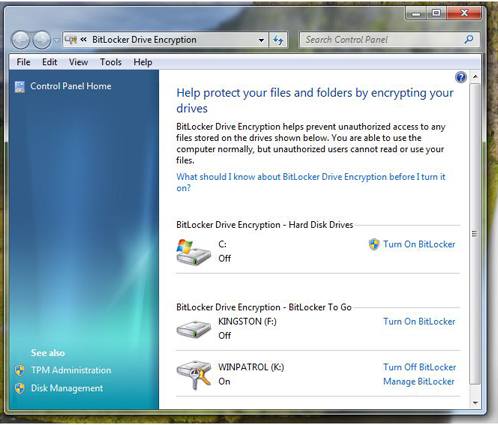
Enter “Bitlocker To Go”. Bitlocker can now be applied to portable storage devices like USB flash drives. This is one of my favorite new features in Windows 7. The use of portable devices to store data has become very common.  It also means misplacing data in public areas happens far to often. You know darn well people working for banks and credit card companies are bringing their work home on thumb drives. Bitlocker To Go makes it less dangerous to all of us.

New Bitlocker in Windows 7 showing flash drives.
Bitlocker now shows and encrypts portable storage media


 User Account Control Options

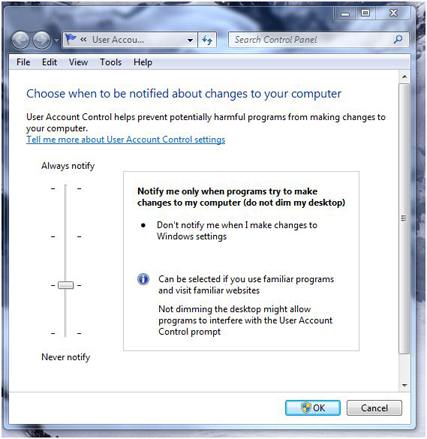
The User Account Control feature now has some options.  You can turn if off completely or choose two middle settings. One of the options removes the annoying black screen that secures the desktop and lets you know the UAC dialog is coming.  I wish this was an option by itself . To disable the black screen on Windows 7 you’ll also need to agree to remove UAC when “I make changes to Windows settings”.  I’m still looking into what Microsoft considers “Windows settings”. Vista users can click here for instructions on how to remove the black UAC screen.

What would really be nice is to come up with a scheme that would keep UAC active but like many firewalls, allow you to mark particular programs or functions as permitted.

New UAC Dialog
New User Account Control options dialog


Smart Cards
Expect to see an increase in the use of Smart Cards in Windows 7.  Smart Card drivers were first introduced in Windows XP SP2 and enhanced in Vista but certification testing and installation wasn’t a simple process.  Windows 7 automatically detects which drivers are needed without any user intervention. Do you have a hard time keeping track of passwords? A smart card may be in your future.

I also expect to see applications using smart cards to combat software piracy. In the 70’s some software was released with little “dongles” that needed to be plugged in for the software to work. The dongles in the old days were easy to get around. Smart cards will require some serious and costly efforts to break when used to prevent illegal software distribution.

What I’d love to see is the ability to use a smart card in combination with User Access Control to give permissions to commonly used programs.


Local Security Policy
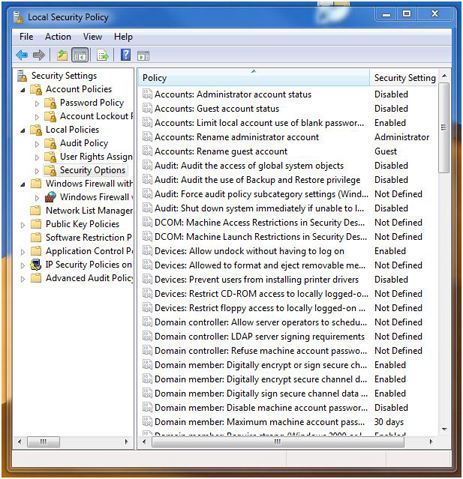
Windows 7 has plenty of security settings available if you’re helping someone else set up their computer. Unfortunately, additional security settings may not be obvious. One applet in need of help is the one used to set Local Security Policy settings. This is a very powerful tool that could really be easier to use. IT managers need to be familiar with this applet. If you’re configuring a home machine for family members knowing more about Security Policy settings is a real plus.  Just like RegEdit, this tool can really get you into trouble if you don’t know what you’re doing.  And like RegEdit, it should receive a major UI overhaul.

Local Policy Settings
Local Security Policy


Action Center

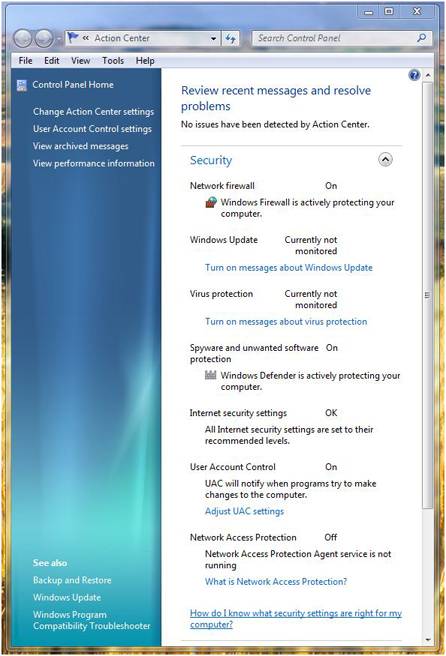
If you’re looking for a friendly interface for security settings you’ll want the “Action Center”.  This single, simple applet gives you access to many of the settings you’ll want to review when using Windows.

Windows 7 Action Center


Conclusion
Microsoft has obviously been listening to users and they know security is a huge problem. I’m sure they’d be happier if they could reduce the calls from infected users. Windows 7 addresses security as much as time and testing has allowed.  Personally, I would have liked to see more improvements in firewall and networking monitoring but they have to leave some functionality to 3rd party solutions.


Most of the security improvements in Windows 7 will never be noticed by users. Improvements in code to prevent buffer overflows, and other vulnerabilities has been a major focus in Redmond. We all hope, Tuesday Security Patch Days will be something we can someday reminisce about.


Read More
Posted in Bitlocker, homeland security, UAC, Windows 7 | No comments

Wednesday, 4 June 2008

Is Vista Really More Secure?

Posted on 08:01 by Unknown

First, I’ll admit as much as I’d like to be, I’m not a fan of Vista. I do find myself saying that Vista is more secure and that’s not a bad thing. I’ve noticed that most people associate the increase in security to User Account Control. There’s actually more to Vista security than UAC.


Everyone loves to hate User Account Control because it’s so annoying. Ars technica recently referred to WinPatrol as being UAC for Windows XP which motived me to create some new annoy-proof features. (Coming soon). I was pleased to see that even Vista evangelist Ed bott recently wrote “How Microsoft can fix UAC”. Ed pointed to comments by Sunbelts Software’s Alex Eckelberry who shares my own “cry wolf” fears with UAC. “Since over 80% of all infections are based on social engineering, the popups should focus on that weak point.”


Social engineering is when users are tricked into doing something and end up installing malware that they never wanted. I’ve mentioned many examples of social engineering but my favorite is the hacker who would leave a floppy disk with a virus/worm on it laying around at a company he wanted to infiltrate. On the label of the floppy disk, he hand wrote the words “Employee Salaries”.


Since social engineering isn’t addressed in Vista, is Vista really more secure?


Symantec recently published a number of papers on Vista security. While their work was balanced they weren’t shy pointing out some problems. For instance, most of the code that makes up Vista includes a compiler feature called GS Stack Protection which prevents a popular hack called “Buffer Overflow”. According to Symantec researcher Ollie Whitehouse “~150 binaries under the C:\Windows directory that do not contain GS protected code.”


According to AV-test.org, UAC stops many rootkits from being installed, and I know Microsoft takes these infiltrations seriously. One of my friends at Microsoft once told me, “They(root kits) scare the bejebers out of us”. Kernel Patch Protection prevents programs from hooking into the guts of Windows and is critical in the prevention of root kit infiltrations. Unfortunately, KPP only works with Vista x64 and breaks attempts at protection from many other security vendors. Thankfully, it’s not a problem for WinPatrol.


Microsoft also considers Windows Auto Update to be a security feature. They recommend users allow auto updates and when new security patches are available on Tuesdays, Windows users are automatically saved from possible threats by newly discovered vulnerabilities. If you’re a regular Bits from Bill reader you’ll know how I feel about auto updates. They’re just plain evil.


Vista Ultimate includes a feature called BitLocker. Essentially, this feature encrypts all data stored on your hard drive. This method has already been hacked by researchers at Princeton and sadly reminds me how much success I had with early Microsoft disk compression. I’ll pass for now.


Microsoft’s Strategy Director Jeff Jones recently published his “Windows Vista One Year Vulnerability Report” and the results show “Windows Vista has an improved security vulnerability profile over its predecessor.”

  • Windows Vista had 30% fewer Security Bulletins than Windows XP
  • Windows Vista had 20% fewer vulnerabilities than Windows XP
  • Windows Vista had 28% fewer Critical and Important vulnerabilities than Windows XP
  • 26 vulnerabilities on Windows Vista are less severe for any users running as standard user.

So, it appears for the 20% of non-Social Engineered vulnerabilities Vista has an advantage. Unfortunately, it’s still not enough for me. As long as any vulnerabilities are being found I’ll continue to be on watch using my favorite protection programs.


Read More
Posted in Security, Symantec, UAC, Vista | No comments

Wednesday, 9 May 2007

Wow! Vista's Been Here for 100 Days

Posted on 11:21 by Unknown

The official launch of Windows Vista celebrates a 100 day milestone this week. Not everyone has embraced Windows Vista but Microsoft(MSFT) claims over 20 million licenses were sold in its first 30 days. They say it’s twice the adoption rate of Windows XP when it was released.

Unlike every other version of Window I still only use Vista on a test machine. In the past, I upgraded as soon as a new Windows was released. Everyone agrees, the new Aero interface is nice, but some have complained it can be a drain on laptop batteries. There also seems to be a love-hate relationship with the new User Access Control feature which makes Vista more secure.

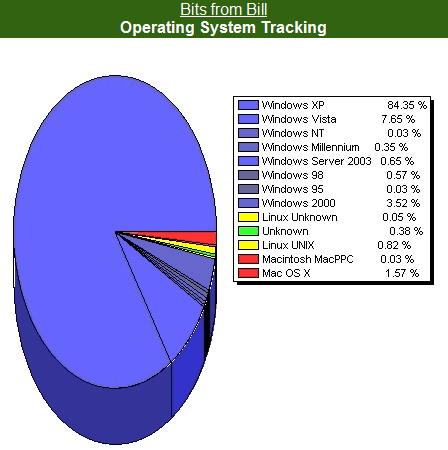
According to my Blog stats 7.65% of my readers are now using Vista.Bits from Bill Blog Stats on May 9th.

This is up from 1.3% which I documented on January 22nd. Initial predictions estimated Vista infiltration to be at 15% within the first year.

It looks like Vista is here to stay and Microsoft is busy making improvements based on user feedback. According to an interview in WindowsITPro by Paul Thurrott, “Microsoft will fix or create drivers for any device that generates 500 or more user reports.” Maybe it’s really worth while to send those error reports to Redmond when your system crashes. According to Microsoft, the only exception appears to be “drivers for devices that are no longer sold because the company that made them went out of business”.

This week a number of fixes were included in auto updates for both Windows XP, Vista and Office. I’m sure Microsoft will keep them coming. I’ll probably wait until SP1 before I upgrade my main machine but obviously regular folks have been Wow’d by Vista.

Read More
Posted in MSFT, Stats, UAC, Vista | No comments
Older Posts Home
Subscribe to: Posts (Atom)

Popular Posts

Categories

  • 2007
  • 3G
  • AAPL
  • ABC
  • accelerometer
  • Achilles
  • Acrobat
  • Activex
  • adobe
  • Ads
  • advertising
  • Adware
  • Adwords
  • Airlines
  • Albany Medical Center
  • algorithm
  • Amazon
  • amber alert
  • AMUST
  • Animation
  • antimalware
  • Antivirus 2009
  • antivirus2008
  • AOL
  • Apple
  • applets
  • AQuantive
  • archive
  • Aruba
  • ASC
  • Ask.com
  • ATI
  • Audio
  • Autorun
  • AutoUpdate
  • autoupdates
  • AVG
  • Azure
  • backup
  • badware
  • Bakugan
  • Baseball
  • battery
  • Ben Edelman
  • Beta
  • BillP
  • Birthdayware
  • Bitlocker
  • Blackberry
  • BlackViper
  • bloatware
  • Blogger
  • Blogs
  • Blogspot
  • Blu-ray
  • Bluehoo
  • bluetooth
  • boinc
  • Bonjour
  • Brazil
  • break
  • Breakaway games
  • Brookman
  • Browser wars
  • C64
  • camera
  • Carpal Tunnel
  • CBS News
  • cell phone
  • CES
  • charity
  • Child Safety
  • chinese
  • Chris Cook
  • Christmas
  • Chrome
  • CIPAV
  • clampi
  • Cloud
  • CNet
  • codec
  • comodo
  • conficker
  • Control Panel
  • copy
  • coupon
  • craplets
  • crapware
  • Crawford
  • credit
  • credit card
  • credit cards
  • ctfmon
  • daylight savings time
  • Dell
  • demo
  • Discount
  • Disney
  • DNS
  • Dollar
  • Domain
  • Donna
  • Doubleclick
  • Downadup
  • Dreamscene
  • droid
  • DVD
  • Dvorak
  • Easter egg
  • eclipse
  • Ed Bott
  • Edelman
  • egreeting
  • Email
  • Environment
  • Epilepsy
  • EU
  • eWeek
  • explorer
  • facebook
  • false positive
  • false-positive
  • FBI
  • file types
  • finnish
  • FiOS
  • Firefox
  • fireworks
  • fix
  • flash
  • Flashpix
  • Fort Drum
  • foxit
  • fraud
  • FTC
  • games
  • garmin
  • Gateway
  • GE
  • George Bush
  • Germany
  • global
  • Godmode
  • Google
  • Google Research
  • GotoMyPC
  • gps
  • green
  • Groceries
  • Habitat
  • Hacks
  • hallmark
  • Halo
  • hard drive
  • Harry McCracken
  • Harry Potter
  • Harvard
  • HD-DVD
  • help
  • hidden files
  • Hijack
  • History
  • Hiton
  • homeland security
  • Honor Flight
  • hosts
  • Hubble
  • IAC
  • ICANN
  • IE
  • IE6
  • IE7
  • IE8
  • installers
  • interface
  • Internet
  • IPAddress
  • iPhone
  • iPod
  • Iraq
  • iTouch
  • iTunes
  • java
  • Kaspersky
  • Kazaa
  • kenmore
  • key logger
  • keygen
  • Keylogger
  • Kosovo
  • LA
  • lady chalupa
  • langa
  • Laptop
  • lawsuit
  • Legoland
  • Levar Burton
  • Linksys
  • Little League
  • Live Writer
  • Live.com
  • localize
  • Logo
  • London
  • LOP
  • lottery
  • Lucasfilm
  • Macintosh
  • Malware
  • Marie Domingo
  • Mary
  • McCracken
  • Media
  • Memorial Day
  • mgrs.exe
  • Micosoft
  • Microsoft
  • Microsoft Surface
  • MiFi
  • mit
  • moon
  • Mossberg
  • Mothers Day
  • MPack
  • MSFT
  • msn
  • MTV
  • Multicore
  • Music
  • MVP
  • MVP09
  • nasa
  • NBC
  • Nero
  • Netbook
  • Network
  • network solution
  • New York
  • newsletter
  • Nintendo
  • Nintendo Wii
  • NNEDV
  • Norton
  • NYAG
  • OAuth
  • obama
  • Office
  • OLPC
  • Olympics
  • OpenDNS
  • oprah
  • optimize
  • optout
  • Paperghost
  • passwords
  • Patch
  • Patriot Flight
  • PC Guy
  • pc pitstop
  • PC World
  • pcmag
  • PCWorld
  • PDC
  • PDF
  • pedipaws
  • performance
  • phishing
  • photos
  • Photoshop
  • Pinnacle
  • Piracy
  • Pirillo
  • pogue
  • Porn
  • pornware
  • postcard
  • prediction
  • prefetch
  • Preview
  • Price
  • privacy
  • Prodigy
  • Programming
  • PSP
  • Public Relations
  • Pytlovany
  • Q-Link
  • Quicktime
  • quotes
  • radio
  • realnetworks
  • realplayer
  • RegCleaner
  • RegCure
  • regedit
  • Registry
  • registry cleaner
  • Release
  • remove
  • Research
  • return policy
  • review
  • RIAA
  • Rivera
  • RMS
  • Road Runner
  • rogue
  • router
  • RTM
  • Rumor
  • safari
  • safety
  • sale
  • Sales
  • Santa Monica
  • scam
  • Schenectady
  • Scoble
  • Scott Dunn
  • Scotty
  • sd
  • Search
  • Sears
  • Security
  • Services
  • seti
  • ShellExecute
  • Shirt
  • SimCity
  • site advisor
  • slingbox
  • snopes
  • social engineering
  • social network
  • solid state disk
  • Sounds
  • Sp3
  • space station
  • SPAM
  • spamhaus
  • Special
  • speedtest
  • Spyware
  • SSD
  • Startup
  • Stats
  • Steve Bass
  • stopbadware
  • storm
  • STS-125
  • Sugar
  • Sunbelt
  • support
  • Symantec
  • tagged
  • Task Catcher
  • Task Scheduler
  • taskbar
  • Tax
  • Techorati
  • techwatch
  • teens
  • temp
  • Thinkpad
  • Thurrott
  • tinyurl
  • Tips
  • TiVo
  • TLD
  • Today Show
  • Toolbar
  • toolbars
  • top ten
  • topten
  • toys
  • Translator
  • transunion
  • Tree
  • Trend Micro
  • tricks
  • trillian
  • Trojan
  • tweaks
  • twitter
  • UAC
  • UI
  • Ultimate
  • Unbox
  • Unboxed
  • update
  • Updates
  • upgrade
  • url
  • USB
  • Utility
  • Valentine
  • Verizon
  • versions
  • Veteran
  • Video Games
  • Vista
  • Vulnerability
  • wall-e
  • war
  • Washington
  • web2.0
  • Webslice
  • WGA
  • Widget
  • WiFi
  • Wii
  • WiiItis
  • wiimote
  • Win7
  • Windows 7
  • Windows Secrets
  • Windows Update
  • Windows7
  • WinPartrol
  • WinPatrol
  • winpatrolflash
  • WinPatrolToGo
  • Winter
  • Wireless
  • Wristband
  • WSJ
  • WWII
  • x64
  • Xbox
  • XO
  • XO Laptop
  • XOActivity
  • Xobni
  • xolaptop
  • XP
  • XP SP3
  • xp3
  • Yahoo
  • Zero Day
  • Zone Alarm
  • Zwinky

Blog Archive

  • ▼  2013 (31)
    • ▼  November (2)
      • Employee Manual to Prevent Cryptolocker and More
      • My First State-Sponsored Attack
    • ►  October (1)
    • ►  September (1)
    • ►  August (2)
    • ►  July (3)
    • ►  June (5)
    • ►  May (2)
    • ►  April (3)
    • ►  March (2)
    • ►  February (5)
    • ►  January (5)
  • ►  2012 (30)
    • ►  December (3)
    • ►  November (3)
    • ►  October (2)
    • ►  September (2)
    • ►  August (2)
    • ►  July (3)
    • ►  June (2)
    • ►  May (1)
    • ►  April (4)
    • ►  March (4)
    • ►  February (2)
    • ►  January (2)
  • ►  2011 (28)
    • ►  December (4)
    • ►  November (2)
    • ►  October (4)
    • ►  September (2)
    • ►  August (2)
    • ►  July (2)
    • ►  June (2)
    • ►  May (2)
    • ►  April (2)
    • ►  March (2)
    • ►  February (3)
    • ►  January (1)
  • ►  2010 (44)
    • ►  December (2)
    • ►  November (3)
    • ►  October (3)
    • ►  September (4)
    • ►  August (3)
    • ►  July (3)
    • ►  June (3)
    • ►  May (4)
    • ►  April (4)
    • ►  March (3)
    • ►  February (3)
    • ►  January (9)
  • ►  2009 (90)
    • ►  December (6)
    • ►  November (8)
    • ►  October (6)
    • ►  September (4)
    • ►  August (4)
    • ►  July (12)
    • ►  June (6)
    • ►  May (11)
    • ►  April (7)
    • ►  March (9)
    • ►  February (9)
    • ►  January (8)
  • ►  2008 (122)
    • ►  December (9)
    • ►  November (11)
    • ►  October (14)
    • ►  September (6)
    • ►  August (9)
    • ►  July (9)
    • ►  June (10)
    • ►  May (13)
    • ►  April (8)
    • ►  March (10)
    • ►  February (10)
    • ►  January (13)
  • ►  2007 (155)
    • ►  December (15)
    • ►  November (14)
    • ►  October (12)
    • ►  September (14)
    • ►  August (12)
    • ►  July (13)
    • ►  June (11)
    • ►  May (19)
    • ►  April (17)
    • ►  March (21)
    • ►  February (7)
Powered by Blogger.

About Me

Unknown
View my complete profile