


One of the main reasons Vista evangelists encourage others to upgrade is security. Unfortunately, many have scoffed at User Account Control for being too heavy handed. Vista 64 users found that many Anti-Virus programs didn’t work. Vista doesn’t solve the most common reason for infections which remains user error. Windows 7 still doesn’t solve the problem of user’s being tricked but it does come with some serious improvements.
Bitlocker is Finally Useful
Bitlocker has been available in the more expensive versions of Vista but was never a tool I would have recommended. Bitlocker encrypts your entire disk drive so you need a private key or password to access anything on the disk. While this may sound desirable, it increases the possibility of hard drive errors. It reminds me too much of when Microsoft added full disk compression to Windows to increase disk space. It was a great idea that led to more data loss then it saved.
Enter “Bitlocker To Go”. Bitlocker can now be applied to portable storage devices like USB flash drives. This is one of my favorite new features in Windows 7. The use of portable devices to store data has become very common. It also means misplacing data in public areas happens far to often. You know darn well people working for banks and credit card companies are bringing their work home on thumb drives. Bitlocker To Go makes it less dangerous to all of us.
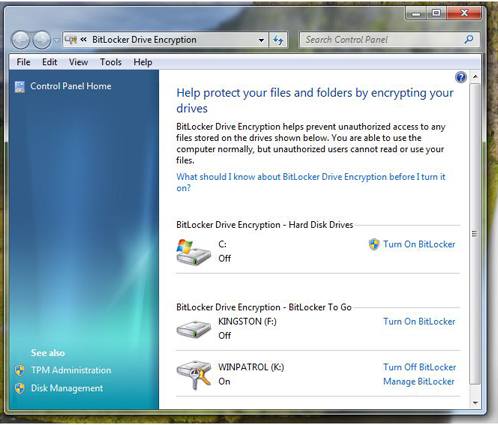
Bitlocker now shows and encrypts portable storage media
User Account Control Options
The User Account Control feature now has some options. You can turn if off completely or choose two middle settings. One of the options removes the annoying black screen that secures the desktop and lets you know the UAC dialog is coming. I wish this was an option by itself . To disable the black screen on Windows 7 you’ll also need to agree to remove UAC when “I make changes to Windows settings”. I’m still looking into what Microsoft considers “Windows settings”. Vista users can click here for instructions on how to remove the black UAC screen.
What would really be nice is to come up with a scheme that would keep UAC active but like many firewalls, allow you to mark particular programs or functions as permitted.
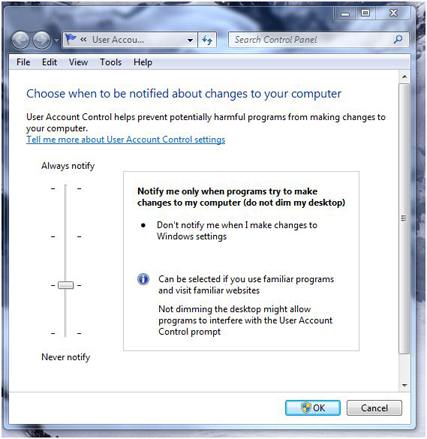
New User Account Control options dialog
Smart Cards
Expect to see an increase in the use of Smart Cards in Windows 7. Smart Card drivers were first introduced in Windows XP SP2 and enhanced in Vista but certification testing and installation wasn’t a simple process. Windows 7 automatically detects which drivers are needed without any user intervention. Do you have a hard time keeping track of passwords? A smart card may be in your future.
I also expect to see applications using smart cards to combat software piracy. In the 70’s some software was released with little “dongles” that needed to be plugged in for the software to work. The dongles in the old days were easy to get around. Smart cards will require some serious and costly efforts to break when used to prevent illegal software distribution.
What I’d love to see is the ability to use a smart card in combination with User Access Control to give permissions to commonly used programs.
Local Security Policy
Windows 7 has plenty of security settings available if you’re helping someone else set up their computer. Unfortunately, additional security settings may not be obvious. One applet in need of help is the one used to set Local Security Policy settings. This is a very powerful tool that could really be easier to use. IT managers need to be familiar with this applet. If you’re configuring a home machine for family members knowing more about Security Policy settings is a real plus. Just like RegEdit, this tool can really get you into trouble if you don’t know what you’re doing. And like RegEdit, it should receive a major UI overhaul.
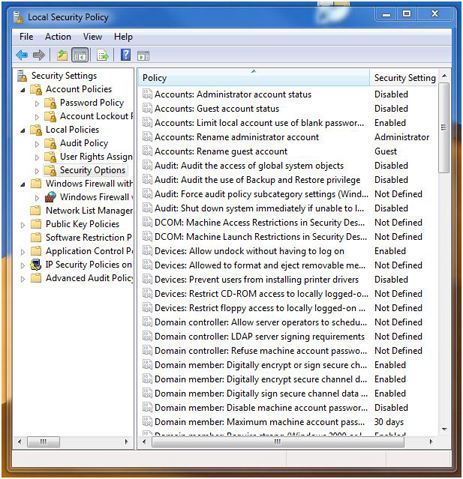
Local Security Policy
Action Center
If you’re looking for a friendly interface for security settings you’ll want the “Action Center”. This single, simple applet gives you access to many of the settings you’ll want to review when using Windows.
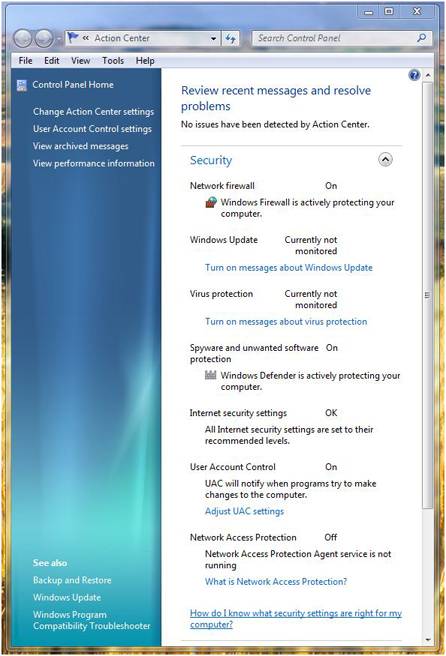
Conclusion
Microsoft has obviously been listening to users and they know security is a huge problem. I’m sure they’d be happier if they could reduce the calls from infected users. Windows 7 addresses security as much as time and testing has allowed. Personally, I would have liked to see more improvements in firewall and networking monitoring but they have to leave some functionality to 3rd party solutions.
Most of the security improvements in Windows 7 will never be noticed by users. Improvements in code to prevent buffer overflows, and other vulnerabilities has been a major focus in Redmond. We all hope, Tuesday Security Patch Days will be something we can someday reminisce about.


0 comments:
Post a Comment