Billps Tudios

  • Subscribe to our RSS feed.
  • Twitter
  • StumbleUpon
  • Reddit
  • Facebook
  • Digg
Showing posts with label privacy. Show all posts

Saturday, 5 December 2009

Who Gets Your Personal Information on Facebook?

Posted on 12:27 by Unknown


Are you one of the 350 million Facebook users? I’m a big fan of Facebook and like many I connect daily to see what my friends are doing and to share photos. As a security professional I am very careful about what I post and what information I allow to be shared. In that respect I’m unique. It surprises me how many of my friends will refuse to allow companies to share their information but eagerly give away their personal information to application developers on Facebook.

allowaccess

My friend Diana sent me some Christmas cheer. How could that be a bad thing right? Well, if I accept her cheer I’m sharing my personal information and all my friends with a company called Mob Science who has no physical address or privacy policy posted on their website.

Who are these application developers you’re giving your personal information too. One of the most popular developers is San Francisco based Zynga. They’re responsible for the games Farmville, YoVille, Mafia Wars, RollerCoaster Kingdom, Scrabble and dozens more. You’ll never be offered a chance to read Zynga’s privacy policy but the information is typical. They say only your name, address and gender are collected. As in most privacy policies they protect themselves with vague statements like “we don't generally collect any “Personally Identifying Information” about our users”.

I’m not saying the folks at Zynga are evil or have bad intent but I doubt most users realize they’re providing information to this or other little known companies. Most people mistakenly believe it’s just all part of the Facebook experience.

It’s not just the games. When you take a quiz, or even donate to “Causes” you’re providing access your personal information. When you create or join a “Cause” you’re registering your personal information with Berkeley based Philotic Inc, started by Sean Parker, one of the brilliant co-founders of Napster.


If you’re a fan of Farm Town, you’ve registered with Florida based SlashKey. Popular game provider MindJolt.com is another one that doesn’t include any physical address or privacy policy on their website. The number two Facebook developer Playfish acknowledges “We collect the following personal data from you … : your date of birth, gender and your contact details including the country where you live and any phone number(s) or email address(es) that you provide.” In addition, “We may use a third party to serve advertisements on our site. Cookies may be associated with these advertisements … We do not have access to or control of cookies placed by third parties.”

In the grand scheme of things the dangers from sharing your information with these companies may still be minor compared to other risks. I wanted to focus on 3rd party Facebook Applications because most people don’t understand why their Email Spam seems to know specific personal details.
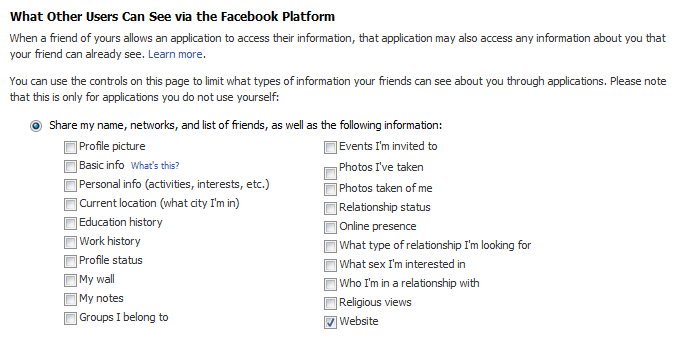
Facebook Applications can access this info
Did you know when your friend allows an application, they give away all your information too?

When you sign up for Facebook all these boxes are checked as the default setting. That means if your friend allows an application, all the information you may have set to "Friends Only" is made available. Click Here to change your settings. (Update 12/9: Facebook has made some changes do don't be surprised if this page looks a little different)

Facebook has been slow to react to customer concerns but recently announced new privacy options. It’s still up to the individual user to check out their rights and options to protect themselves. If you’re a Facebook user please click here to read how you can update your privacy settings.

Updated 12/9
Facebook has updated their privacy options. Here's the replacement for the screen allowing you to restrict information shared by your friends.
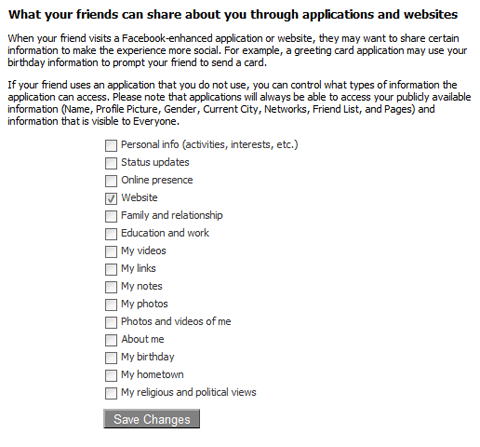


Updated Facebook privacy


Facebook Simplifies Sharing your Personal Info
Read More
Posted in facebook, privacy | No comments

Wednesday, 13 February 2008

Opt Out to Protect Your Privacy and Identity

Posted on 07:57 by Unknown

The World Privacy Forum has posted their Top Ten Opt Outs which I recommend you all review. If you think the Do Not Call Registry is a great idea you’ll be excited to learn what else is available.

I know many of you are concerned about using your credit card online but you might also want to protect what information the credit card company shares(sells) about you.

According to the FDIC:

Unless you opt out, your financial company can provide your personal financial information (for example, information on the kinds of stores you shop at, how much you borrow, your account balances, or the dollar value of your assets) to non-affiliates for marketing and other purposes.
Contact your credit card company to opt-out(4)

Top Ten Opt Outs

  • 1. National Do Not Call Registry
    Do Not Call opt out does not stop you from being called by anyone you have done business with in the last 18 months. If you make an inquiry of a merchant, the merchant can call you for six months. Charities and politicians are not covered by the Do Not Call list rules.

  • 2. Prescreened offers of credit and insurance
    Credit bureaus may also sell information about you to lenders and insurers who use the information to decide whether to send you unsolicited offers of credit or insurance. This is known as prescreening. You can opt out of receiving these prescreened offers by calling 1-888-567-8688.

  • 3. DMA opt outs

  • 4. Financial institution opt outs

  • 5. CAN SPAM

  • 6. Credit freeze

  • 7. FERPA
    The FERPA opt out stops schools from releasing student directory information (Name, home address, date of birth, and other information) without consent, with some limitations.

  • 8. Data broker opt outs

  • 9. Internet portal opt outs

  • 10. NAI opt out

Read More
Posted in credit, optout, privacy | No comments

Thursday, 3 January 2008

Your Sears Purchase Details Available to World

Posted on 22:39 by Unknown

When I first heard about this from Ben Edelman I couldn’t believe it. Unfortunately, this isn’t an urban legend you’ll find a Snopes or PhoneyMail.com. Sears has made it extremely easy for you to review the details of your purchase history. You’ll find your model number, download manuals and you can even purchase extended warranties. The only problem is you’re not the only one who can access this information.

Want to see what items your friends, family, and neighbors have purchased? Just set up a Sears “Manage My Home” account. It’s easy at http://www.managemyhome.com/. All you need is an Email address. Once you have an account just go to your home profile and click on “Find your products” under “Sears Purchase History”.

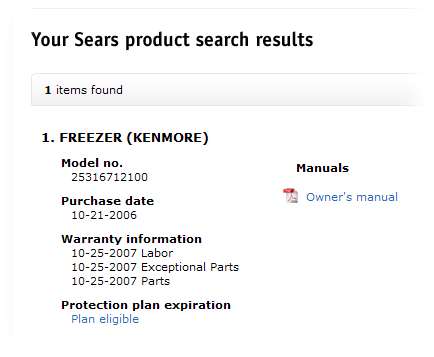
All you need now is a name and address. It doesn’t need to be your name and even the phone number you enter won’t matter. I found some purchase histories going back to 1982 and hey, I didn’t know my daughter bought a Freezer last October.

Why can I access this private purchase information?

Easy to access purchase information

Apparently the “softer side of Sears” refers to the brains of the people at the Sears Holding Corporation. If so called reputable companies are this ignorant, can you imagine what lack of privacy we all have with other companies. Anyone looking to start a class action lawsuit, let me know. I’ll be the first to sign up.

If you feel guilty looking up up someone’s information (as you should ) my address can be found by clicking here. You can see the eight items I’ve purchased at Sears in the last five years. (I actually don’t recommend the Galaxy Refrigerator which was returned.)

Update: Sears has fixed this particular stupidity due to obvious criticism.

Read More
Posted in kenmore, privacy, Sears | No comments

Friday, 14 December 2007

Malware is FREE on Wireless Networks

Posted on 13:43 by Unknown

I love that when I travel I can get online from just about anywhere. High speed WiFi networks are now available in most hotels and airports of the world. This is a big change from when I used to bring wire strippers, electrical tape and a screw driver when traveling. In my old Q-Link days hotels didn’t even have modular jacks so I used to unscrew the phone jack to wire up my 300 baud modem.

Unfortunately, WiFi public networks can be a real danger to your privacy and the security of your computer. If you’re connecting to an unsecured WiFi network your data is up for grabs to anyone with the right tools. Keystrokes, Emails and passwords on unsecure web pages can be grabbed out of the air.

What you also need to watch for is bogus WiFi networks that phish for your connection. One of the guys at VirusList.com recently blogged, while sitting at Schiphol Airport in Amsterdam, that his computer found suspicious networks with names like “Free Public WiFi” and “US Airways Free WiFi”.


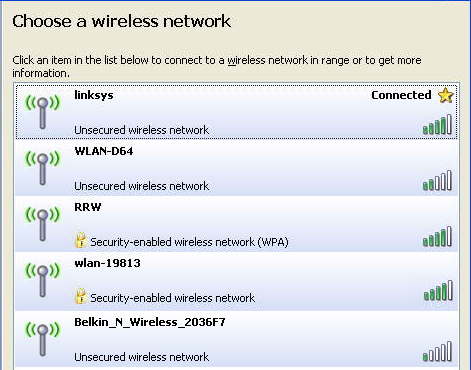
Beware of free Wireless Networks

Just driving around my neighborhood I was able to find a number of wireless networks open to the public. At a hotel or airport you’ll see many others including some with the word “FREE” in their name. Beware!

According to VirusList.com

“It's easy to spot rogue WiFi links - you just need to look for the following signs:

- an enticing name like 'Free Wifi' or 'Free Internet'
- an AD-Hoc type connection, rather than an access point”

If it’s an AD-Hoc network you should see the words, “Computer-to-Computer” under the network name. The ones shown in my example are Access Point networks.

They also recommend the following…

“- use a VPN link over any public WiFi internet access link to dial back home and access the internet using a secure proxy over the VPN link
- use only encrypted IMAP e-mail connections to read mail, TLS or SSL
- beware of fake certificates
- use a firewall and IPS or a combined security solution such as KIS7”

Most of you don’t have or probably don’t know what a VPN is so I’ll offer you an alternative. I use a service from GoToMyPC.com.

Using GoToMyPC when I travel, I connect to my home/office PC. I open up my Outlook Email as if I was sitting in my chair at home. It also means I don’t have to sync up stuff I’m working on when I leave and return. I even sign on AOL from that computer via GoToMyPC. Essentially my laptop acts as a dump terminal and the entire session is done using 128–bit AES encryption. The service is $20 a month but you can click here for a free trial.

If you’re a regular reader you’ll remember I recently changed from Time Warner Road Runner to Verizon FIOS which provides much greater upload speed. Many broadband providers give you lots of download bandwidth but a small slice for upload. Having more bandwidth allocated to upload is especially helpful for using GoToMyPC.

Read More
Posted in GotoMyPC, privacy, WiFi, Wireless | No comments
Older Posts Home
Subscribe to: Posts (Atom)

Popular Posts

  • Support for Downloads without Surprises
    Last week I posted a message about the  packaging of ad supported programs along with popular software. It appears to be a common practice t...
  • Employee Manual to Prevent Cryptolocker and More
    A common way computers are infected or compromised has always been a simple yet well thought out deception. It can happen to anyone and the ...
  • What on Earth is “Cloud” Computing
    The new big buzz word in the computing world is “Cloud” computing. In the past I’ve been critical of the concept and even poked fun at Cloud...
  • SQLite C Code to Read Cookies
    While most of the technology leaking from my brain is for a wide audience, today’s post is very technical in nature. I expected the informat...
  • WinPatrol Cloud Edition Public Beta
    WinPatrol Adds the Newest Technology Available. You’ll now have access the knowledge of thousands of WinPatrol users shared in real-tim...
  • Four Secret Reasons Why Win7 is Ten Times Better
    It’s no secret that I’ve never been a fan of Windows Vista. I really wanted to love it but even as a designated Microsoft MVP I couldn’t dri...
  • Free #1 Tweak to Improve Windows Performance
    Every year billions of dollars are spent by folks just trying to improve the performance of their computers. Over the last couple years ther...
  • Forget the DVD & Save on your New Laptop
    I’ve written before about the coming death of the CD/DVD ’s for data storage.  While that time hasn’t come yet for desktop there is one real...
  • Can Facebook be Trusted?
    Last week Facebook rolled out another round of what they consider easy to use privacy settings. What they’re really doing is trying to appea...
  • TWITTER ALERT
    Anyone who uses Twitter, DO NOT use the Twitter web interface until further notice. There is a code injection vulnerability being used tha...

Categories

  • 2007
  • 3G
  • AAPL
  • ABC
  • accelerometer
  • Achilles
  • Acrobat
  • Activex
  • adobe
  • Ads
  • advertising
  • Adware
  • Adwords
  • Airlines
  • Albany Medical Center
  • algorithm
  • Amazon
  • amber alert
  • AMUST
  • Animation
  • antimalware
  • Antivirus 2009
  • antivirus2008
  • AOL
  • Apple
  • applets
  • AQuantive
  • archive
  • Aruba
  • ASC
  • Ask.com
  • ATI
  • Audio
  • Autorun
  • AutoUpdate
  • autoupdates
  • AVG
  • Azure
  • backup
  • badware
  • Bakugan
  • Baseball
  • battery
  • Ben Edelman
  • Beta
  • BillP
  • Birthdayware
  • Bitlocker
  • Blackberry
  • BlackViper
  • bloatware
  • Blogger
  • Blogs
  • Blogspot
  • Blu-ray
  • Bluehoo
  • bluetooth
  • boinc
  • Bonjour
  • Brazil
  • break
  • Breakaway games
  • Brookman
  • Browser wars
  • C64
  • camera
  • Carpal Tunnel
  • CBS News
  • cell phone
  • CES
  • charity
  • Child Safety
  • chinese
  • Chris Cook
  • Christmas
  • Chrome
  • CIPAV
  • clampi
  • Cloud
  • CNet
  • codec
  • comodo
  • conficker
  • Control Panel
  • copy
  • coupon
  • craplets
  • crapware
  • Crawford
  • credit
  • credit card
  • credit cards
  • ctfmon
  • daylight savings time
  • Dell
  • demo
  • Discount
  • Disney
  • DNS
  • Dollar
  • Domain
  • Donna
  • Doubleclick
  • Downadup
  • Dreamscene
  • droid
  • DVD
  • Dvorak
  • Easter egg
  • eclipse
  • Ed Bott
  • Edelman
  • egreeting
  • Email
  • Environment
  • Epilepsy
  • EU
  • eWeek
  • explorer
  • facebook
  • false positive
  • false-positive
  • FBI
  • file types
  • finnish
  • FiOS
  • Firefox
  • fireworks
  • fix
  • flash
  • Flashpix
  • Fort Drum
  • foxit
  • fraud
  • FTC
  • games
  • garmin
  • Gateway
  • GE
  • George Bush
  • Germany
  • global
  • Godmode
  • Google
  • Google Research
  • GotoMyPC
  • gps
  • green
  • Groceries
  • Habitat
  • Hacks
  • hallmark
  • Halo
  • hard drive
  • Harry McCracken
  • Harry Potter
  • Harvard
  • HD-DVD
  • help
  • hidden files
  • Hijack
  • History
  • Hiton
  • homeland security
  • Honor Flight
  • hosts
  • Hubble
  • IAC
  • ICANN
  • IE
  • IE6
  • IE7
  • IE8
  • installers
  • interface
  • Internet
  • IPAddress
  • iPhone
  • iPod
  • Iraq
  • iTouch
  • iTunes
  • java
  • Kaspersky
  • Kazaa
  • kenmore
  • key logger
  • keygen
  • Keylogger
  • Kosovo
  • LA
  • lady chalupa
  • langa
  • Laptop
  • lawsuit
  • Legoland
  • Levar Burton
  • Linksys
  • Little League
  • Live Writer
  • Live.com
  • localize
  • Logo
  • London
  • LOP
  • lottery
  • Lucasfilm
  • Macintosh
  • Malware
  • Marie Domingo
  • Mary
  • McCracken
  • Media
  • Memorial Day
  • mgrs.exe
  • Micosoft
  • Microsoft
  • Microsoft Surface
  • MiFi
  • mit
  • moon
  • Mossberg
  • Mothers Day
  • MPack
  • MSFT
  • msn
  • MTV
  • Multicore
  • Music
  • MVP
  • MVP09
  • nasa
  • NBC
  • Nero
  • Netbook
  • Network
  • network solution
  • New York
  • newsletter
  • Nintendo
  • Nintendo Wii
  • NNEDV
  • Norton
  • NYAG
  • OAuth
  • obama
  • Office
  • OLPC
  • Olympics
  • OpenDNS
  • oprah
  • optimize
  • optout
  • Paperghost
  • passwords
  • Patch
  • Patriot Flight
  • PC Guy
  • pc pitstop
  • PC World
  • pcmag
  • PCWorld
  • PDC
  • PDF
  • pedipaws
  • performance
  • phishing
  • photos
  • Photoshop
  • Pinnacle
  • Piracy
  • Pirillo
  • pogue
  • Porn
  • pornware
  • postcard
  • prediction
  • prefetch
  • Preview
  • Price
  • privacy
  • Prodigy
  • Programming
  • PSP
  • Public Relations
  • Pytlovany
  • Q-Link
  • Quicktime
  • quotes
  • radio
  • realnetworks
  • realplayer
  • RegCleaner
  • RegCure
  • regedit
  • Registry
  • registry cleaner
  • Release
  • remove
  • Research
  • return policy
  • review
  • RIAA
  • Rivera
  • RMS
  • Road Runner
  • rogue
  • router
  • RTM
  • Rumor
  • safari
  • safety
  • sale
  • Sales
  • Santa Monica
  • scam
  • Schenectady
  • Scoble
  • Scott Dunn
  • Scotty
  • sd
  • Search
  • Sears
  • Security
  • Services
  • seti
  • ShellExecute
  • Shirt
  • SimCity
  • site advisor
  • slingbox
  • snopes
  • social engineering
  • social network
  • solid state disk
  • Sounds
  • Sp3
  • space station
  • SPAM
  • spamhaus
  • Special
  • speedtest
  • Spyware
  • SSD
  • Startup
  • Stats
  • Steve Bass
  • stopbadware
  • storm
  • STS-125
  • Sugar
  • Sunbelt
  • support
  • Symantec
  • tagged
  • Task Catcher
  • Task Scheduler
  • taskbar
  • Tax
  • Techorati
  • techwatch
  • teens
  • temp
  • Thinkpad
  • Thurrott
  • tinyurl
  • Tips
  • TiVo
  • TLD
  • Today Show
  • Toolbar
  • toolbars
  • top ten
  • topten
  • toys
  • Translator
  • transunion
  • Tree
  • Trend Micro
  • tricks
  • trillian
  • Trojan
  • tweaks
  • twitter
  • UAC
  • UI
  • Ultimate
  • Unbox
  • Unboxed
  • update
  • Updates
  • upgrade
  • url
  • USB
  • Utility
  • Valentine
  • Verizon
  • versions
  • Veteran
  • Video Games
  • Vista
  • Vulnerability
  • wall-e
  • war
  • Washington
  • web2.0
  • Webslice
  • WGA
  • Widget
  • WiFi
  • Wii
  • WiiItis
  • wiimote
  • Win7
  • Windows 7
  • Windows Secrets
  • Windows Update
  • Windows7
  • WinPartrol
  • WinPatrol
  • winpatrolflash
  • WinPatrolToGo
  • Winter
  • Wireless
  • Wristband
  • WSJ
  • WWII
  • x64
  • Xbox
  • XO
  • XO Laptop
  • XOActivity
  • Xobni
  • xolaptop
  • XP
  • XP SP3
  • xp3
  • Yahoo
  • Zero Day
  • Zone Alarm
  • Zwinky

Blog Archive

  • ▼  2013 (31)
    • ▼  November (2)
      • Employee Manual to Prevent Cryptolocker and More
      • My First State-Sponsored Attack
    • ►  October (1)
    • ►  September (1)
    • ►  August (2)
    • ►  July (3)
    • ►  June (5)
    • ►  May (2)
    • ►  April (3)
    • ►  March (2)
    • ►  February (5)
    • ►  January (5)
  • ►  2012 (30)
    • ►  December (3)
    • ►  November (3)
    • ►  October (2)
    • ►  September (2)
    • ►  August (2)
    • ►  July (3)
    • ►  June (2)
    • ►  May (1)
    • ►  April (4)
    • ►  March (4)
    • ►  February (2)
    • ►  January (2)
  • ►  2011 (28)
    • ►  December (4)
    • ►  November (2)
    • ►  October (4)
    • ►  September (2)
    • ►  August (2)
    • ►  July (2)
    • ►  June (2)
    • ►  May (2)
    • ►  April (2)
    • ►  March (2)
    • ►  February (3)
    • ►  January (1)
  • ►  2010 (44)
    • ►  December (2)
    • ►  November (3)
    • ►  October (3)
    • ►  September (4)
    • ►  August (3)
    • ►  July (3)
    • ►  June (3)
    • ►  May (4)
    • ►  April (4)
    • ►  March (3)
    • ►  February (3)
    • ►  January (9)
  • ►  2009 (90)
    • ►  December (6)
    • ►  November (8)
    • ►  October (6)
    • ►  September (4)
    • ►  August (4)
    • ►  July (12)
    • ►  June (6)
    • ►  May (11)
    • ►  April (7)
    • ►  March (9)
    • ►  February (9)
    • ►  January (8)
  • ►  2008 (122)
    • ►  December (9)
    • ►  November (11)
    • ►  October (14)
    • ►  September (6)
    • ►  August (9)
    • ►  July (9)
    • ►  June (10)
    • ►  May (13)
    • ►  April (8)
    • ►  March (10)
    • ►  February (10)
    • ►  January (13)
  • ►  2007 (155)
    • ►  December (15)
    • ►  November (14)
    • ►  October (12)
    • ►  September (14)
    • ►  August (12)
    • ►  July (13)
    • ►  June (11)
    • ►  May (19)
    • ►  April (17)
    • ►  March (21)
    • ►  February (7)
Powered by Blogger.

About Me

Unknown
View my complete profile