Billps Tudios

  • Subscribe to our RSS feed.
  • Twitter
  • StumbleUpon
  • Reddit
  • Facebook
  • Digg
Showing posts with label Windows 7. Show all posts

Wednesday, 6 May 2009

Windows 7: Good, Bad and the Ugly

Posted on 19:36 by Unknown

Have you heard about Windows 7?

This week Microsoft is distributing the “Release Candidate” of Windows version 7. I’m sure you’ll be reading about it all over the place. Blogs like Ed Bott Windows Expertise and Paul Thurotts Supersite provide information on all the new features complete with screen shots and setup advice. Naturally, I like to focus on the unusual and this week I picked out some of my favorite and not-so favorite features.

There is plenty of good new stuff in Windows 7. New desktop backgrounds, screen savers and animation effects really make Windows 7 a graphical experience. I tend to look for the not to obvious new features. Here’s one that really makes sense.
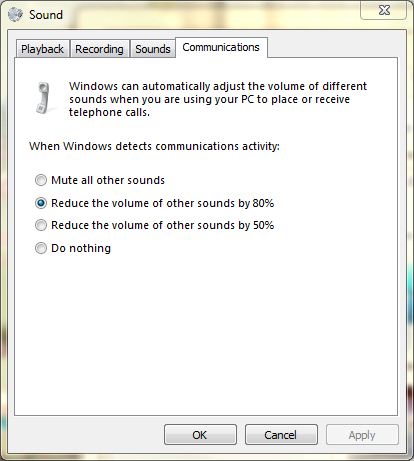

Sounds options


Another feature that looks really nice is the System Health Report. This can be found in the Control Panel on Advanced Tools for System Performance.

It takes about 60 seconds to create a report and Microsoft explains its purpose as follows…
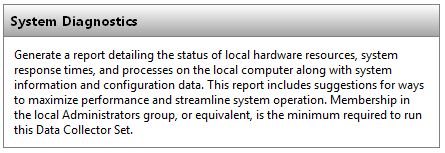
Description of Health Report

I was hoping for some user friendly information but what you get looks like some kind of SQL statement which makes absolutely no sense to me.
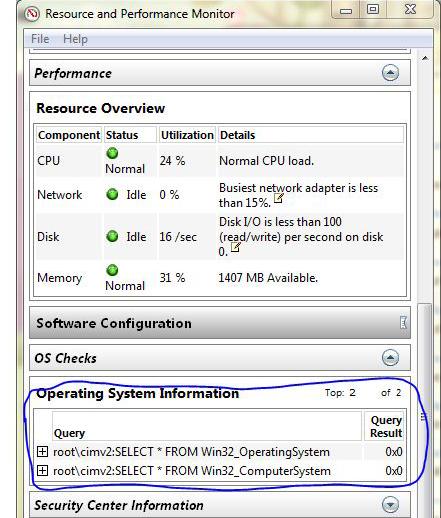
Results of  health report

Here’s some more unfriendly, useless system performance information. The red flag is warning me I don’t have any approved AntiVirus product installed. Everything else is about as useful as a message that says “Error #5”.
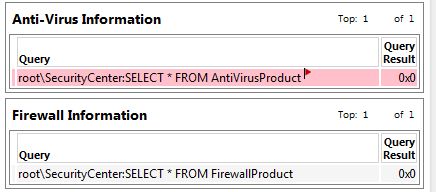
Even more useless data results


One of the things that make me the happiest is when features are located in the same place as previous versions. When I need to help someone fix a problem it’s so much easier to have a single set of instructions. I prefer this to having waste an Email asking which version of Windows is being used before I know how to provide detailed steps on how to get to the desired feature.

So I was pleased that under Internet Options, the button to delete saved content to clean up the cache was basically in the same location. I was even happier to see that Microsoft has expanded the types of information you may want to delete. The only problem is you might be confused by the wording in the following dialog. Does the check mean it will be deleted or it will be preserved?
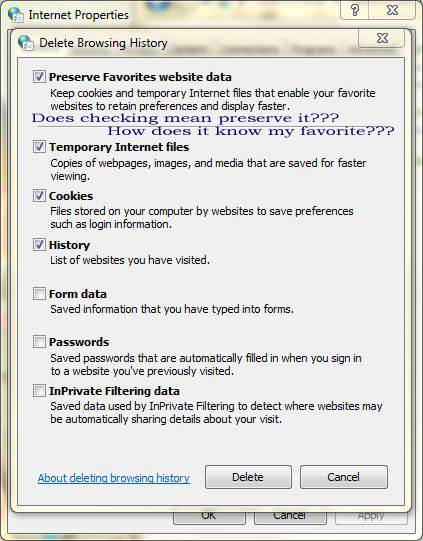
Internet Delete Features


Now for one last final nitpick even though it’s not really new in Windows 7. Dump a file, save a tree?
Why do they still call it a Recycle-Bin? If you move files there are they reused to save a tree somewhere? It’s nice to be politically correct but we really need to go back to calling this a Garbage Can or even better a File Shredder.


I’ve only had the new Windows 7 for a week so there’s a lot more I haven’t explored yet. Stay turned for more Good, Bad and Ugly.
Read More
Posted in Windows 7 | No comments

Wednesday, 25 February 2009

Release Windows 7, Summer of 2009

Posted on 11:59 by Unknown

When I first read that the next release of Windows 7 was going to be a “release candidate” my reaction was to shout obscenities at my computer screen. I’ve been part of many Window beta tests in the past but Microsoft really seems to be rushing the release of the newest Windows. I really want Windows 7 to be a success and the thought of a quick beta cycle scares me.


After reading more including Ed Bott’s “Who Needs Another Windows 7 beta”, I have reversed my opinion.  I don’t agree completely with everything Ed says but he got me thinking.


Momentum
Right now Windows 7 has momentum. The press and bloggers so far on Win7 has been extremely positive. The performance provided by Windows 7 has been surprising. The longer a beta the higher the expectations and some of the current excitement will fade.


Interruption of Imagination
Every new beta release is a distraction to developers. The time it takes to create a frozen version takes away from a developers imagination and productivity. I’ve worked at Microsoft and I accomplished a lot more when I was sitting in my office all day then I did sitting in meetings or running focus groups. The internal testing required before any public beta is a lot longer than you might think.


Most Beta Testers Suck
As a developer I can tell you , beta tests aren’t what they used to be.  The number of people who actually report decent bug information is minimal. Most people download the beta just to be an earlier adopter. Developers are lucky if users read the release notes and compatibility list let alone any beta instructions. There are so many different machine configurations that sadly the only way to find some bugs is to have full global adoption of new software.


Just use Auto Updates
Anyone who reads Bits From Bill knows I think AutoUpdates are evil. Unfortunately, they’ve become a fact of life. Microsoft has determined Auto Updates are part of the equation and has perfected the procedure as much as technically possible.


Compatibility Already Exists
While there are plenty of new features in Windows 7, there’s a reasonable chance if a program is compatible with Vista, it will work okay on Windows 7. There are many new features a program can take advantage of but under the hood Windows 7 is still a new version of Vista.


Bailing out the Computer Industry
Last year Microsoft told customers that Windows 7 would ship in January 2010.  This would be a huge mistake because it would completely miss the opportunity to increase holiday computer sales. For manufacturers to ship a shiny new Windows 7 computer, the product needs to be final sometime in October. While I don’t expect a government bail out of computer manufactures, it’s in the consumers best interest to have many successful competing OEM’s. (Original equipment manufacturer)

Students will choose PC’s not Macs
If they really want to push it, t
he next big computer sales period is the end of summer when parents and students are shopping.  Vista’s current reputation may encourage more Mac purchases for kids going off to school. If there’s a release candidate in April, like currently being reported, that might allow a final OEM product being available by early summer.  That would also be a huge boost for student computer sales and certainly help Microsoft’s bottom line.


My only complaint
One of the reasons Windows will generate new computer sales is because there currently is no upgrade path from Windows XP. If you have Windows XP you’ll need to install Windows 7 by reformatting from scratch.


Update: 
Microsoft has posted a list of new changes for the upcoming Release Candidate.
http://blogs.msdn.com/e7/archive/2009/02/26/some-changes-since-beta.aspx


Part II:

Windows 7 Certified and Free Win7 Upgrades


Read More
Posted in Beta, Windows 7 | No comments

Tuesday, 3 February 2009

Windows 7 Limited to 3 Applications at one Time

Posted on 12:00 by Unknown

Microsoft has announced the various flavors of Windows 7.  As I had hoped Microsoft tried to reduce the confusion and say they will be concentrating most on their Home Premium and Ultimate versions. Apparently there will still be six official SKU’s which isn’t much of a reduction.

There’s no word yet on price but I suspect the Windows 7 Starter will be the under $100 USD version. I’m very surprised at a restriction of “3 concurrent applications” and anxious to find out how that works.  My first question to Microsoft is “Do programs like WinPatrol monitoring your system count as one application”? I suspect this feature will be getting a lot more attention in the press this week.

Microsoft said I can share the following information starting Feb 3 at noon PST.

Windows 7 Starter

  • Broad app and device compatibility with up to 3 concurrent applications
  • Safe, reliable, and supported
  • Ability to join a Home Group
  • Improved taskbar and JumpLists

Windows 7 Home Basic (emerging markets only)

  • Unlimited applications
  • Live Thumbnail Previews & enhanced visual experience
  • Advanced networking support (ad-hoc wireless networks and internet connection sharing)
  • Mobility Center

Windows 7 Home Premium

  • Unlimited applications
  • Aero Glass & advanced windows navigation
  • Easy networking & sharing across all your PCs & devices
  • Improved media format support, enhancements to Windows Media Center and media streaming, including Play To
  • Multi-touch and improved handwriting recognition

Windows 7 Professional

  • Unlimited applications
  • Ability to join a managed network with Domain Join
  • Protect  data with advanced network backup and Encrypting File System
  • Print to the right printer at home or work with Location Aware Printing

Windows 7 Enterprise and Ultimate

  • Unlimited applications
  • BitLocker data protection on internal and external drives
  • DirectAccess provides seamless connectivity to your corporate network. 
    (requires Windows Server 2008 R2)
  • Decrease time branch office workers wait to open file across the network with BranchCache. (requires Windows Server 2008 R2)
  • Prevent unauthorized software from running with AppLocker

Ultimate includes all Enterprise and all Home Premium features, including multi-language packs.  Windows 7 Enterprise is available only through Microsoft Volume Licensing


Read More
Posted in versions, Windows 7 | No comments

Sunday, 25 January 2009

What's New in Windows 7 Security

Posted on 18:31 by Unknown

One of the main reasons Vista evangelists encourage others to upgrade is security. Unfortunately, many have scoffed at User Account Control for being too heavy handed. Vista 64 users found that many Anti-Virus programs didn’t work. Vista doesn’t solve the most common reason for infections which remains user error. Windows 7 still doesn’t solve the problem of user’s being tricked but it does come with some serious improvements.


Bitlocker is Finally Useful
Bitlocker has been available in the more expensive versions of Vista but was never a tool I would have recommended.  Bitlocker encrypts your entire disk drive so you need a private key or password to access anything on the disk. While this may sound desirable, it increases the possibility of hard drive errors. It reminds me too much of when Microsoft added full disk compression to Windows to increase disk space. It was a great idea that led to more data loss then it saved.


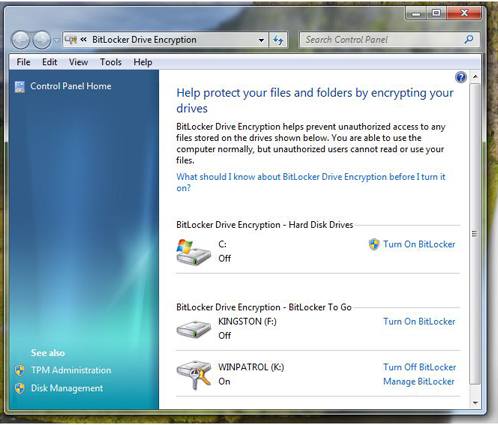
Enter “Bitlocker To Go”. Bitlocker can now be applied to portable storage devices like USB flash drives. This is one of my favorite new features in Windows 7. The use of portable devices to store data has become very common.  It also means misplacing data in public areas happens far to often. You know darn well people working for banks and credit card companies are bringing their work home on thumb drives. Bitlocker To Go makes it less dangerous to all of us.

New Bitlocker in Windows 7 showing flash drives.
Bitlocker now shows and encrypts portable storage media


 User Account Control Options

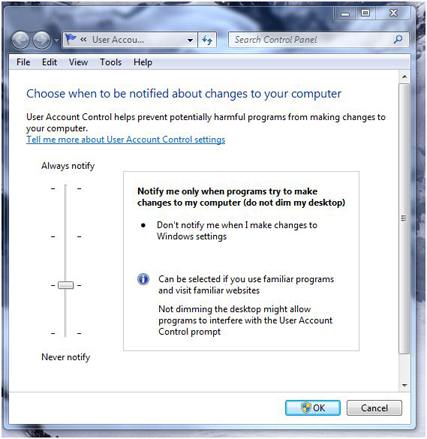
The User Account Control feature now has some options.  You can turn if off completely or choose two middle settings. One of the options removes the annoying black screen that secures the desktop and lets you know the UAC dialog is coming.  I wish this was an option by itself . To disable the black screen on Windows 7 you’ll also need to agree to remove UAC when “I make changes to Windows settings”.  I’m still looking into what Microsoft considers “Windows settings”. Vista users can click here for instructions on how to remove the black UAC screen.

What would really be nice is to come up with a scheme that would keep UAC active but like many firewalls, allow you to mark particular programs or functions as permitted.

New UAC Dialog
New User Account Control options dialog


Smart Cards
Expect to see an increase in the use of Smart Cards in Windows 7.  Smart Card drivers were first introduced in Windows XP SP2 and enhanced in Vista but certification testing and installation wasn’t a simple process.  Windows 7 automatically detects which drivers are needed without any user intervention. Do you have a hard time keeping track of passwords? A smart card may be in your future.

I also expect to see applications using smart cards to combat software piracy. In the 70’s some software was released with little “dongles” that needed to be plugged in for the software to work. The dongles in the old days were easy to get around. Smart cards will require some serious and costly efforts to break when used to prevent illegal software distribution.

What I’d love to see is the ability to use a smart card in combination with User Access Control to give permissions to commonly used programs.


Local Security Policy
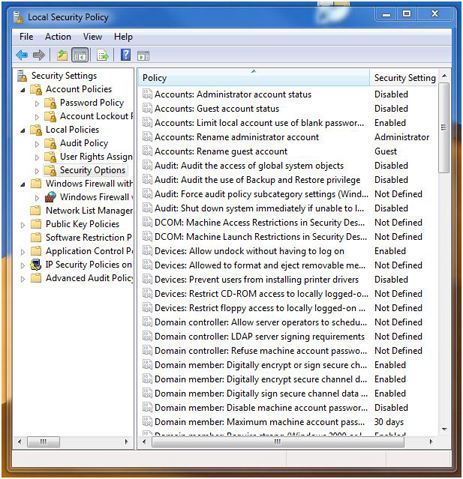
Windows 7 has plenty of security settings available if you’re helping someone else set up their computer. Unfortunately, additional security settings may not be obvious. One applet in need of help is the one used to set Local Security Policy settings. This is a very powerful tool that could really be easier to use. IT managers need to be familiar with this applet. If you’re configuring a home machine for family members knowing more about Security Policy settings is a real plus.  Just like RegEdit, this tool can really get you into trouble if you don’t know what you’re doing.  And like RegEdit, it should receive a major UI overhaul.

Local Policy Settings
Local Security Policy


Action Center

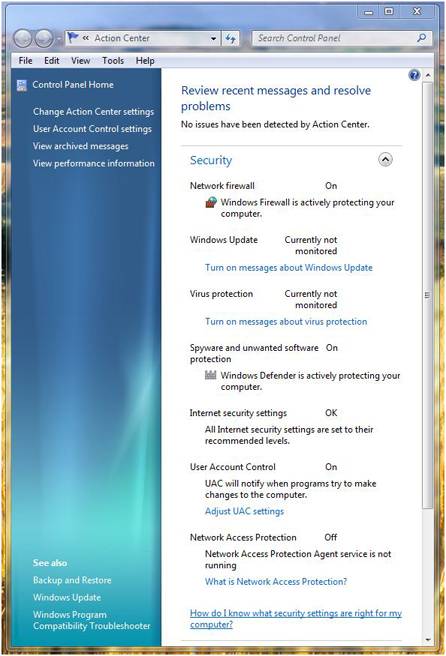
If you’re looking for a friendly interface for security settings you’ll want the “Action Center”.  This single, simple applet gives you access to many of the settings you’ll want to review when using Windows.

Windows 7 Action Center


Conclusion
Microsoft has obviously been listening to users and they know security is a huge problem. I’m sure they’d be happier if they could reduce the calls from infected users. Windows 7 addresses security as much as time and testing has allowed.  Personally, I would have liked to see more improvements in firewall and networking monitoring but they have to leave some functionality to 3rd party solutions.


Most of the security improvements in Windows 7 will never be noticed by users. Improvements in code to prevent buffer overflows, and other vulnerabilities has been a major focus in Redmond. We all hope, Tuesday Security Patch Days will be something we can someday reminisce about.


Read More
Posted in Bitlocker, homeland security, UAC, Windows 7 | No comments

Tuesday, 28 October 2008

Windows 7 Desktop Preview at PDC

Posted on 10:29 by Unknown

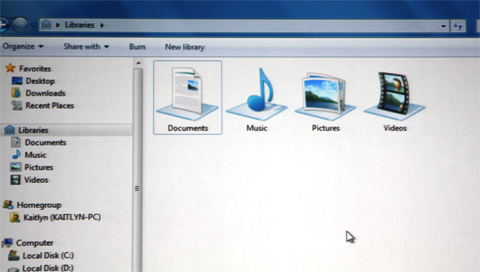
Microsoft let the cat out of the bag today with a semi-public demo of Windows 7. While I not really about Microsoft’s new Windows Azure, Cloud computing, the new Desktop for Windows 7 is promising. Unfortunately, it also means folks will be forced to learn some new terminology and functionality. New “Jump Lists”, “Libraries” are both designed to make it easier to find your documents in your “Home Group”.

New Library based access in Windows 7
New Library based replacement for “My Documents” spans multiple locations.

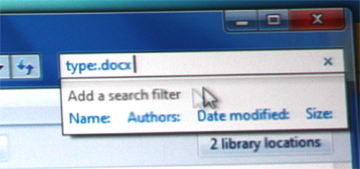
Find your documents easier
Finding and opening documents just got easier.


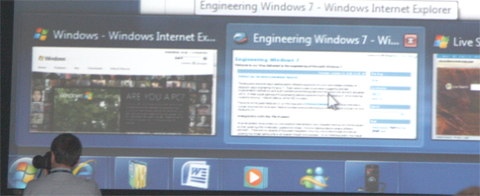
New Windows 7 tasb bar
Windows 7 Task Bar


The new system tray is completely configurable so it’s easier for you to decide which icons are displayed in your notification area. If you don’t like those notifications which slide up, you can decide which ones you want immediately and send others to a log that you can look through when you feel like it.

Windows 7 Device Manager
Windows 7 designed to manage and communicate with more device types.


Microsoft also showed us a new version of Windows Paint and promised upgrades of most of the standard Windows applications like Notepad, WordPad, Calculator, etc… Be prepared for all these applications to use a standard Ribbon Interface just like you love in Office 2007.

If you like multi-touch, Windows 7 has a touch layer that mimics mouse events so you can use a multi-touch interface even if the application isn’t touch aware.


As Marisa Tomei would say... There’s more!
Microsoft has finally found a use for Bitlocker by allowing you to use it on external portable USB drives. This is a must just in case someone else finds your lost thumb drive.

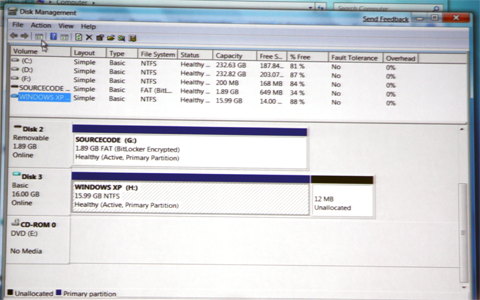
The biggest applause of the day came when it was announced that Virtual Disk Partitioning was native to Windows 7. Developers in particular need to have machines that can run multiple platforms. 


Disk Partitioning


Conclusion
For now Microsoft has succeeded in getting me excited but it wasn’t all the new desktop enhancements. It was their promise to increase speed, responsiveness, and scale, while decreasing memory, Input/Output and power consumption. If they keep this promise we’ll all be upgrading. The official release of Windows 7 isn’t going to be for well over a year so anything is possible. 


Read More
Posted in PDC, Preview, Windows 7 | No comments

Monday, 13 October 2008

Microsoft Professional Developers Conference

Posted on 13:19 by Unknown

If everything goes as planned I’ll be traveling out to Los Angeles later this month for the Microsoft Professional Developers Conference. I’ve attended a number of PDC’s in the past and always had a good time. In the old days Bill Gates would give the keynote address. This year we’ll be double teamed by Ray Ozzie, Amitabh Srivastava, Bob Muglia, David Thompson, Steven Sinofsky, Scott Guthrie, David Treadwell and Rick Rashid.

This is a big chance for Microsoft to get developers excited enough to begin programming for Windows 7. Microsoft says they’ll provide each participant with a 160 GB external hard drive with everything we need to get started. Like many I’ve been disappointed with Vista so I’m really hoping this event will get me engergized.


If I like what I see I may add some Win7 specific features to future WinPatrol versions. At the very least I’ll make sure that Scotty is compatible. I’ve always looked for ways to make WinPatrol fill in the gaps in Windows both in security and other useful functionality. Either way, I’m sure my imagination will be working overtime.


If any of my readers are attending this event be sure to let me know. You’ll recognize me in L.A. my WinPatrol sports shirt.

WinPatrol Sports Shirt.  Click to purchase

and my WinPatrol wrist band.
WinPatrol Wrist band


I’m looking forward to seeing some old friends, meeting some new ones and doing a little California dreamin’. I’ll be bringing a camera, doing screen shots and will report all my findings here on BitsfromBill.com, so stay tuned for more.


Read More
Posted in PDC, Windows 7 | No comments
Older Posts Home
Subscribe to: Posts (Atom)

Popular Posts

Categories

  • 2007
  • 3G
  • AAPL
  • ABC
  • accelerometer
  • Achilles
  • Acrobat
  • Activex
  • adobe
  • Ads
  • advertising
  • Adware
  • Adwords
  • Airlines
  • Albany Medical Center
  • algorithm
  • Amazon
  • amber alert
  • AMUST
  • Animation
  • antimalware
  • Antivirus 2009
  • antivirus2008
  • AOL
  • Apple
  • applets
  • AQuantive
  • archive
  • Aruba
  • ASC
  • Ask.com
  • ATI
  • Audio
  • Autorun
  • AutoUpdate
  • autoupdates
  • AVG
  • Azure
  • backup
  • badware
  • Bakugan
  • Baseball
  • battery
  • Ben Edelman
  • Beta
  • BillP
  • Birthdayware
  • Bitlocker
  • Blackberry
  • BlackViper
  • bloatware
  • Blogger
  • Blogs
  • Blogspot
  • Blu-ray
  • Bluehoo
  • bluetooth
  • boinc
  • Bonjour
  • Brazil
  • break
  • Breakaway games
  • Brookman
  • Browser wars
  • C64
  • camera
  • Carpal Tunnel
  • CBS News
  • cell phone
  • CES
  • charity
  • Child Safety
  • chinese
  • Chris Cook
  • Christmas
  • Chrome
  • CIPAV
  • clampi
  • Cloud
  • CNet
  • codec
  • comodo
  • conficker
  • Control Panel
  • copy
  • coupon
  • craplets
  • crapware
  • Crawford
  • credit
  • credit card
  • credit cards
  • ctfmon
  • daylight savings time
  • Dell
  • demo
  • Discount
  • Disney
  • DNS
  • Dollar
  • Domain
  • Donna
  • Doubleclick
  • Downadup
  • Dreamscene
  • droid
  • DVD
  • Dvorak
  • Easter egg
  • eclipse
  • Ed Bott
  • Edelman
  • egreeting
  • Email
  • Environment
  • Epilepsy
  • EU
  • eWeek
  • explorer
  • facebook
  • false positive
  • false-positive
  • FBI
  • file types
  • finnish
  • FiOS
  • Firefox
  • fireworks
  • fix
  • flash
  • Flashpix
  • Fort Drum
  • foxit
  • fraud
  • FTC
  • games
  • garmin
  • Gateway
  • GE
  • George Bush
  • Germany
  • global
  • Godmode
  • Google
  • Google Research
  • GotoMyPC
  • gps
  • green
  • Groceries
  • Habitat
  • Hacks
  • hallmark
  • Halo
  • hard drive
  • Harry McCracken
  • Harry Potter
  • Harvard
  • HD-DVD
  • help
  • hidden files
  • Hijack
  • History
  • Hiton
  • homeland security
  • Honor Flight
  • hosts
  • Hubble
  • IAC
  • ICANN
  • IE
  • IE6
  • IE7
  • IE8
  • installers
  • interface
  • Internet
  • IPAddress
  • iPhone
  • iPod
  • Iraq
  • iTouch
  • iTunes
  • java
  • Kaspersky
  • Kazaa
  • kenmore
  • key logger
  • keygen
  • Keylogger
  • Kosovo
  • LA
  • lady chalupa
  • langa
  • Laptop
  • lawsuit
  • Legoland
  • Levar Burton
  • Linksys
  • Little League
  • Live Writer
  • Live.com
  • localize
  • Logo
  • London
  • LOP
  • lottery
  • Lucasfilm
  • Macintosh
  • Malware
  • Marie Domingo
  • Mary
  • McCracken
  • Media
  • Memorial Day
  • mgrs.exe
  • Micosoft
  • Microsoft
  • Microsoft Surface
  • MiFi
  • mit
  • moon
  • Mossberg
  • Mothers Day
  • MPack
  • MSFT
  • msn
  • MTV
  • Multicore
  • Music
  • MVP
  • MVP09
  • nasa
  • NBC
  • Nero
  • Netbook
  • Network
  • network solution
  • New York
  • newsletter
  • Nintendo
  • Nintendo Wii
  • NNEDV
  • Norton
  • NYAG
  • OAuth
  • obama
  • Office
  • OLPC
  • Olympics
  • OpenDNS
  • oprah
  • optimize
  • optout
  • Paperghost
  • passwords
  • Patch
  • Patriot Flight
  • PC Guy
  • pc pitstop
  • PC World
  • pcmag
  • PCWorld
  • PDC
  • PDF
  • pedipaws
  • performance
  • phishing
  • photos
  • Photoshop
  • Pinnacle
  • Piracy
  • Pirillo
  • pogue
  • Porn
  • pornware
  • postcard
  • prediction
  • prefetch
  • Preview
  • Price
  • privacy
  • Prodigy
  • Programming
  • PSP
  • Public Relations
  • Pytlovany
  • Q-Link
  • Quicktime
  • quotes
  • radio
  • realnetworks
  • realplayer
  • RegCleaner
  • RegCure
  • regedit
  • Registry
  • registry cleaner
  • Release
  • remove
  • Research
  • return policy
  • review
  • RIAA
  • Rivera
  • RMS
  • Road Runner
  • rogue
  • router
  • RTM
  • Rumor
  • safari
  • safety
  • sale
  • Sales
  • Santa Monica
  • scam
  • Schenectady
  • Scoble
  • Scott Dunn
  • Scotty
  • sd
  • Search
  • Sears
  • Security
  • Services
  • seti
  • ShellExecute
  • Shirt
  • SimCity
  • site advisor
  • slingbox
  • snopes
  • social engineering
  • social network
  • solid state disk
  • Sounds
  • Sp3
  • space station
  • SPAM
  • spamhaus
  • Special
  • speedtest
  • Spyware
  • SSD
  • Startup
  • Stats
  • Steve Bass
  • stopbadware
  • storm
  • STS-125
  • Sugar
  • Sunbelt
  • support
  • Symantec
  • tagged
  • Task Catcher
  • Task Scheduler
  • taskbar
  • Tax
  • Techorati
  • techwatch
  • teens
  • temp
  • Thinkpad
  • Thurrott
  • tinyurl
  • Tips
  • TiVo
  • TLD
  • Today Show
  • Toolbar
  • toolbars
  • top ten
  • topten
  • toys
  • Translator
  • transunion
  • Tree
  • Trend Micro
  • tricks
  • trillian
  • Trojan
  • tweaks
  • twitter
  • UAC
  • UI
  • Ultimate
  • Unbox
  • Unboxed
  • update
  • Updates
  • upgrade
  • url
  • USB
  • Utility
  • Valentine
  • Verizon
  • versions
  • Veteran
  • Video Games
  • Vista
  • Vulnerability
  • wall-e
  • war
  • Washington
  • web2.0
  • Webslice
  • WGA
  • Widget
  • WiFi
  • Wii
  • WiiItis
  • wiimote
  • Win7
  • Windows 7
  • Windows Secrets
  • Windows Update
  • Windows7
  • WinPartrol
  • WinPatrol
  • winpatrolflash
  • WinPatrolToGo
  • Winter
  • Wireless
  • Wristband
  • WSJ
  • WWII
  • x64
  • Xbox
  • XO
  • XO Laptop
  • XOActivity
  • Xobni
  • xolaptop
  • XP
  • XP SP3
  • xp3
  • Yahoo
  • Zero Day
  • Zone Alarm
  • Zwinky

Blog Archive

  • ▼  2013 (31)
    • ▼  November (2)
      • Employee Manual to Prevent Cryptolocker and More
      • My First State-Sponsored Attack
    • ►  October (1)
    • ►  September (1)
    • ►  August (2)
    • ►  July (3)
    • ►  June (5)
    • ►  May (2)
    • ►  April (3)
    • ►  March (2)
    • ►  February (5)
    • ►  January (5)
  • ►  2012 (30)
    • ►  December (3)
    • ►  November (3)
    • ►  October (2)
    • ►  September (2)
    • ►  August (2)
    • ►  July (3)
    • ►  June (2)
    • ►  May (1)
    • ►  April (4)
    • ►  March (4)
    • ►  February (2)
    • ►  January (2)
  • ►  2011 (28)
    • ►  December (4)
    • ►  November (2)
    • ►  October (4)
    • ►  September (2)
    • ►  August (2)
    • ►  July (2)
    • ►  June (2)
    • ►  May (2)
    • ►  April (2)
    • ►  March (2)
    • ►  February (3)
    • ►  January (1)
  • ►  2010 (44)
    • ►  December (2)
    • ►  November (3)
    • ►  October (3)
    • ►  September (4)
    • ►  August (3)
    • ►  July (3)
    • ►  June (3)
    • ►  May (4)
    • ►  April (4)
    • ►  March (3)
    • ►  February (3)
    • ►  January (9)
  • ►  2009 (90)
    • ►  December (6)
    • ►  November (8)
    • ►  October (6)
    • ►  September (4)
    • ►  August (4)
    • ►  July (12)
    • ►  June (6)
    • ►  May (11)
    • ►  April (7)
    • ►  March (9)
    • ►  February (9)
    • ►  January (8)
  • ►  2008 (122)
    • ►  December (9)
    • ►  November (11)
    • ►  October (14)
    • ►  September (6)
    • ►  August (9)
    • ►  July (9)
    • ►  June (10)
    • ►  May (13)
    • ►  April (8)
    • ►  March (10)
    • ►  February (10)
    • ►  January (13)
  • ►  2007 (155)
    • ►  December (15)
    • ►  November (14)
    • ►  October (12)
    • ►  September (14)
    • ►  August (12)
    • ►  July (13)
    • ►  June (11)
    • ►  May (19)
    • ►  April (17)
    • ►  March (21)
    • ►  February (7)
Powered by Blogger.

About Me

Unknown
View my complete profile