Billps Tudios

  • Subscribe to our RSS feed.
  • Twitter
  • StumbleUpon
  • Reddit
  • Facebook
  • Digg
Showing posts with label optimize. Show all posts

Monday, 12 October 2009

Faster Startup with Windows Prefetch

Posted on 07:39 by Unknown

Earlier this month I had a huge reaction to my post about cleaning up the Windows “Temporary Internet Folder”. Comments from readers provided many other great tips but there was some confusion over one of my major points. Even if you don’t use the stand alone Internet Explorer browser, other components of Windows use this folder so if you missed this post check it out.

See: Free #1 Tweak to Improve Windows Performance

A few people also mentioned the Windows Prefetch folder. Prefetch is a pretty cool feature that started with Windows XP, was improved in Vista and even more optimized in Windows 7. There are two primary functions provided by the Prefetch system both designed to speed up your boot and recover time.


prefetch


The first methodology used by Prefetch is to tell Widows which programs or code segments are commonly used at startup by multiple programs or processes. Instead of the having Windows load the same code segment multiple times, it’s loaded once and available for all the programs who use it.

The second focus of Prefetch is to help the disk layout of programs which are commonly loaded at startup. Window keeps track of commonly loaded programs and will check how these programs are stored on your hard drive or other storage device. If needed, the disk will be de-fragmented and organized during idle time so that the programs are easily accessible at boot time. This information is stored in a text file layout.ini found in the prefetch folder.

layout


Other memory optimization information is stored here and used by Windows to decide which code segment should be in active memory and what can be cached. Under Windows XP, many background programs like virus scanners which aren’t common startup programs may get more attention than they deserve. While it’s been fixed starting with Vista, it can still be a problem under Windows XP. If this becomes a problem the solution is a simple reboot. There has always been the controversy over keeping your computer on over night or to reboot each day. I now recommend occasional rebooting which will also help refresh the Prefetch information.

The Prefetch folder is another good reason to keep your list of auto startup programs to a minimum. Using programs like WinPatrol can clean up which programs are auto started and thus stored in Prefetch. Adding WinPatrol PLUS will help you decide which programs are really required.

Delete Prefetch Files?
A lot of tipsters advocate going into the Prefetch folder and deleting the files so it can start with new information. I’ve been playing with this and while I haven’t seen any difference, I don’t see this causing any harm. The next few times you reboot it might take a little longer but that’s expected. I have determined that Windows does do some garbage collection on its own and limits the number of .pf files in this folder to 128 or less.

Microsoft will pay you to forward this Email.
If you believe this one I have another myth for you. An online tip I’ve seen recommends modifying the registry value used by the prefetch mechanism.
HKLM\SYSTEM\CurrentControlSet\Control\Session Manager\Memory Management\PrefetchParameters

There are four values used here by Windows.
0 – Disable Prefetch
1 – Use Application Launch Prefetch only
2 – Default Boot Prefetch
3 – Maximum Prefetch

If you read that you can use a value higher than 3 don’t believe it. I’ve heard from people who swear they see faster performance but there’s no technology to back up the claims.

I’ll be doing some more research on how prefetch, SuperFetch and other memory optimization is done in Windows 7 but for now I recommend just letting Windows do its thing.
Read More
Posted in optimize, prefetch, Win7 | No comments

Wednesday, 7 November 2007

My Verizon FiOS is Speedy

Posted on 19:31 by Unknown

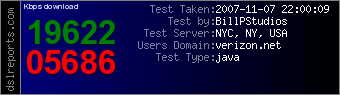
Early this week I wrote about my switch from Time Warner Road Runner to Verizon FiOS. The Verizon installer was here all day and then I spent the next couple days fine tuning my computer to finally obtain the full benefits of the advertised 20 Mbps download and 5 Mbps upload.

I’m spending a long weekend in Portland so I thought I’d give everyone an update before I flew across the country.


Ta-Da!

I wish I could point to a single example of what I changed to double my download speed but it required a couple applications to do the job.

Our friends at PC Pitstop have a cool little app called PC Pitstop Optimize. This application allowed me to do a lot more than the optimize program provided by Verizon. Even better, it actually told me what it was changing so I could decide for myself if I wanted to make the change.

I also used WinPatrol PLUS to review many of Windows Services which were set to Automatically start even though I had no interest in using their associated product on a regular basis. I certainly didn’t need six services running just to phone home to check for autoupdates. WinPatrol allowed me to set some Windows Services to Disabled or Manual and I immediately noticed that more memory and resources were available.

I’m still not ready to give my full blessing to Verizon FiOS but I’m really happy with my new found speed. Stay tuned for more FiOS details as I discover them.


Read More
Posted in FiOS, optimize, pc pitstop, speedtest | No comments
Older Posts Home
Subscribe to: Posts (Atom)

Popular Posts

  • Support for Downloads without Surprises
    Last week I posted a message about the  packaging of ad supported programs along with popular software. It appears to be a common practice t...
  • Employee Manual to Prevent Cryptolocker and More
    A common way computers are infected or compromised has always been a simple yet well thought out deception. It can happen to anyone and the ...
  • What on Earth is “Cloud” Computing
    The new big buzz word in the computing world is “Cloud” computing. In the past I’ve been critical of the concept and even poked fun at Cloud...
  • SQLite C Code to Read Cookies
    While most of the technology leaking from my brain is for a wide audience, today’s post is very technical in nature. I expected the informat...
  • WinPatrol Cloud Edition Public Beta
    WinPatrol Adds the Newest Technology Available. You’ll now have access the knowledge of thousands of WinPatrol users shared in real-tim...
  • Four Secret Reasons Why Win7 is Ten Times Better
    It’s no secret that I’ve never been a fan of Windows Vista. I really wanted to love it but even as a designated Microsoft MVP I couldn’t dri...
  • Free #1 Tweak to Improve Windows Performance
    Every year billions of dollars are spent by folks just trying to improve the performance of their computers. Over the last couple years ther...
  • Forget the DVD & Save on your New Laptop
    I’ve written before about the coming death of the CD/DVD ’s for data storage.  While that time hasn’t come yet for desktop there is one real...
  • Can Facebook be Trusted?
    Last week Facebook rolled out another round of what they consider easy to use privacy settings. What they’re really doing is trying to appea...
  • TWITTER ALERT
    Anyone who uses Twitter, DO NOT use the Twitter web interface until further notice. There is a code injection vulnerability being used tha...

Categories

  • 2007
  • 3G
  • AAPL
  • ABC
  • accelerometer
  • Achilles
  • Acrobat
  • Activex
  • adobe
  • Ads
  • advertising
  • Adware
  • Adwords
  • Airlines
  • Albany Medical Center
  • algorithm
  • Amazon
  • amber alert
  • AMUST
  • Animation
  • antimalware
  • Antivirus 2009
  • antivirus2008
  • AOL
  • Apple
  • applets
  • AQuantive
  • archive
  • Aruba
  • ASC
  • Ask.com
  • ATI
  • Audio
  • Autorun
  • AutoUpdate
  • autoupdates
  • AVG
  • Azure
  • backup
  • badware
  • Bakugan
  • Baseball
  • battery
  • Ben Edelman
  • Beta
  • BillP
  • Birthdayware
  • Bitlocker
  • Blackberry
  • BlackViper
  • bloatware
  • Blogger
  • Blogs
  • Blogspot
  • Blu-ray
  • Bluehoo
  • bluetooth
  • boinc
  • Bonjour
  • Brazil
  • break
  • Breakaway games
  • Brookman
  • Browser wars
  • C64
  • camera
  • Carpal Tunnel
  • CBS News
  • cell phone
  • CES
  • charity
  • Child Safety
  • chinese
  • Chris Cook
  • Christmas
  • Chrome
  • CIPAV
  • clampi
  • Cloud
  • CNet
  • codec
  • comodo
  • conficker
  • Control Panel
  • copy
  • coupon
  • craplets
  • crapware
  • Crawford
  • credit
  • credit card
  • credit cards
  • ctfmon
  • daylight savings time
  • Dell
  • demo
  • Discount
  • Disney
  • DNS
  • Dollar
  • Domain
  • Donna
  • Doubleclick
  • Downadup
  • Dreamscene
  • droid
  • DVD
  • Dvorak
  • Easter egg
  • eclipse
  • Ed Bott
  • Edelman
  • egreeting
  • Email
  • Environment
  • Epilepsy
  • EU
  • eWeek
  • explorer
  • facebook
  • false positive
  • false-positive
  • FBI
  • file types
  • finnish
  • FiOS
  • Firefox
  • fireworks
  • fix
  • flash
  • Flashpix
  • Fort Drum
  • foxit
  • fraud
  • FTC
  • games
  • garmin
  • Gateway
  • GE
  • George Bush
  • Germany
  • global
  • Godmode
  • Google
  • Google Research
  • GotoMyPC
  • gps
  • green
  • Groceries
  • Habitat
  • Hacks
  • hallmark
  • Halo
  • hard drive
  • Harry McCracken
  • Harry Potter
  • Harvard
  • HD-DVD
  • help
  • hidden files
  • Hijack
  • History
  • Hiton
  • homeland security
  • Honor Flight
  • hosts
  • Hubble
  • IAC
  • ICANN
  • IE
  • IE6
  • IE7
  • IE8
  • installers
  • interface
  • Internet
  • IPAddress
  • iPhone
  • iPod
  • Iraq
  • iTouch
  • iTunes
  • java
  • Kaspersky
  • Kazaa
  • kenmore
  • key logger
  • keygen
  • Keylogger
  • Kosovo
  • LA
  • lady chalupa
  • langa
  • Laptop
  • lawsuit
  • Legoland
  • Levar Burton
  • Linksys
  • Little League
  • Live Writer
  • Live.com
  • localize
  • Logo
  • London
  • LOP
  • lottery
  • Lucasfilm
  • Macintosh
  • Malware
  • Marie Domingo
  • Mary
  • McCracken
  • Media
  • Memorial Day
  • mgrs.exe
  • Micosoft
  • Microsoft
  • Microsoft Surface
  • MiFi
  • mit
  • moon
  • Mossberg
  • Mothers Day
  • MPack
  • MSFT
  • msn
  • MTV
  • Multicore
  • Music
  • MVP
  • MVP09
  • nasa
  • NBC
  • Nero
  • Netbook
  • Network
  • network solution
  • New York
  • newsletter
  • Nintendo
  • Nintendo Wii
  • NNEDV
  • Norton
  • NYAG
  • OAuth
  • obama
  • Office
  • OLPC
  • Olympics
  • OpenDNS
  • oprah
  • optimize
  • optout
  • Paperghost
  • passwords
  • Patch
  • Patriot Flight
  • PC Guy
  • pc pitstop
  • PC World
  • pcmag
  • PCWorld
  • PDC
  • PDF
  • pedipaws
  • performance
  • phishing
  • photos
  • Photoshop
  • Pinnacle
  • Piracy
  • Pirillo
  • pogue
  • Porn
  • pornware
  • postcard
  • prediction
  • prefetch
  • Preview
  • Price
  • privacy
  • Prodigy
  • Programming
  • PSP
  • Public Relations
  • Pytlovany
  • Q-Link
  • Quicktime
  • quotes
  • radio
  • realnetworks
  • realplayer
  • RegCleaner
  • RegCure
  • regedit
  • Registry
  • registry cleaner
  • Release
  • remove
  • Research
  • return policy
  • review
  • RIAA
  • Rivera
  • RMS
  • Road Runner
  • rogue
  • router
  • RTM
  • Rumor
  • safari
  • safety
  • sale
  • Sales
  • Santa Monica
  • scam
  • Schenectady
  • Scoble
  • Scott Dunn
  • Scotty
  • sd
  • Search
  • Sears
  • Security
  • Services
  • seti
  • ShellExecute
  • Shirt
  • SimCity
  • site advisor
  • slingbox
  • snopes
  • social engineering
  • social network
  • solid state disk
  • Sounds
  • Sp3
  • space station
  • SPAM
  • spamhaus
  • Special
  • speedtest
  • Spyware
  • SSD
  • Startup
  • Stats
  • Steve Bass
  • stopbadware
  • storm
  • STS-125
  • Sugar
  • Sunbelt
  • support
  • Symantec
  • tagged
  • Task Catcher
  • Task Scheduler
  • taskbar
  • Tax
  • Techorati
  • techwatch
  • teens
  • temp
  • Thinkpad
  • Thurrott
  • tinyurl
  • Tips
  • TiVo
  • TLD
  • Today Show
  • Toolbar
  • toolbars
  • top ten
  • topten
  • toys
  • Translator
  • transunion
  • Tree
  • Trend Micro
  • tricks
  • trillian
  • Trojan
  • tweaks
  • twitter
  • UAC
  • UI
  • Ultimate
  • Unbox
  • Unboxed
  • update
  • Updates
  • upgrade
  • url
  • USB
  • Utility
  • Valentine
  • Verizon
  • versions
  • Veteran
  • Video Games
  • Vista
  • Vulnerability
  • wall-e
  • war
  • Washington
  • web2.0
  • Webslice
  • WGA
  • Widget
  • WiFi
  • Wii
  • WiiItis
  • wiimote
  • Win7
  • Windows 7
  • Windows Secrets
  • Windows Update
  • Windows7
  • WinPartrol
  • WinPatrol
  • winpatrolflash
  • WinPatrolToGo
  • Winter
  • Wireless
  • Wristband
  • WSJ
  • WWII
  • x64
  • Xbox
  • XO
  • XO Laptop
  • XOActivity
  • Xobni
  • xolaptop
  • XP
  • XP SP3
  • xp3
  • Yahoo
  • Zero Day
  • Zone Alarm
  • Zwinky

Blog Archive

  • ▼  2013 (31)
    • ▼  November (2)
      • Employee Manual to Prevent Cryptolocker and More
      • My First State-Sponsored Attack
    • ►  October (1)
    • ►  September (1)
    • ►  August (2)
    • ►  July (3)
    • ►  June (5)
    • ►  May (2)
    • ►  April (3)
    • ►  March (2)
    • ►  February (5)
    • ►  January (5)
  • ►  2012 (30)
    • ►  December (3)
    • ►  November (3)
    • ►  October (2)
    • ►  September (2)
    • ►  August (2)
    • ►  July (3)
    • ►  June (2)
    • ►  May (1)
    • ►  April (4)
    • ►  March (4)
    • ►  February (2)
    • ►  January (2)
  • ►  2011 (28)
    • ►  December (4)
    • ►  November (2)
    • ►  October (4)
    • ►  September (2)
    • ►  August (2)
    • ►  July (2)
    • ►  June (2)
    • ►  May (2)
    • ►  April (2)
    • ►  March (2)
    • ►  February (3)
    • ►  January (1)
  • ►  2010 (44)
    • ►  December (2)
    • ►  November (3)
    • ►  October (3)
    • ►  September (4)
    • ►  August (3)
    • ►  July (3)
    • ►  June (3)
    • ►  May (4)
    • ►  April (4)
    • ►  March (3)
    • ►  February (3)
    • ►  January (9)
  • ►  2009 (90)
    • ►  December (6)
    • ►  November (8)
    • ►  October (6)
    • ►  September (4)
    • ►  August (4)
    • ►  July (12)
    • ►  June (6)
    • ►  May (11)
    • ►  April (7)
    • ►  March (9)
    • ►  February (9)
    • ►  January (8)
  • ►  2008 (122)
    • ►  December (9)
    • ►  November (11)
    • ►  October (14)
    • ►  September (6)
    • ►  August (9)
    • ►  July (9)
    • ►  June (10)
    • ►  May (13)
    • ►  April (8)
    • ►  March (10)
    • ►  February (10)
    • ►  January (13)
  • ►  2007 (155)
    • ►  December (15)
    • ►  November (14)
    • ►  October (12)
    • ►  September (14)
    • ►  August (12)
    • ►  July (13)
    • ►  June (11)
    • ►  May (19)
    • ►  April (17)
    • ►  March (21)
    • ►  February (7)
Powered by Blogger.

About Me

Unknown
View my complete profile