


Early this week I wrote about my switch from Time Warner Road Runner to Verizon FiOS. The Verizon installer was here all day and then I spent the next couple days fine tuning my computer to finally obtain the full benefits of the advertised 20 Mbps download and 5 Mbps upload.
I’m spending a long weekend in Portland so I thought I’d give everyone an update before I flew across the country.
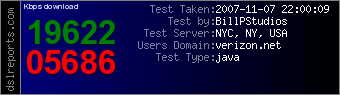
Ta-Da!
I wish I could point to a single example of what I changed to double my download speed but it required a couple applications to do the job.
Our friends at PC Pitstop have a cool little app called PC Pitstop Optimize. This application allowed me to do a lot more than the optimize program provided by Verizon. Even better, it actually told me what it was changing so I could decide for myself if I wanted to make the change.
I also used WinPatrol PLUS to review many of Windows Services which were set to Automatically start even though I had no interest in using their associated product on a regular basis. I certainly didn’t need six services running just to phone home to check for autoupdates. WinPatrol allowed me to set some Windows Services to Disabled or Manual and I immediately noticed that more memory and resources were available.
I’m still not ready to give my full blessing to Verizon FiOS but I’m really happy with my new found speed. Stay tuned for more FiOS details as I discover them.


0 comments:
Post a Comment