


Disabling normal Startup/AutoRun Programs can really speed up your system. Picking and choosing some programs that aren’t needed to run all the time is a straight forward decision. Versions of Windows based on NT technology like XP and Vista include programs called “Windows Services”. These programs may also be set to run on bootup or automatically when other programs launch. Deciding what Services can be disabled or set to manual may not always be obvious.
Many of the services from Microsoft are integral parts of the Windows operating system. Some services that may not sound needed could be required by other Microsoft services. Some Services that don’t seem necessary today could be expected by new software or hardware components that you add in the future.
Bill Detwiler at Tech Republic has created a list of common Windows Services and included recommendations for which services can be disabled. The six page white paper also includes suggested settings along with special considerations. If you really like the minimum programs running on your system check it out by clicking here. (update: Registration is required)
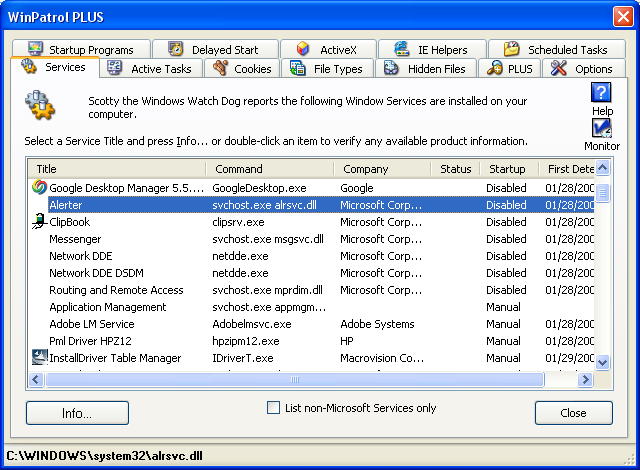
Services Tab using WinPatrol
When I first added the Services tab to WinPatrol there were very few non-Microsoft service components. Now, many new programs include one or more Services. You’ll find many of the autoupdate programs these days are Services. The options for services are Automatic, Manual and Disable. When I’m not sure if something can be Disabled, I’ll set it to manual so it’s still available when needed but won’t run on boot up.
Update 03/16: Some comments have been left with tips on other sites that provide information on Windows Services.
Black Viper: http://www.blackviper.com/WinXP/servicecfg.htm
Speedy Vista: http://www.speedyvista.com/services.html


0 comments:
Post a Comment