Microsoft said the cost for cloud computing with Windows Azure would be “competitive”.



Microsoft let the cat out of the bag today with a semi-public demo of Windows 7. While I not really about Microsoft’s new Windows Azure, Cloud computing, the new Desktop for Windows 7 is promising. Unfortunately, it also means folks will be forced to learn some new terminology and functionality. New “Jump Lists”, “Libraries” are both designed to make it easier to find your documents in your “Home Group”.
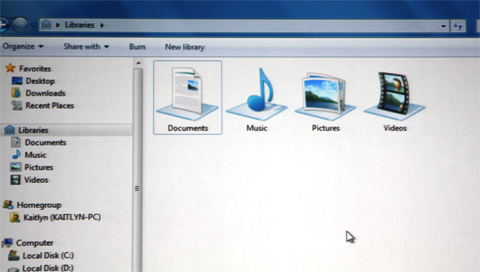
New Library based replacement for “My Documents” spans multiple locations.
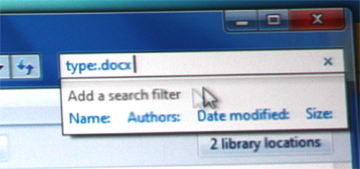
Finding and opening documents just got easier.
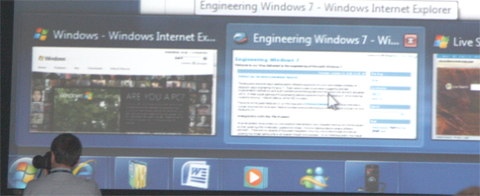
Windows 7 Task Bar
The new system tray is completely configurable so it’s easier for you to decide which icons are displayed in your notification area. If you don’t like those notifications which slide up, you can decide which ones you want immediately and send others to a log that you can look through when you feel like it.
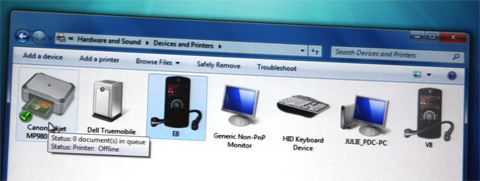
Windows 7 designed to manage and communicate with more device types.
Microsoft also showed us a new version of Windows Paint and promised upgrades of most of the standard Windows applications like Notepad, WordPad, Calculator, etc… Be prepared for all these applications to use a standard Ribbon Interface just like you love in Office 2007.
If you like multi-touch, Windows 7 has a touch layer that mimics mouse events so you can use a multi-touch interface even if the application isn’t touch aware.
As Marisa Tomei would say... There’s more!
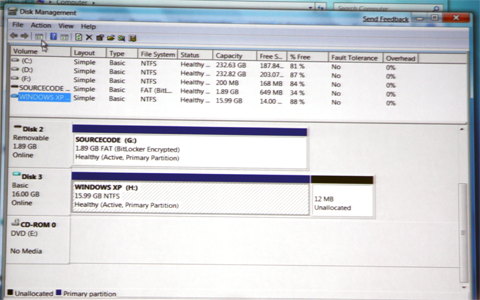
Microsoft has finally found a use for Bitlocker by allowing you to use it on external portable USB drives. This is a must just in case someone else finds your lost thumb drive.
The biggest applause of the day came when it was announced that Virtual Disk Partitioning was native to Windows 7. Developers in particular need to have machines that can run multiple platforms.
Conclusion
For now Microsoft has succeeded in getting me excited but it wasn’t all the new desktop enhancements. It was their promise to increase speed, responsiveness, and scale, while decreasing memory, Input/Output and power consumption. If they keep this promise we’ll all be upgrading. The official release of Windows 7 isn’t going to be for well over a year so anything is possible.
I’m happy to report I’ve left the cold rainy northeast to bask in the warm sun of southern California. This year Microsoft is releasing the first large scale alpha of what they call Windows 7 at the Professional Developers Conference this week. They’re trying to get everyone as excited about this event as Steve Jobs does for his new Apple product announcements.
I’m really hoping that Microsoft will excite me more than they have with Vista but I’m not easy. There will be plenty of sites reporting on this event so I’ll try my best to provide my own little twisted view of what I learn.
While I had hoped they would give me my copy of Windows 7 today, they’re saving Windows 7 specific stuff until Tuesday. Today is all about “Cloud Computing” and the new Microsoft service called “Windows Azure”. We even learned how to create programs today that will run on the Microsoft cloud server.
That’s right, all the code that we create would run on a Microsoft owned server. I’ll bet that makes you feel all warm and fuzzy right? Naturally, the Cloud Computing investment also relies on your local provider to keep you productive. According to Microsoft, pricing for hosting applications on Azure would be “competitive”.
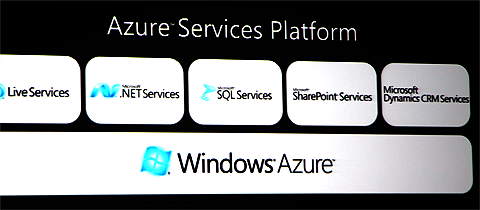
They say one advantage of Azure is scalability. Not only will applications be designed to be available for your Windows 7 based machine but will be mobile accessible as well. We already learned how to create a “Hello Cloud” application. Microsoft showed an existing demo of something called BlueHoo with the obligatory cute representations of the people around you.
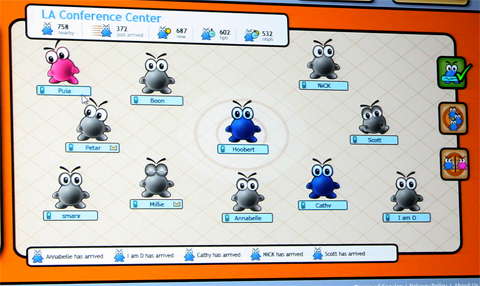
Boys are blue, Girls are red, and grey I guess if you’re not sure.
I’ll have more to write tomorrow about Windows 7 from my point of view. I’ve already had a sneak peek but can’t blog about it yet. You can however get an early fix (wink wink) from Mary-Jo Foley at http://blogs.zdnet.com/microsoft/?p=1667.


Night One while at the Microsoft Professional Developers Conference
I have to admit, the folks here at the Santa Monica Doubletree Guest Suites made sure I had a room with a great view. I took this photo last night. Once the sun goes down the Ferris wheel puts on a light show that can only be described as “trippy”.
So far my only problem has been with the alarm clock in my room. I’m running an hour behind because the smart alarm clocks here thought that today was the start of Daylight Savings and fell back over the night. I learned of this problem with a note under my door.
Dear Valued Guest,
Please be aware in room alarm clocks are not correct due to previous programming for day light savings time. Actual time is one hour ahead. We apologize for any inconvenience this may cause you. Should you have any questions or concerns please do not hesitate to call our CARE line by dialing extension 7.
Hospitality Yours,
Hotel Management Team
If you’re a regular BitsFromBill.com reader you know how I feel about the concept of auto updating software. I hate autoupdate programs from Apple, Google and Adobe.
Occasionally, the bad guys learn about a vulnerability and are quick to deploy dangerous attacks designed to take advantage newly discovered security holes. When this happens installing an update to protect yourself is worth any risk of updated code.
Today is one of those days. Yesterday Microsoft released security bulletin MS08–067 Vulernability in Server Service Could Allow Remove Code Execution. You might be thinking, “But I have a laptop, not a server”. Well, technically you do have a server and even your laptop is exposed if you’re connected to the internet.
So far the reported attacks seem to be targeted but it won’t be long before internet bots are scanning all IP address for this vulnerability. Microsoft has been a little vague only giving specific details to security providers. This attack can bypass firewalls and users don’t have to visit any webpages to become infected. I’ve read enough to suggest this security patch is a special exception.
So, I don’t know if this update could cause problems but I’ve updated my machines and I recommend you do the same.
http://update.microsoft.com/windowsupdate/v6/default.aspx
 I haven’t posted this week since I’ve been getting ready for a trip out to this years Microsoft Professional Developers Conference.
I’m looking forward to seeing some old friends and meeting some new ones. I’m bringing along a couple dozen 1 GB WinPatrol Flash wristbands so if you spot me please say hello and introduce yourself.
The first 20 people who ask will receive a free 1 GB WinPatrol Flash wristband.
While I expect to be wearing our popular WinPatrol PLUS sports shirts I can also be identified with my always present BillP smile.

Bill Pytlovany working hard at BillP Studios home office.
(Photo courtesy of Temerc)
I’ll be reporting live from L.A. so expect some Windows 7 and other news in this blog next week. Microsoft is trying hard to get the kind of coverage you typically see with Apple events. The keynote speeches will be streamed live and number of “All-Star” bloggers have joined together to cover the event. Click for more info.
It’s no secret that I’ve been disappointed with the current version of Windows known as Vista. I really wanted to love Vista but it just never happen. I’m skipping Vista and hoping that Microsoft will get me excited about Windows 7. I’m so hopeful that I’ll be attending this years Professional Developers Conference and will start playing with the newest version next month.
Today I caught an article that described changes in the Windows development process that sound very promising. Last year, I connected with Larry Osterman, a long time developer at Microsoft who helped me find a compatibility problem with WinPatrol in Vista. Larry went out of his way, working into the night to help debug the problem and became one of my heroes in Redmond. Larry is busy working on Windows 7 but took the time to post an article describing how the development process has improved.
ENGINEERING 7: A VIEW FROM THE BOTTOM
“… the test team was brought into the planning process very early on, the test team provided valuable input and we were able to ensure that we built features that were not only code complete but also test complete by the end of the milestone (something that didn’t always happen in Vista). And it ensured that the features we built were actually testable (it sounds stupid I know, but you’d be surprised at how hard it can be to test some features).”
Larry also hints that some features may not make the final version but any that do will be solid.
“A feature is not permitted to be checked into the winmain branch until it is complete. And I do mean complete: the feature has to be capable of being shipped before it hits winmain – the UI has to be finished, the feature has to be fully functional, etc.”
So from an engineering stand point is sounds like Microsoft really has it together. This sounds more like the habits I learned from my mentor when I worked for Microsoft.
I would love to see a similar article that describes how new user experience issues are adopted. Some of my disdain for Vista came from changes in how to accomplish simple tasks. In a support role, providing help to others is much easier when the steps are consistent. Vista made some major changes and hopefully we all won’t have to start all over again with Windows 7.
Larry will be speaking at the Professional Developers Conference so I’m looking forward to thanking him in person for both his help and for getting me excited about Windows 7.