Billps Tudios

  • Subscribe to our RSS feed.
  • Twitter
  • StumbleUpon
  • Reddit
  • Facebook
  • Digg

Thursday, 16 August 2012

What You Need to Know About Windows 8

Posted on 14:26 by Unknown

This week Windows 8 passed a major milestone and the final version was made available to many of those responsible for its future.  Most everything you’ll read will  be debating the radical new interface formerly called “metro”. The real impact of Windows 8 is so much larger.  The difference for consumers goes way beyond flat tiles, a missing Start button or a touch screen interface.


startexample
Window 8 Preview Version


Most of my readers know I never was a fan of the 64 bit version of Windows. As I wrote last year, “64-bit Windows is Here, Like it or Not”, continues to be true. As a developer, the changes created quite a learning curve and many hours of programming, testing and customer support.

When first released many users stayed away from 64-bit Windows because it didn’t support some of their old programs or devices. If you purchase a new desktop or laptop today it’s unlikely you’ll even have a choice. Well, the change to 64-bit Windows is nothing compared to what’s coming with Windows 8.


Windows x86/64 or Windows ARM

When the time comes to purchase a Windows 8 system you’ll want to know the kind of processor is used.

Windows PC laptops and desktop computers generally have processors from Intel or AMD that use the x86\64 based instruction set.  Smart phones, tablets, camera’s and many other new devices use chips with a completely new instruction set called ARM.  The major advantage of the ARM design is that is uses far less power than traditional processors and can be built into smaller spaces with less heat.

ARM-Logo-ProductPicture

No single company makes the chips using the ARM instruction set, but the specification is owned and licensed by ARM Holding, based in Cambridge, UK. It’s based on the idea of “Reduced Instruction Set Computing” or RISC. The ARM design and instruction set was originally developed by the Acorn Computer Group in 1985 as “Acorn RISC Machines”. 

ARM now known as “Advanced RISC Machines” was created in 1990 as a collaboration of Acorn, Apple and VLSI Technology. The Apple Newton PDA was based on ARM technology.  ARM chips for Windows have been announced from NVidia, Qualcomm and Texas Instruments.

Microsoft’s plan is the release a separate “Windows on ARM” (WOA) now called “Windows RT” so companies can create tablets for Windows that will be smaller, use less power and take advantage of other features that may only be possible on an ARM based device.  This has been a huge development project for Microsoft and this week they made Visual Studios 2012 available allowing developers to create both x86/64 and ARM based Apps.

Which Windows are you Buying?
Consumers need to know if they are buying a tablet or convertible laptop with Windows RT using an ARM processor or a traditional system running on an Intel or AMD processor. A Windows RT machine will only run programs specifically created for ARM processors. Even programs from Microsoft will be limited.  On release you’ll find Internet Explorer but for Office users you’ll be limited to Word, Excel, PowerPoint and OneNote.  It makes my changes for 64-bit Windows look like a stroll in the park.

The good news, Microsoft has provided plenty of options with respect to programming languages. The bad news, how a program communicates with Windows is brand new. Developers won’t be able to just recompiled their current applications.  New Windows RT apps will need to be designed for the new Windows 8 interface. Just like programs for an iPhone/iPad or Android device, new Apps will only be available from the Microsoft Store.

At this time I can’t advise readers on when they should feel comfortable making the purchase of an ARM only based Windows machine.  I suspect many of us will continue to use our traditional PC’s while the tablet market grows. If the price is right, many of us will pick up an ARM based Windows tablet or convertible laptop for a variety of reasons.

The change to ARM based code is a major risk for Microsoft and indicates a major direction for the leader of the computer industry. History will show if this is bold leadership or a desperate move to compete with the expansion of the smart phone/tablet industry.


I’m Optimistic
Ultimately, like it or not, what we call a computer is changing. I have a personal interest in programming in ARM assembly code and will be expanding my security research to new WindowsRT tablets. The reduced instruction set reminds me of my start in the PC market when I programmed Commodores and the Apple II using the 6502 chip.
globalfoundries_logo_web


The economy of my upstate NY neighbors may also depend on the success of a new GlobalFoundries chip plant which has invested heavily in the ARM chip design. The success of ARM based devices could directly impact my local taxes.


I’ll continue to write more so stop by again, especially before you purchase a device that says it comes with “Windows 8”.

Update from Bloomberg: David Schmoock, head of Lenovo North America says Windows RT systems using ARM chips will sell for $200-$300 less. Schmoock predicts Windows RT will be a good consumer box while corporations will stay with Intel based Windows 8 for compatibility.

Read More
Posted in | No comments

Monday, 30 July 2012

How America Online Created the Internet

Posted on 11:33 by Unknown

Last week Gordon Crovitz created a hornets nest of debate with an article in the Wall Street Journal, “Who Really Invented the Internet?”  This new article has generated more responses and distortions than Al Gore’s interview with Wolf Blitzer on March 9th, 1999 when he said, “I took the initiative in creating the Internet.”

The goal of the WSJ article seems to downplay the governments’ role in developing technology that helped generate successful Internet businesses. What appeared to be a tech article turns out to be a political piece.

Mr. Crovitz would instead give full credit to Xerox PARC labs for their creation of Ethernet. He even managed to weave Steve Jobs into his story acknowledging Jobs saw potential in Xerox which included the graphical user interface he would later use at Apple.

I’ve read a number of articles which rebut the Journal and most mention Vinton Cerf and Robert Kahn who created TCP/IP while working on the government project called ARPANET. Ironically, many articles neglected to mention Sir Tim Berners-Lee who was honored during the Olympic Opening Ceremonies. NBC’s lack of info had everyone scrambling to search his contribution in creating a web standards group. Sir Tim documented application protocols and gets credit for HTTP, HTML and the URL format used to define hyperlinks. HTML is actually derived from SGML a mark-up language that itself resulted in early research by IBM.

In fact, most of the fame given to Internet pioneers is related to the technical networks and “protocols” used to transfer or present data in a meaningful, standard way.

So when I claim that AOL, who used a proprietary communication protocol(P3) and a display convention(FDO) optimized for 300 baud modem traffic, created the Internet, I’m going to make some heads spin

Critical Mass is defined as “an amount necessary or sufficient to have a significant effect or to achieve a result.”  What the Wall Street Journal and most tech historians ignore is the Internet, as we know it, would not have been possible without the millions of users instantly provided by America Online. The cost of hosting any website would not have been possible without a critical mass of customers to make it possible. Without AOL’s efforts to integrate and commercialize the Internet nobody would be spending money on your favorite website.

z28
While I had left my lead development position in 1991, I stayed involved as a consultant to AOL and many of its partners. My initial consulting project for Capital Cites/ABC was building automated tools so they could easily upload content to build their AOL areas. The executive leadership at ABC (pre-Disney) openly acknowledged they weren’t expecting to profit by being online. Companies did see a future being online but many households still thought using a modem was for hacking into government computers. An presence online was still a research experiment for most enterprises. 

During the early 90’s my replacement at AOL, who had inherited my FDO language, convinced me that HTML would allow partners to use standard tools and modem speeds could now support it. America Online clearly knew the future was in the acceptance of Internet standards to provide even more content for their members.

Thanks to the archiving of AOL Press Releases by Time Magazine’s, editor at large, Harry McCracken, I was able to find some of the evidence that helps prove my point. Source: A History of AOL, as Told in Its Own Press Releases

qanimateYou may think AOL’s devious plan to create a critical mass of people online was the massive distribution of CD’s. Even when AOL’s Commodore service Q-Link was only available after 6 PM, it was obvious that online growth depended on modem availability. For years, AOL urged computer makers to include a modem as standard equipment. In 1990 AOL negotiated a deal with IBM to develop a service called Promenade to be installed on their PS/1 computers along with its own Prodigy experiment. Once IBM provided modems as standard equipment the industry had to follow. Thanks to AOL, all new computer owners had the ability to connect to an easy to use service without knowing of about duplexes, stop bits or parity. If not for the critical mass of consumer modem users nobody would have later invested in affordable broadband access.


On June 3rd, 1992 AOL announced it was opening up an Email gateway making it simple to send Email to contacts not using AOL. Members just needed to add the @domain name to the Email name. There still weren’t a lot of Internet ISP’s so at first it mostly provided a way for AOL members to communicate with friends on CompuServe and other online services.

Harry documented when AOL passed their 500,000 member goal in 1993 but I guess there wasn’t a press release on how AOL customers were unleashed onto the USENET News Groups with its first graphical user interface. When AOL arrived there were only 4,000 news groups. According to Wikipedia by October 2002 there were 100,000.  The invasion of new users provided a critical mass that allowed for groups on any topic imaginable. Unfortunately, the established USENET users weren’t happy that all these new users also meant diversity. AOL users were quickly labeled as “newbies” and worse because they didn’t know “the rules”. What had been a private playground used by techies was now available to anyone and AOL wasn’t welcomed. It was one of many contributions which were ignored and even generated negative press.

On June 2nd, 1994 AOL continued to promote Internet standards announcing an easy, graphical interface to the popular services Gopher and WAIS.  At the time, these were hot examples on what the Internet offered. Apparently, they weren’t as interesting to the masses since today most have never heard of them. Both were absorbed into standards defined by the World Wide Web Consortium. ( W3.org )

By the end of 1994, AOL opened its doors providing its own content in a HTML format making the service available to Internet users not using AOL software.  In November 1994, they acquired BookLink Technologies who had the most sophisticated web browser at that time.  Future acquisitions continued to focus on Internet enhancements.

Two million certainly seems small by today's numbers but providing those active AOL members with easy, graphical access was key to the growth of the World Wide Web.  AOL was instrumental in creating an environment to both grow a customer base and finally made it cost effective for most company’s to create an online presence.  In the next year, AOL’s membership doubled to four million.

In the years that followed AOL made some good and bad choices. The decision to make unlimited online access available was radical at the time but set a standard for others still common today. Unfortunately, as most you know, this seemingly popular decision backfired. The popularity of the service was unsurpassed and the inability for members to consistently connect would permanently damage the AOL brand. So, when I wrote telling you that “America Online Created the Internet”, your reaction was probably “What? AOL Sucks”.


aolat20 
America Online 20th Anniversary Celebration, May 2005

Most pictured here spent years working long hours with no expectations of changing the world. Many never became Internet millionaires. We just knew it was fun and shared the dream that we could provide an online world that anyone could use.

Read More
Posted in | No comments

Saturday, 21 July 2012

SmartScreen Filter the Next UAC 2.0?

Posted on 16:41 by Unknown

Now that most of us have stopped whining about the User Account Control screen Microsoft is trying to build a better program trap. Their newest plan is to expand a tool called SmartScreen Filter.  I’ve discovered both the good and bad with the plan.

Last month I investigated the need to have a code signing certificate for programs distributed by download.  This added expense for developers can range from $100 to $500 depending on the company providing the security review and certificate.
June 5th: Software Code Signing Certificates. Do you care?

My ultimate decision was to continue purchasing a certificate because it was respectful to folks upgrading to our new WinPatrol and set a good example to anyone new to downloading WinPatrol.  I also discovered if an application isn’t signed it’s nearly impossible to download using Internet Explorer with its SmartScreen Filter enabled.  While this is currently a feature of Internet Explorer expect to find SmartScreen Filter integrated into Windows 8.

Currently, when you try to download a new program which isn’t signed using Internet Explorer you’ll most likely see the following warning…

smart0

As I wrote about previously, even if you click “Actions”, Microsoft discourages you from downloading the file and essentially hides the sequence needed to continue your download.

When I released WinPatrol v25 signed with my brand new certificate I was in for a shock from "SmartScreen Filter".  While the message for my signed app was now yellow it still implied that WinPatrol was most likely a dangerous choice.

smart3

I received dozens of Emails from long time WinPatrol users most thinking that Microsoft was reporting a false positive.  It turns out that SmartScreen Filter doesn’t 100% trust a code signing certificate.  Based on recent events, they shouldn’t.

SmartScreen Filter is about trust and “Reputation”
SmartScreen Filter is best known as a tool to detect phishing websites based on their reputation. As you now know it also controls the files you download based on their reputation.

On the first night when WinPatrol v25 was released SmartScreen Filter put up what I’d call a level one warning. The screen says “this program is not commonly downloaded” but most developers might argue it will never get downloaded with warnings this scary. 
 smart4b 
The only way to continue downloading was to click “More Options”. By the next day WinPatrol had accumulated enough downloads that its reputation improved enough to receive what I call “SmartScreen Filter” level two warning screen. When folks clicked on the “Action” button they’d still see a scary screen but downloading was a little easier.

smart4 
While Internet Explorer continued to warn that WinPatrol could be harmful at least allow folks were able to “Run anyway”.  As a developer who just purchased a brand new code signing certificate I was still annoyed that Microsoft was recommending “Don’t run this program”.

After two days of scary warnings the WinPatrol setup program had finally become ScreenSmart worthy.  When launching our setup program everyone now receives normal installation screens starting with the traditional User Account Control screen.  Like SmartScreen Filter the UAC is designed to warn users before running apps that might be dangerous.


smart7
 
User Account Control
Even for signed applications the UAC protection has no white list. It has no way for a program to build its reputation. It currently doesn’t connect to the internet to collect or verify information on the program you’re about to run. Essentially, UAC is an extra step users must agree to before running a program which has special rights or permissions. It hasn’t really changed much since its introduction.

SmartScreen Filter
On the other hand, while I’d like to see the scary messages rewritten, SmartScreen does provide an advantage over User Account Control. It has great potential for growth and improvement. The SmartScreen Filter connects to the Internet and evaluates a file before it’s allowed to run. Instead of being a tool to detect phishing sites, Windows 8 users will become familiar with SmartScreen  Filter anytime they want to run a file downloaded from the internet.

When you hear Microsoft promoting Windows 8 as more secure, this will be one of the reasons. It provides a serious security layer that many users will like, especially if they have kids. Others won’t like it and have already written articles on how to disable it. Beta versions of Windows 8 includes two SmartScreen options under the Folder Options dialog. If done properly I can imagine some users reducing their UAC setting in favor of SmartScreen Filter.

I’m told next year when I renew my certificate I’ll need to rebuild my reputation again. That means when I make an update available using a new code signing certificate we’ll spend another couple days scaring users. I haven’t talked to other developers to find out if two days is normal for legitimate signed application. I’m also curious if determining a reputation will change for applications downloaded from the Microsoft Store for Windows 8.


My Recommendation

The only true failure occurred when I clicked on the “What’s SmartScreen Filter?” link. Something like SmartScreen Filter really needs a help screen instead of the following results which I can only guess is an error that can easily be fixed.

smart6a


I’d also hope that SmartScreen Filter provides a special category for programs which install a 2nd unrelated application. Just this morning I was approached by yet another toolbar company offering me big bucks to install their toolbar as part of our WinPatrol setup.  In my opinion, these programs do cause harm and should never receive a good reputation.

Either way, I’m sure you’ll hear more about this topic.  I’m curious about SmartScreen and will pass along more information as I discover it.


SmartScreen Filter: Frequently Asked Questions
 

Microsoft Recalls Certificates Exploited by Flame malware

Microsoft Security Advisory:
      Unauthorized Digital Certificates Could Allow Spoofing

Windows 8 To Feature SmartScreen Filter Protection

Read More
Posted in | No comments

Saturday, 7 July 2012

WinPatrol v25 Learns Lessons from Stuxnet

Posted on 18:29 by Unknown

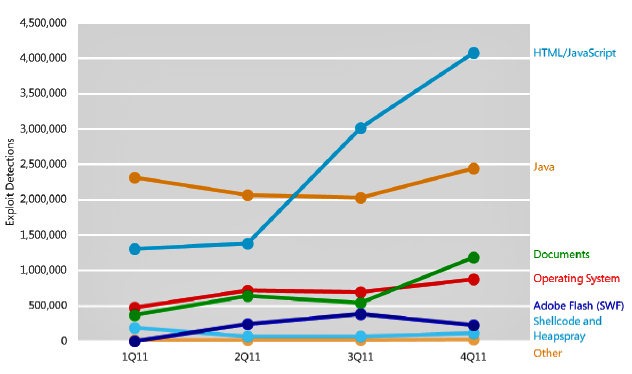
In recent months we’ve all noticed a change in how malware is introduced on someone’s computer. While the most common entry point remains users making a bad choice, the use of program vulnerabilities is used by more sophisticated malware. The number of Microsoft vulnerabilities being exposed is actually decreasing yet Microsoft was forced to send a number of out-of-cycle Windows security updates last month. Non-Microsoft applications however accounted for 71.2% of all publicly known vulnerabilities in the 2nd quarter of 2011.

There’s no Anti-Virus software available that can totally protect you from the variety of vulnerabilities that continue to be exposed by hackers. Even WinPatrol can’t stop all these holes but does everything possible to alert you and help you cleanup unwanted programs. Some of the newest malware sits quietly in the background waiting for a target. One of our goals has always been to make sure you know what’s happening on your system. WinPatrol v25 continues to improve its monitoring of system location required by sinister applications.

Based on the research done on state sponsored malware like Stuxnet and Flame I’ve added two new features which have become popular methods used to hide and disable security programs. These new features are designed to prevent programs from hiding on your system waiting for a target before releasing their full payload.

* Uninstall Detection ( NEW! )
The new WinPatrol v25 will track programs that have been installed on your system and will monitor the location Windows uses to store Uninstall information. This location includes the path to the Uninstall command which is often used by malware to remove a program silently. WinPatrol will let you know the names of any programs which are removed. This feature is available to PLUS only users and is optional. Legitimate alerts may occur during software updates or when you choose to remove software.

* Start Program Removed Detection ( NEW! )
All WinPatrol users can benefit from the often requested option of Start program removal. WinPatrol PLUS is not required to benefit from this feature. WinPatrol was the first program to let users know if a new auto startup programs were installed. Now WinPatrol will also let you know if another program has removed one of your Startup programs. One of the common behaviors of malware is to reduce the possibility of being detected by Anti-Virus or security software. It’s common for new malware to remove programs from your auto Startup list so it won't be detected. Since WinPatrol is not as well known as other commercial products it's rarely a target for removal.


vulnerabilities
Recent Exploits


* Delayed Startup Programs
One of our more popular features is the ability to delay the launch of a Startup programs. This can really speed up your boot time. Our recent sale generated a lot of new WinPatrol users who helped isolate a few bugs in Delayed Start especially on the 64 bit versions of Windows. These bugs have been fixed so programs aren’t lost and parameters are properly returned when moving a Delayed program back to its original status.

* Windows XP Kill Task
This bug only affected XP users and even reverting to our v18 code didn’t resolve a flaw preventing WinPatrol from killing tasks. It turns out Microsoft changed the value of one of the parameter masks used in a function called OpenProcess. The Kill Task function broke on XP after we updated to newer Microsoft tools in our efforts to better support Windows 7. Sorry to the XP folks that it took this long to find. I can't thank Larry from Microsoft enough for his assistance. This is an important feature because unlike Task Manager, WinPatrol allows you to select multiple programs to kill with one click.

* Company Name, Details and Correct Path
One of the first steps in detecting a suspicious programs is the lack of a company name in its resource. On Windows 64 bit machines not all of the details of programs were available due to a bug I found and reported to Microsoft. It turns out a common Windows function called ExpandEnvironmentStrings won’t always providing the correct path when represented by the environment variable %programfiles%. If you’re using Windows 64 bit you probably noticed there is a "C:\Program Files" path for 64 bit programs and older programs are stored in "C:\Program Files (x86)". A correct path to your program is required to obtain details like a company name. We’ve worked around this bug so we can find the correct path which is required for company name and many other features. .

* Misc Fixes
Anyone who noticed Scotty's ability to run on startup was sometimes missing will be pleased. There was in fact a bug that removed WinPatrol as a Startup program. It wasn't caused by other programs, just programmer stupidity.

* Remaining Bug – Scotty Barks
There's a weird bug that some folks have experienced where Scotty just randomly barks but doesn’t display a message. It's been around for years and receive reports 2-3 times a month. Usually reinstalling WinPatrol fixes the problem. If you experience this bug you can help us narrow down the reason for this barking by using a little known feature in WinPatrol.
In the Windows Control Panel you'll find an Sound Applet that allows you to customize sounds in programs which take advantage of this option. Near the end of the list of applications you'll find WinPatrol and you can assign different sound files to the different kind of WinPatrol alerts. Instead of our barking sound you can assign any sound you have available on your system. This feature was created for our legally blind supporters. By assigning a different sound file to each alert type you may help us narrow down the type of alert which is occurring when Scotty barks but doesn't display a message.

Why You Need WinPatrol
If you’ve wondered why you need WinPatrol just read what Microsoft has discovered in their malware research. “In the fourth quarter of 2011 alone, Conficker was detected on 1.7 million systems worldwide”
This infection is still increasing even though it’s well known to all popular security programs and simple Windows security updates will prevent it from spreading.

You need extra help and WinPatrol is still designed to monitor locations ignored by traditional security software. Contrary to what they might read you from a support script, WinPatrol works and plays well with others. You can run WinPatrol along side your favorite Anti-Malware package and you'll never detect any difference in performance.

Sources:
Microsoft Security Intelligence Report

Process Security and Access Rights

Computer World June 7th, 2012
Flame authors order infected computers to remove all traces of the malware

Update: As mentioned in the comments some folks are experiencing are repeating alerts since this weeks Windows Update.  This problem has been fixed and verified. On Friday July 13th a new release 25.0.2012.5 is available on our download page.  It fixes the repeating Uninstall alerts and a bug on our Automatically run checkbox.

Read more and download from the following upgrade page.
http://www.winpatrol.com/upgrade.html

Read More
Posted in | No comments

Tuesday, 5 June 2012

Software Code Signing Certificates. Do you care?

Posted on 20:15 by Unknown

I always considered it important to have our program clearly defined as an authentic application. There is a value in proving a file you’re about to install on your computer comes from a reputable company like BillP Studios.  This is currently accomplished through the use of a code signing certificate created specifically for BillP Studios and used during the creation of WinPatrol.  Before the release of any new version I run a code signing program from Microsoft that uses two encrypted files with uniquely assigned keys to validate and identify our WinPatrol files.

The use of code signing certificate provides anyone who downloads our program proof that their download comes from BillP Studios and isn’t malware created to fool people into thinking they’re downloading WinPatrol. It also prevents any changes to our files.

verifieduacWhen someone installs WinPatrol they currently may see this dialog providing proof that the file has been “signed” using a certificate created for BillP Studios.  To obtain a code signing certificate BillP Studios must prove it’s a legitimate company. Our name, address, phone, bank account and other assets are validated by a company that is authorized to assign certificates. In our case, the “certificate authority” is VeriSign which is owned by Symantec. For a one year certificate we also have to pay a fee of $499 USD for the validation process. Since our information has remained the same over the years we’re pretty easy.

BillPCertIf you click on the details arrow located on the dialog above you can learn more about who created the file and read information included in their certificate.

As you can see, this particular certificate expires on June 9th, 2012. I only have a few days to decide if I will continue relying on the code certificate technology to valid WinPatrol and other programs I create


Most people don’t really pay attention to the information provided in the first dialog and in the older dialogs below most people really didn’t notice much difference.  It has been a common practice to download programs which weren’t signed. 

Last weekend the value of a signed file was even more diminished. It was publicly exposed how certificates could be faked and the virus known as “Flame” was shown to be using a certificate that appeared to come from Microsoft. This forced Microsoft to release a dangerous emergency update this weekend to revoke some security certificates.

So, the question facing me this week is, should I pay $500 to Symantec so I could continue to have WinPatrol an officially signed and certified application?

On older versions of Windows and IE the difference in a signed application and one not signed wasn’t significant. Both dialogs don’t give you confidence about downloading from the internet.

signedold
This is what users would see if they downloaded the setup program for WinPatrol. How dare they suggest my file could harm someone’s computer?

notsignedold
If I didn’t sign our setup program the text here is actually more precise in its explanation. Most people knew what they were getting and I don’t think anyone would have been deterred by this message.

Now however, Microsoft Windows has increased their warning and made it harder to install unsigned programs.

iesigned
A signed application downloaded by Internet Explorer 9 will still include a yellow warning but it’s nothing compared to the red warning that shows up if the download is not signed. 
iewarning1
There is no option to Run a non-signed program.  To continue you must click on Actions which generates more fear from IE’s SmartScreen dialog. Instead of code signing Internet Explorer can also base its advice on a known “Reputation”. I’m told as a small developer the best way to maintain a good reputation is to sign your code.

iewarning2
The SmartScreen filter doesn’t give you any option to continue running a non-signed program unless you click on “More Options”.

Luckily, other browsers don’t scare users as much and your warning will come from the Windows User Account Control dialog.
chromeunsigned 
Shown above is when the WinPatrol setup is un-signed.

verifieduac 
Here’s the friendly dialog you’ll see if a WinPatrol has been signed. I doubt many users actually click on Show Details to find out more about the Verified publisher. It might be useful if a program appears out of nowhere but since most users make a choice to download WinPatrol having it signed doesn’t really seem to be necessary. Would you see the difference and cancel a setup based on the difference in these two dialogs?

Again, I’m faced with the question of paying $500 to Symantec so I can distribute WinPatrol as a program signed using a valid certificate. Is $500 worth it for those of you who understand digital code signing? I don’t believe the concept of code signing is something users know about or understand.

As someone with an interest in cyber security my first response is to applaud Microsoft for forcing more developers to sign their code.  As a developer I’m hesitant to trust code signing.  I’d really rather use the $500 fee towards a new copy of Adobe Photoshop than a security certificate nobody will pay attention to.

I’ll make a decision within a couple days so I welcome your feedback. Leave your comments here or on Twitter to @BillP


Update June 8, 2012: Thank you all for providing great feedback. Comments were even more detailed than I expected. Based on well thought out advice I will continue to sign WinPatrol, its components and setup program. Most folks say they ignore code signing information but they also agree it’s respectful to WinPatrol users for BillP Studios to provide a validated WinPatrol file before they download it. 

It was actually a friend working for Microsoft who pointed me to a “certificate authority” that provided a code signing certificate for $95 USD instead of the $500 I’ve been paying every year.  It’s always good to shop around but in this case the difference in price for virtually the same product is amazing.


Resources:
PC Magazine: Microsoft revokes Certificates Used by Flame Malware
June 4th, 2012

arstechnica: Flame malware hijacks Windows Update to spread from PC to PC  June 4th, 2012

arstechnica: “Flame” malware was signed by rogue Microsoft certificate
June 4th, 2012

Wikipedia: Code Signing

Symantec: VeriSign Code Signing Certificates

MSDN Blogs: Everything you need to know about Authenticode Code Signing  March 22, 2011   EricLaw’s IE Internals

Microsoft Security Response Center: Security Advisory 2718704: Update to Phased Mitigation Strategy June 4, 2012

Read More
Posted in | No comments

Saturday, 2 June 2012

Targeted Cyber Threats Aren’t Just Attacking Iran

Posted on 13:38 by Unknown

This week the news has been focusing on the computer threats called Stuxnet and Flame. Both have actually been around a few years but were not a problem to most Windows or Mac users. These threats have gotten attention lately because of a trend towards “targeted” computer infiltrations.

iran Stuxnet was designed to “worm” its way on to Windows computers specifically in Iran and then target specific computer devices which may be used to process the nuclear fuel, Uranium. International observers indicate that Stuxnet was likely responsible for the eventual destruction of 10% of the centrifuge machines at Irans Natanz nuclear facility. Flame is a newer, larger version but may be more detectable because it seems overly ambiguous.

Many cyber researchers, myself included, feel that Stuxnet and other worms targeting Iran were developed in Israel and supported by the U.S. Department of Homeland Security. By reverse engineering Stuxnet subtle clues backing this theory can be found encrypted in the code. If the developers wanted to blame our government these clues would have been more obvious.

On June 1st, the New York Times reported they had additional proof of our involvement. They claim a cyber sabotage program had been started under the George W Bush administration. During his first months as president Barak Obama ordered the expansion of the program, coded-named “Olympic Games”.  Instead of writing more about Stuxnet and Flame like everyone else, I think it’s more important to focus on targeted attacks in general.

Targeted attacks aren’t just being used against countries who are part of the axis of evil.  Businesses are being targeted by competitors, candidates running for office are targeted by their opposition, celebrities targeted by reporters and now we’re seeing an increase in targeted attacks on individuals who are tricked into installing Rogueware also called Exhortionware or Ransomware.

We’ve had reports of individuals targeted on the phone with callers claiming to be from Microsoft. Typically, the caller reports that a virus has been detected on your computer. They offer a solution which requires giving them access to your computer so they can fix the problem for free. phoneWhile you might think people wouldn’t fall for this trick, obviously enough users are convinced by their story to make it worth the time and effort. The virus always turns out to be worse than expected.  You’ll need to pay around $400 if you want your computer back. Even then you can expect your computer to include a quiet infection so that it still provides remote access.

Individual Targets
The extremely scary part is you’re no longer a name and number on a list. The bad guys have been doing their homework and they know about you before you hear their voice on the phone. Even if you don’t fall for their story, the feeling of a stranger knowing personal details calling your home will give most people an uneasy feeling of being violated.

A recent phone call to our home was designed specifically for me. The caller knew my name, address, my IP address, what kind of machine I had and even my professional background. My caller identified himself as Walt, and claimed to be a support tech for the Microsoft MVP program.  He knew I was an MVP and explained this was a new way of reaching out to MVPs. He claimed Microsoft was testing a new security solution but due to NDA restrictions I couldn’t download it. The only way to get this top secret program was to allow Walt access to my computer so he could install it.

This isn’t the first time I’ve been a target. In what you might call the glory days of AOL being an former employee with the screen name “BillP” made me a frequent target. Some assumed my account had special privileges or access to internal areas. Of course, back then all someone had to do was call AOL customer service and convince them they were Bill Pytlovany. Customer service would reset my passwords and they’d have access to my account. Eventually, AOL locked down my accounts and for a while I had the benefit of a RSA key to get online.

I suspect this recent attacker may have been hoping I had something under a Microsoft NDA because of my MVP status. It’s also possible Walt was someone looking to access my WinPatrol source code. I have shared my experience with other MVP’s in case they receive similar phone calls.  I admit, I make a lot of my personal information available. I do this so WinPatrol customers feel confident knowing they’re dealing with a real person. It’s a choice I’ve made but also means I have to spend some time looking over my shoulder and keeping my eyes open to imaginative attacks.


Included Links:

Gizmodo: Hack Politician and Son Arrested for Political Hack 5/24/2012

NY Times: Obama Order Sped Up Wave of Cyberattacks Against Iran 6/1/2012

Microsoft: About “Most Valuable Professional”

Read More
Posted in | No comments

Wednesday, 2 May 2012

FBI Has Good Guys but Your Time is Limited

Posted on 08:55 by Unknown

There have been a number of articles about what we all call the DNS Changer infection. PC World recently estimated 350,000 systems are still affected and on July 9th will no longer have internet access. It’s rare that we credit government agencies for doing good and few authors have given our justice dept credit for how they handled this malware. If not for a decision by this agency millions of infected computers would have suddenly lost their internet last year with no warning.
 

fbi Last year the FBI went after a criminal group that had infected computers around the world leaving what’s typically called a “bot”.  The virus creating the bot gave multiple criminal groups complete control over the infected computers. One of the many changes they made was to the computers “DNS look up address”. This is the location your browser goes first to find the numeric address of a website.  When you type in “www.WinPatrol.com”, a legitimate DNS server will direct your browser to my server address, 161.58.14.137.  The default setting will take you to a DNS look-up server managed by the company who provides you with Internet access.

If you were infected by the DNS Changer last year your browser would often redirect you to fake websites. These websites may just contain advertising or be duplicates of the original setup so they can steal your password or credit card data. In many cases, the sites encouraged you to download software that would not only steal additional information it would often require you to pay a fee to have it removed. Instead of downloading WinPatrol like you expected you’d get what we called ExtortionWare or ScareWare. Even if you paid the extortion they wouldn’t help and you’d find important documents still encrypted.


When the FBI found and arrested the criminals behind this fraud they could have just shut down their entire operation. If they had, anyone infected would have lost their Internet immediately. Their browser wouldn’t be able to look up the numeric addresses required to find websites. Instead, the Justice Department received permission by the courts to set up replacement servers using the same address previous registered to the criminal but they provided legitimate DNS addresses. The infected computers never noticed the change and even now may have no obvious indication they were infected.  Unfortunately, the court order expires on July 9th, 2012 and the replacement DNS servers will go dark.


Many engineers, including some smart people at Microsoft, have tried to create software solutions. In theory, like the criminals, the FBI could just take control of the infected machines and change the DNS setting back to a default value. Aside from the legal restrictions from doing this the danger of causing damage to the infected computer is greater than you might think. Not only does the false DNS address need to be removed but the bot software needs to be removed.  Changes made by the original virus may vary on each machine and without removing the remote control software, other criminals could just find and take control of these machines.

Solution 1
The FBI has created an advisory page which contains plenty of information although it may not be great for non-technical folks. It provides a solution that will keep you on the Internet but doesn’t address other possible infections. It may however give you a clue if you were a victim of this virus.  Click for FBI PDF file

Solution 2
There is an alternate DNS service which I’ve recommended in the past. They have a free version with instructions that may be little better than the FBI document.  The service is call OpenDNS.
dnsaddress

Windows Example: Under the Properties of your network adapter you’ll find a path to a screen like this that stores your DNS server address. The default setting would be “Obtain DNS server address automatically”.  In the example above, I have changed the DNS server address to point at an address used by the service OpenDNS. So instead of my browser going to a FIOS to look-up websites, my machine goes directly to servers managed by OpenDNS.

A machine which has been infected by a DNS Changer virus would also have a set of alternate DNS server addresses. A list of numbers currently managed by the FBI can be found in their PDF file available above. If you find a match then you’ll want to clean up your computer, but first check the circle that says “Obtain DNS server address automatically”.

Solution 3
The FBI and I both recommend running a good updated Anti-Virus Scanner to examine your computer.  This week I recommend checking out the Microsoft Safety & Security site and download the new Microsoft Security Essentials. Microsoft also provides a great tool called Windows Defender Offline that creates a boot repair CD/DVD. This is something I recommend you have available even if you’re not a victim of DN Changer.


Ultimately, I am pleased to see that the Department of Justice does have some bright folks on staff.  I understand it’s not their responsibility to maintain these servers forever and I’m happy to do my part to educate users before the July 9th deadline.


Additional Resources:
PC World: Why Your Internet May Disappear This Summer 4/23/2012

ARS Technica: DoJ, FBI set up command-and-control servers  4/2011

The Telegraph: ‘Internet Doomsday’ July 9 Claims FBI  4/25/2012

DNS Changer Working Group ( More articles and cleanup tools )

Microsoft Windows Defender Offline (Free Download tool )

Read More
Posted in | No comments
Newer Posts Older Posts Home
Subscribe to: Posts (Atom)

Popular Posts

  • Support for Downloads without Surprises
    Last week I posted a message about the  packaging of ad supported programs along with popular software. It appears to be a common practice t...
  • Employee Manual to Prevent Cryptolocker and More
    A common way computers are infected or compromised has always been a simple yet well thought out deception. It can happen to anyone and the ...
  • WinPatrol Cloud Edition Public Beta
    WinPatrol Adds the Newest Technology Available. You’ll now have access the knowledge of thousands of WinPatrol users shared in real-tim...
  • What on Earth is “Cloud” Computing
    The new big buzz word in the computing world is “Cloud” computing. In the past I’ve been critical of the concept and even poked fun at Cloud...
  • Four Secret Reasons Why Win7 is Ten Times Better
    It’s no secret that I’ve never been a fan of Windows Vista. I really wanted to love it but even as a designated Microsoft MVP I couldn’t dri...
  • SQLite C Code to Read Cookies
    While most of the technology leaking from my brain is for a wide audience, today’s post is very technical in nature. I expected the informat...
  • Free #1 Tweak to Improve Windows Performance
    Every year billions of dollars are spent by folks just trying to improve the performance of their computers. Over the last couple years ther...
  • Forget the DVD & Save on your New Laptop
    I’ve written before about the coming death of the CD/DVD ’s for data storage.  While that time hasn’t come yet for desktop there is one real...
  • Can Facebook be Trusted?
    Last week Facebook rolled out another round of what they consider easy to use privacy settings. What they’re really doing is trying to appea...
  • TWITTER ALERT
    Anyone who uses Twitter, DO NOT use the Twitter web interface until further notice. There is a code injection vulnerability being used tha...

Categories

  • 2007
  • 3G
  • AAPL
  • ABC
  • accelerometer
  • Achilles
  • Acrobat
  • Activex
  • adobe
  • Ads
  • advertising
  • Adware
  • Adwords
  • Airlines
  • Albany Medical Center
  • algorithm
  • Amazon
  • amber alert
  • AMUST
  • Animation
  • antimalware
  • Antivirus 2009
  • antivirus2008
  • AOL
  • Apple
  • applets
  • AQuantive
  • archive
  • Aruba
  • ASC
  • Ask.com
  • ATI
  • Audio
  • Autorun
  • AutoUpdate
  • autoupdates
  • AVG
  • Azure
  • backup
  • badware
  • Bakugan
  • Baseball
  • battery
  • Ben Edelman
  • Beta
  • BillP
  • Birthdayware
  • Bitlocker
  • Blackberry
  • BlackViper
  • bloatware
  • Blogger
  • Blogs
  • Blogspot
  • Blu-ray
  • Bluehoo
  • bluetooth
  • boinc
  • Bonjour
  • Brazil
  • break
  • Breakaway games
  • Brookman
  • Browser wars
  • C64
  • camera
  • Carpal Tunnel
  • CBS News
  • cell phone
  • CES
  • charity
  • Child Safety
  • chinese
  • Chris Cook
  • Christmas
  • Chrome
  • CIPAV
  • clampi
  • Cloud
  • CNet
  • codec
  • comodo
  • conficker
  • Control Panel
  • copy
  • coupon
  • craplets
  • crapware
  • Crawford
  • credit
  • credit card
  • credit cards
  • ctfmon
  • daylight savings time
  • Dell
  • demo
  • Discount
  • Disney
  • DNS
  • Dollar
  • Domain
  • Donna
  • Doubleclick
  • Downadup
  • Dreamscene
  • droid
  • DVD
  • Dvorak
  • Easter egg
  • eclipse
  • Ed Bott
  • Edelman
  • egreeting
  • Email
  • Environment
  • Epilepsy
  • EU
  • eWeek
  • explorer
  • facebook
  • false positive
  • false-positive
  • FBI
  • file types
  • finnish
  • FiOS
  • Firefox
  • fireworks
  • fix
  • flash
  • Flashpix
  • Fort Drum
  • foxit
  • fraud
  • FTC
  • games
  • garmin
  • Gateway
  • GE
  • George Bush
  • Germany
  • global
  • Godmode
  • Google
  • Google Research
  • GotoMyPC
  • gps
  • green
  • Groceries
  • Habitat
  • Hacks
  • hallmark
  • Halo
  • hard drive
  • Harry McCracken
  • Harry Potter
  • Harvard
  • HD-DVD
  • help
  • hidden files
  • Hijack
  • History
  • Hiton
  • homeland security
  • Honor Flight
  • hosts
  • Hubble
  • IAC
  • ICANN
  • IE
  • IE6
  • IE7
  • IE8
  • installers
  • interface
  • Internet
  • IPAddress
  • iPhone
  • iPod
  • Iraq
  • iTouch
  • iTunes
  • java
  • Kaspersky
  • Kazaa
  • kenmore
  • key logger
  • keygen
  • Keylogger
  • Kosovo
  • LA
  • lady chalupa
  • langa
  • Laptop
  • lawsuit
  • Legoland
  • Levar Burton
  • Linksys
  • Little League
  • Live Writer
  • Live.com
  • localize
  • Logo
  • London
  • LOP
  • lottery
  • Lucasfilm
  • Macintosh
  • Malware
  • Marie Domingo
  • Mary
  • McCracken
  • Media
  • Memorial Day
  • mgrs.exe
  • Micosoft
  • Microsoft
  • Microsoft Surface
  • MiFi
  • mit
  • moon
  • Mossberg
  • Mothers Day
  • MPack
  • MSFT
  • msn
  • MTV
  • Multicore
  • Music
  • MVP
  • MVP09
  • nasa
  • NBC
  • Nero
  • Netbook
  • Network
  • network solution
  • New York
  • newsletter
  • Nintendo
  • Nintendo Wii
  • NNEDV
  • Norton
  • NYAG
  • OAuth
  • obama
  • Office
  • OLPC
  • Olympics
  • OpenDNS
  • oprah
  • optimize
  • optout
  • Paperghost
  • passwords
  • Patch
  • Patriot Flight
  • PC Guy
  • pc pitstop
  • PC World
  • pcmag
  • PCWorld
  • PDC
  • PDF
  • pedipaws
  • performance
  • phishing
  • photos
  • Photoshop
  • Pinnacle
  • Piracy
  • Pirillo
  • pogue
  • Porn
  • pornware
  • postcard
  • prediction
  • prefetch
  • Preview
  • Price
  • privacy
  • Prodigy
  • Programming
  • PSP
  • Public Relations
  • Pytlovany
  • Q-Link
  • Quicktime
  • quotes
  • radio
  • realnetworks
  • realplayer
  • RegCleaner
  • RegCure
  • regedit
  • Registry
  • registry cleaner
  • Release
  • remove
  • Research
  • return policy
  • review
  • RIAA
  • Rivera
  • RMS
  • Road Runner
  • rogue
  • router
  • RTM
  • Rumor
  • safari
  • safety
  • sale
  • Sales
  • Santa Monica
  • scam
  • Schenectady
  • Scoble
  • Scott Dunn
  • Scotty
  • sd
  • Search
  • Sears
  • Security
  • Services
  • seti
  • ShellExecute
  • Shirt
  • SimCity
  • site advisor
  • slingbox
  • snopes
  • social engineering
  • social network
  • solid state disk
  • Sounds
  • Sp3
  • space station
  • SPAM
  • spamhaus
  • Special
  • speedtest
  • Spyware
  • SSD
  • Startup
  • Stats
  • Steve Bass
  • stopbadware
  • storm
  • STS-125
  • Sugar
  • Sunbelt
  • support
  • Symantec
  • tagged
  • Task Catcher
  • Task Scheduler
  • taskbar
  • Tax
  • Techorati
  • techwatch
  • teens
  • temp
  • Thinkpad
  • Thurrott
  • tinyurl
  • Tips
  • TiVo
  • TLD
  • Today Show
  • Toolbar
  • toolbars
  • top ten
  • topten
  • toys
  • Translator
  • transunion
  • Tree
  • Trend Micro
  • tricks
  • trillian
  • Trojan
  • tweaks
  • twitter
  • UAC
  • UI
  • Ultimate
  • Unbox
  • Unboxed
  • update
  • Updates
  • upgrade
  • url
  • USB
  • Utility
  • Valentine
  • Verizon
  • versions
  • Veteran
  • Video Games
  • Vista
  • Vulnerability
  • wall-e
  • war
  • Washington
  • web2.0
  • Webslice
  • WGA
  • Widget
  • WiFi
  • Wii
  • WiiItis
  • wiimote
  • Win7
  • Windows 7
  • Windows Secrets
  • Windows Update
  • Windows7
  • WinPartrol
  • WinPatrol
  • winpatrolflash
  • WinPatrolToGo
  • Winter
  • Wireless
  • Wristband
  • WSJ
  • WWII
  • x64
  • Xbox
  • XO
  • XO Laptop
  • XOActivity
  • Xobni
  • xolaptop
  • XP
  • XP SP3
  • xp3
  • Yahoo
  • Zero Day
  • Zone Alarm
  • Zwinky

Blog Archive

  • ▼  2013 (31)
    • ▼  November (2)
      • Employee Manual to Prevent Cryptolocker and More
      • My First State-Sponsored Attack
    • ►  October (1)
    • ►  September (1)
    • ►  August (2)
    • ►  July (3)
    • ►  June (5)
    • ►  May (2)
    • ►  April (3)
    • ►  March (2)
    • ►  February (5)
    • ►  January (5)
  • ►  2012 (30)
    • ►  December (3)
    • ►  November (3)
    • ►  October (2)
    • ►  September (2)
    • ►  August (2)
    • ►  July (3)
    • ►  June (2)
    • ►  May (1)
    • ►  April (4)
    • ►  March (4)
    • ►  February (2)
    • ►  January (2)
  • ►  2011 (28)
    • ►  December (4)
    • ►  November (2)
    • ►  October (4)
    • ►  September (2)
    • ►  August (2)
    • ►  July (2)
    • ►  June (2)
    • ►  May (2)
    • ►  April (2)
    • ►  March (2)
    • ►  February (3)
    • ►  January (1)
  • ►  2010 (44)
    • ►  December (2)
    • ►  November (3)
    • ►  October (3)
    • ►  September (4)
    • ►  August (3)
    • ►  July (3)
    • ►  June (3)
    • ►  May (4)
    • ►  April (4)
    • ►  March (3)
    • ►  February (3)
    • ►  January (9)
  • ►  2009 (90)
    • ►  December (6)
    • ►  November (8)
    • ►  October (6)
    • ►  September (4)
    • ►  August (4)
    • ►  July (12)
    • ►  June (6)
    • ►  May (11)
    • ►  April (7)
    • ►  March (9)
    • ►  February (9)
    • ►  January (8)
  • ►  2008 (122)
    • ►  December (9)
    • ►  November (11)
    • ►  October (14)
    • ►  September (6)
    • ►  August (9)
    • ►  July (9)
    • ►  June (10)
    • ►  May (13)
    • ►  April (8)
    • ►  March (10)
    • ►  February (10)
    • ►  January (13)
  • ►  2007 (155)
    • ►  December (15)
    • ►  November (14)
    • ►  October (12)
    • ►  September (14)
    • ►  August (12)
    • ►  July (13)
    • ►  June (11)
    • ►  May (19)
    • ►  April (17)
    • ►  March (21)
    • ►  February (7)
Powered by Blogger.

About Me

Unknown
View my complete profile