Billps Tudios

  • Subscribe to our RSS feed.
  • Twitter
  • StumbleUpon
  • Reddit
  • Facebook
  • Digg

Friday, 30 November 2007

Top Ten Bits for November 2007

Posted on 18:01 by Unknown
End of month summary of postings in November 2007.
  1. DreamScene Ran on Windows 95 But Not My Vista

  2. My Verizon FiOS is Speedy

  3. Top Ten Online Shopping Mistakes

  4. Happy 10th Birthday to Scotty

  5. CNet: Top 9 Windows Utilities

  6. Give a Child a Laptop

  7. Facebook Recommends IE7

  8. Windows XP SP3 Includes Four New Services

  9. "TiVo Like" Features on your PC

  10. Searchland Security Advisory High


Here are the top Bits from Bill that Google has found interesting enough to send folks here when they searched.

  1. Detect Changes to Windows Automatic Updates

  2. Do I need Apple Mobile Device Service?

  3. What is Zwinky?

  4. IE7 changes include IEFrame.dll

  5. Christmas Computers

Read More
Posted in Blogs, topten | No comments

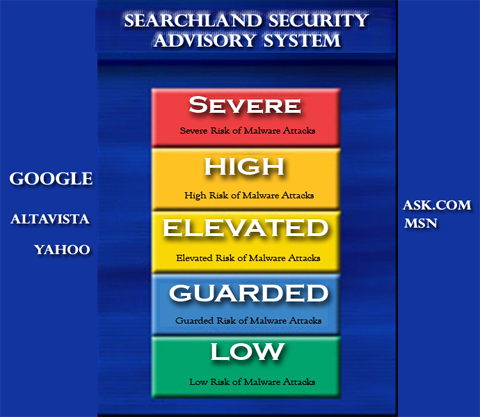
Searchland Security Advisory High

Posted on 09:22 by Unknown

If you haven’t gotten around to updating your anti-virus software and/or installed the newest Windows update patches the time is now! In the last few weeks our users have reported 3 times the normal number of malware attempts.

One new approach is to bomb search engines with malware sites. Google and others have been cleaning up their results as quickly as possible but it’s an ongoing battle.

HEADS UP: More Google poising on the way? SunbeltBLOG


Malware Advisory


If you think the search engines are in the business of filtering out the bad guys you would be wrong. Even some paid advertising was recently found to send folks to malware sites. They do their best to keep you safe but that’s not really their responsibility.

The bottom line is you need to take steps to stay safe. Here are just a few timely tips.

  • Update Windows
    One of the most common entries into your system is a well known vulnerability you’ll see referred to the IFRAME exploit. Microsoft has corrected this problem and as long as you’ve installed all the Windows Update patches you’re better off.

  • Don’t download that CODEC
    A popular trick to get users to download files is to make you think it’s required. It doesn’t have to be a video of a naked Brittney. It could be a video of a cute kitty but if it says, you must install this codec before viewing the video, STOP.

  • Your computer is not a “potential Spyware operation”.
    Don’t fall for a pop up that says your computer is infected. Even if this is true any web page that detects this without you asking is a scam. You’ll end up with is Rogue Anti-Spyware software which will exhort a payment from you before giving you control of your own computer. If you want security software go with a known company.

  • Disconnect your computer at night. (New)
    Turning off your computer at night has long been debated within the computer industry and I won’t get into it now. I will advise at the least, disconnect your computer from the Internet when not in use. Even if you think your computer is clean you could may infected and your computer could act as a “bot”. You’re also at risk to be infected by some vulnerability like MSBlaster that hasn’t been made public yet. If everyone got in the habit of turning off the internet when not in use it couldn’t hurt.

Read More
Posted in Google, safety, Search, Spyware, update | No comments

Wednesday, 28 November 2007

"TiVo Like" Features on your PC

Posted on 15:09 by Unknown

TiVoMy name is Bill and I am a TiVoholic. I’m almost embarrassed to say we currently have six TiVo’s in our house and home office. It really annoys me when I hear someone say they have “TiVo like” features in their product. Google results in over 100,000 sites when searching on “TiVo-Like”.

There is WAY MORE to TiVo than its ability to pause or fast forward through commercials. Unless they own a TiVo most people won’t understand.

The most common offenders relate to the software that comes with TV video cards for PC’s. Even Microsoft strives to be TiVo-Like with its Windows XP Media Center Edition. While I’m impressed with the hardware that decodes TV signals for your PC, I have yet to find TV-PC software that isn’t crap.

Last year I tried out the ATI All-in-Wonder graphics board. The software that was included made my system so unstable I no choice but to remove it. Last week I needed to do some testing with Pinnacles Program Scheduler so I picked up a PCTV HD Stick on Amazon. When I could get it to work the HD analog signal that streamed on to my screen was crystal clear. I didn’t have the patience to do a full software evaluation so I’ll just summarize by saying, it sucks.
I have checked out others but none have the stability or power of TiVo. I do have a little bit of experience in this area. When I worked for Microsoft my job was to design an EPG(Electronic Program Guide) for something called the Information Highway PC. Some of my time was spent doing focus studies, observing people from behind a one-way mirror. It was a lot of fun but unfortunately I didn’t stay out west long enough to make a difference.

Now TiVo has announced a partnership with digital software company, Nero AG, best known for their CD/DVD burning suites. At last, a real TiVo interface on a PC. According to TiVo’s CEO Tom Rogers…

“This agreement provides TiVo with an opportunity to deliver its interface and differentiated feature set globally via the PC, enabling TiVo to use all avenues of mass distribution -- from consumer electronics, to cable and satellite boxes and soon, the PC”

This sounds promising but I’m still a little skeptical. The current TiVo software is Unix based and I’m not sure how successfully it can be ported to run under Windows. You’d think I’d be doing the dance of joy but I’ll stick with my current TiVo boxes for now.


Read More
Posted in ATI, Nero, Pinnacle, TiVo | No comments

Tuesday, 27 November 2007

Windows XP SP3 Includes Four New Services

Posted on 16:15 by Unknown

Microsoft is in the process of testing service packs for both Vista(SP1) and Windows XP(SP3). There has been a lot of talk about how Windows XP may be the biggest competitor for Vista. I’ll never forget Bill Gates showing the Blue Screen of Death on Windows 98 as the reason to upgrade to Windows XP. Many of us are satisfied with what Windows XP offers and I’m pleased with the continued support from Microsoft.

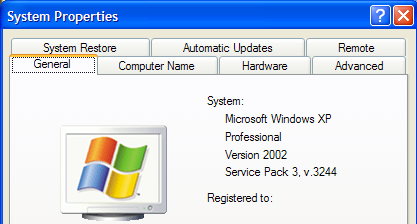
While reports of Vista’s service pack have been mixed, many folks testing Windows XP SP3 report a more robust operating system. While I don’t typically upgrade immediately, as a developer I need to keep up with new versions of Windows. I wasn’t included on Microsofts’ beta list but I was able to check out SP3 on a friends laptop.

Windows XP SP3


You won’t find a lot of visible changes to SP3. In fact, I was very surprised that it didn’t force an to upgrade to IE7.

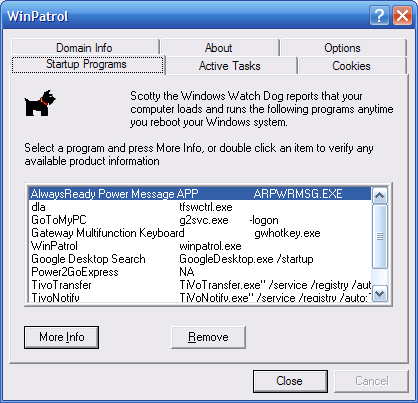
Using WinPatrol’s date “First Detected” feature, I did find a few new services that weren’t there before. This list could vary depending on your configuration.

  • EAPSVC.DLL – Provides windows clients Extensible Authentication Protocol Service Click for more info

  • KMSVC.DLL – Manages health certificates and keys (used by NAP) This relates to managing keys for volume licenses and their health, not medical information.

  • QAGENTRT.DLL – Allows windows clients to participate in Network Access Protection. This includes some of the new security features of Vista minus UAC.

  • DOT3SVC.DLL – This service performs IEEE 802.1X authentication on Ethernet interfaces. Improves detection and connection to wireless networks

Luckily, I was able to run some benchmarks on the system before SP3 was installed. I’ll write more if I find a difference in performance or other issues as I continue to perform tests.

Read More
Posted in Beta, Services, Sp3, XP | No comments

Monday, 26 November 2007

Facebook Recommends IE7

Posted on 10:18 by Unknown

I may have mentioned once or twice that I’m not always the first to upgrade to new versions. When something works for me I’m happy and will continue using it until I have a good reason to upgrade. I still haven’t upgraded to Internet Explorer 7 and haven’t had a good reason to switch. Most of the time I use Firefox but I do occasionally use IE especially on my tablet PC which has some problems with Firefox.

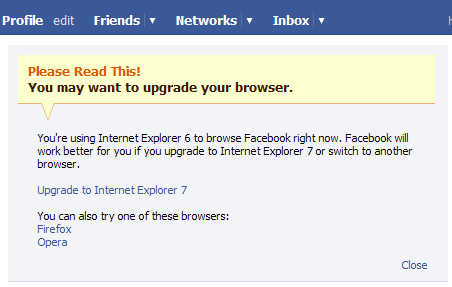
I was surprised when I went to Facebook today and saw that they were encouraging me to upgrade to IE7.

Facebook screen I noticed today

Of course, they’re not just promoting Microsoft's Internet Explorer. They also provided links to Firefox and Opera.

According to my Blog reader stats 46% of my readers are using IE7. Only 16% are still on IE6. I guess it might be time to upgrade. I haven’t heard any horror stories from IE7 users lately. What do you think? Click on “Comments” below and let me know.

Read More
Posted in facebook, IE6, IE7, upgrade | No comments

Thursday, 22 November 2007

Give a Child a Laptop

Posted on 07:59 by Unknown

Do you remember the concept of the $100 laptop that would be designed for kids in developing countries? Well, it’s here! The price didn’t quite make it under $100 but there’s a good chance many kids will still benefit from this project.

There are a few days remaining for you to participate in a special “Give One, Get One” promotion. By purchasing one of the new XO Laptops for a child, you can purchase one for yourself at the current price of $199 USD. After November 26th don’t expect to see them for sale at the Wal*Mart.(see update below)

The “One Laptop Per Child” project is the vision of MIT Professor Nicholas Negroponte as discussed in his book Being Digital . The original idea came from MIT Media Lab Professor Seymour Papert in the 1960s.


XO Laptop

Click Here to Participate

The XO Laptops are being distributed as a first-come first-serve basis so they won’t guarantee shipping by December 25th. I contributed twice so I’ll have two laptops which can communicate with each other via a “mesh” wireless network. I am looking forward to creating some software especially for this project.

I had hoped to do my own review by now but instead I’ll point you to that zany David Pogue who published a comprehensive review already for the NY Times. Click Here

Update: I haven't seen word on the OLPC website but Engadget is reporting the time to particate has been extended to December 31st.

Read More
Posted in mit, xolaptop | No comments

Tuesday, 20 November 2007

CNet: Top 9 Windows Utilities

Posted on 13:02 by Unknown

I was pleased today to see that CNet’s Executive Editor, Tom Merritt was letting folks know about what they called “Must-have Windows downloads”. The article by Peter Butler was also titled, “Giving Thanks: Top Windows Utilities” in honor of this weeks American holiday.

I’m always looking for tips on good programs but I was even more happy to see that WinPatrol was listed as number three!

“For protecting Internet Explorer against browser hijackers and for keeping my startup list free of unwanted entries, I know that I can always count on Scotty the Watchdog and the excellent security app WinPatrol.”

This was a nice present for Scotty on his 10th birthday.

CNet also included some of my other favorites like Process Explorer and Mozilla Firefox. CNet also has a review of the beta 1 of Firefox 3 by Stephen Shankland.

“Firefox 3 beta 1 includes a number of significant features that Mozilla said should improve security, ease of use, rendering of Web pages, and location of previously visited Web pages. And for the new era of rich Internet applications, the browser can run Web-based applications even when the computer is disconnected from a network.“

I use Firefox but will probably wait for the final release before upgrading.


Read More
Posted in CNet, Firefox, WinPatrol | No comments

Sunday, 18 November 2007

Happy 10th Birthday to Scotty

Posted on 12:52 by Unknown

Monday, November 19th is the 10th Anniversary of the public release of WinPatrol. ( 70 in dog years ). This program was originally created for friends and family after I had a machine infected with a clever trojan designed to steal my AOL password. Below is a screen shot of WinPatrol 1.0 which still runs today but has obviously improved a great deal since 1997.


Screen shot of what WinPatrol 1.0 looked like.
WinPatrol 1.0


Going through my old backup CDs I was pleased to find some great video and audio of our friends spreading the news about WinPatrol. Keep in mind what you see and hear is about an old version. The interviews will tell you more about BillP and WinPatrol then you ever cared to know. Smile and the whole world smiles with you.


Interview with TeMerc Internet Countermeasures (Text)


TechWatch Radio Interview with BillP (25 Minutes – mp3)


WinPatrol on Screen Savers with Sarah Lane and Leo Leporte (Video)


Steve Bass demos WinPatrol on Tech TV with Patrick Norton (Video)


Bill Pytlovany featured on WRGB (Video)


I never really advertised WinPatrol so its international popularity is due completely to friends. The majority of new features came as suggestions from friends of Scotty. So, THANK YOU, THANK YOU to all of you who have encouraged and supported my WinPatrol project. It’s been a rewarding ten years.


Read More
Posted in | No comments

Thursday, 15 November 2007

Top Ten Online Shopping Mistakes

Posted on 08:57 by Unknown

We’re approaching the time for holiday shopping and for me there’s no better place to shop then from the comfort of your own home. I’ve seen many articles that provide tips for online holiday shopping but I always like to look at things a little differently.  So here are the top ten mistakes that people are likely to make while shopping online. And yes, I know many of them from experience.


High Shipping Costs
It’s really easy to find things online which are cheaper but sometimes you’ll pay the difference in inflated shipping and handling fees.  This is especially true when making a purchase from a small retailer or via an online auction sites.


Late Delivery
If you’re buying a present for someone, you’ll want to be sure that your item is available and will be delivered before date you need it.  Always leave yourself some time for unexpected delays.


Wrong Shipping Destination
Many sites will remember previous locations where you had items shipped. Usually, they’ll remember the last location used so don’t be tempted by One-Click purchases.  Your item will be shipped to the last person who received a present from you.


Buying by Email Marketing
Don’t be tempted by Email specials unless you specifically requested information from a company. Don’t respond to any spam promotions.  Just because it’s a well known product, it doesn’t mean the Email came from the real company.  Anytime you respond to spam, you just encourage more.


Generating More Spam
When purchasing items online don’t use the Email address which is personal or important to you.  There are a number of free Email services where you can create a throw away Email account just for shopping. Create something like MeShopping07@gmail.com or a similar account.


Losing Track of your Purchases
I have one credit card which I use for online purchases. When the bill comes in I make sure to compare it with online purchases. Frequently, the company name on the bill won’t be obvious to the purchased item. I do this more for tracking then for security. Using a credit card online is usually safer than giving it to a waiter or store clerk. Always print out any orders you make online and keep them in a special pile.


Wrong Product or Model
Sometimes the image shown isn’t identical to the product model you’re ordering. Read the full description of what you’re ordering. The title may say “Beatles Greatest Hits”  but it doesn’t mean the songs are actually performed by the fab four.


False Credentials
Just because a vendor displays images from the Better Business Bureau or eTrust doesn’t mean they really have been approved.  If buying from an unfamiliar store verify they really do have the credentials they claim.


Costly Return Policies
Brick and mortar stores aren’t the only ones with so called “Re-stocking Fees”. Check the return policy of any store your order from. If you receive a defective product will the store pay the shipping to return your item?


Rushed Purchases
This really summarizes all the previous mistakes. I don’t recommend using a 1-Click® purchase process like Amazon will set up for you. Usually the system will remember your important information but seriously, how difficult is it to type in your name and address or credit card. Re-entering your credit card is a good idea because you may notice the expiration date has passed.  This may not be picked up on a 1-Click purchase and will delay your delivery.


Feel free to click on the comments link and tell us what mistakes you or others have made.


Read More
Posted in | No comments

Wednesday, 14 November 2007

Obvious Spam Subject Lines

Posted on 19:44 by Unknown

It may be the jet lag from my recent trip but I had to write a quick article about the various titles I see in my spam folder. The following are just a part of a one day sample of the spam I received.

You know it’s spam if it says…
  • Buy OEM Software
  • You're approved! You are approved for an unsecured $7,500 credit line
  • 250 Free Full Color Business Cards - Don't Miss Out!
  • prescription medications online
  • Urgent Equity Alert
  • US $ 69.95 Viagra 100mg x 10 pills
  • Watch your body change with Anatrim
  • Wir wissen was Frauen wollern
  • Photoshop, Windows, Office
  • Your order approved
  • Send this to your friends
  • November 70% OFF
  • Next Big market Winner
  • New Company Pick for November
  • Legal software sales
  • Home-based job opportunity
  • Free Dating Profile - Limited Time
  • exclusive watches, affordable prices rolex
  • Credit Card Debt Relief

I’m sure most of you would just hit Delete on any of the subject lines above as well as many of the imaginative lines below.

  • Add some more male meat to your package!
  • Sail down the love canal more confidently
  • Increase your love stick to make it really magic!
  • This remedy is a true godsend for your little willy
  • True masculinity is impossible without a substantial volume of male meat
  • We'll teach you how to get a schlong you could be proud of!
  • Say "I can have sex all night long"!
  • Prepare your love wand for the next battle
  • Not enough length? We'll show you how to change it!
  • No woman will resist your masculine attractiveness!
  • Have a great night with your girlfriend!
  • Great news for men in despair
  • Get more pleasure in love with your new big phallus
  • Encouraging news for your willy


I’m not sure I even know what it means but I really had to laugh today when in mail today I saw


  • Now your penis can serve as the lighthouse in the open sea.
Read More
Posted in | No comments

Sunday, 11 November 2007

Thank a Veteran Today

Posted on 08:37 by Unknown

Read More
Posted in | No comments

Wednesday, 7 November 2007

My Verizon FiOS is Speedy

Posted on 19:31 by Unknown

Early this week I wrote about my switch from Time Warner Road Runner to Verizon FiOS. The Verizon installer was here all day and then I spent the next couple days fine tuning my computer to finally obtain the full benefits of the advertised 20 Mbps download and 5 Mbps upload.

I’m spending a long weekend in Portland so I thought I’d give everyone an update before I flew across the country.


Ta-Da!

I wish I could point to a single example of what I changed to double my download speed but it required a couple applications to do the job.

Our friends at PC Pitstop have a cool little app called PC Pitstop Optimize. This application allowed me to do a lot more than the optimize program provided by Verizon. Even better, it actually told me what it was changing so I could decide for myself if I wanted to make the change.

I also used WinPatrol PLUS to review many of Windows Services which were set to Automatically start even though I had no interest in using their associated product on a regular basis. I certainly didn’t need six services running just to phone home to check for autoupdates. WinPatrol allowed me to set some Windows Services to Disabled or Manual and I immediately noticed that more memory and resources were available.

I’m still not ready to give my full blessing to Verizon FiOS but I’m really happy with my new found speed. Stay tuned for more FiOS details as I discover them.


Read More
Posted in FiOS, optimize, pc pitstop, speedtest | No comments

Monday, 5 November 2007

Verizon FiOS Speed Test Paradox

Posted on 11:34 by Unknown

This weekend I switched my home office to the new Verizon FiOS fiber optic service. I’m pretty excited to be one of the first in our area to have it. I pay a few dollars more but the advertised speeds are twice what I’ve been getting on Road Runner.

The package I signed up for is 20 Mbps download and 5 Mbps Upload for $49.95 a month. Time Warner is charging me $38.53 for an advertised 10 Mbps download and 1 Mbps upload.

On Road Runner my advertised 10/1 would usually test as 5–6 Mbps down and 0.7 on upload. When I tested my FiOS connection today on DSLReports.com I was pleased with my new upload speed but a little concerned with my download.


Verizon FiOS Test
(Advertised 20/5)

When they installed FiOS they ran an optimizer program which I assume changes the registry values like MTU that many other optimizers do. I plugged back into my Road Runner to see if maybe the optimizer helped their service too. It did make my upload a little better then my previous tests but I’m obviously pleased with the improved speed of FiOS.


Road Runner Test
(Advertised 10/1)

I’m not ready to give my full blessing to FiOS yet. I’m especially suspicious because when I go to Verizons own speedtest page, I get values much higher than I get using DSLReports.com. When I go to Verizon Central they consistently tell me the following.

Test results from Verizon Central
http://speedtest.verizon.net/

So much for truth in advertising. For instance, my 1000 GB hard drive only has 926 GB’s available which is common. This kind of “rounding up marketing” is getting out of hand.

Update: Its working better. Now if only they would come back and fix my phone. See http://billpstudios.blogspot.com/2007/11/my-verizon-fios-is-speedy.html

Read More
Posted in FiOS, Road Runner, Verizon | No comments

Thursday, 1 November 2007

DreamScene Ran on Windows 95 But Not My Vista

Posted on 09:28 by Unknown

I was pleased when I heard that Microsoft was making their Vista Ultimate Extras available. I was especially looking forward to DreamScene which provides cool animated, video desktop backgrounds.

Unfortunately, the machine I use for Vista testing doesn’t support DreamScene. This Ultimate Vista Extra requires the Windows Aero theme. Unfortunately, Aero doesn’t seem to be supported on my year old NVidia GeForce3 graphics card.

Not many people know that animated desktop backgrounds were introduced over ten years ago on Windows 95. An ingenious Seattle programmer named Joe King created a wallpaper animation engine called Crystal Walls. Joe, who once worked on the Windows 1.0 team, had the support of over 30 programmers and artists who created over a dozen unique flowing backgrounds.


I was honored to be one of the programmers who created a scene to include in the product which was first launched in Egghead Software stores. My scene “13 Sharpei’s Contemplating the Universe” included a number of playful pups including Nosey who would occasionally approach and tap his paw on the monitor glass.

Crystal Walls puppy used in my animated wall paper

Crystal Walls was considered to be included in a “Windows PLUS Pack!” but instead, Microsoft introduced something called Active Desktop with Internet Explorer 4.0. Active Desktop broke the Crystal Walls engine and promised to provide a similar experience. Active Desktop was created to take advantage of “push” technology but it never really gained mass appeal.

According to his LinkedIn profile Joe’s talent has been discovered by the folks at Amazon where he’s Senior Manager of Social Computing.

Vista Trick: There’s a window handle trick on Vista that lets you to use a screen saver as desktop wallpaper. LockerGnome wrote about it today and according to Chris Pirillo, this works on monitors that may not support DreamScene. Unfortunately, it didn’t work well on mine.

From the cmd.exe box, type “ribbons.scr /p65552”. This trick is cool but be sure to close any open files before you try it. While it may work on some machines it could jumble the screen on others. If you try this and it messes up, you’ll need to Ctrl-Alt-Del and either Log Off or Restart. You can use other screen savers and it should work on all version of Vista, not just Ultimate.


Read More
Posted in Dreamscene, Pirillo, Tips, Ultimate, Vista | No comments
Newer Posts Older Posts Home
Subscribe to: Comments (Atom)

Popular Posts

  • Support for Downloads without Surprises
    Last week I posted a message about the  packaging of ad supported programs along with popular software. It appears to be a common practice t...
  • Employee Manual to Prevent Cryptolocker and More
    A common way computers are infected or compromised has always been a simple yet well thought out deception. It can happen to anyone and the ...
  • What on Earth is “Cloud” Computing
    The new big buzz word in the computing world is “Cloud” computing. In the past I’ve been critical of the concept and even poked fun at Cloud...
  • Why Dancing with the Stars is #1
    Are you wondering why the heck I’m talking about TV Shows? Well, it’s still a little all about tech and some of my past experiences. In the ...
  • WinPatrol Cloud Edition Public Beta
    WinPatrol Adds the Newest Technology Available. You’ll now have access the knowledge of thousands of WinPatrol users shared in real-tim...
  • SQLite C Code to Read Cookies
    While most of the technology leaking from my brain is for a wide audience, today’s post is very technical in nature. I expected the informat...
  • Free #1 Tweak to Improve Windows Performance
    Every year billions of dollars are spent by folks just trying to improve the performance of their computers. Over the last couple years ther...
  • Forget the DVD & Save on your New Laptop
    I’ve written before about the coming death of the CD/DVD ’s for data storage.  While that time hasn’t come yet for desktop there is one real...
  • TWITTER ALERT
    Anyone who uses Twitter, DO NOT use the Twitter web interface until further notice. There is a code injection vulnerability being used tha...
  • Security Software Doesn’t Fix Human Nature
    If you’re interested in PC Security, you’ll want to check a look at research recently compiled by the folks at PC Pitstop. Even I was surpri...

Categories

  • 2007
  • 3G
  • AAPL
  • ABC
  • accelerometer
  • Achilles
  • Acrobat
  • Activex
  • adobe
  • Ads
  • advertising
  • Adware
  • Adwords
  • Airlines
  • Albany Medical Center
  • algorithm
  • Amazon
  • amber alert
  • AMUST
  • Animation
  • antimalware
  • Antivirus 2009
  • antivirus2008
  • AOL
  • Apple
  • applets
  • AQuantive
  • archive
  • Aruba
  • ASC
  • Ask.com
  • ATI
  • Audio
  • Autorun
  • AutoUpdate
  • autoupdates
  • AVG
  • Azure
  • backup
  • badware
  • Bakugan
  • Baseball
  • battery
  • Ben Edelman
  • Beta
  • BillP
  • Birthdayware
  • Bitlocker
  • Blackberry
  • BlackViper
  • bloatware
  • Blogger
  • Blogs
  • Blogspot
  • Blu-ray
  • Bluehoo
  • bluetooth
  • boinc
  • Bonjour
  • Brazil
  • break
  • Breakaway games
  • Brookman
  • Browser wars
  • C64
  • camera
  • Carpal Tunnel
  • CBS News
  • cell phone
  • CES
  • charity
  • Child Safety
  • chinese
  • Chris Cook
  • Christmas
  • Chrome
  • CIPAV
  • clampi
  • Cloud
  • CNet
  • codec
  • comodo
  • conficker
  • Control Panel
  • copy
  • coupon
  • craplets
  • crapware
  • Crawford
  • credit
  • credit card
  • credit cards
  • ctfmon
  • daylight savings time
  • Dell
  • demo
  • Discount
  • Disney
  • DNS
  • Dollar
  • Domain
  • Donna
  • Doubleclick
  • Downadup
  • Dreamscene
  • droid
  • DVD
  • Dvorak
  • Easter egg
  • eclipse
  • Ed Bott
  • Edelman
  • egreeting
  • Email
  • Environment
  • Epilepsy
  • EU
  • eWeek
  • explorer
  • facebook
  • false positive
  • false-positive
  • FBI
  • file types
  • finnish
  • FiOS
  • Firefox
  • fireworks
  • fix
  • flash
  • Flashpix
  • Fort Drum
  • foxit
  • fraud
  • FTC
  • games
  • garmin
  • Gateway
  • GE
  • George Bush
  • Germany
  • global
  • Godmode
  • Google
  • Google Research
  • GotoMyPC
  • gps
  • green
  • Groceries
  • Habitat
  • Hacks
  • hallmark
  • Halo
  • hard drive
  • Harry McCracken
  • Harry Potter
  • Harvard
  • HD-DVD
  • help
  • hidden files
  • Hijack
  • History
  • Hiton
  • homeland security
  • Honor Flight
  • hosts
  • Hubble
  • IAC
  • ICANN
  • IE
  • IE6
  • IE7
  • IE8
  • installers
  • interface
  • Internet
  • IPAddress
  • iPhone
  • iPod
  • Iraq
  • iTouch
  • iTunes
  • java
  • Kaspersky
  • Kazaa
  • kenmore
  • key logger
  • keygen
  • Keylogger
  • Kosovo
  • LA
  • lady chalupa
  • langa
  • Laptop
  • lawsuit
  • Legoland
  • Levar Burton
  • Linksys
  • Little League
  • Live Writer
  • Live.com
  • localize
  • Logo
  • London
  • LOP
  • lottery
  • Lucasfilm
  • Macintosh
  • Malware
  • Marie Domingo
  • Mary
  • McCracken
  • Media
  • Memorial Day
  • mgrs.exe
  • Micosoft
  • Microsoft
  • Microsoft Surface
  • MiFi
  • mit
  • moon
  • Mossberg
  • Mothers Day
  • MPack
  • MSFT
  • msn
  • MTV
  • Multicore
  • Music
  • MVP
  • MVP09
  • nasa
  • NBC
  • Nero
  • Netbook
  • Network
  • network solution
  • New York
  • newsletter
  • Nintendo
  • Nintendo Wii
  • NNEDV
  • Norton
  • NYAG
  • OAuth
  • obama
  • Office
  • OLPC
  • Olympics
  • OpenDNS
  • oprah
  • optimize
  • optout
  • Paperghost
  • passwords
  • Patch
  • Patriot Flight
  • PC Guy
  • pc pitstop
  • PC World
  • pcmag
  • PCWorld
  • PDC
  • PDF
  • pedipaws
  • performance
  • phishing
  • photos
  • Photoshop
  • Pinnacle
  • Piracy
  • Pirillo
  • pogue
  • Porn
  • pornware
  • postcard
  • prediction
  • prefetch
  • Preview
  • Price
  • privacy
  • Prodigy
  • Programming
  • PSP
  • Public Relations
  • Pytlovany
  • Q-Link
  • Quicktime
  • quotes
  • radio
  • realnetworks
  • realplayer
  • RegCleaner
  • RegCure
  • regedit
  • Registry
  • registry cleaner
  • Release
  • remove
  • Research
  • return policy
  • review
  • RIAA
  • Rivera
  • RMS
  • Road Runner
  • rogue
  • router
  • RTM
  • Rumor
  • safari
  • safety
  • sale
  • Sales
  • Santa Monica
  • scam
  • Schenectady
  • Scoble
  • Scott Dunn
  • Scotty
  • sd
  • Search
  • Sears
  • Security
  • Services
  • seti
  • ShellExecute
  • Shirt
  • SimCity
  • site advisor
  • slingbox
  • snopes
  • social engineering
  • social network
  • solid state disk
  • Sounds
  • Sp3
  • space station
  • SPAM
  • spamhaus
  • Special
  • speedtest
  • Spyware
  • SSD
  • Startup
  • Stats
  • Steve Bass
  • stopbadware
  • storm
  • STS-125
  • Sugar
  • Sunbelt
  • support
  • Symantec
  • tagged
  • Task Catcher
  • Task Scheduler
  • taskbar
  • Tax
  • Techorati
  • techwatch
  • teens
  • temp
  • Thinkpad
  • Thurrott
  • tinyurl
  • Tips
  • TiVo
  • TLD
  • Today Show
  • Toolbar
  • toolbars
  • top ten
  • topten
  • toys
  • Translator
  • transunion
  • Tree
  • Trend Micro
  • tricks
  • trillian
  • Trojan
  • tweaks
  • twitter
  • UAC
  • UI
  • Ultimate
  • Unbox
  • Unboxed
  • update
  • Updates
  • upgrade
  • url
  • USB
  • Utility
  • Valentine
  • Verizon
  • versions
  • Veteran
  • Video Games
  • Vista
  • Vulnerability
  • wall-e
  • war
  • Washington
  • web2.0
  • Webslice
  • WGA
  • Widget
  • WiFi
  • Wii
  • WiiItis
  • wiimote
  • Win7
  • Windows 7
  • Windows Secrets
  • Windows Update
  • Windows7
  • WinPartrol
  • WinPatrol
  • winpatrolflash
  • WinPatrolToGo
  • Winter
  • Wireless
  • Wristband
  • WSJ
  • WWII
  • x64
  • Xbox
  • XO
  • XO Laptop
  • XOActivity
  • Xobni
  • xolaptop
  • XP
  • XP SP3
  • xp3
  • Yahoo
  • Zero Day
  • Zone Alarm
  • Zwinky

Blog Archive

  • ►  2013 (31)
    • ►  November (2)
    • ►  October (1)
    • ►  September (1)
    • ►  August (2)
    • ►  July (3)
    • ►  June (5)
    • ►  May (2)
    • ►  April (3)
    • ►  March (2)
    • ►  February (5)
    • ►  January (5)
  • ►  2012 (30)
    • ►  December (3)
    • ►  November (3)
    • ►  October (2)
    • ►  September (2)
    • ►  August (2)
    • ►  July (3)
    • ►  June (2)
    • ►  May (1)
    • ►  April (4)
    • ►  March (4)
    • ►  February (2)
    • ►  January (2)
  • ►  2011 (28)
    • ►  December (4)
    • ►  November (2)
    • ►  October (4)
    • ►  September (2)
    • ►  August (2)
    • ►  July (2)
    • ►  June (2)
    • ►  May (2)
    • ►  April (2)
    • ►  March (2)
    • ►  February (3)
    • ►  January (1)
  • ►  2010 (44)
    • ►  December (2)
    • ►  November (3)
    • ►  October (3)
    • ►  September (4)
    • ►  August (3)
    • ►  July (3)
    • ►  June (3)
    • ►  May (4)
    • ►  April (4)
    • ►  March (3)
    • ►  February (3)
    • ►  January (9)
  • ►  2009 (90)
    • ►  December (6)
    • ►  November (8)
    • ►  October (6)
    • ►  September (4)
    • ►  August (4)
    • ►  July (12)
    • ►  June (6)
    • ►  May (11)
    • ►  April (7)
    • ►  March (9)
    • ►  February (9)
    • ►  January (8)
  • ►  2008 (122)
    • ►  December (9)
    • ►  November (11)
    • ►  October (14)
    • ►  September (6)
    • ►  August (9)
    • ►  July (9)
    • ►  June (10)
    • ►  May (13)
    • ►  April (8)
    • ►  March (10)
    • ►  February (10)
    • ►  January (13)
  • ▼  2007 (155)
    • ►  December (15)
    • ▼  November (14)
      • Top Ten Bits for November 2007
      • Searchland Security Advisory High
      • "TiVo Like" Features on your PC
      • Windows XP SP3 Includes Four New Services
      • Facebook Recommends IE7
      • Give a Child a Laptop
      • CNet: Top 9 Windows Utilities
      • Happy 10th Birthday to Scotty
      • Top Ten Online Shopping Mistakes
      • Obvious Spam Subject Lines
      • Thank a Veteran Today
      • My Verizon FiOS is Speedy
      • Verizon FiOS Speed Test Paradox
      • DreamScene Ran on Windows 95 But Not My Vista
    • ►  October (12)
    • ►  September (14)
    • ►  August (12)
    • ►  July (13)
    • ►  June (11)
    • ►  May (19)
    • ►  April (17)
    • ►  March (21)
    • ►  February (7)
Powered by Blogger.

About Me

Unknown
View my complete profile