


I’ve often said, even some of the smartest folks I know can find themselves infected with malware. Last week a family member found themselves with frequent pop ups telling them they were infected. They didn’t do anything wrong. Their machine had a vulnerability that allowed the infection just by being connected to the Internet. They finally gave up and downloaded Antivirus 2009. Luckily, they had WinPatrol available to remove it but one simple step could have saved them a lot of anxiety.
It happen to me today as well. I clicked on a legitimate link and suddenly received the following pop up.
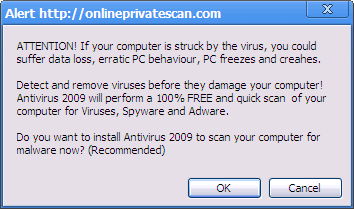
This appeared just by being on the Internet
It won’t do you any good to click any button including the X. The result will always be a fake scan by Extortion-ware Anti Virus 2009
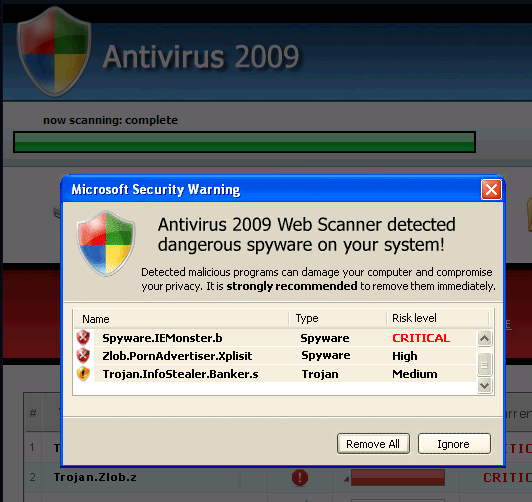
STOP here, clicking on the Red X won't save you.
Eventually, most folks give up and end up downloading Antivirus 2009 which turns into Extortion-Ware. They try to convince you that upgrading and paying is the only way to clean up the viruses listed above.
Solution: Ctrl-Alt-Del
The answer to this situation is simple. As soon as you experience your first pop up that can’t be closed by the X in the upper right-hand corner your next step should be Ctrl-Alt-Del. This is your opportunity to open the Windows Task Manager. Check the list of Applications and Kill your browser.
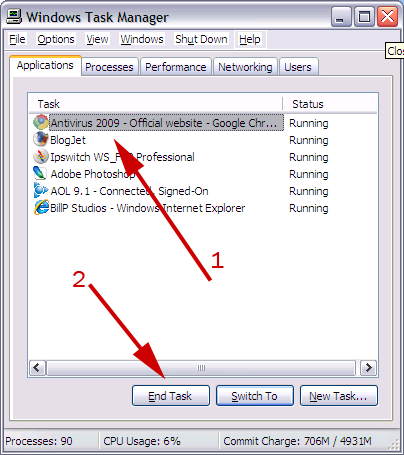
Windows XP Task Manager
You could also use WinPatrol’s Active Task list to kill the browser but since you only need to kill a single task, Ctrl-Alt-Del is even easier. If however you did download AntiVirus 2009 you’ll want WinPatrol so you can sort, select and kill multiple tasks in a single operation. You can also use WinPatrol to “Delete File on Reboot” any files which don’t seem to want to go away. WinPatrol users see http://www.winpatrol.com/helpme.html.
Prevention: Security Updates
Your next step is to make sure you’ve downloaded all the available Windows security updates. Many of you know, I typically recommend against automatically installing new Windows updates on the day they’re released. Last month Microsoft did release a number of new security patches. Guess what? It’s time to update.
Let me repeat. The first pop up I received came with I clicked on a valid link. I went back to the same link and it was fine. IT’S TIME TO UPDATE!!!


0 comments:
Post a Comment