Billps Tudios

  • Subscribe to our RSS feed.
  • Twitter
  • StumbleUpon
  • Reddit
  • Facebook
  • Digg

Monday, 31 December 2007

Favorite Posts of 2007

Posted on 14:32 by Unknown

It’s been a great year. We’ve had a lot of cool new tech toys and some really interesting business events. The number of people who come here has doubled since last year. My wife Cindi still can’t believe that many people care what I think.

Here are the 10 more popular posts of 2007.

  • Task Scheduler Provides Malware Hiding Place (10/8)


  • Detect Changes to Windows Automatic Updates (10/26)


  • Do I need Apple Mobile Device Service? (6/05)


  • WinPatrol: Best Products of 2007 (5/20)


  • Auto Update Programs Running All the Time (5/5)


  • Don't Change My File Type Associations (9/10)


  • Detecting FBI (CIPAV) Spyware (6/19)


  • Happy 10th Birthday to Scotty (11/18)


  • Mysteries of SD Flash Cards Exposed (12/6)


  • Worlds Best Vista Craplet Cleaner (1/11)


Thank you all for your support and feedback. I wish you all a safe and wonderful New Year.


Read More
Posted in 2007, top ten | No comments

Sunday, 30 December 2007

Give One Get One While You Can

Posted on 09:05 by Unknown
Unless a change is announced you only have one more day to Give One to Get One.

“The Give One Get One (“G1G1”) initiative ends on December 31, 2007. In connection with your payment of US$399 to OLPC Foundation, OLPC Foundation will provide you with one XO laptop, and a second XO laptop will be given by OLPC Foundation to a child in one of the least developed countries in the developing world. “

The OLPC Foundation created the G1G1 program to seed interested U.S. XO laptop buyers and supporters. It was a good decision. Originally, this program was due to end in November but its popularity allowed it to be extended under December 31st.

Will it be extended again? I can’t say but if you’d like to participate I wouldn’t risk it. This is a non-profit foundation so if it is extended it won’t be for the sake of profit. If anything I could see the OLPC Foundation making laptops available to prevent a black market in XO laptops that might prevent them from getting to the kids. Already, we’re seeing scumbags trying to sell XO laptops on eBay at inflated prices.

So if you have $400 cash left over after the holidays you have an opportunity to do something good and be a part of a growing community of new XO laptop users.

Just go to http://laptopgiving.org/en/give-one-get-one.php but don’t wait long.

Read More
Posted in OLPC, XO Laptop | No comments

Saturday, 29 December 2007

Winter.exe comes in like a Lion

Posted on 12:39 by Unknown

Earlier this month I started to see an increase in requests for a file name Winter.exe. I didn't have a good feeling about this filename and our follow up research proved I was correct. Our friend Temerc has a good write up on this infiltration at his forum, Temerc Internet Countermeasures. The other exe’s that appear to be included are infos.exe, autos.exe and a few randomly created filename. Fortunately, they all show up in WinPatrols’ startup programs list. The filename bronto.dll showed up in our IE Helpers list.


Google has done a good job at making it easy for people to create Blogs, but in many ways, it’s too easy. A huge number of Google Blogspot, blogs are being created and have become host sites for this file and other malicious programs. I wrote earlier his month that Spamhaus was blocking any Email which included a Google blog in the content of the message. This was a dramatic step but has proved to be necessary.


Trend Micro is referring to these blog traps as “Poisonous Blogs”. There are a number of ways you might get to these blogs including…

  • A link to the Blog is included in a teaser Email.
    (Typically, it’s a greeting card, free product, drug or naked celebrity. This week we’ve frequently seen what claims to be video of Bhutto’s assassination)

  • The blog might show up in a typical Google search.
    (These sites are too new to be validated by programs like SiteAdvisor)

  • You click on the “Next” button on a Blogspot site.
    (This feature is disabled on Bits from Bill)

Our friends at SunbeltBlog have also written about this topic and show how easy it can be to run across these blog traps. Alex at Sunbelt provided some good screen shots and stresses how video “codec” scams are frequently used as an malware entry point.

If you see a message that says “You need to download new version of Video ActiveX Object to play this video file”, run away! Don't press cancel or even trust the red close box in the corner. Press Ctrl-Alt-Del and look at your list of processes. Select your browser( iexplore.exe or firefox.exe) and click on End Process.

Read More
Posted in Blogspot, codec, Google, storm, Winter | No comments

Friday, 28 December 2007

Favorite New Christmas Toys

Posted on 11:00 by Unknown

Christmas day at the Pytlovany house was very special and included no less than 25 family members of all ages. There were new babies, new clothes and naturally new toys.


Alexis, Emily and Michal


Except for my new XO laptop, nobody I know received a new computer or laptop this Christmas. I take that as a bad sign for the computer industry. It used to be that new versions of Windows generated new computer sales but there hasn’t been a lot of excitement around Vista.


John and Jim playing tetris
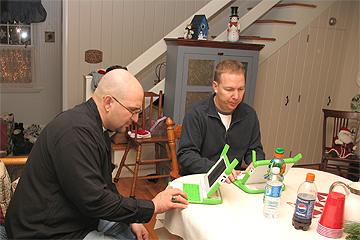
John and Jim exploring the new XO laptop.


Our big present this year was SmartParts 15” Digital Picture Frame. I have used and reviewed other digital picture frames and wasn’t expecting to be this impressed. I love it and even though it’s from a company I had never heard of. I’m happy to say the picture quality is awesome. The interface is easy and while I’m not sure I’ll use the feature, it will play audio and video files from what ever flash media you use.

The Nintendo DS Lite was still popular but the big kids were really excited about the Sony PSP. We already have a Wii which I have written about before. GPS Units were very popular with the adults. I really want one myself so I’m anxious to hear back which one works the best.


Santa gave one of my other favorites to my granddaughter Marisa. She’s been spending a lot of time playing with her new iTouch. I might get one when they expand the memory. She also received a lot of iTune gift cards which must be used in the country they were purchased. We’ll be doing a lot of downloading before she returns to Germany next week.


Click on “Comments” below and share information on your favorite new toy.

Read More
Posted in Christmas, gps, Nintendo, PSP, toys | No comments

Saturday, 22 December 2007

New Activities and Games at XOActivity.com

Posted on 09:38 by Unknown

Over the last week my new XO laptops have monopolized much of my time and postings here at Bits From Bill. I realize that not everyone is interested in the OLPC XO Laptop so I’ve created a new site called XO Activity. If you are interested in learning more I’ll be documenting my adventures and sharing what I learn.

My first new post today will help XO user find new games and other XO Activities.

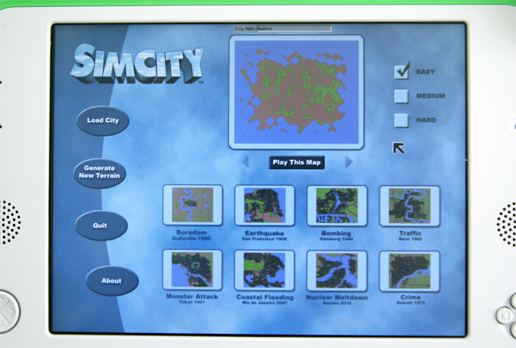
The Sims, now available on your XO Laptop
SimCity.xo is available free at http://wiki.laptop.org/go/Activities


Thank you for your patience. Next week I’ll be back posting about auto updates, spyware, adware, spam and ranting about other more useful technical information.

Read More
Posted in Laptop, OLPC, SimCity, XO, XOActivity | No comments

Friday, 21 December 2007

OLPC XO Laptop: Getting Started

Posted on 06:36 by Unknown

My new XO Laptop is proving to be very controversial. People seem to either love it or hate it. If you’ve never heard of it you’re not alone but you’ll be hearing more. If you’re sick of me writing about it I promise to cover other topics soon.

The target audience for this laptop is not the typical computer geek but we’re all giving one to get one so we can play and learn more. Almost everything about this laptop is new and the excitement I feel is reminiscent of my old Commodore days.

The user interface for the XO is called “Sugar”.


  • Instead of programs or applications, the XO Laptop has “Activities”. Most Activities are designed to be used in a share mode.

  • Instead of a Desktop you’ll be “Home” when the laptop starts. Your Home lets you switch between Activies. Like the computers I grew up with, only one Activity will run at a time.

  • Your Local network of friends is called your “Group”. In a classroom environment you’ll see your classmates and can create a buddy list and/or participate in a group bulletin board.

  • The more familiar “Neighborhood” will show your available Networks.

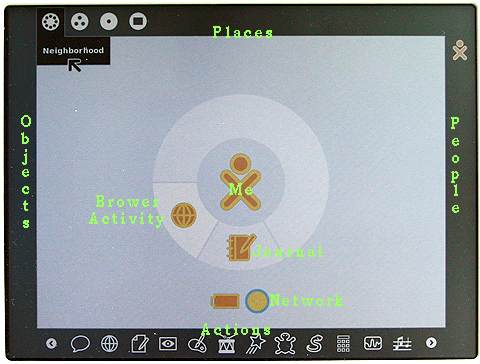
The main User Interface of the XO Laptop using Sugar.
Home mode with Frame visible
Green text was added

Along the top the Places you can access are Neighborhood, Group, Home, and Activity. When you move the cursor into any “hot” corners, the “Frame” will appear and provide an interface to “zoom” to your Places, People, Objects and the “Activity” launcher. Move the cursor back off the frame and it will disappear.

Toggle the Sugar Frame using this keyThere’s also a Frame key in the upper right corner to toggle it back and forth.


Most data items in your Activities may be stored in the XO clipboard as an Object. Multiple objects can be stored in the clipboard and hey will be displayed on the left side of the screen.
On the right side of the screen you’ll see other People you can share with on the Mesh network.

While many user interface elements are completely new you’ll find some familiar computer concepts.

For instance, Delete and Backspace have been combined into “Erase” which operates like the traditional backspace.
Clipboard concepts like Select All and Cut,Copy,Paste are available and so are the familiar shortcut keys of Ctrl+A,X,C,V.

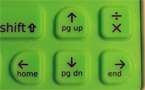
Use the Function key to access Home, End, Page Up, Page DownYou’ll want to know how to use Home, End, Page Up and Down. Hold down the function key and press the arrow key. Like legacy computers holding down the shift will select the text.
For a full description of all the keys Click Here

For all the Linux fans out there with good eyesight here’s what you’re looking for. You can access the Linux command line. by holding down Ctrl+Alt+Fn and press 1. When asked for a Login name, type “root”. To return to the Sugar User Interface hold down Ctrl+Alt+Fn and press 3.
Read More
Posted in OLPC, Sugar, UI, XO | No comments

Tuesday, 18 December 2007

OLPC Evaluation Guide - First Impressions

Posted on 09:29 by Unknown

I’ve been getting a lot of questions about my new OLPC so I expect to write a lot about my experience with this new XO Laptop. I doubt I’ll be the only one writing about this unique device.


OLPC Evaluation Guide


Rule 1: Forget everything you already know.
The target user for this laptop are kids who have never been exposed to a computer before. You’ll need to look at using this computer as if you’ve never used Windows, Mac or even a C64 before.
That means forget about double clicking by tapping on the touch pad. The position of OK and Cancel buttons won’t match the Windows interface. You shouldn’t expect File/Edit drop down menus. Instead of Save, you’ll “Keep” your data and access it from your journal. Forget any concept of a folder based file system.


Rule 2: Forget about the price
In theory, the kids won’t ever know the market value of the OLPC laptop. It was supposed to be the $100 laptop but that price will have to wait. If you Give One to Get One, you are making a donation. Don’t expect your OLPC laptop to be anything more than a conversation piece or toy.


Rules 3: Take your Time
I had thought I could spend a couple days to evaluate the OLPC. I was really wrong. I keep learning more and more and there’s no way I can do justice to this machine until I spend at least a month with it. Nobody should publish any review for this laptop until at least next year.


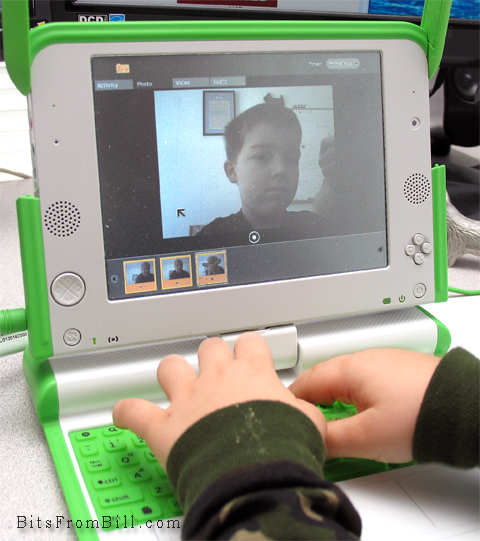
Tristan taking his photo with the OLPC
Tristan playing with the photo/video/audio application.


OLPC First Impression


My first impression was disappointment but that’s already starting to change. The interface is different which is ok and expected. Unfortunately, it’s fragmented. It tries to be different but still tries to teach computer skills. I think there’s always been a gap between academia and real world. What sounds good in some white paper may not convert well to a real product(::cough:: Ada). Profit is sometimes the best motivation in the creation of great products.


Earlier this month John C. Dvorak wrote an article suggesting it might be better to just give $200 worth of food. John was just being a cranky greek and I still disagree. Giving this laptop is an investment and while risky it’s worth a shot. It’s not like it could hurt America’s image any more than the Bush Admistration has already done.


What I Like

  • The browser doesn’t suck: It’s quick enough and while limited, it supports Flash, Javascript, PDF files and Cookies(Yea that can be a good thing)

  • Applications are plentiful: It even includes a number of programming examples for kids to learn how to create their own programs.

  • Size: It’s small for kids hands.

  • Networking: It took a little practice but it now always finds my WiFi network and searches for any available Mesh networks.

What I don’t Like

  • No power crank: I thought this was the whole point.

  • Durability: I expected it to be a little more ruggedized.

  • Bugs: I’ve had my share of reboots and mouse weirdness. I can’t say if it’s hard,soft or firmware related.

  • No Popups: Some web apps actually use pop ups.

  • Sound quality: The quality is similiar to my old C64 but the speaker isn’t as good. Seems like MOS Technology’s SID chip could gotten cheaply.

One thing for sure, there is a huge need for some instruction books along with tips and tricks. I have to wonder if David Pogue is already working on “OLPC: The Missing Manual”.

Update: I spoke with David and we won't be seeing a book from him but Edward Cherlin directed me to OLPC help available at http://wiki.laptop.org/go/OLPC_Publications. Edward also was kind enough to address my dislikes in the comments section below.

Read More
Posted in Dvorak, Laptop, OLPC, pogue, review | No comments

Saturday, 15 December 2007

Playing with my OLPC Laptop

Posted on 20:32 by Unknown

I received an early gift from Santa today and it looks like I’ll be snowed in all weekend so I’ll have plenty of time to play. It doesn’t come with manuals but after a little exploring I’m now connected to my WiFi network and surfing my favorite web sites.

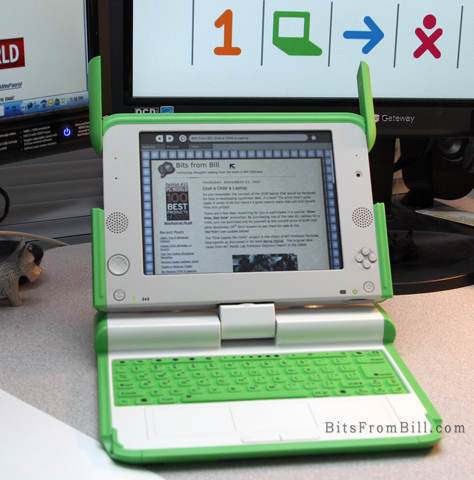
My new Give One, Get One OLPC Laptop

OLPC stands for “One Laptop Per Child” and this is my half of the “Give One, Get One” program from the makers of this unique device. You may also hear it called the XO Laptop.


I really didn’t expect to receive my laptop so soon. Perhaps the folks trying to get out all the Nintendo Wii’s for Christmas could take a lesson from the OLPC Foundation. I have a 2nd laptop coming so I can play with the wireless mesh network which is integrated into the machine and ideal for classroom usage. As a developer I’m looking forward to creating something useful to do my part.

I’ll be writing more but for now I just wanted to let folks know they’re real and they really work. If you participated in this program hopefully yours may be arriving soon. My only problem so far is, I keep trying to tap on the touch pad to select which isn’t supported. You have to click the left button.

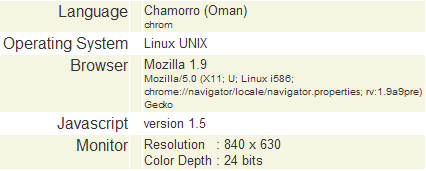
I also took note of my Blog stats to see how accessing web sites is recorded.

How the OLPC appears when it visits a web site.
Web stats from an OLPC laptop

The Give One, Get One program is curently available but is scheduled to end on December 31st. The price of the laptop is $200 so your total donation is $400 plus tax. If you’d like to know more go to http://www.laptopgiving.org


Read More
Posted in Laptop, OLPC, Wireless, xolaptop | No comments

Friday, 14 December 2007

Malware is FREE on Wireless Networks

Posted on 13:43 by Unknown

I love that when I travel I can get online from just about anywhere. High speed WiFi networks are now available in most hotels and airports of the world. This is a big change from when I used to bring wire strippers, electrical tape and a screw driver when traveling. In my old Q-Link days hotels didn’t even have modular jacks so I used to unscrew the phone jack to wire up my 300 baud modem.

Unfortunately, WiFi public networks can be a real danger to your privacy and the security of your computer. If you’re connecting to an unsecured WiFi network your data is up for grabs to anyone with the right tools. Keystrokes, Emails and passwords on unsecure web pages can be grabbed out of the air.

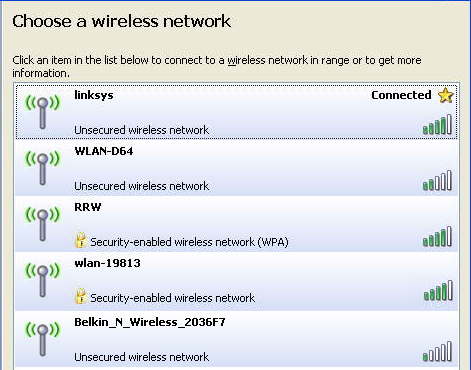
What you also need to watch for is bogus WiFi networks that phish for your connection. One of the guys at VirusList.com recently blogged, while sitting at Schiphol Airport in Amsterdam, that his computer found suspicious networks with names like “Free Public WiFi” and “US Airways Free WiFi”.


Beware of free Wireless Networks

Just driving around my neighborhood I was able to find a number of wireless networks open to the public. At a hotel or airport you’ll see many others including some with the word “FREE” in their name. Beware!

According to VirusList.com

“It's easy to spot rogue WiFi links - you just need to look for the following signs:

- an enticing name like 'Free Wifi' or 'Free Internet'
- an AD-Hoc type connection, rather than an access point”

If it’s an AD-Hoc network you should see the words, “Computer-to-Computer” under the network name. The ones shown in my example are Access Point networks.

They also recommend the following…

“- use a VPN link over any public WiFi internet access link to dial back home and access the internet using a secure proxy over the VPN link
- use only encrypted IMAP e-mail connections to read mail, TLS or SSL
- beware of fake certificates
- use a firewall and IPS or a combined security solution such as KIS7”

Most of you don’t have or probably don’t know what a VPN is so I’ll offer you an alternative. I use a service from GoToMyPC.com.

Using GoToMyPC when I travel, I connect to my home/office PC. I open up my Outlook Email as if I was sitting in my chair at home. It also means I don’t have to sync up stuff I’m working on when I leave and return. I even sign on AOL from that computer via GoToMyPC. Essentially my laptop acts as a dump terminal and the entire session is done using 128–bit AES encryption. The service is $20 a month but you can click here for a free trial.

If you’re a regular reader you’ll remember I recently changed from Time Warner Road Runner to Verizon FIOS which provides much greater upload speed. Many broadband providers give you lots of download bandwidth but a small slice for upload. Having more bandwidth allocated to upload is especially helpful for using GoToMyPC.

Read More
Posted in GotoMyPC, privacy, WiFi, Wireless | No comments

Thursday, 13 December 2007

Spamhaus Blocks Google Bloggers

Posted on 08:44 by Unknown

Like many others, I’ve always included a link to my Blog in my Email signature. Apparently, it’s not always a good idea. If you’re a Blogger who uses BlogSpot (and you include a link in your signature) some folks may never see your Email.

I recently tried to respond to a friend at Harvard’s Berkman Center for Internet and Society only to have my Email bounce back. Apparently, my blog is listed on the Spamhaus Block List.
When I checked the link included in the bounce I read the following…

“Google's blogspot.com - seeming endless abuse (HerbalKing)”

I wrote to Spamhaus and received the following reply.

Harvard is trying to protect their users from the tens of thousands of blogspot.com URL's set up by spammers in just the past month.

We advise all users to consider emails with blogspot.com links in them as probably spam. Your emails include your non-spam blogspot URL. Sadly, on the same IP address is the tens of thousands of spammer URLs.

Until Blogspot (Google) can come up with a solution to the abuse, we'd advise you to use tinyurl.com or easyurl.com to "mask" your blogspot.com link when included in emails.

--
Regards,

John Reid
The Spamhaus Project
http://www.spamhaus.org/

I personally think Spamhaus is being a little heavy handed but that’s why I don’t use any auto spam filter. By the time I publish this, HerbalKing and other spammers may be including Tinyurl links in their spam. This could potentially kill Tinyurl.

Luckily, I recently registered “BitsFromBill.com” and can use that domain to redirect folks to my Blog. This may not be an option for other BlogSpot/Blogger.com users so you may want to review how you sign your Email.


Read More
Posted in Blogger, Google, Harvard, spamhaus, tinyurl | No comments

Tuesday, 11 December 2007

Don't Give In to Charity Spam

Posted on 17:01 by Unknown

Don't forget to Give but when you do, Give Wisely.

It’s the time of year when you’ll start to see some real and some illegitimate organizations asking for donations. While we’re all in the holiday spirit and the credit card is close at hand it’s a good time for fund raising. I knew it was time as soon as I started to receive bogus invitations for have letters from Santa sent to my kids. Yea, like I want to give anyone a kids Email address.

In general, I reject any requests that come via my phone or in my Email. I often give to those in need, both organized and personal but I don’t need to be reminded. I certainly don’t want unrequested Emails added to all my spam. Chances are high that charity Emails you get this month are not to be opened.

I hate to say but even some seeming reputable charities may not be spending your donation in a way you’d want. There are a number of web sites including “Charity Navigator” that will rate charities and provide details on how funds are utilized.

I was pleased to see that the “Marine Toys for Tots Foundation” received a 4 star rating. Only 2.5% is used for non-program expenses. Our local “Animal Protection Foundation” in Scotia, NY also received fours stars. Unfortunately, I noticed the Northeast Animal Shelter only received one star and only 52% of the funds go to programs. About 8% goes to administration and 40% is spent on fund raising expenses like advertising on Google.

Charity Navigator also includes compensation for CEO’s, historical data and my favorite is their privacy policy. Many well known charities will share your personal information unless you explicity Opt-Out. I found some real surprises but I’d rather not pick on anyone specific. Visit and see for yourself.


Read More
Posted in charity | No comments

Sunday, 9 December 2007

Commodore 64: 25th Anniversary Celebration

Posted on 15:10 by Unknown

The Computer History Museum in Mountain View, CA is having a special celebration on Monday, December 10th. Invited speakers include former CBM president Jack Tremial, Apple pioneer Steve Wozniack, Amiga developer Adam Chowaniec and William C Lowe, father of the IBM PC. I’m sure my invitation was lost in the mail.


The Commodore C64

Let me just say that the C64 changed my life like no other device. It was like a drug that addicted me with its charm and personality. It helped me find new love, friendship, travel and a completely fun new career. Call me sentimental but it allowed me to find confidence and purpose in my life.

I had become quite the advocate of the C64/128 when I met up with a guy named Steve Case and his friend Marc Seriff. We shared a vision that personal telecommunications could be so much easier. I won’t bore you with sorted details of my C64 history but I’ll share some of my favorite tricks and memories that might be interesting to other C64 users.

Q-link animation
Click for Video of my 1985 Q-Link Demo


I used to bring my Commodore Vic-20 with me into my chemistry lab in college. Instead of spending one hour studying the lab work the night before, I would spend three hours writing a program to input and process my lab results. I thought my professor would be impressed but he was more excited that I could make the computer duplicate the sound of a phone ringing.

Unlike other computers of the time, the Commodore 1541 floppy disk drive had a processor and memory which allowed it to be programmed as well. While this was typically used for copy protection, someone actually wrote a program that made the disk drive play the tune “Bicycle Built for Two” by moving the drive head back and forth at different frequencies. It was a cute trick but not one I demo’d very often.

My favorite trick was created by programmer, Michael J Henry. It was easy to customize the text in programs by editing characters on the floppy disk so you could make the screen say anything. Well, Michael’s trick discouraged people from removing his name on the screen. The “L” in his first name was represented as “4C” which in the machine language of the C64 was also the code for the instruction JMP or Jump to the address of the next two bytes. At startup, his program would jump to the physical screen address where the “L” was visible and it would cause the program execution to jump to the address “204A” which was represented by the “space J” in his name. If anyone changed his name, the program stopped working. If you were able to follow that you can claim geek status.

One person missing from Mondays’ event will be my old friend and mentor Jim Butterfield. In doing research for today’s post I discovered that Jim passed away peacefully June 29th of this year.

Read More
Posted in AOL, C64, History, Q-Link | No comments

Friday, 7 December 2007

Visit Skywalker Ranch with CNet

Posted on 13:44 by Unknown

I ran into a great article on CNet today that was nostalgic for me but might be of interest many of you as well. Many years ago I worked on a project called Habitat in a partnership with Lucasfilm LTD. One of the benefits of the project included visits to Skywalker Ranch, just north of the San Francisco. It was a quiet year for the ranch. No new Star War movies were planned and the most recent feature film had been Howard the Duck.


Habitat from Lucusfilms and QuantumLink, later called Club Caribe
Click to view video promo

CNet’s Daniel Terdiman reported on his recent trip to Skywalker Ranch and was allowed to take and publish a number of photos.

Click for Skywalker Ranch photos

The ranch has expanded a lot since my last visit and is the home of Skywalker Sound, the recipient of 18 Oscars. If you’re into state of the art sound production this is the place to go. Daniel has all the details in his article, “The hills are alive with the sounds of Skywalker”

Read More
Posted in CNet, Habitat, Lucasfilm, Q-Link | No comments

Thursday, 6 December 2007

Mysteries of SD Flash Cards Exposed

Posted on 10:29 by Unknown

I used to backup my data to CDs, then DVD’s but now with the low cost of solid state memory I’m actually archiving data on postage stamp sized 2 GB cards.  Secure Digital Flash memory is also becoming the most popular storage for camera’s, PDA’s, mobile phones and Audio players.


Unfortunately, if you’ve been shopping for SD cards you’ll easily be confused about which one to purchase. For instance Kingston has Secure Digital, Secure Digital Elite Pro, Secure Digital Ultimate and Secure Digital High Capacity.  SanDisk has its standard SD memory, Ultra II, and SD Extreme III.


Secure Digital Logo Secure Digital  (  <= 2 GBs )
Below are current rates from Amazon. Read/Write are maximum speed when no fragmentation of data blocks is found. Sometimes speed is measured in 66x or 133x. x = the standard CD-Rom speed of 150kb/s.
Name                   Price        Read     Write           Warranty
San Disk 2 GB           $15            ?         ?                 5-year
Kingston 2 GB           $15          5 MB/s  1.5 MB/s        Lifetime
San Disk Ultra II        $30         10 MB/s   9 MB/s         Lifetime
Kingston Elite Pro 50x $27         8.2 MB/s  7.7 MB/s      Lifetime
San Disk Extreme III   $38        20 MB/s   20 MB/s        Lifetime

 Secure Digital High Capacity LogoSecure Digital High Capacity  ( > 2 GBs )
Speed is measured by class which is the minimum data rate even with fragmentation. In theory these cards could grow to 128 GBs although 8 GB is most currently available. While the higher capacity SD cards are typically formatted with the FAT32 file system that isn’t the difference between SD and SDHC. SDHC uses SD protocol 2.0 to store data blocks. 
Class   Speed
  2         2 MB/s
  4         4 MB/s
  6         6 MB/s

You might think price equals quality and speed but it’s a little more complicated. Many camera’s and other devices won’t support the larger SD cards. Many card readers don’t support the new SDHC format for cards over 2 GB. For instance, our grandson is getting a Kid-Tough Digital Camera from Fisher Price which doesn’t support “high speed” SD or cards greater than 1 GB.  The Nintendo Wii only supports up to 2 GB. Some devices may support new protocols if their firmware is updated. Not every store includes this very useful information in their product description.


One of the cool things about the SD type memory is its SDIO expandability. This allow devices to be built along with the card including wireless, cameras, GPS, fingerprint recognition and much more. I recently wrote about the Eye-Fi SD card which uses this functionality.


The big question for me is how many times can the memory be written to, and how long with it last?  This information isn’t easy to find. The industry claims this kind of memory( NAND) can be written to up to 100,000 times and operate up to 51 years.  My research concludes that SD memory should last up to 10 years when stored in a safe place.


What you really need to remember…


  • When purchasing SD cards make sure it’s compatible with your device and your SD reader and vise versa.

  • When writing data to your SD card, be sure the operation is complete before removing the card from the reader.
Read More
Posted in | No comments

Monday, 3 December 2007

Two "Must Have" Camera Features

Posted on 11:33 by Unknown

Over many years the focus of digital camera improvements have been price, pixels and speed. It’s all the same technology, just bigger, better and cheaper. The popularity of the digital camera has however spawned a welcome industry evolution in solid state memory cards.

I’ve been snapping digital photos for over ten years and finally, I’m starting to see some real innovations.

  • Wireless Photo Transfer
    This is a natural progression and Eye-Fi just made it simple and cheap. Instead of each camera company building it into their camera, Eye-Fi has built it into the memory card. Eye-Fi even supports automatic upload to 20 photo sharing sites with more to come. For only $99, if your camera uses SD cards you’ll want to order one of these before supplies run out.

Wireless SD Card
Eye-Fi Wireless SD Card


  • Global Positioning Tagging
    It may not be available for all cameras but if Sirf has its way it will be soon. Your camera currently records the date and time you take your photo. How nice would it be to know exactly where you were when the photo was taken? In my opinion this isn’t any kind of brilliant idea, it’s a natural convergence of technology. The GPS network is there and available, why shouldn’t your camera use it.

Navman 750
Navman 750

What would really be really cool is if they could just build GPS functionality into the Eye-Fi card. Smile, it's sooo sweet!


Read More
Posted in camera, gps, sd, solid state disk | No comments
Newer Posts Older Posts Home
Subscribe to: Comments (Atom)

Popular Posts

  • Support for Downloads without Surprises
    Last week I posted a message about the  packaging of ad supported programs along with popular software. It appears to be a common practice t...
  • Employee Manual to Prevent Cryptolocker and More
    A common way computers are infected or compromised has always been a simple yet well thought out deception. It can happen to anyone and the ...
  • What on Earth is “Cloud” Computing
    The new big buzz word in the computing world is “Cloud” computing. In the past I’ve been critical of the concept and even poked fun at Cloud...
  • Why Dancing with the Stars is #1
    Are you wondering why the heck I’m talking about TV Shows? Well, it’s still a little all about tech and some of my past experiences. In the ...
  • WinPatrol Cloud Edition Public Beta
    WinPatrol Adds the Newest Technology Available. You’ll now have access the knowledge of thousands of WinPatrol users shared in real-tim...
  • SQLite C Code to Read Cookies
    While most of the technology leaking from my brain is for a wide audience, today’s post is very technical in nature. I expected the informat...
  • Free #1 Tweak to Improve Windows Performance
    Every year billions of dollars are spent by folks just trying to improve the performance of their computers. Over the last couple years ther...
  • Forget the DVD & Save on your New Laptop
    I’ve written before about the coming death of the CD/DVD ’s for data storage.  While that time hasn’t come yet for desktop there is one real...
  • TWITTER ALERT
    Anyone who uses Twitter, DO NOT use the Twitter web interface until further notice. There is a code injection vulnerability being used tha...
  • Security Software Doesn’t Fix Human Nature
    If you’re interested in PC Security, you’ll want to check a look at research recently compiled by the folks at PC Pitstop. Even I was surpri...

Categories

  • 2007
  • 3G
  • AAPL
  • ABC
  • accelerometer
  • Achilles
  • Acrobat
  • Activex
  • adobe
  • Ads
  • advertising
  • Adware
  • Adwords
  • Airlines
  • Albany Medical Center
  • algorithm
  • Amazon
  • amber alert
  • AMUST
  • Animation
  • antimalware
  • Antivirus 2009
  • antivirus2008
  • AOL
  • Apple
  • applets
  • AQuantive
  • archive
  • Aruba
  • ASC
  • Ask.com
  • ATI
  • Audio
  • Autorun
  • AutoUpdate
  • autoupdates
  • AVG
  • Azure
  • backup
  • badware
  • Bakugan
  • Baseball
  • battery
  • Ben Edelman
  • Beta
  • BillP
  • Birthdayware
  • Bitlocker
  • Blackberry
  • BlackViper
  • bloatware
  • Blogger
  • Blogs
  • Blogspot
  • Blu-ray
  • Bluehoo
  • bluetooth
  • boinc
  • Bonjour
  • Brazil
  • break
  • Breakaway games
  • Brookman
  • Browser wars
  • C64
  • camera
  • Carpal Tunnel
  • CBS News
  • cell phone
  • CES
  • charity
  • Child Safety
  • chinese
  • Chris Cook
  • Christmas
  • Chrome
  • CIPAV
  • clampi
  • Cloud
  • CNet
  • codec
  • comodo
  • conficker
  • Control Panel
  • copy
  • coupon
  • craplets
  • crapware
  • Crawford
  • credit
  • credit card
  • credit cards
  • ctfmon
  • daylight savings time
  • Dell
  • demo
  • Discount
  • Disney
  • DNS
  • Dollar
  • Domain
  • Donna
  • Doubleclick
  • Downadup
  • Dreamscene
  • droid
  • DVD
  • Dvorak
  • Easter egg
  • eclipse
  • Ed Bott
  • Edelman
  • egreeting
  • Email
  • Environment
  • Epilepsy
  • EU
  • eWeek
  • explorer
  • facebook
  • false positive
  • false-positive
  • FBI
  • file types
  • finnish
  • FiOS
  • Firefox
  • fireworks
  • fix
  • flash
  • Flashpix
  • Fort Drum
  • foxit
  • fraud
  • FTC
  • games
  • garmin
  • Gateway
  • GE
  • George Bush
  • Germany
  • global
  • Godmode
  • Google
  • Google Research
  • GotoMyPC
  • gps
  • green
  • Groceries
  • Habitat
  • Hacks
  • hallmark
  • Halo
  • hard drive
  • Harry McCracken
  • Harry Potter
  • Harvard
  • HD-DVD
  • help
  • hidden files
  • Hijack
  • History
  • Hiton
  • homeland security
  • Honor Flight
  • hosts
  • Hubble
  • IAC
  • ICANN
  • IE
  • IE6
  • IE7
  • IE8
  • installers
  • interface
  • Internet
  • IPAddress
  • iPhone
  • iPod
  • Iraq
  • iTouch
  • iTunes
  • java
  • Kaspersky
  • Kazaa
  • kenmore
  • key logger
  • keygen
  • Keylogger
  • Kosovo
  • LA
  • lady chalupa
  • langa
  • Laptop
  • lawsuit
  • Legoland
  • Levar Burton
  • Linksys
  • Little League
  • Live Writer
  • Live.com
  • localize
  • Logo
  • London
  • LOP
  • lottery
  • Lucasfilm
  • Macintosh
  • Malware
  • Marie Domingo
  • Mary
  • McCracken
  • Media
  • Memorial Day
  • mgrs.exe
  • Micosoft
  • Microsoft
  • Microsoft Surface
  • MiFi
  • mit
  • moon
  • Mossberg
  • Mothers Day
  • MPack
  • MSFT
  • msn
  • MTV
  • Multicore
  • Music
  • MVP
  • MVP09
  • nasa
  • NBC
  • Nero
  • Netbook
  • Network
  • network solution
  • New York
  • newsletter
  • Nintendo
  • Nintendo Wii
  • NNEDV
  • Norton
  • NYAG
  • OAuth
  • obama
  • Office
  • OLPC
  • Olympics
  • OpenDNS
  • oprah
  • optimize
  • optout
  • Paperghost
  • passwords
  • Patch
  • Patriot Flight
  • PC Guy
  • pc pitstop
  • PC World
  • pcmag
  • PCWorld
  • PDC
  • PDF
  • pedipaws
  • performance
  • phishing
  • photos
  • Photoshop
  • Pinnacle
  • Piracy
  • Pirillo
  • pogue
  • Porn
  • pornware
  • postcard
  • prediction
  • prefetch
  • Preview
  • Price
  • privacy
  • Prodigy
  • Programming
  • PSP
  • Public Relations
  • Pytlovany
  • Q-Link
  • Quicktime
  • quotes
  • radio
  • realnetworks
  • realplayer
  • RegCleaner
  • RegCure
  • regedit
  • Registry
  • registry cleaner
  • Release
  • remove
  • Research
  • return policy
  • review
  • RIAA
  • Rivera
  • RMS
  • Road Runner
  • rogue
  • router
  • RTM
  • Rumor
  • safari
  • safety
  • sale
  • Sales
  • Santa Monica
  • scam
  • Schenectady
  • Scoble
  • Scott Dunn
  • Scotty
  • sd
  • Search
  • Sears
  • Security
  • Services
  • seti
  • ShellExecute
  • Shirt
  • SimCity
  • site advisor
  • slingbox
  • snopes
  • social engineering
  • social network
  • solid state disk
  • Sounds
  • Sp3
  • space station
  • SPAM
  • spamhaus
  • Special
  • speedtest
  • Spyware
  • SSD
  • Startup
  • Stats
  • Steve Bass
  • stopbadware
  • storm
  • STS-125
  • Sugar
  • Sunbelt
  • support
  • Symantec
  • tagged
  • Task Catcher
  • Task Scheduler
  • taskbar
  • Tax
  • Techorati
  • techwatch
  • teens
  • temp
  • Thinkpad
  • Thurrott
  • tinyurl
  • Tips
  • TiVo
  • TLD
  • Today Show
  • Toolbar
  • toolbars
  • top ten
  • topten
  • toys
  • Translator
  • transunion
  • Tree
  • Trend Micro
  • tricks
  • trillian
  • Trojan
  • tweaks
  • twitter
  • UAC
  • UI
  • Ultimate
  • Unbox
  • Unboxed
  • update
  • Updates
  • upgrade
  • url
  • USB
  • Utility
  • Valentine
  • Verizon
  • versions
  • Veteran
  • Video Games
  • Vista
  • Vulnerability
  • wall-e
  • war
  • Washington
  • web2.0
  • Webslice
  • WGA
  • Widget
  • WiFi
  • Wii
  • WiiItis
  • wiimote
  • Win7
  • Windows 7
  • Windows Secrets
  • Windows Update
  • Windows7
  • WinPartrol
  • WinPatrol
  • winpatrolflash
  • WinPatrolToGo
  • Winter
  • Wireless
  • Wristband
  • WSJ
  • WWII
  • x64
  • Xbox
  • XO
  • XO Laptop
  • XOActivity
  • Xobni
  • xolaptop
  • XP
  • XP SP3
  • xp3
  • Yahoo
  • Zero Day
  • Zone Alarm
  • Zwinky

Blog Archive

  • ►  2013 (31)
    • ►  November (2)
    • ►  October (1)
    • ►  September (1)
    • ►  August (2)
    • ►  July (3)
    • ►  June (5)
    • ►  May (2)
    • ►  April (3)
    • ►  March (2)
    • ►  February (5)
    • ►  January (5)
  • ►  2012 (30)
    • ►  December (3)
    • ►  November (3)
    • ►  October (2)
    • ►  September (2)
    • ►  August (2)
    • ►  July (3)
    • ►  June (2)
    • ►  May (1)
    • ►  April (4)
    • ►  March (4)
    • ►  February (2)
    • ►  January (2)
  • ►  2011 (28)
    • ►  December (4)
    • ►  November (2)
    • ►  October (4)
    • ►  September (2)
    • ►  August (2)
    • ►  July (2)
    • ►  June (2)
    • ►  May (2)
    • ►  April (2)
    • ►  March (2)
    • ►  February (3)
    • ►  January (1)
  • ►  2010 (44)
    • ►  December (2)
    • ►  November (3)
    • ►  October (3)
    • ►  September (4)
    • ►  August (3)
    • ►  July (3)
    • ►  June (3)
    • ►  May (4)
    • ►  April (4)
    • ►  March (3)
    • ►  February (3)
    • ►  January (9)
  • ►  2009 (90)
    • ►  December (6)
    • ►  November (8)
    • ►  October (6)
    • ►  September (4)
    • ►  August (4)
    • ►  July (12)
    • ►  June (6)
    • ►  May (11)
    • ►  April (7)
    • ►  March (9)
    • ►  February (9)
    • ►  January (8)
  • ►  2008 (122)
    • ►  December (9)
    • ►  November (11)
    • ►  October (14)
    • ►  September (6)
    • ►  August (9)
    • ►  July (9)
    • ►  June (10)
    • ►  May (13)
    • ►  April (8)
    • ►  March (10)
    • ►  February (10)
    • ►  January (13)
  • ▼  2007 (155)
    • ▼  December (15)
      • Favorite Posts of 2007
      • Give One Get One While You Can
      • Winter.exe comes in like a Lion
      • Favorite New Christmas Toys
      • New Activities and Games at XOActivity.com
      • OLPC XO Laptop: Getting Started
      • OLPC Evaluation Guide - First Impressions
      • Playing with my OLPC Laptop
      • Malware is FREE on Wireless Networks
      • Spamhaus Blocks Google Bloggers
      • Don't Give In to Charity Spam
      • Commodore 64: 25th Anniversary Celebration
      • Visit Skywalker Ranch with CNet
      • Mysteries of SD Flash Cards Exposed
      • Two "Must Have" Camera Features
    • ►  November (14)
    • ►  October (12)
    • ►  September (14)
    • ►  August (12)
    • ►  July (13)
    • ►  June (11)
    • ►  May (19)
    • ►  April (17)
    • ►  March (21)
    • ►  February (7)
Powered by Blogger.

About Me

Unknown
View my complete profile